

 Tested by
Kamatera is a cloud server provider run by The OMC Group, a company that has sold cloud and hosting services since the mid-1990s. Instead of fixed plans, you build each server yourself: CPU type, number of vCPUs, RAM, NVMe storage and one of 21 locations you can pick in the US, Canada, Europe, Asia, Australia and Israel.
It suits developers and businesses that know what their app needs and want to size a server exactly, including Windows servers. The smallest server costs $4/month (1 shared vCPU, 1 GB of RAM, 20 GB NVMe, 5 TB of traffic), and new accounts get a 30-day free trial worth up to $100 on one server.
My Kamatera review scores below are based on the current plans, prices and policies checked on November 8, 2026, my November 2026 speed and load tests of three Kamatera customer websites, my own pre-sales emails with Kamatera, and published customer feedback.
| Overall | Features | Performance | Ease of use | Price | Support |
|---|---|---|---|---|---|
| 7.4 | 8.6 | 6.5 | 6.8 | 7.8 | 7.4 |
Contents
Data sheet of the host
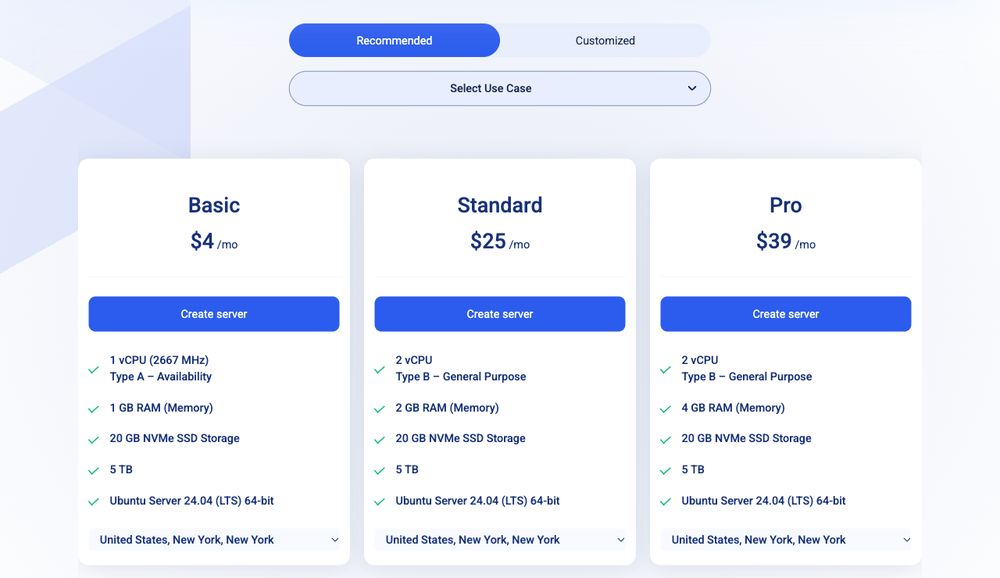
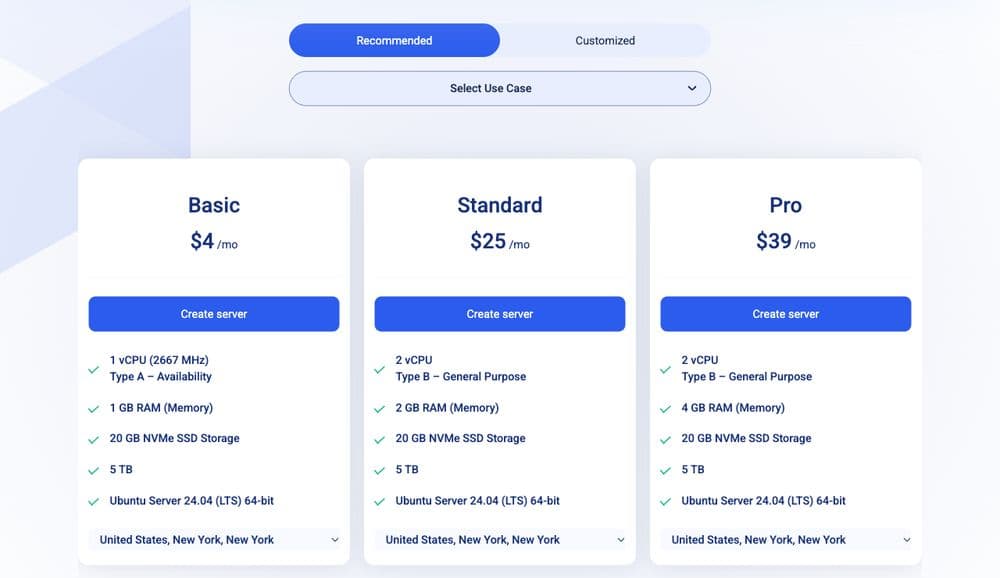
Kamatera's three suggested setups start at $4/month; every value can be changed in the configurator (pricing page, November 2026).
Kamatera is the cloud brand of The OMC Group. According to Kamatera's About page, OMC was co-founded in 1995 and the Kamatera hosting brand launched in 1996. Its servers run in 21 selectable cities across North America, Europe, Asia, Australia and the Middle East.
Hosting Types
Self-managed cloud servers (VPS) that you configure one value at a time:
- CPU: from 1 vCPU to over 100, in four CPU types (A, B, D and T)
- RAM: from 256 MB, up to 128 GB in the configurator
- Storage: NVMe SSD from 20 GB to 4,000 GB, up to 16 drives per server
- Traffic: 5 TB a month included on monthly servers (1 TB in Hong Kong, Tokyo, Sydney and Singapore)
Billed monthly (prepaid) or hourly (by the minute). Best for websites, apps and test servers whose size you can estimate.
- Type A, Availability: shared vCPU, no guaranteed resources, from $4/month
- Type B, General Purpose: a dedicated CPU thread per vCPU, from $9/month for 1 vCPU and 1 GB
- Type D, Dedicated: a dedicated physical core (2 threads) per vCPU
- Type T, Burstable: a dedicated thread, with extra charges above 10% average CPU use
All four run on Intel Xeon processors.
Servers are unmanaged by default. Kamatera sells management as an add-on:
- Pro Managed: $50/month per server (monitoring, OS troubleshooting, OS updates on request, backup and restore help)
- Premium Managed: $150/month, in select regions only, adds application management
- Extra NVMe disk space at $0.05/GB per month
- Cloud Firewall with FortiGate or OPNsense images, or your own appliance
- Load balancers, private networks (VLANs) and block storage
- IPv6 at $1 per address per month, on request
Windows Server 2016 to 2025 and Windows 10 and 11 cloud desktops, with the license added to the server's monthly price. Microsoft Office, SQL Server and Remote Desktop licenses are rented by the month too.
Operating Systems
- Linux: Ubuntu (20.04 to 26.04), Debian 11 to 13, AlmaLinux 9 and 10, Rocky Linux 8 to 10, CentOS Stream 9 and 10, Alpine, Arch Linux and Gentoo
- Linux desktops: Ubuntu, Debian, Fedora and Linux Mint
- BSD: FreeBSD 14.2 and 15
- Windows Server 2016 to 2025, Windows 10 and Windows 11 (license fee added)
- Your own image or license
DataCenters
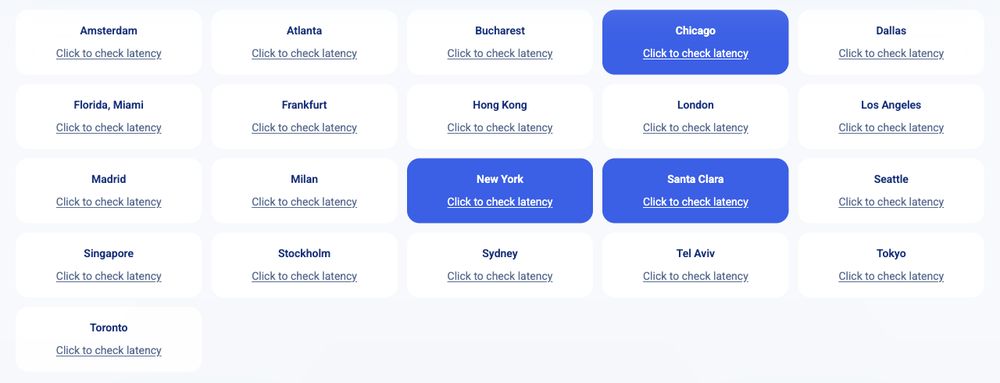
The 21 cities you can pick on Kamatera's data center page; the highlighted ones are the closest to the visitor (November 2026).
| Region | Locations | Number |
|---|---|---|
| United States | Atlanta, Chicago, Dallas, Los Angeles, Miami, New York, Santa Clara and Seattle | 8 |
| Canada | Toronto | 1 |
| Europe | Amsterdam, Bucharest, Frankfurt, London, Madrid, Milan and Stockholm | 7 |
| Asia | Hong Kong, Singapore and Tokyo | 3 |
| Australia | Sydney | 1 |
| Middle East | Tel Aviv | 1 |
Kamatera's page headline says 25 locations, but it lists 21 cities you can deploy in. Kamatera's account manager gave the same split by email: 7 in Europe, 8 in the USA.
Seven European cities is more than most budget clouds offer, so Kamatera is one of the hosts in my list of cheap VPS in Europe.
About Kamatera
Kamatera is a pure infrastructure provider. It doesn't sell shared hosting or a WordPress dashboard: you get a server, root or administrator access, and a long list of extras you can attach to it.
Its strongest point is flexibility: few hosts let you pick the CPU type, RAM and disk separately and change them later.
The tradeoffs: you run the server yourself unless you pay $50/month for management, and the three customer websites I tested on Kamatera were the slowest group of the 31 VPS hosts I compare.
Pros
- Every server is custom: CPU type, vCPUs, RAM and disk are chosen separately.
- 21 locations, including 7 in Europe and Tel Aviv.
- $4/month entry server with 5 TB of monthly traffic.
- 30-day free trial worth up to $100, Windows servers included.
- 24/7 phone support, which few cloud providers offer.
- Dedicated-thread and dedicated-core CPU types when shared vCPUs aren't enough.
Cons
- Weakest result of the 31 VPS hosts in my speed and load tests.
- Unmanaged by default; management costs $50/month per server.
- Backups cost extra ($3/month per 20 GB, kept 14 days).
- Monthly servers are prepaid with no refund for the current month.
- The trial needs a credit card that passes 3D Secure, or a $10 deposit.
- The SLA's credit terms are narrow and leave a lot to Kamatera's discretion.
Technical Features

Score: 8.6/10
Kamatera's configurator gives you more control over a server than almost any budget cloud, in 21 locations. I took points off because backups cost extra, DDoS protection isn't described on its pages, and IPv6 needs a support request.
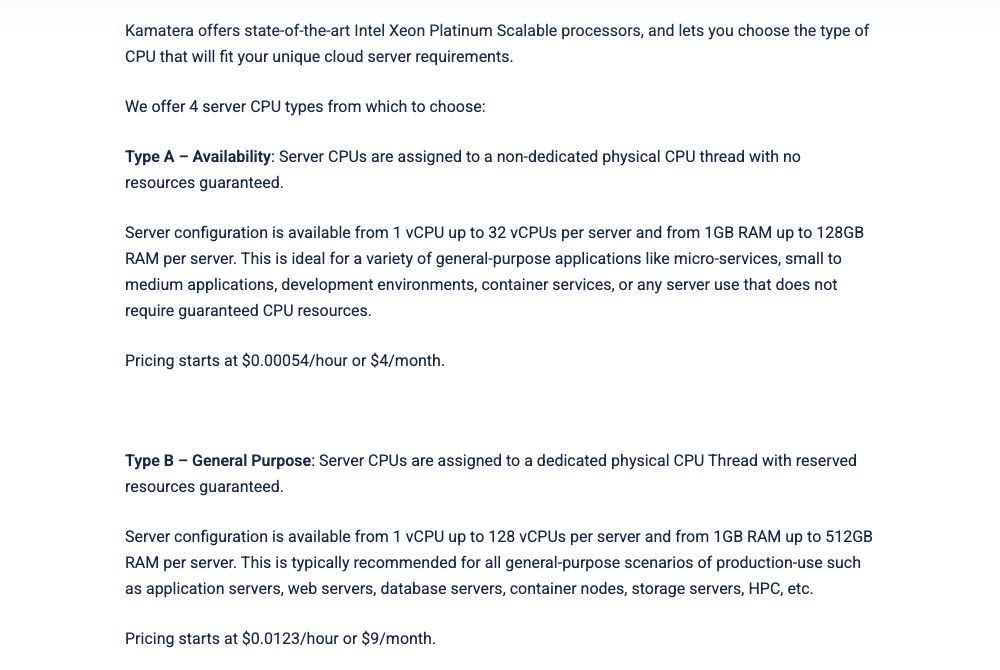
Kamatera's FAQ: Type A vCPUs share a physical thread, Type B vCPUs get a dedicated one, from $4 and $9 a month (November 2026).
Four CPU types: shared, thread, core and burstable
This is the choice that matters most on Kamatera. Type A is a shared vCPU: Kamatera's FAQ says its vCPUs sit on "a non-dedicated physical CPU thread with no resources guaranteed." That's the $4/month server.
Type B reserves a dedicated CPU thread for every vCPU, and Type D gives each vCPU a whole physical core (2 threads). Type T also has a dedicated thread, but you pay extra once the CPU averages more than 10% use, so it only suits servers that are idle most of the time.
One detail to watch: the configurator's short description of Type A says both "dedicated" and "no resources guaranteed" in the same sentence. The FAQ and Kamatera's account manager both describe Type A as shared, so treat it as a shared vCPU.
For a business website or online store, I'd start on Type B. Kamatera's FAQ lists Type B from $9/month, against $4 for Type A, and a dedicated thread stops a busy neighbor from slowing your CPU down.
Processors, RAM and NVMe storage
Kamatera's cloud server page lists Intel Xeon Platinum (Cascade Lake) processors at 2.7 GHz or more, and the $4 server shows a 2667 MHz vCPU. In our emails the account manager described them as Intel Xeon Gold at 2.7 GHz, so the exact CPU can depend on the data center.
RAM starts at 256 MB and storage is NVMe SSD from 20 GB to 4,000 GB, with up to 16 disks per server. Extra disk space costs $0.05 per GB per month. Disks can grow but not shrink, as the account manager pointed out, so add space in steps.
Scaling and cloning
You can change CPU, RAM and disk from the console and clone a server to the same data center or another location. That's useful for a staging copy, or for moving a site closer to its visitors without rebuilding it.
Windows servers and software licenses
Windows is a real strength here. You can run Windows Server 2016 to 2025 or a Windows 10 or 11 cloud desktop, and Kamatera rents Microsoft Office, SQL Server and Remote Desktop licenses by the month.
The license is added to the server price. The software licensing page lists Windows Server at $10 or $19 a month per server without saying which applies when, so check the configurator's total before you order.
Control panels and marketplace apps
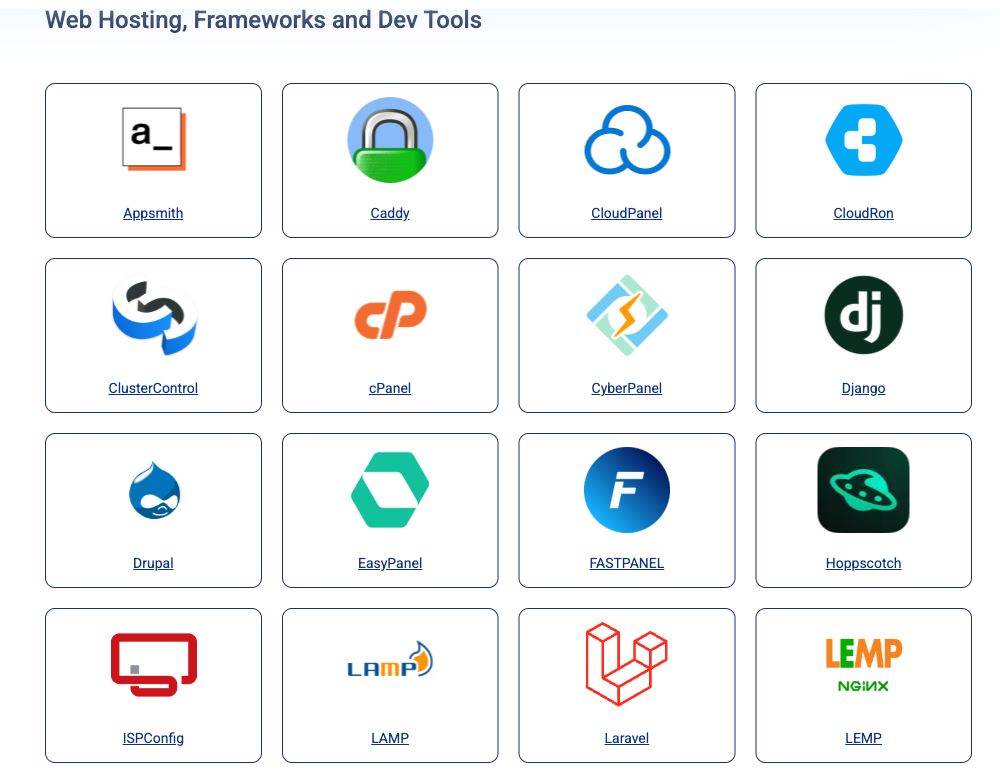
Part of the marketplace's web hosting section, with CloudPanel, cPanel, CyberPanel and other images (November 2026).
The marketplace lists about 140 one-click images, from WordPress, Magento and Ghost to Docker, Coolify, n8n, Ollama and OpenVPN. Free panels such as CloudPanel, CyberPanel and Webmin cost nothing extra.
cPanel and Plesk are rented by the month: cPanel Admin (5 accounts) is $38/month and Plesk Web Admin (10 domains) $25/month, on top of the server. On a $4 server, the license costs more than nine times as much as the server.
Private networks, firewall and VPN use
You can connect servers through private VLANs and put a Cloud Firewall in front of them, using a FortiGate or OPNsense image or your own appliance. The firewall can also act as a VPN gateway between sites.
OpenVPN, Netbird and UTunnel VPN install from the marketplace. If a private VPN server is your main use, I compare Kamatera with other options in my guide to a cheap VPS for VPN.
Performance and Security

Score: 6.5/10
I tested three verified Kamatera customer websites in November 2026, and Kamatera has the weakest result of the 31 VPS hosts in my benchmarks (rating E, 31st of 31). Here are the numbers, followed by what they mean if you're buying.
Kamatera Speed Test Results (November 2026)
In November 2026, I load-tested three live websites on Kamatera cloud servers (VPS). Each site's hosting was verified from its server IP.
I compare hosts on uncached server time. The test skips the site's page cache, so Kamatera's server has to build the page, and the network round trip from the test location is subtracted from the result. Each hosting type's figure is the median of its sites, the middle result, so one unusually slow or fast site doesn't decide it.
| Hosting type | Website | Server location | Uncached TTFB | Server time |
|---|---|---|---|---|
| VPS | Flour supplier store (Magento) | United States | 5,818 ms | 5,811 ms |
| VPS | Cybersecurity training (WordPress + WooCommerce) | United States | 533 ms | 525 ms |
| VPS | Shooting club (Django) | United States | 2,348 ms | 2,341 ms |
| VPS median | 3 sites | 2,348 ms | 2,341 ms |
Test settings, 3 and 6 November 2026: 5 virtual users for 2 minutes, at most 1 request per second, every second request with a unique query string to bypass the page cache. Live websites under light load, not a controlled benchmark of Kamatera's plans.
The VPS results are far apart (525 ms, 2,341 ms, 5,811 ms). The median uses the middle one, so the fastest and slowest site don't decide the figure. Each site's plan, theme, plugins and page weight affect how long its server takes to build a page.
All three sites answered every request without an error.
Uptime figures come once the monitored site has 30 days of data.
Kamatera Under Load: 1 to 50 Visitors (November 2026)
The speed tests above use light traffic. For this test, k6 raised the number of visitors from 1 to 50 over 2 minutes, and every request skipped the page cache, so the server had to build every page. It puts real load on a live website, so I only run it on sites I manage or have permission to test, normally at a quiet hour for their visitors.
Each line is one website, every request uncached · k6 load from Ashburn, USA · 5 November 2026 · lower is faster
- VPS: cybersecurity training site (United States)
- VPS: flour supplier store site (United States)
Server time = average TTFB in each 12-second window minus the network round trip to the site's server. Hover or tap the chart to see each site's value and the number of visitors at that moment.
| Hosting type | Website | Server location | Server time at 1-10 users | Server time at 40-50 users | Failed requests | Grade |
|---|---|---|---|---|---|---|
| VPS | Cybersecurity training site | United States | 617 ms | 10,656 ms | 0% | E |
| VPS | Flour supplier store site | United States | 1,772 ms | stopped at 47 users | 15.9% | E |
On the cybersecurity training site, server time climbed from 617 ms to 10,656 ms at 40 to 50 visitors, about 17 times slower. Requests still succeeded, but visitors would have waited several seconds for each uncached page.
On the flour supplier store site, server time climbed from 1,772 ms to about 15 seconds, and k6 stopped the test at 47 visitors because requests hit its 30-second timeout (25 timeouts, 16% failed requests). That earns grade E.
Grades use fixed limits on server time at 40 to 50 visitors: A under 0.5 s, B under 1 s, C under 2 s, D under 4 s, E 4 s or more, more than 1% failed requests, or a test k6 had to stop. Real visitors mostly get cached pages, so this is the hard case: a traffic spike on pages the cache can't answer, such as carts, searches or logged-in pages. Each site's plan, theme and plugins also affect the result.
This load grade counts in my Kamatera score. It's one of the three grades behind the host's benchmark rating and the Performance and Security score of this review, next to server time and the slowest 5% of requests.
What these results mean if you buy Kamatera
Three sites is a small sample, and they run very different software: a Magento store, a WordPress and WooCommerce site, and a Django app. I don't know which CPU type, how many vCPUs or how much RAM each owner chose, and on Kamatera that choice is wide open, from a $4 shared vCPU to dedicated cores.
Still, I can't explain the result away. Two of three sites were slow even under light traffic, and both sites in the load test fell apart as visitors rose, one with 16% failed requests. That's why Kamatera ranks last of the 31 VPS hosts in my benchmark rating.
The fair reading is that a Kamatera server is only as fast as the configuration you pay for. The WooCommerce site answered in 525 ms, a usable result for an uncached store page, so a well-set-up Kamatera server can serve a site at reasonable speed.
If you choose Kamatera, three things matter more than on a host that sizes servers for you:
- Size the server for your app. For a store or a database-heavy app, start with Type B (dedicated threads) and at least 2 vCPUs and 4 GB of RAM, then watch CPU use.
- Use page and object caching. A full-page cache and Redis or Memcached keep most visitors away from the slow, uncached path these tests measure.
- Use the trial to load-test your own app before you move a busy site. My results show how much speed can vary between servers on the same host.
Uptime guarantee
Kamatera's Service Level Agreement promises 99.9% availability, which it defines as up to 8 hours of downtime per service over 12 months.
If Kamatera misses it, you get one month of the failed service free, capped at $5,000 and once every 12 months. You have to file a written claim within 14 days, and the exclusions are broad: they include "network or infrastructure outages" and "any reason" at Kamatera's sole discretion. Treat it as a statement of intent, not real protection.
Hardware and network
Monthly servers include 5 TB of traffic per server, pooled across your servers in the same data center (five servers in London share 25 TB), according to the account manager. In Hong Kong, Tokyo, Sydney and Singapore, the allowance is 1 TB per server.
Extra traffic costs $0.01 per GB, with no hard cap. There's also an unmetered 50 Mbit/sec option, but the pricing page says the traffic is billed in full if incoming data goes over 33% of the total.
DDoS protection and firewall
Kamatera's Cloud Firewall sits in front of your servers and filters what gets through, and its page lists protection against DoS attacks, intrusion attempts and malware. Kamatera's security team sets it up for you.
What I couldn't find is a clear statement on network-level DDoS mitigation: the product pages don't describe it or its capacity. If your site attracts attacks, ask sales before you order, or put a proxy service like Cloudflare in front of it.
Backups and snapshots
Backups are not included. The add-on takes a daily full-server backup around midnight (data center time), stores it on another host in the same data center and keeps it for 14 days, according to Kamatera's backup page and the account manager.
It costs $3/month per 20 GB, and restores are done by Kamatera's support team by ticket or phone. Because the copies stay in the same data center, keep an offsite backup of anything important too.
Where the servers are
With 21 cities, Kamatera can put a server close to most audiences in North America, Europe and East Asia. Tel Aviv and Bucharest are locations few budget clouds offer.
The data center page has a latency test for every city, which is a quick way to see which one is nearest to you. All three sites I tested were in the US, so I have no results from Kamatera's other regions yet.
Ease of Use

Score: 6.8/10
The console and configurator are clear, and the marketplace saves setup time. The score stays below 7 because the server is unmanaged, the CPU types take time to understand, and small things like IPv6 need a support request.
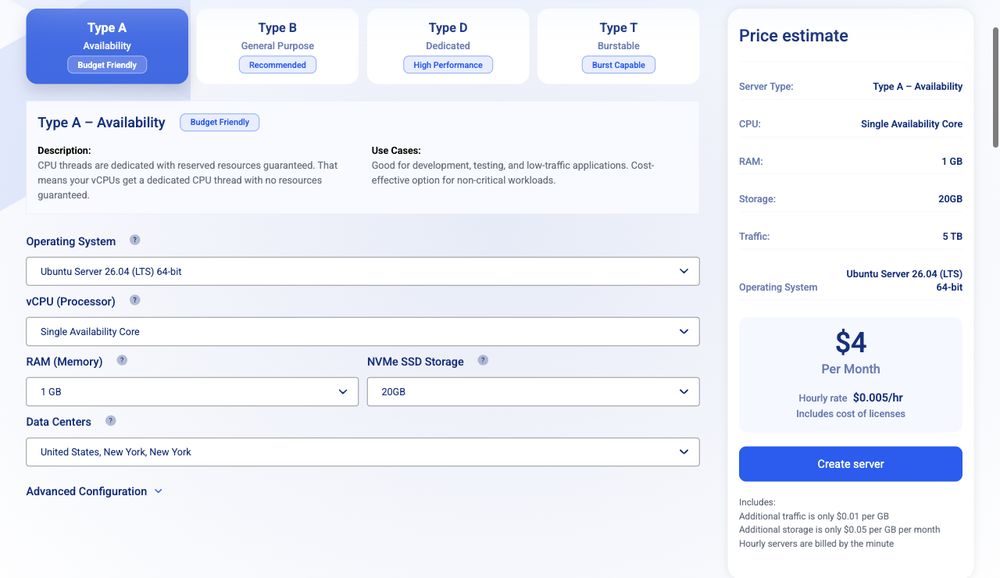
The configurator shows the monthly price and the hourly rate as you change each value; here the $4 Type A server at $0.005/hour (pricing page, November 2026).
Creating a server follows the same steps as the pricing page: pick a data center, an image, a CPU type, vCPUs, RAM and disk, and the price updates as you go. Kamatera says a server deploys in about 60 seconds.
The hard part is everything after that. Kamatera servers are unmanaged unless you pay for management: you install updates, set up the web server and firewall rules, and fix WordPress or PHP problems yourself. The account manager described free support as "basic": advice and login help, with system-level work inside the server needing the managed service.
A few details add friction. IPv6 isn't in the console: you ask support to turn it on when the server is created. And billing has more moving parts than a fixed-plan VPS, with prepaid monthly servers, per-minute hourly servers and separate charges for disks, traffic and licenses.
If you'd rather not run a Linux server, Pro Managed at $50/month per server adds monitoring, OS troubleshooting and updates on request. On a small server, that costs more than the server itself, so it makes more sense on larger setups. My guide to VPS hosting explains what you're responsible for on an unmanaged server.
Price

Score: 7.8/10
The $4 entry server with 5 TB of traffic and the free trial make Kamatera cheap to start with. Points come off for paid backups, the no-refund policy on monthly servers, and how quickly a Type B server or a cPanel license raises the bill.
Cloud server prices
| Server | vCPU | RAM | Storage | Traffic | Price |
|---|---|---|---|---|---|
| Basic (Type A) | 1 shared | 1 GB | 20 GB NVMe | 5 TB | $4/month |
| Type B | 1 dedicated thread | 1 GB | 20 GB NVMe | 5 TB | $9/month |
| Standard (Type B) | 2 dedicated threads | 2 GB | 20 GB NVMe | 5 TB | $25/month |
| Type A | 2 shared | 4 GB | 20 GB NVMe | 5 TB | $16/month |
| Pro (Type B) | 2 dedicated threads | 4 GB | 20 GB NVMe | 5 TB | $39/month |
The Basic, Standard and Pro prices are on Kamatera's pricing page and the $9 Type B price is in its FAQ; the $16 server is a configuration the account manager quoted by email. Prices are for Linux in a US data center, and the traffic allowance drops to 1 TB in Hong Kong, Tokyo, Sydney and Singapore.
Unlike shared hosting, there's no low introductory price that jumps at renewal: you pay the configurator's price every month. The common extras are backups ($3/month per 20 GB), extra disk ($0.05/GB), IPv6 ($1 per address), management ($50/month) and cPanel (from $38/month).
How hourly billing works
On hourly billing, Kamatera charges per minute of running time. The $4 server shows an hourly rate of $0.005, which is about $3.65 a month if it runs all 730 hours of a month (an estimate).
There are two catches, both confirmed by the account manager. Switching an hourly server off doesn't stop every charge: its disk and IP address are still billed, and hourly servers pay $0.01/GB for all traffic instead of getting the 5 TB allowance. For a website that runs all month, the monthly option is usually cheaper.
Free trial
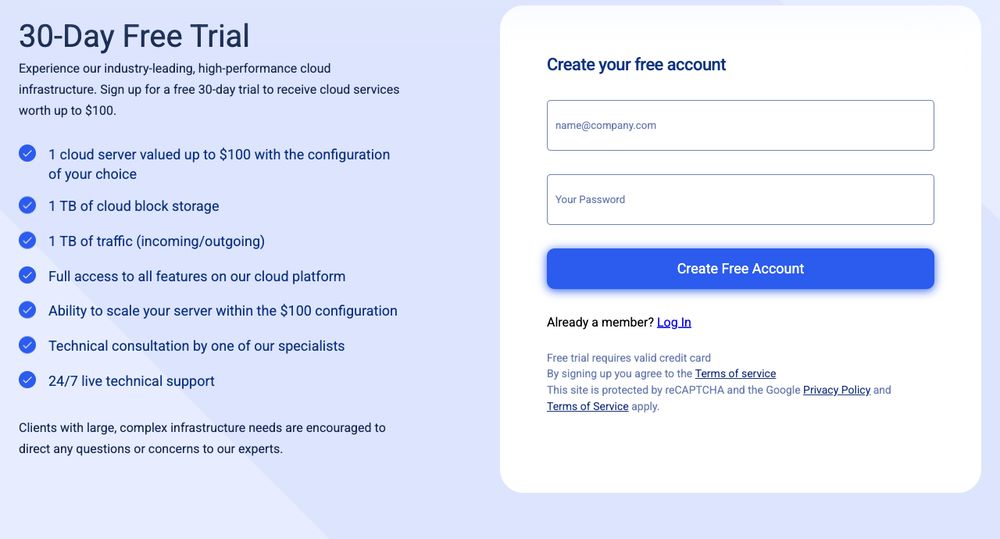
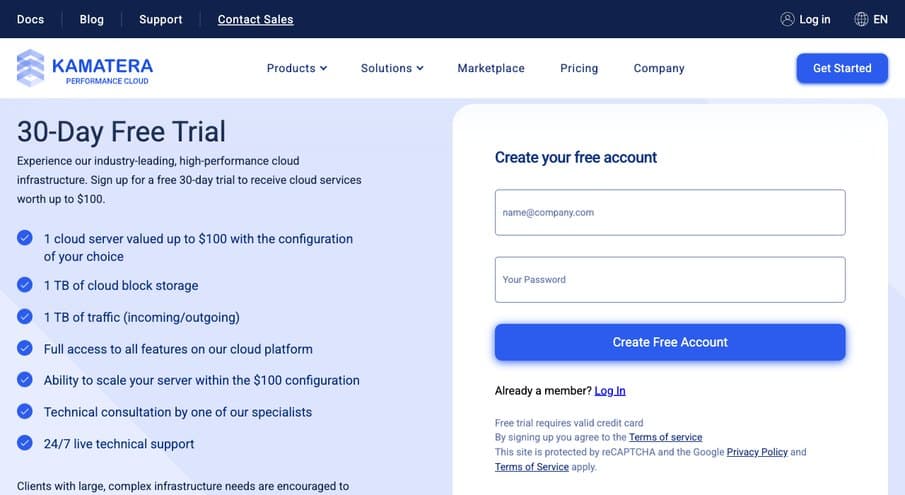
The trial covers one server worth up to $100, 1 TB of block storage and 1 TB of traffic for 30 days (free trial page, November 2026).
New accounts get 30 days on one server worth up to $100, with 1 TB of block storage and 1 TB of traffic in and out. You can pick any data center and any configuration, Windows included, as long as the total stays under $100, and the trial account is capped at that amount.
A credit card is required, and it has to pass 3D Secure. The servers keep running after day 30 and are billed as normal servers from then on, so delete anything you don't want to pay for. I cover the sign-up steps and the deposit option in my guide to the Kamatera free trial.
Refunds and payment
Kamatera's terms say all fees are non-refundable unless stated otherwise. Monthly servers are prepaid and there's no refund for the current month; hourly servers stop billing when you delete them. Closing the whole account needs 30 days' written notice.
Kamatera accepts credit and debit cards that carry the cardholder's name, and prepaid deposits by card or PayPal. If a prepaid or virtual card fails 3D Secure three times, you can switch to a $10 deposit and keep a balance that covers 7 days of server costs; the deposit is refunded if you cancel within the 30-day trial.
Reliability and Support

Score: 7.4/10
24/7 phone support is rare for a cloud provider, and Kamatera's Trustpilot rating is strong. My own pre-sales email took longer than Kamatera's stated window to get a first reply, and free support is basic in scope, which keeps the score below 8.
Kamatera lists 24/7 technical support by phone in the US and UK and by email (support page, November 2026).
Kamatera's Worldwide Technical Support Center is open 24 hours a day, 7 days a week, by phone (US and UK numbers), email and tickets from the console. Support is in English and Hebrew only, according to the account manager.
Free support covers the platform, billing and basic advice. Work inside your server's operating system needs managed services, which add monitoring, OS troubleshooting and an account manager.
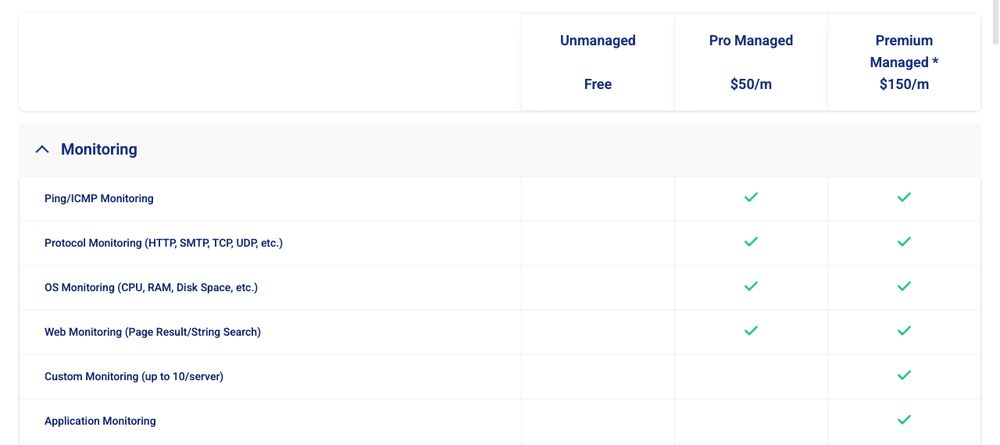
Unmanaged support is free; Pro Managed is $50/month and Premium Managed $150/month (managed cloud services page, November 2026).
Customer feedback is mostly positive. On Trustpilot, Kamatera had a TrustScore of 4.3 from 394 reviews on November 8, 2026, with 68% five-star and 23% one-star reviews. The positive reviews mention fast, polite support and the account managers.
The negative ones are individual reports, but they're worth knowing: a charge after an account deletion request, a suspension linked to an unpaid balance on an older account (Kamatera allows one account per client), and complaints about the $10 trial deposit. Kamatera replied to the negative reviews.
What support told me
On Saturday, November 7, 2026 (Friday evening in the US), I emailed Kamatera's sales and support addresses with eight questions about the free trial, prices and data centers. An automatic reply turned the email into a ticket and said tickets get an answer in 5 minutes to 24 hours.
The first answer from a person came on Sunday afternoon, about a day and a half after I wrote, from an account manager assigned to me as a personal contact. That's longer than the stated window, though it fell over a weekend and my questions were pre-sales, not urgent. When I sent six follow-up questions, the answers came the same afternoon.
- Card: the account is activated with a credit card that passes 3D Secure. A prepaid or virtual card that fails three times can use a $10 deposit instead, refundable if you cancel within 30 days.
- Trial: one server up to $100 and 1 TB of traffic for 30 days. The account is capped at $100, and anything above that needs a ticket.
- After day 30: servers are not stopped: you delete the ones you don't want, or they keep running and are billed.
- No card: there's no way to try Kamatera without a payment method.
- CPU: Type A has no guaranteed thread, Type B has a dedicated thread, both on Intel Xeon Gold at 2.7 GHz, per the account manager (the website names Xeon Platinum).
- Support scope: 24/7 by ticket, email and phone, in English and Hebrew, and "basic": system-level help inside the server needs managed services at $50/month per server.
The answers were detailed and matched Kamatera's own pages, apart from the CPU name. The first reply skipped two questions (block storage and the European locations); the follow-up gave the number of European data centers, 7, but not the cities. That's one experience with pre-sales email; phone support may be much faster.
Conclusion: Is Kamatera Right for You?
For people who know what their server needs, Kamatera is among the most flexible cloud providers I've reviewed. You choose the CPU type, vCPUs, RAM and disk separately, in 21 locations, with Windows options and 24/7 phone support, from $4/month.
The warning sign is performance. The three customer sites I tested gave Kamatera the weakest result of 31 VPS hosts, and both sites in the load test failed the 50-visitor test. On Kamatera, a slow server is usually a server that's too small or uncached for its app, and the platform leaves that decision entirely to you.
I'd choose Kamatera if you can manage a server, want a specific location or Windows, and will size it properly: Type B CPUs for anything busy, caching from day one. Use the 30-day trial to test your own app under load first. If you'd rather have a host that tunes the server for you, compare it with the managed options in my cloud hosting guide.