


 Tested by
Think of GreenGeeks as a cPanel shared and WordPress host with a green angle: it buys renewable energy certificates covering 300% of the electricity it estimates it uses. It suits small sites, blogs and small stores that want LiteSpeed hosting in the US, Canada, Europe (Amsterdam) or Singapore, and you pick the location at checkout.
The entry Lite plan costs $1.95/month on a 12-month term during GreenGeeks' early Black Friday sale (the normal first-year price is $2.95), and it renews at $14.95/month. Every shared plan comes with free SSL, a free first-year domain, daily backups, a free Cloudflare CDN connection and a 30-day money-back guarantee.
The weak spots are the renewal prices, Redis caching only on the top plan, and limited self-service restores on Lite. GreenGeeks also sells reseller hosting, self-managed and managed VPS, and dedicated servers.
My scores are based on GreenGeeks' official pages and checkout, its published policies and attributed customer reviews, all checked on November 14, 2026. I haven't run my own speed tests on GreenGeeks sites yet.
Pros
- 300% renewable energy match, backed by a dated 2026 certificate from the Bonneville Environmental Foundation.
- LiteSpeed web server and LiteSpeed Cache on every shared plan.
- You choose the data center at checkout: US, Canada, Europe or Singapore.
- A free domain for the first year, plus free SSL, CDN and site migration.
- Pro and Premium include Node.js and Python, staging, Git and on-demand backups.
- Free malware cleanup (with restrictions) and a 30-day money-back guarantee.
Cons
- Renewals cost 5 to 7 times the sale price (Lite renews at $14.95/month).
- The discount only applies to the 12-month term; 2 and 3-year terms are billed at about the regular rate.
- Lite customers can't restore system backups themselves (1 free restore a month, then $25 each).
- Redis object caching only on Premium; no published CPU, RAM or entry process limits.
- Self-managed VPS is US-only, has no backups included and comes without cPanel.
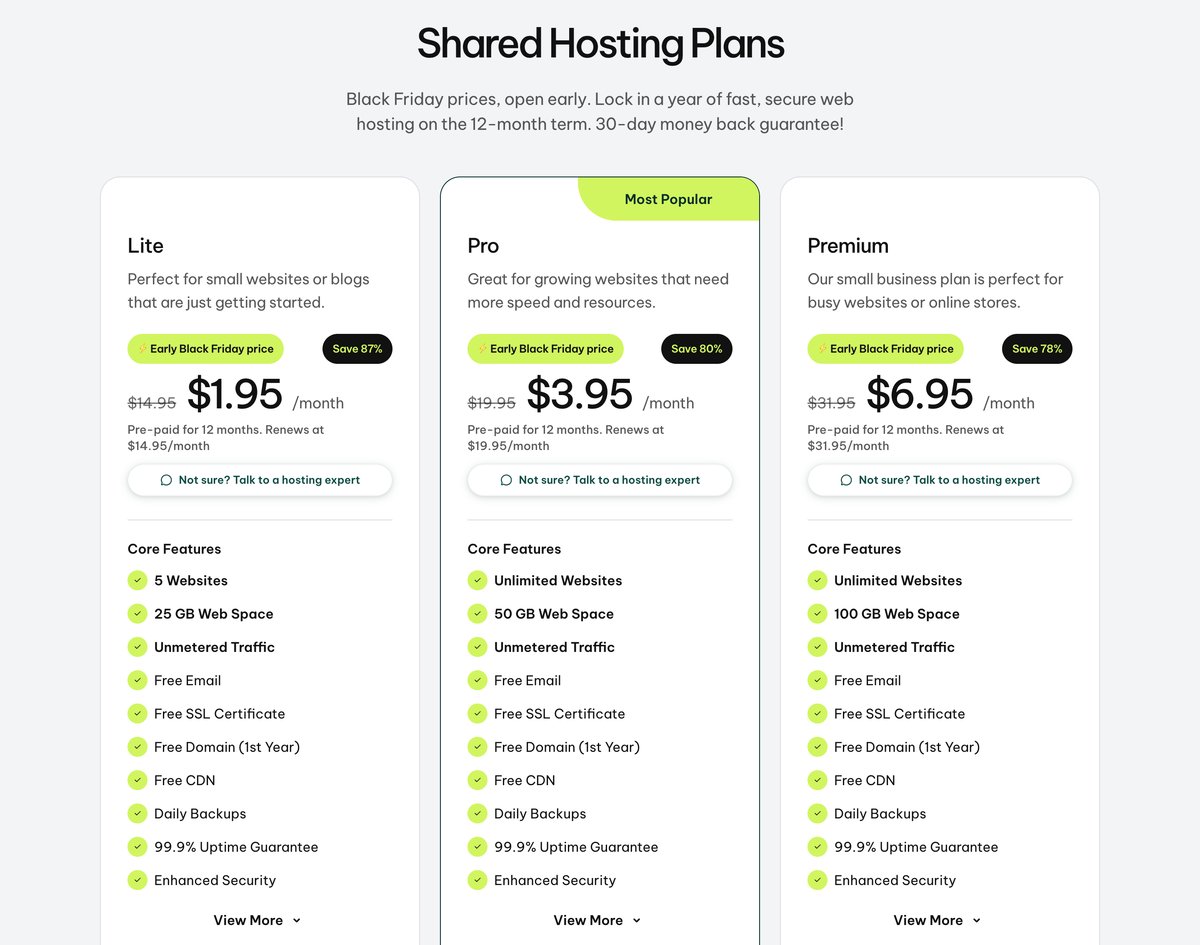
GreenGeeks shared hosting plans with the early Black Friday prices, checked November 14, 2026.
Trey Gardner started GreenGeeks in 2008. The company, GreenGeeks LLC, gives a Wilmington, Delaware address and claims a customer base topping 55,000. Its WordPress and WooCommerce pages sell the same three shared plans at the same prices.
Contents
Technical Features

Score 4.0/5
Shared hosting plans
The shared and WordPress plans are called Lite, Pro and Premium (Ecosite Lite, Pro and Premium in the cart). All three use cPanel, unmetered traffic, free email, unlimited databases and LiteSpeed caching.
| Plan | Websites | Web space | Extra features |
|---|---|---|---|
| Lite | 5 | 25 GB | Daily backups, staging, Git, WP-CLI and SSH |
| Pro | Unlimited | 50 GB | Adds Node.js and Python, on-demand backups, priority support and a WordPress repair tool |
| Premium | Unlimited | 100 GB | Adds a free dedicated IP, a free AlphaSSL certificate and Redis object caching |
Pro is the plan most people should start with, since Lite caps you at 5 sites and lacks Node.js. If you need Node.js, my guide to Node.js on GreenGeeks covers how the app setup works.
"Unmetered" doesn't mean unlimited resources. GreenGeeks' terms say an account that uses 100% of its allocated CPU, memory, disk I/O or file count is slowed down automatically, but GreenGeeks doesn't publish those limits per plan. My guides on entry processes and inode limits explain what happens when a shared account hits them.
Data center locations
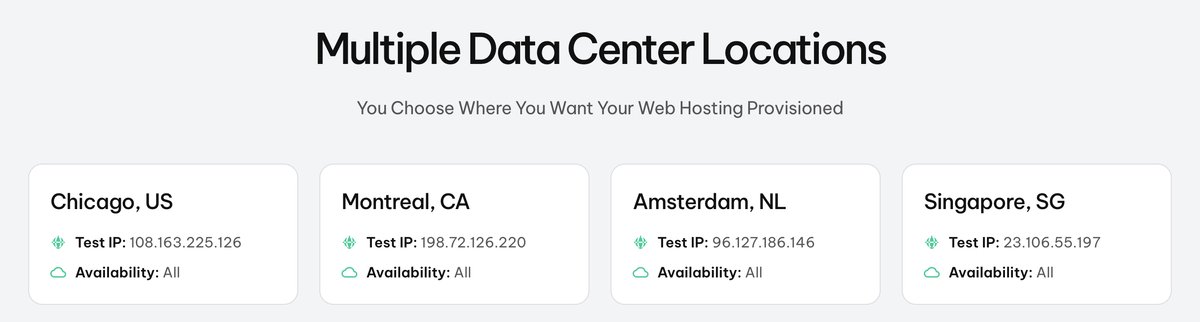
GreenGeeks lists 4 data centers: Chicago (US), Montreal (Canada), Amsterdam (Netherlands) and Singapore, each with a test IP you can ping before you buy. The data center page says all four are available for all services.
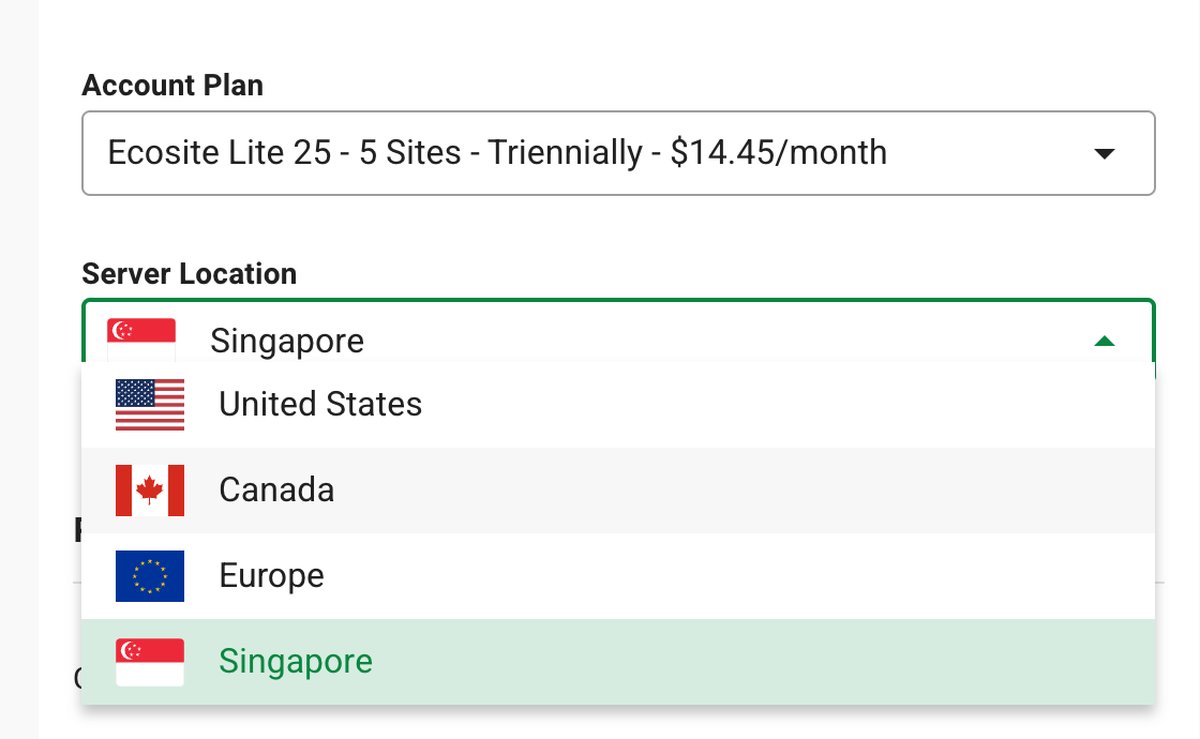
On a shared plan, the checkout lets you choose United States, Canada, Europe or Singapore. The self-managed VPS checkout only offered the United States when I checked, so the "all services" wording doesn't seem to hold for VPS.
Canada is a real advantage for Canadian businesses that want their site hosted in the country, and Singapore helps for visitors in Southeast Asia. There's no location in Australia, India or the UK, though.
Backups
GreenGeeks runs daily disaster recovery backups of its shared and reseller platform and tries to hold roughly 30 backup sets at a time. Pro and Premium customers can restore from those backups themselves and make on-demand backups.
On Lite, restores go through a support ticket: one manual restore a month is free, and each extra one costs $25. VPS and dedicated servers aren't backed up automatically; on the self-managed VPS, backups are a paid add-on.
The terms also say it's your job to keep your own copies. I'd follow that advice on any shared host, and download a full backup before big changes.
Developer tools and extras
Every shared plan includes SSH, WP-CLI, Git and staging, plus multi-user access and the AI website builder. PHP versions range from 5.2 to 8.5, with 8.4 as the default (GreenGeeks' March 2026 list), and you switch versions in cPanel.
Pro and Premium add Node.js and Python. The free CDN is a one-click Cloudflare integration, which helps cache static files closer to visitors but isn't a hosting location.
Other hosting types
- Reseller hosting: RH-25, RH-50 and RH-80, which hold between 25 and 80 cPanel accounts, with WHM and WHMCS billing.
- Self-managed VPS: KVM servers with root access and one-click Docker apps, from 2 vCPU and 4 GB RAM.
- Managed VPS: cPanel/WHM servers with a cPanel Solo license (cPanel's single-account tier), from 4 vCPU and 4 GB RAM.
- Dedicated servers: Intel Xeon servers from $169/month, sold through the sales team.
Performance and Security

Score 3.5/5
I haven't speed-tested GreenGeeks customer sites yet. When I do, the results will be added to my web hosting benchmarks, and this section will show them. Until then, the score is a cautious estimate based on GreenGeeks' published setup, not on my measurements.
GreenGeeks' published server setup
GreenGeeks runs its shared platform on LiteSpeed web servers with MariaDB databases, HTTP/3 and the LiteSpeed Cache plugin for WordPress. On shared hosting, few WordPress caching setups beat LiteSpeed's page cache, but only once you switch it on and set it up.
Redis object caching is only on Premium. That matters most for WooCommerce stores and logged-in users, where pages can't be served from the page cache. On Lite and Pro, those requests rely on PHP and the database alone.
The data center page lists Intel Xeon servers with at least 128 GB of RAM and SSD storage in RAID 10. Shared plans use SSDs; only the self-managed VPS lists NVMe storage.
GreenGeeks uses container-based accounts with LVE limits, which keep one busy site from slowing its neighbors. The flip side is that a heavy WordPress site can hit its CPU or memory limit, and GreenGeeks doesn't publish where those limits are.
What users report about speed
Customer reviews on Trustpilot often mention stable hosting and fast pages after turning on LiteSpeed Cache. One reviewer, a customer of 10 years, wrote on October 31, 2026 that their sites started returning 503 errors and slow WordPress editing in 2026, which they blamed on LVE limits.
GreenGeeks replied that the limits hadn't changed and that the site was reaching its CPU and memory limits because of resource-heavy plugins, and support recommended a VPS. These are individual experiences, not measurements, but they show what happens on shared hosting when a site outgrows its plan.
Security
Shared plans include free Let's Encrypt SSL with automatic renewal, a firewall GreenGeeks describes as AI-based, network-level DDoS mitigation and real-time malware scanning. If a site gets hacked, GreenGeeks will do a free malware cleanup, with restrictions it doesn't spell out on the plan page.
Premium adds a free dedicated IP and an AlphaSSL certificate, which only matter if you need a paid certificate or your own IP address. On a self-managed VPS, securing and updating the server is your job.
Ease of use

Score 4.0/5
GreenGeeks uses cPanel, so anyone who has used another cPanel host will find their way around. WordPress installs in one click, auto-updates are available, and the plans include staging, which lets you test changes before they go live.
Every shared plan includes free website migration, and the reseller plans include free migration of up to 30 cPanel accounts. Beginners also get an AI website builder with drag-and-drop editing.
The signup is short: pick a domain (or choose it later), enter your details, then pick the plan, billing term and server location. Watch the billing term field, since it decides whether you get the sale price.
Price

Score 3.5/5
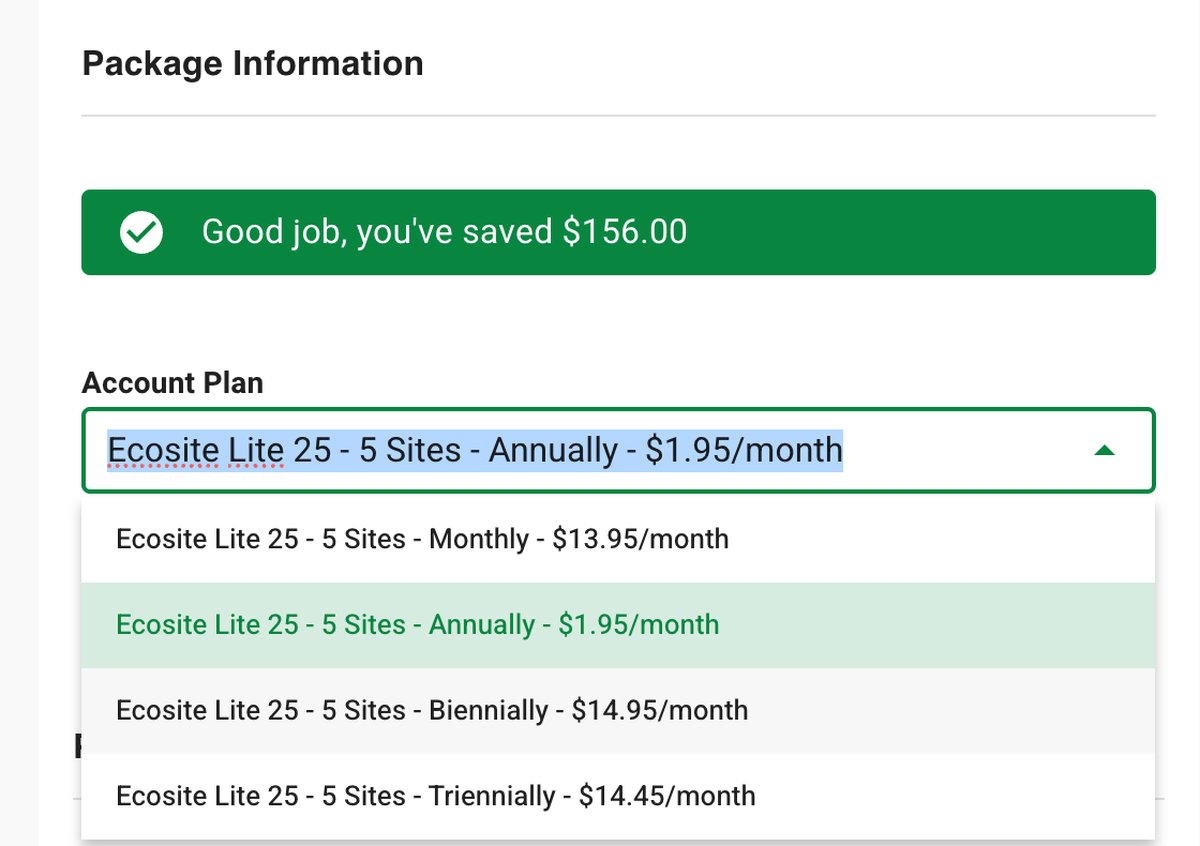
GreenGeeks bills every plan upfront for the whole term, and the checkout says promotional prices apply to new customers for the first term only. On November 14, 2026, the prices below included an early Black Friday sale, so expect them to change after the sale.
| Plan | 1 month | 12 months | 24 months | 36 months | Renewal |
|---|---|---|---|---|---|
| Lite | $13.95/mo | $1.95/mo | $14.95/mo | $14.45/mo | $14.95/mo |
| Pro | $18.95/mo | $3.95/mo | $19.95/mo | $19.45/mo | $19.95/mo |
| Premium | $30.95/mo | $6.95/mo | $31.95/mo | $31.45/mo | $31.95/mo |
The 12-month term is the only discounted one. Lite costs $23.40 for the first year, then $179.40 a year at the renewal price. The 2 and 3-year terms are billed at about the regular rate, so they make little sense during this sale.
Monthly billing works too, at $13.95/month for Lite, which is a little below its renewal rate. Plan for the renewal price rather than the first-year deal: after year one, Pro costs about as much as many hosts' premium shared plans.
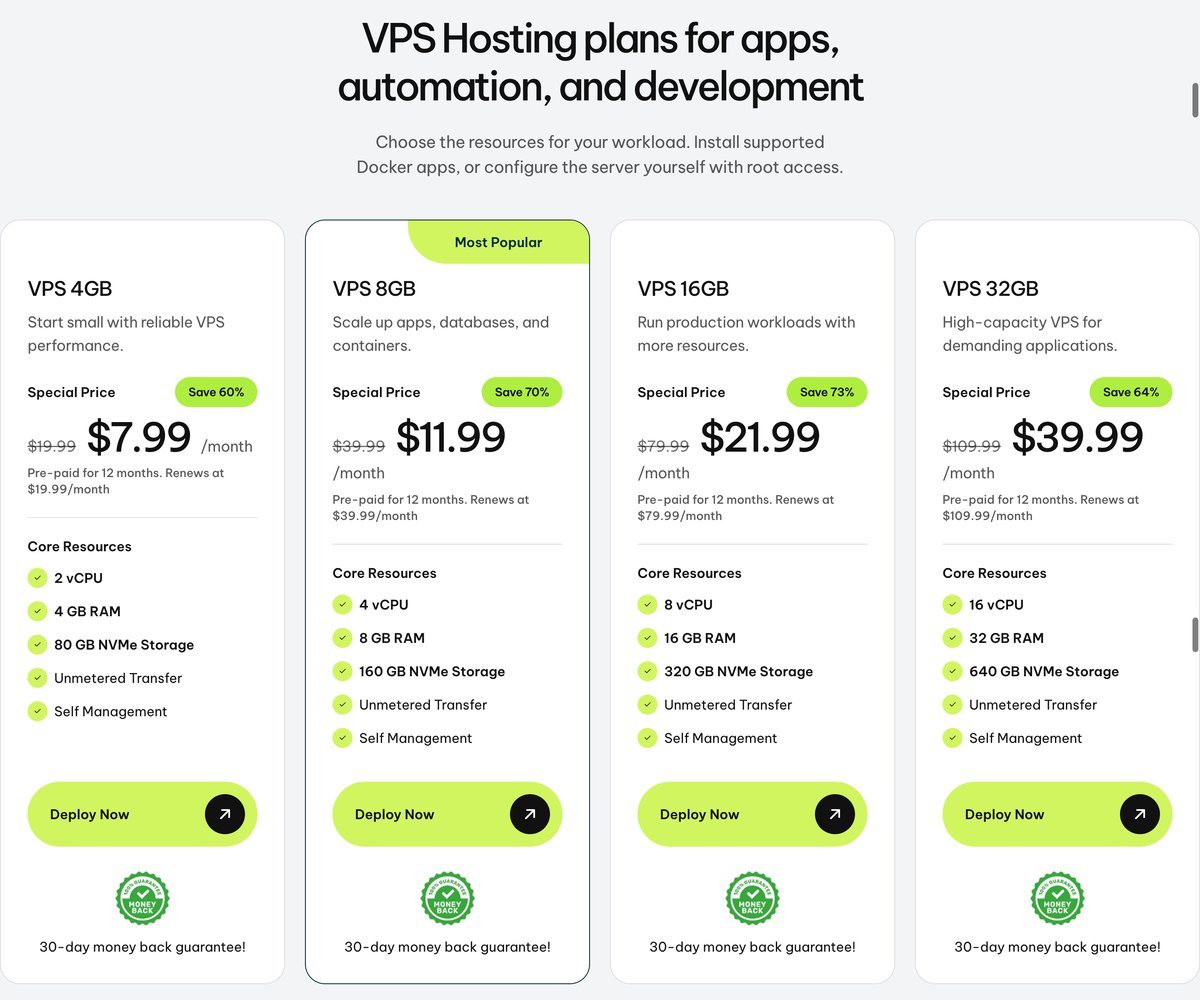
| Self-managed VPS | Resources | 12 months | Renewal |
|---|---|---|---|
| VPS 4GB | 2 vCPU, 4 GB RAM, 80 GB NVMe | $7.99/mo | $19.99/mo |
| VPS 8GB | 4 vCPU, 8 GB RAM, 160 GB NVMe | $11.99/mo | $39.99/mo |
| VPS 16GB | 8 vCPU, 16 GB RAM, 320 GB NVMe | $21.99/mo | $79.99/mo |
| VPS 32GB | 16 vCPU, 32 GB RAM, 640 GB NVMe | $39.99/mo | $109.99/mo |
All four plans have unmetered transfer and full root access. The sale price applies to the 12-month term; monthly, 2-year and 3-year terms for VPS 4GB were all $19.99/month.
The managed VPS with cPanel/WHM costs $69.95/month (4 vCPU, 4 GB RAM, 75 GB SSD), $129.95/month (6 vCPU, 8 GB) or $179.95/month (6 vCPU, 16 GB), each with 10 TB of transfer. That's expensive next to the self-managed plans, so it only makes sense if you want GreenGeeks to manage cPanel for you.
| Reseller plan | cPanel accounts | Storage | Transfer | 12 months | Renewal |
|---|---|---|---|---|---|
| RH-25 | 25 | 60 GB SSD | 600 GB | $19.95/mo | $34.95/mo |
| RH-50 | 50 | 80 GB SSD | 800 GB | $24.95/mo | $49.95/mo |
| RH-80 | 80 | 160 GB SSD | 1,600 GB | $34.95/mo | $69.95/mo |
Reseller plans include WHM, WHMCS and free migration of up to 30 cPanel accounts. Dedicated servers start at $169/month; GreenGeeks doesn't publish plan specs, so you get a quote from sales. If you resell hosting, compare these plans with my list of the best reseller hosting.
Refund policy
New hosting accounts can be refunded within 30 days. If you got a free domain, the domain registration fee is deducted from the refund, and the domain stays yours.
The guarantee covers the start of your service only, not renewals, and the terms list domains and dedicated servers as non-refundable, even though the dedicated server page shows a 30-day badge. If you plan to leave, cancel well before the renewal date; one Trustpilot reviewer said in November 2026 that GreenGeeks refused a renewal refund because they hadn't canceled 5 days before it.
Reliability and support

Score 3.8/5
GreenGeeks promises 99.9% network uptime for its servers and main network connection. The terms don't mention any service credit if it falls short, so the guarantee comes with no stated compensation.
Support is available 24/7 by live chat and phone (1-877-326-7483), plus tickets from the client area. Recent Trustpilot reviews say the chat now starts with an AI assistant before you reach a person, and two recent reviewers wrote that it solved their problem.
The managed VPS includes support within the scope of cPanel. On the self-managed VPS, GreenGeeks keeps the server and network online, and everything inside the server is yours to manage.
What users say about GreenGeeks

On November 14, 2026, GreenGeeks had a 4.5 rating from 1,764 reviews on Trustpilot, with 83% five-star and 12% one-star reviews. Trustpilot notes that GreenGeeks hasn't invited reviewers recently and that it replies to every negative review, usually within 24 hours.
Most reviewers praise friendly, patient support and easy migrations, and a few long-time customers mention more than 10 years with GreenGeeks. A Canadian reviewer chose it specifically for Canadian servers and the carbon offsets.
The negative reviews focus on renewal charges and refunds: one customer expected a full refund and got about half back after the domain fee was deducted, and another was charged for a renewal they thought they had canceled. These are individual experiences, but they're a good reason to read the refund terms and turn off auto-renewal if you're unsure.
Frequently Asked Questions
Is GreenGeeks really green?
GreenGeeks buys renewable energy certificates (RECs) through the Bonneville Environmental Foundation, sized at triple its estimated electricity use. Its latest certificate, dated January 23, 2026, covers 2,592 RECs for 300% of its estimated 2025 use.
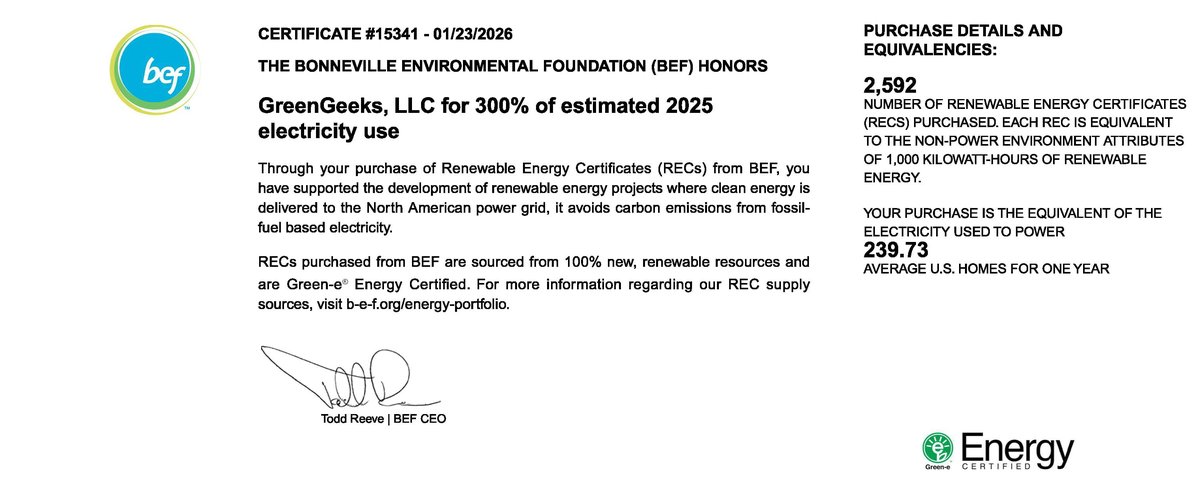
That's a certificate match, not renewable power at the servers: GreenGeeks says each data center draws electricity from its local grid. The US EPA has listed GreenGeeks as a Green Power Partner since 2009, and every new hosting account adds one planted tree.
Where are GreenGeeks' data centers?
GreenGeeks has data centers in Chicago, Montreal, Amsterdam and Singapore. You choose the region (United States, Canada, Europe or Singapore) at checkout for shared hosting; the self-managed VPS was only offered in the United States when I checked.
Is GreenGeeks good for WordPress?
Yes, for small and medium WordPress sites. All plans run on LiteSpeed with LiteSpeed Cache, staging and auto-updates, but busy WooCommerce stores should take Premium for Redis object caching, or a VPS.
How much does GreenGeeks cost after the first year?
The shared plans renew at $14.95/month (Lite), $19.95/month (Pro) and $31.95/month (Premium). The low first-year prices only apply to the 12-month term for new customers.
Does GreenGeeks offer a free domain?
Yes. Shared and WordPress plans include one domain, registered or transferred, free for the first year. Cancel inside the 30-day window and GreenGeeks deducts the domain fee from your refund.
Conclusion: Is GreenGeeks Right for You?
GreenGeeks fits small sites, blogs and small stores best: you get cPanel and LiteSpeed from a company with a documented renewable energy match. I'd pick Pro in most cases, since it removes Lite's 5-site cap and adds Node.js, on-demand backups and self-service restores.
Choose another host if you need servers in Australia, India or the UK, want Redis without paying for Premium, or want a long term at a discount. And budget for the renewal price, not the first-year deal. If you'd like to compare it with a similar cPanel host first, read my HostArmada review.
Your reviews are important and protected. Hosts on WebHostingAdvices can't pay or offer incentives to hide them.