

Speed decides a lot of what happens on a website. A blog, a portfolio or an online store all lose visitors when pages load slowly, and they all gain when pages appear quickly.
Faster pages tend to rank better in search, which brings in more traffic. They also turn more of those visitors into buyers or subscribers.
WPX Hosting builds its managed WordPress plans around that idea, with a London data center for European visitors and infrastructure tuned for speed.
| Overall | Features | Performance | Ease of use | Price | Support |
|---|---|---|---|---|---|
| 9.1 | 9.5 | 9.8 | 8.4 | 7.9 | 9.8 |
Contents
Data sheet of the host


WPX Hosting was founded in 2013 by Terry Kyle and Georgi Petrov, who still own 100% of the company. Formerly known as Traffic Planet Hosting, this web host offers the simplest managed WP solution for anyone who runs a website.
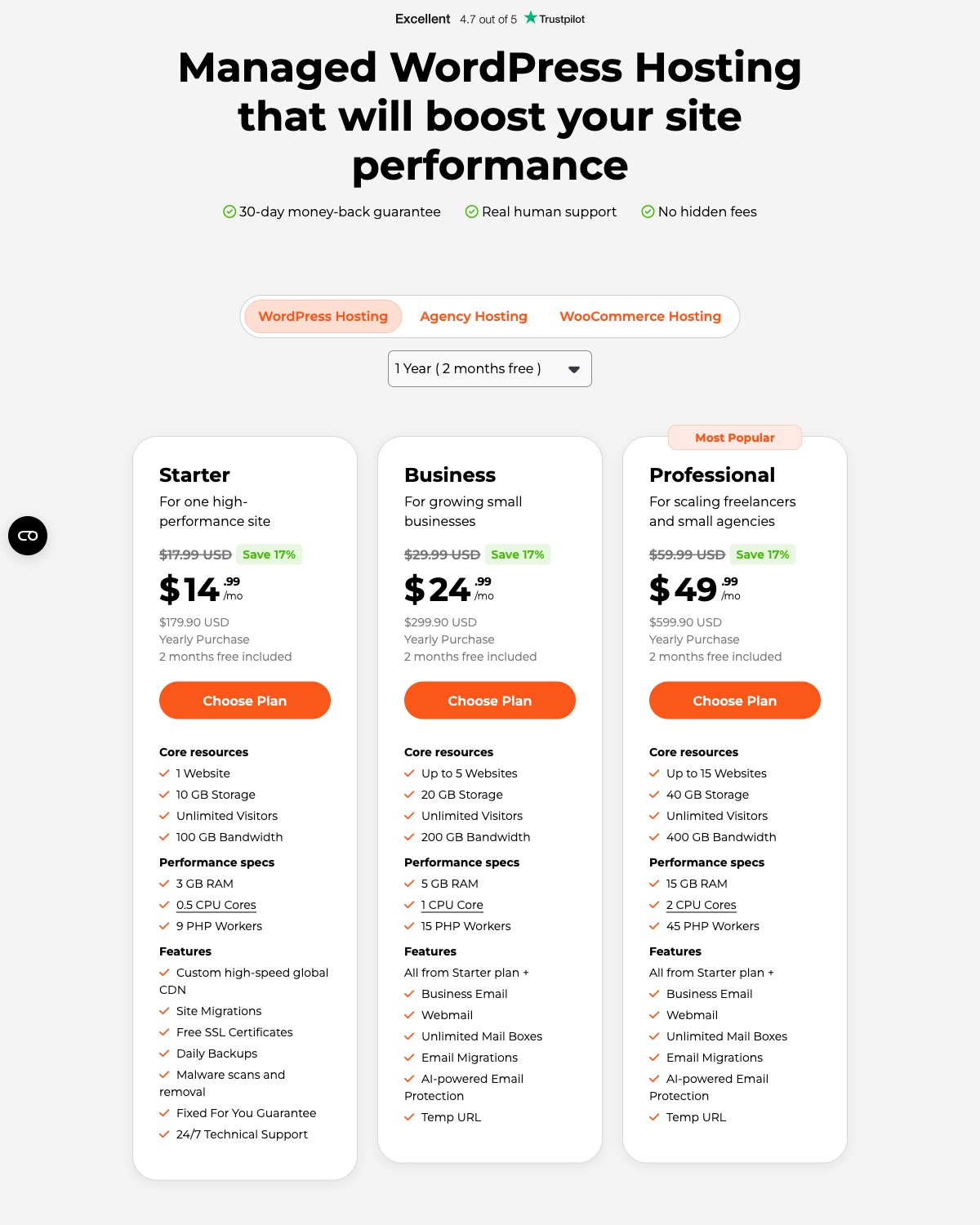
It now sells four WordPress plans: Starter, Business, Professional and Elite, plus separate Agency and WooCommerce plans. What changes from one plan to the next is how many sites you can run, the storage and bandwidth allowance, and the RAM, CPU and PHP workers behind them.
Hosting Types
- Shared
- WordPress
Operating Systems
- Linux
DataCenters
- Chicago (USA)
- London (UK)
- Sydney (Australia)
WordPress Hosting
Remember to select the closest data center to your audiences location among the 3 (USA, UK, Australia) so you can benefit from better loading speeds for your actual market.
About WPX Hosting
Load time affects both traffic and sales. A quicker site has a better chance of good search engine visibility, and visitors who don't have to wait are more likely to buy or sign up.
For a WordPress site, the host is often the biggest speed factor you control. Moving to a host that specializes in fast WordPress hosting can fix more than any plugin, and that is where WPX Hosting positions itself.
I'll start with its main features and what they mean for your site, then look at performance, ease of use, price and support.
Pros
- Multiple server locations. 3 data centers on three continents, and you can choose the one you want.
- Fantastic response times from most locations.
- A 99.95% server uptime guarantee.
- Automatic daily backups, kept for 28 days.
- Fast responsive live chat and ticket support.
- Standard site migrations are unlimited and free.
- Easy to use interface.
Cons
- The pricing is somewhat on the high side, but it’s still worth it because of the amazing features
- No phone support (but live chat is very fast).
- Limited storage space.
Technical Features
Score: 10/10
Optimized WordPress Hosting
WordPress sites need care in many areas, such as speed, bandwidth, and of course, security.
WPX hosting is by far the best WordPress hosting you can get. The installation process is simple and extremely easy. You can just install WordPress with one click.
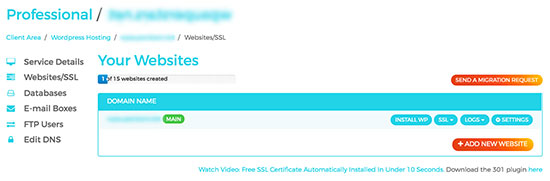
Talking about the performance, the managed WordPress hosting of WPX hosting provides one of the fastest loading times. The dashboard is clean using which you can see all the technical stuff and also create the support ticket directly from there.
It also gives you a staging area to test your website before you publish it live for the users. There is support for WordPress multisite, and WPX publishes no list of banned plugins or themes, although nulled (cracked) plugins are not allowed.
Daily backups of the WordPress website
Backups are important for every website. You can surely use some WordPress plugins such as Updraft Plus to take backups manually.
WPX also backs up your sites automatically every day, and each backup is kept for 28 days on separate backup servers. So, even if something goes wrong with your plugins, you can always restore your website with automatic backups.
You can also create an on-demand backup before a risky change. These personal backups are only kept for 24 hours.
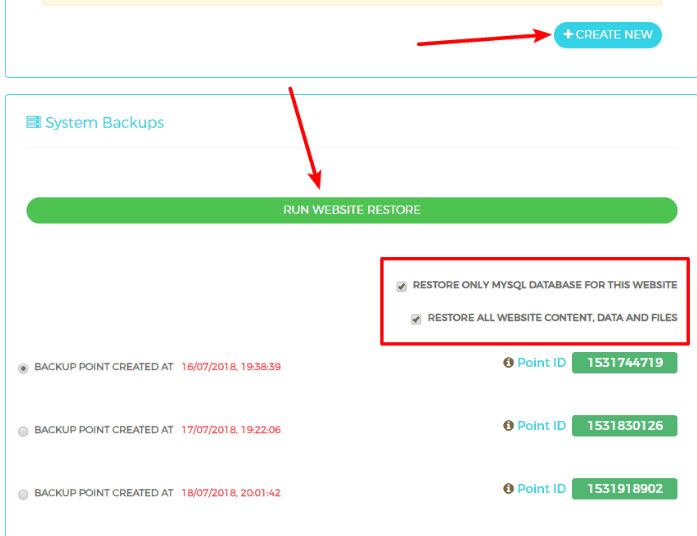
Don’t worry, you will not have to pay an extra penny for the automatic backups.
Free Site Migration
WPX Hosting handles most of the technical things for you. When you decide to move your website to WPX Hosting, they will provide a free migration service. The migration team moves your site by hand, usually within 24 hours of getting your details, and scans it for malware on the way.
So, it is very useful for migrations. You can move your hosting to WPX hosting without doing anything. Just submit a migration request and you are halfway there.
Some moves are paid, though. A migration with a domain name change costs $98, and the Express Migration that skips the queue costs $100 (both excluding VAT).
Email service
Tired of paying extra bucks for new SSL certificates and emails? You get unlimited SSL on every plan, and unlimited mailboxes from the Business plan up.
You can have a free SSL certificate for all the websites you host at WPX hosting. There is no extra charge taken from you on this. SSL is a must nowadays not only for security but also for search engine optimization.
Google and other search engines prefer websites with SSL certificates over the non-SSL websites. So, it will help you in ranking your website.
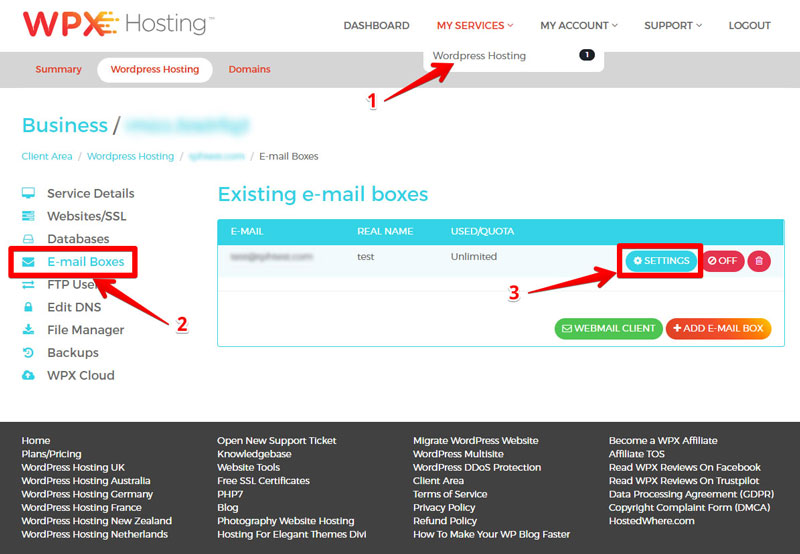
Further, you can have a different email address to categorize your emails. You can create a separate email for the support tickets and different email for the payment related emails. Keep in mind that the single-site Starter plan doesn't include business email, and WPX itself suggests Google Workspace or Zoho for heavy email use.
FTP / SFTP / PhpMyAdmin Access
Even being a managed WordPress hosting provider, WPX hosting still provides you file manager access along with FTP. This will help you manage all the files you have on your website.
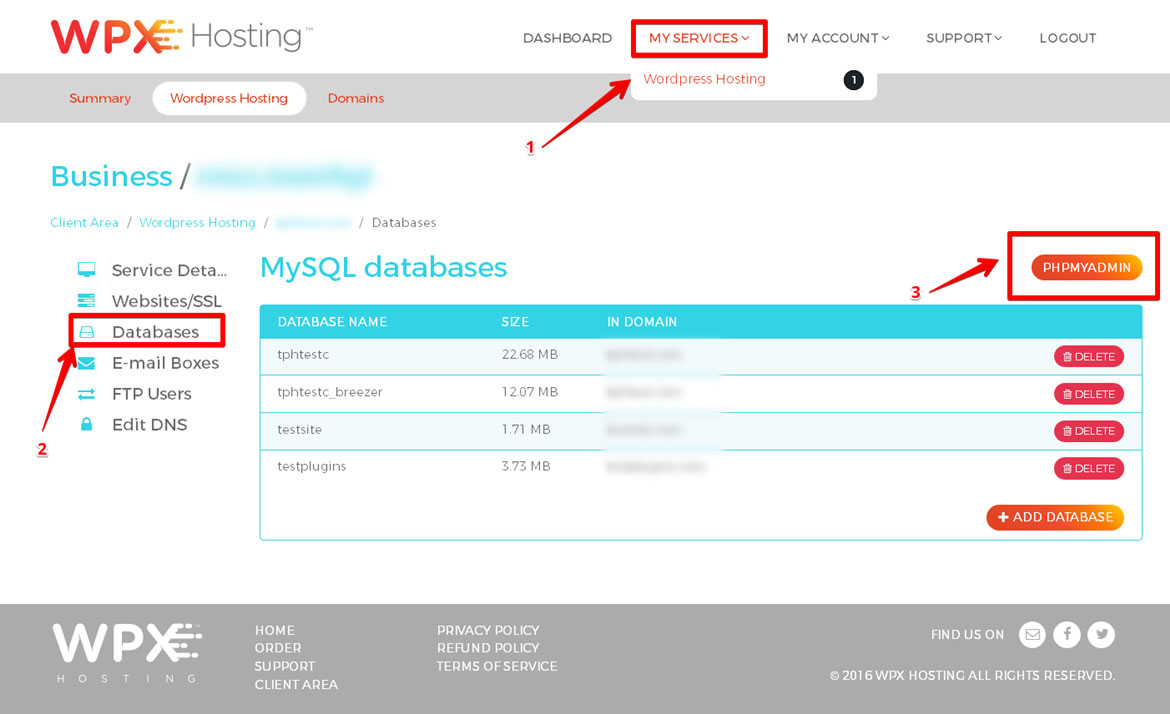
Along with this, you can manage the database using PHPMyAdmin. They don’t have cPanel, Instead, they have their own panel which is easy to use and gives all the features.
WPX supports PHP 8.0 and newer, and a PHP version selector in the control panel lets you pick the version for each site. Further, they will handle the CDN optimization and will also handle the server uptime.
Superfast 24/7/365 support
Support is available around the clock, every day of the year, by live chat and by email ticket. They do provide amazing general support but along with this they also have technical support.
In simpler words, if your website goes offline or stops working, they will fix it for you in the least amount of time for free. Further, if your website is affected by malware, they have a free malware removal service that you can use. In this particular service, they will scan and remove all the malware for free.
WordPress malware is common, especially if you are using various plugins. So, it is always a better option to have some security specialists.
Other features included in every WPX plan:
- A browser-based file manager for your server files
- No banned plugins list
- Support for WordPress Multisite
- SSL certificates at no cost
- Protection against DDoS attacks
- A London data center for European visitors
- SSD storage
- A staging area to work on a copy of your site before it goes live
Watch WPX Hosting's video overview on YouTube
Performance and Security
Score: 10/10
WPX Hosting Speed Test Results (October 2026)
In October 2026, I tested a live floral and event decor website with an online shop on WPX Hosting with a Grafana k6 load test for server speed and Google PageSpeed Insights for page performance.
- Hosting type: shared WordPress hosting
- Type of site: local business (floral and event decor) with a WooCommerce shop
Detected from the site’s server and network; the exact plan isn’t public.
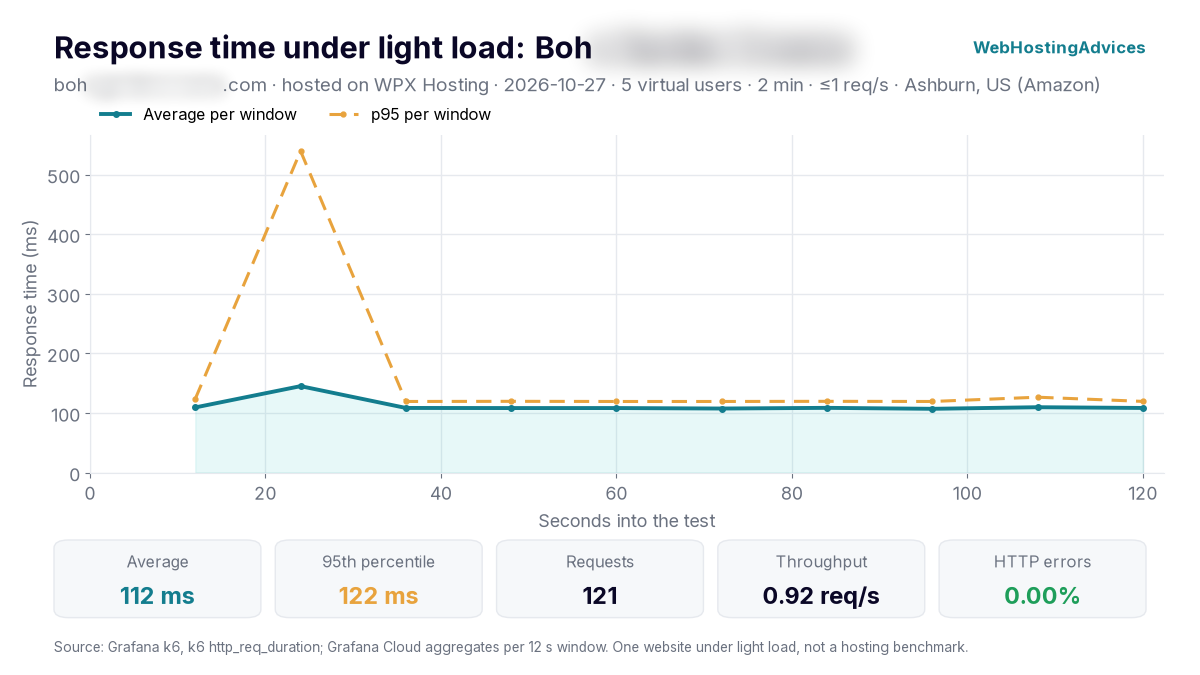
Grafana k6, 27 October 2026, from Ashburn (US): 5 virtual users for 2 minutes, at most 1 request per second. One website under light load, not a hosting benchmark.
The site answered all 121 requests without an error, with a 112 ms average response and 95% of requests within 122 ms.
The server answered in about 25 ms, which usually means the page came straight from a cache; most of the remaining time was the page downloading.
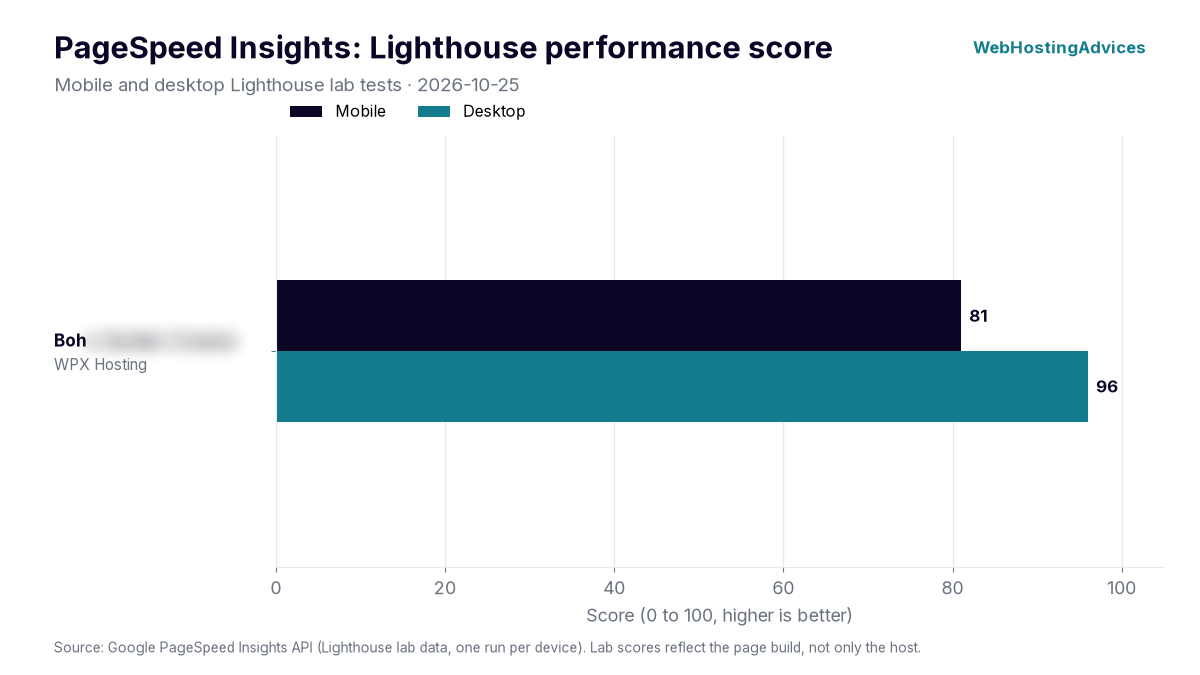
Google PageSpeed Insights lab tests, 25 October 2026, mobile and desktop.
The site scored 81 on mobile and 96 on desktop. Its largest element appeared after 3.53 s on mobile and 922 ms on desktop. No page cache was detected on this site.
PageSpeed scores depend mostly on how a site is built (theme, images, plugins), so treat these numbers as one real-world example, not a lab benchmark of WPX Hosting’s servers. Uptime figures come once the monitored site has 30 days of data.
WPX Hosting Performance and Data Centers
Customer reviews of WPX are positive. On Trustpilot, WPX had a 4.7 out of 5 score from about 3,600 reviews in October 2026, and WPX also points to speed tests by Kevin Ohashi (Review Signal) and Matt Diggity.
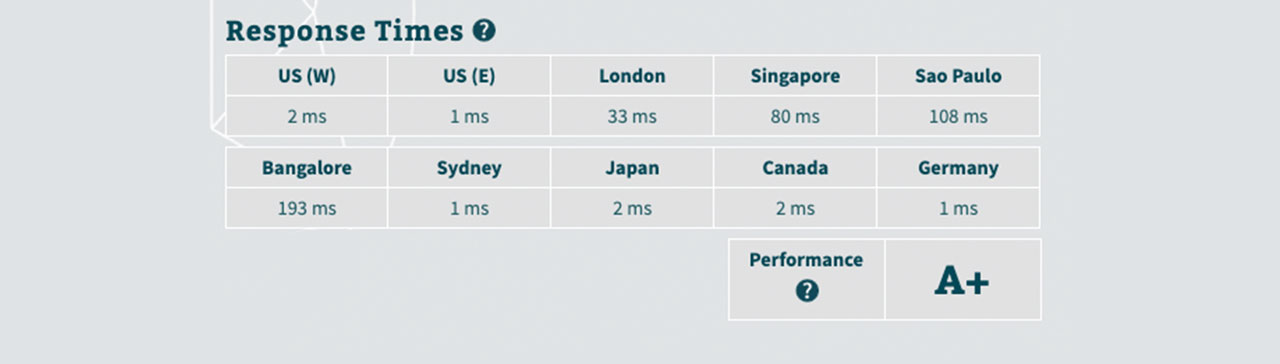
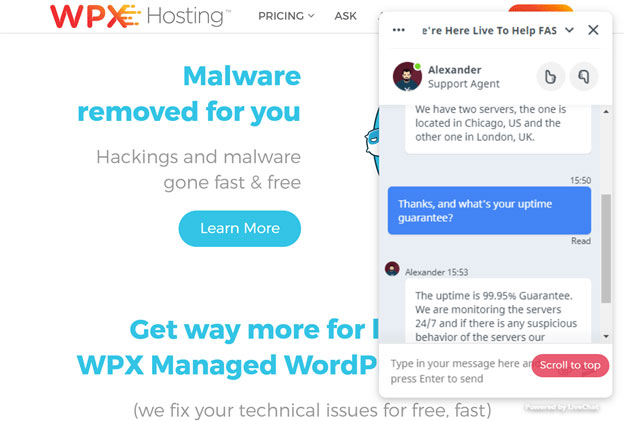
WPX Hosting runs its servers in 3 data centers around the world. One is in Chicago (USA), in the Lakeside Data Center, the second is in London (UK) for Europe, and the third is in Sydney (Australia) for the Asia-Pacific region.
SSD Servers
SSD storage reads and writes data much faster than old hard drives, which helps database-heavy WordPress pages load quicker. WPX uses SSD storage on every plan.
Depending on the plan you have chosen, you will get the storage space.
Caching
The servers run the LiteSpeed Web Server Enterprise with MariaDB and PHP, and caching starts at the server level with a full page cache and OpCache. The Elite plan and above also get Redis cache.
CDN (Content Delivery Network) makes your website even faster. WPX Hosting offers a custom CDN, called XDN, to increase your site speed.
A CDN will deliver the website to the user based on their location. For instance, if someone from New York visits your website, CDN will choose the nearest location to serve the user.
This decreases the loading time and gives high loading speed to your website. The WPX XDN has 43 endpoints to serve your visitors. So, it will pretty much cover the entire globe and you will get amazing speed overall.
WPX built the XDN itself and includes it free on every plan. It still recommends W3 Total Cache with its own settings on top of the XDN, and dynamic pages such as shopping carts gain less because they can't be cached.
With WPX, you don’t need to worry about anything over here. The XDN can cache dynamic content and clears its cache automatically when you update the site. WPX's optimization team also offers a free speed optimization for each website on request.

Security
Last but not the least, security plays an important role in web hosting. Hacked WordPress sites are common, and attacks come in many forms.
DDoS attacks are one of them. Relax, you don’t need to go all technical here as WPX Hosting has hybrid DDoS protection, plus brute-force protection and a web application firewall.
Many other attacks come through injected malware. For that WPX scans your sites for malware every day.
If it finds an infection, its security team removes it for free. WPX also runs security patching and plugin risk scans.
WPX says this coverage is enough that you don't need a separate security plugin or cleanup service.
For further protection, WPX offers unlimited SSL certificates for any of their plan. You can have a separate SSL certificate for all of your websites in the WPX server.
For the people who don’t know, the SSL certificate will enable HTTPS on your website protecting it from data leak. It simply means that the data you are transferring from the site is secure.
The servers also support HTTP/3, which loads HTTPS pages faster.
It surely looks complicated but it isn’t. You can install an SSL certificate with just one click in WPX. So, you don’t need to worry about the installation process which brings us to the next reason you should use WPX Hosting.
Ease of use
Score: 8.6/10
Fast hosting isn't worth much if every task takes an hour to figure out. These are the reasons I find WPX easy to use.
- Clean Dashboard: The dashboard is neat and clean. On one side, you will see all your products such as your email, hosting, etc. On the other side, you will see all the support tickets. You can easily view and see the support tickets directly from the dashboard.
- Free Migration: Moving a WordPress site between hosts is usually slow and error-prone. At WPX, you send a migration request and the team moves the site for free.
- Email address: On the Business plan and above, creating an email address with WPX is simple. You will see an option to “Add email”. Click it, enter the details, and the mailbox is ready to send and receive. WPX sets up the mail records for you, so there's nothing to configure by hand.
All of this makes WPX easy to use and manage.
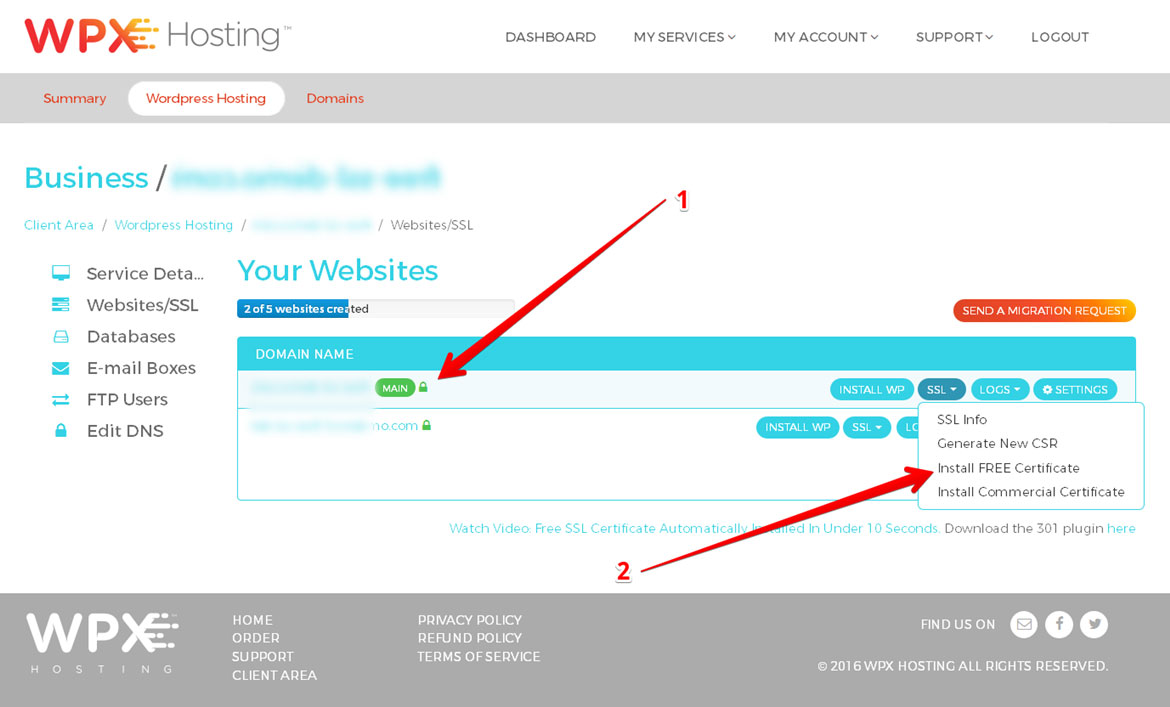
You can also install an SSL certificate with one click
One-click installs Not only WordPress, with this hosting provider, but you can also even install SSL certificates with just one click.
Watch how one-click WordPress and SSL installs work at WPX on YouTube
Price
Score: 8.0/10
The next thing that people worry about is pricing. WPX Hosting for it’s high-quality services it has affordable plans that you can go with.
There are four WordPress plans available as of now. Every plan gets the same core setup, with the XDN, daily backups, malware removal and the Fixed For You guarantee. They differ in the number of sites, storage, bandwidth, RAM and CPU, and business email starts with the Business plan.
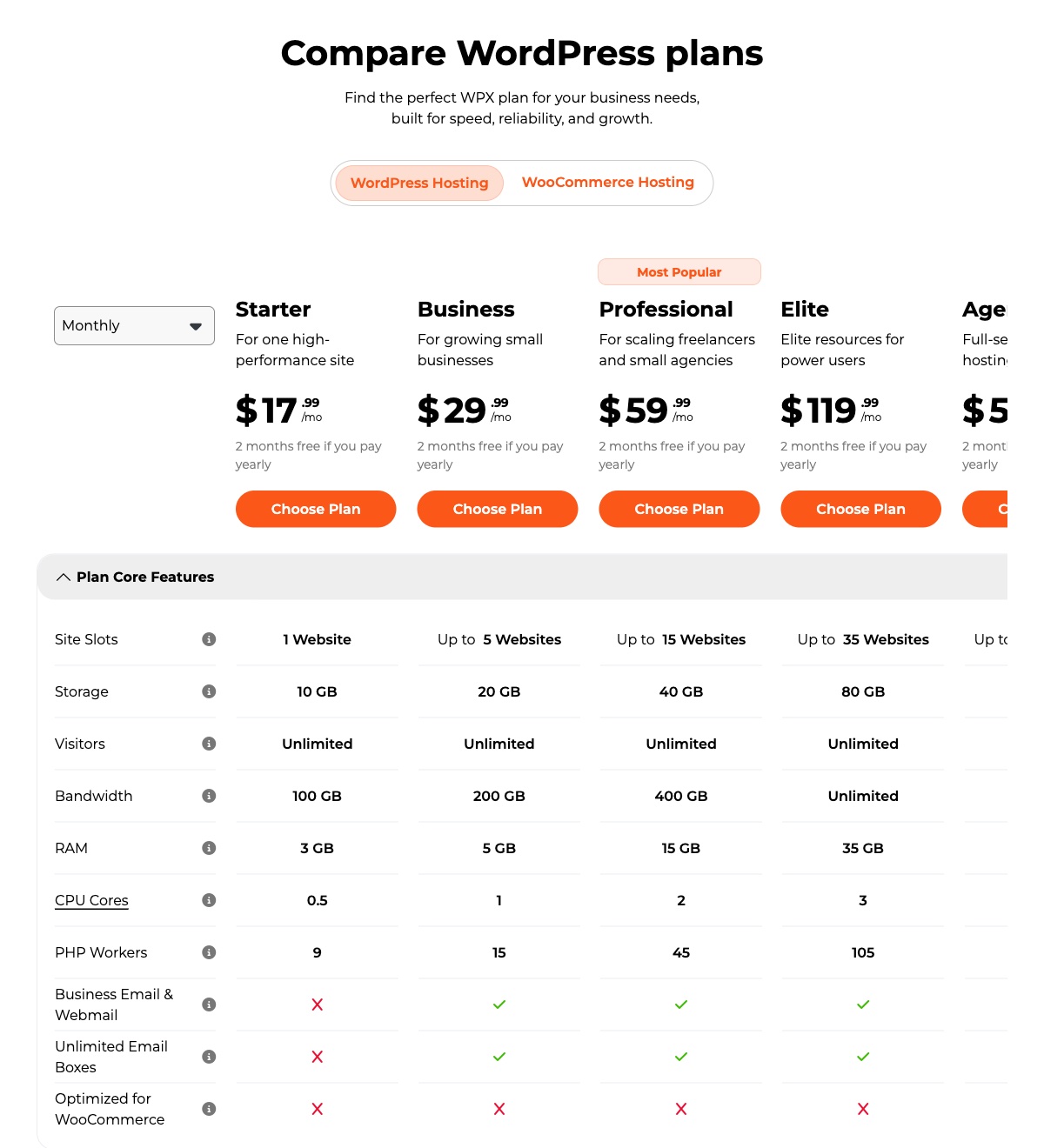
To begin with, the Starter plan costs $17.99 per month if you pay monthly, or $14.99 per month if you pay yearly ($179.90). It covers 1 website with 10 GB of storage and 100 GB of bandwidth.
The Business plan costs $29.99 per month, or $24.99 per month on a yearly plan. It covers 5 websites with 20 GB of storage and 200 GB of bandwidth.
The Professional plan ($59.99 monthly, $49.99 yearly) hosts 15 websites with 40 GB of storage. You can extend the plan to the elite plan ($119.99 monthly, $99.99 yearly) where you can host 35 websites and you will get 80 GB storage. In the Elite plan, the bandwidth is unlimited.
Paying for 2 to 5 years lowers the monthly rate further, down to $11.99 for Starter on a 5-year term. These are WPX's regular prices, so a renewal on the same billing cycle costs the same, unless you used a promo code or WPX changes its fees.
If you have any problems with the hosting, you can get your money back in 30 days. The 30-day money-back guarantee covers the first payment only, and renewals are not refundable.
Remember to select the closest data center to the location of your audience among the 3 ( USA, UK, Australia ) so you can enjoy better loading speeds for your actual market.
Reliability and support
Score: 10/10
There is a 99.95% server uptime guarantee in WPX hosting. Reviews are strong too, with a 4.7 out of 5 score on Trustpilot. So, WPX is hard to beat on reliability.
Even some of the best marketing blogs have rated WPX and have ranked it as the fastest WordPress hosting.
The support is super-fast and amazing. WPX states an average first response of about 30 seconds on live chat. In most of the hosting providers, you will have to wait for at least 2/3 minutes and sometimes even more than 10 minutes to chat with the agent.
Even after you get them online, they will not solve your technical issue or will take a lot of time. Well, that’s not the case here.
WPX Hosting support team is friendly and fixes the issues that take a site offline, which is what the “ Fixed for you guarantee ” covers. It doesn't include custom design work or repairs to broken third-party plugins and themes.
Conclusion: Is WPX Hosting Right for You?
WPX is a fast managed WordPress host, but it won't suit every budget or project.
However, as WPX hosting is newbie-friendly, you can surely migrate your current hosting to WPX.
The amazing support team will help you with every security and technical issue. Further, the Business plan lets you host 5 websites for $24.99 per month (assuming you pay yearly).
That’s roughly $5 for every website. In that, you even get an SSL certificate along with the free email and many other features.
So, you can surely migrate to WPX hosting if you want your website to load faster.