

WP Engine is an Austin, Texas company, founded in 2010, that sells managed WordPress hosting and nothing else: no shared cPanel hosting, no plain VPS, no email. It's built for businesses, agencies and online stores that would rather pay a premium than look after WordPress updates, caching, backups and security themselves.
The entry Essential plan costs $35/month on monthly billing, covering one site and up to 25,000 visits per month. Paying annually brings the first year down to $28/month ($336), after which the yearly price returns to the regular $420.
My WP Engine review scores below are based on the current plans, policies and published customer feedback, checked on October 27, 2026.
| Overall | Features | Performance | Ease of use | Price | Support |
|---|---|---|---|---|---|
| 8.7 | 9.3 | 9.2 | 9.0 | 7.4 | 8.8 |
Contents
Data sheet of the host


WP Engine is an American managed WordPress host. Most sites run on Google Cloud, in a region you choose, with AWS and Microsoft Azure available on premium plans.
Hosting Types
- Managed WordPress hosting: Essential (shared environment), Business (isolated resources) and Enterprise
- eCommerce (WooCommerce) solutions
- Headless WordPress platform
- Publishing and newsroom platform
Operating Systems
- Linux servers managed by WP Engine (no server or operating system access)
- PHP 8.2 and 8.4, with PHP 7.4 on temporary extended support
DataCenters
- Google Cloud (all plans): Iowa, South Carolina, Montreal, Belgium, London, Frankfurt, Netherlands, Finland, Taiwan, Tokyo, Sydney, Singapore and Tel Aviv
- AWS (premium plans): Virginia, Ohio, Oregon, Montreal, Ireland, London, Frankfurt, Singapore and Sydney
- Microsoft Azure (premium plans): Washington, Virginia, Iowa, London, Netherlands, Dubai, Pune and Sydney
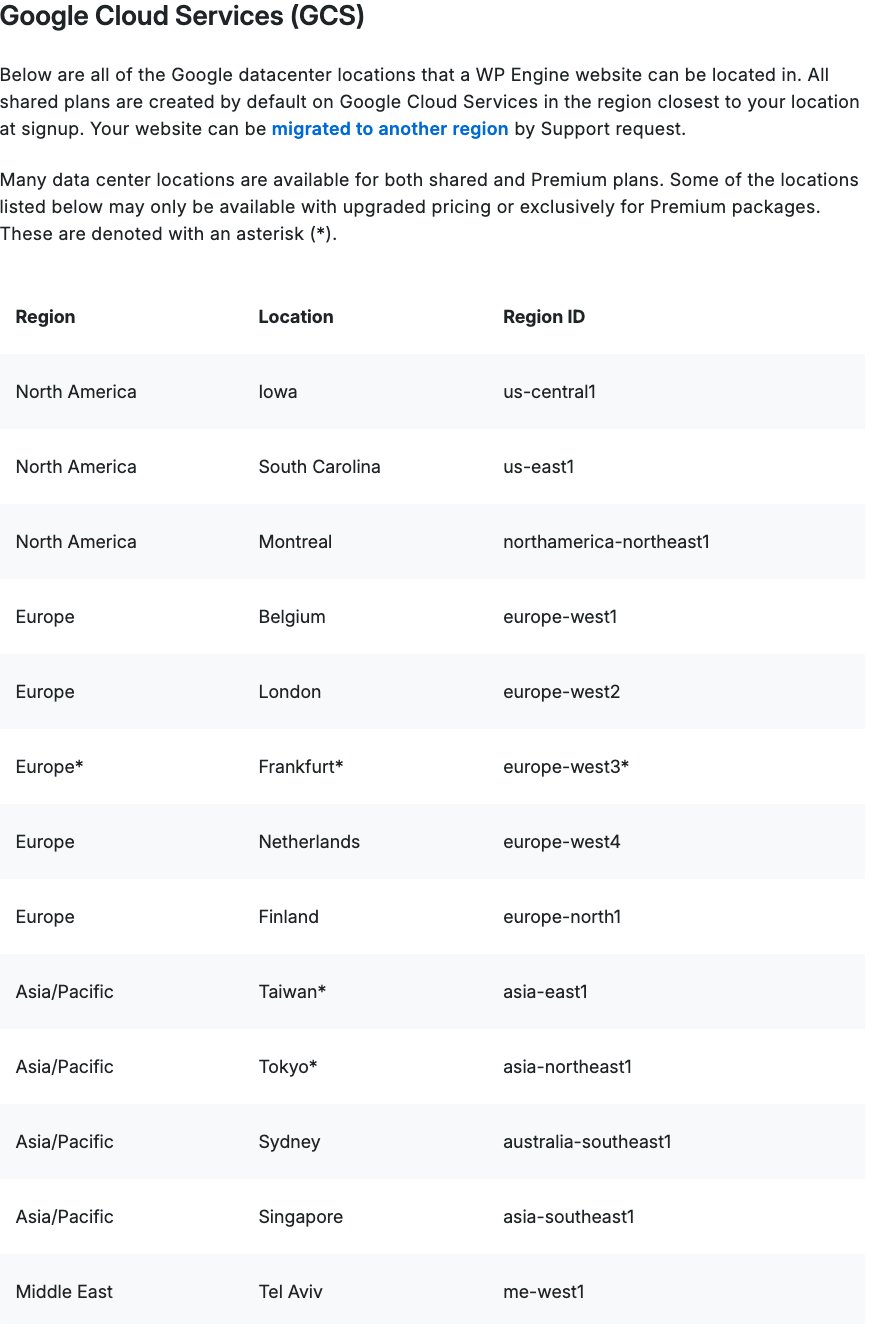
Frankfurt, Taiwan and Tokyo on Google Cloud cost extra or need a premium plan. My guide to WP Engine server locations explains how to choose and change a region.
Managed WordPress Plans
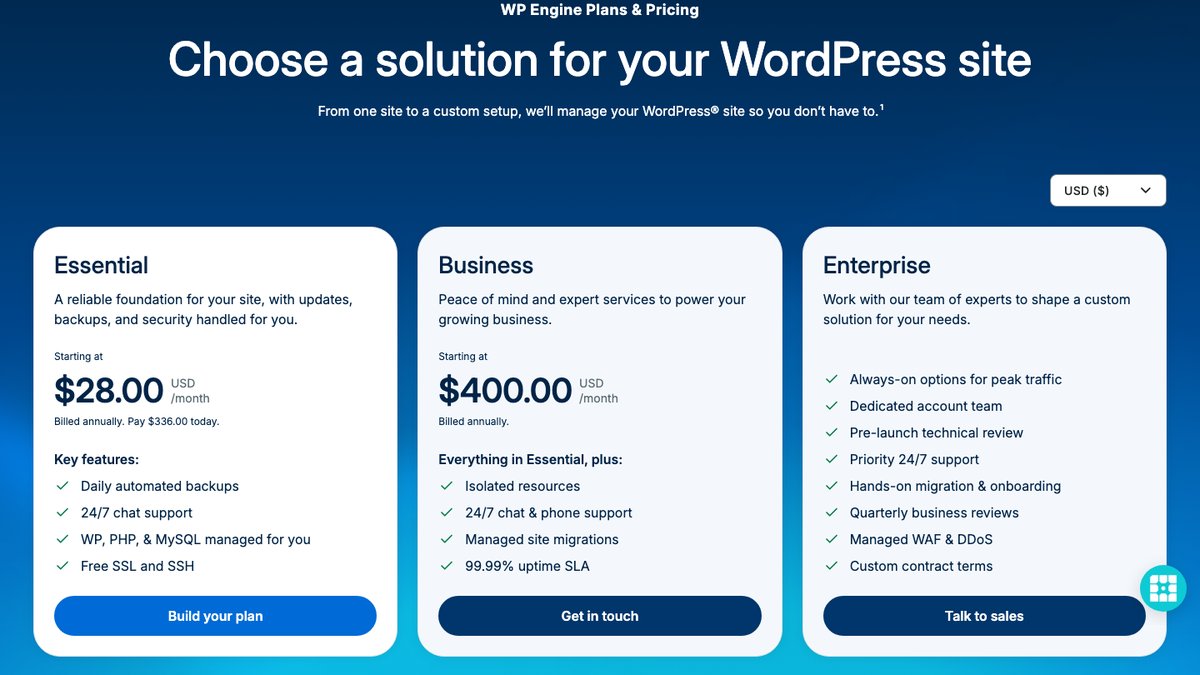
Essential starts at $28 per month for the first year when billed annually ($336 today), or $35 billed monthly. Business starts at $400 per month.
About WP Engine
Jason Cohen started WP Engine in Austin, Texas, in 2010. In 2018 it took a $250 million investment from Silver Lake, and its family of brands has since grown to include Flywheel, Local (a tool for building WordPress sites on your own computer), Advanced Custom Fields, NitroPack and StudioPress.
By its own count, more than 1.5 million WordPress sites run on WP Engine. Its focus has always been managed WordPress: the platform handles WordPress and PHP updates, caching and backups, and the plans are priced by visits rather than by server resources.
One piece of recent history is worth knowing. In September 2024, Matt Mullenweg's company Automattic blocked WP Engine's servers from WordPress.org, which cut its customers off from plugin and theme updates in the official directory. A preliminary injunction brought that access back in December 2024, and the two companies are still in court, with a jury trial set for October 2027.
Pros
- Fully managed WordPress: core and PHP updates, daily backups and security patching.
- EverCache server caching plus a global CDN powered by Cloudflare.
- Free staging and development environments on every plan.
- 10 premium themes and Genesis Blocks included.
- 24/7 chat support from WordPress specialists.
- 13 Google Cloud regions, with AWS and Azure on premium plans.
Cons
- Expensive compared with shared or cloud hosting.
- Visit limits with overage fees ($2 per 1,000 extra visits).
- No email hosting.
- Several popular plugins aren't allowed (W3 Total Cache, some backup plugins).
- No phone support on the Essential plan.
- No money-back guarantee on the current plans page.

Technical Features
Score: 9.3/10
Managed updates and backups
WP Engine updates WordPress core and PHP for you. PHP upgrades are automatic and can't be postponed, which keeps sites secure but means you should test old plugins on a staging copy first.
A backup runs automatically each day, and you can take an extra one yourself right before an update or redesign. WP Engine's support documentation says daily checkpoints are kept for 30 days, stored encrypted on Amazon S3 in the same region as the site.
EverCache and the CDN
EverCache is WP Engine's own page caching system. It serves cached pages to logged-out visitors without running PHP, so you don't need a caching plugin (and some, like W3 Total Cache, are on the disallowed list).
Every plan also includes a global CDN powered by Cloudflare and layer 3/4 DDoS protection. Global Edge Security, WP Engine's managed firewall service, costs extra, from $35/month on the 1-site Essential plan.
Staging, SSH and developer tools
Each site gets one-click staging and development environments, so you can test updates and redesigns without touching the live site. SSH and WP-CLI are available through WP Engine's SSH Gateway.
Git-based CI/CD workflows are included on Business and Enterprise plans. You can also build a site for a client on your account and transfer it to them when it's finished.
Themes and plugins
Every plan includes 10 premium themes and Genesis Blocks from StudioPress. WP Engine also sells add-ons such as Smart Plugin Manager ($10/month), which tests plugin updates automatically and rolls them back if something breaks.
The tradeoff is control. WP Engine keeps a list of disallowed plugins, mostly caching, backup and database tools that duplicate its own features or slow the server, so check it before you migrate.
No cPanel and no email
WP Engine uses its own User Portal instead of cPanel. It's built only for WordPress: sites, domains, backups, staging and users, with no file manager for other apps. I explain the differences in my article on whether WP Engine has cPanel.
There's no email hosting either. Plan on paying for mailboxes elsewhere, with a provider like Google Workspace, Microsoft 365 or Zoho Mail.

Performance and Security
Score: 9.2/10
WP Engine Speed Test Results (October 2026)
In October 2026, I tested two live WordPress sites on WP Engine (a franchise consulting firm aimed at US visitors and a boutique hotel in Hoi An, Vietnam) with a Grafana k6 load test for server speed and Google PageSpeed Insights for page performance.
- Hosting type: managed WordPress hosting (both sites)
- Type of site, consulting site: professional services (franchise consulting), WordPress + WooCommerce
- Type of site, hotel site: travel (boutique hotel), WordPress
Detected from each site’s server and network; the exact plans aren’t public.
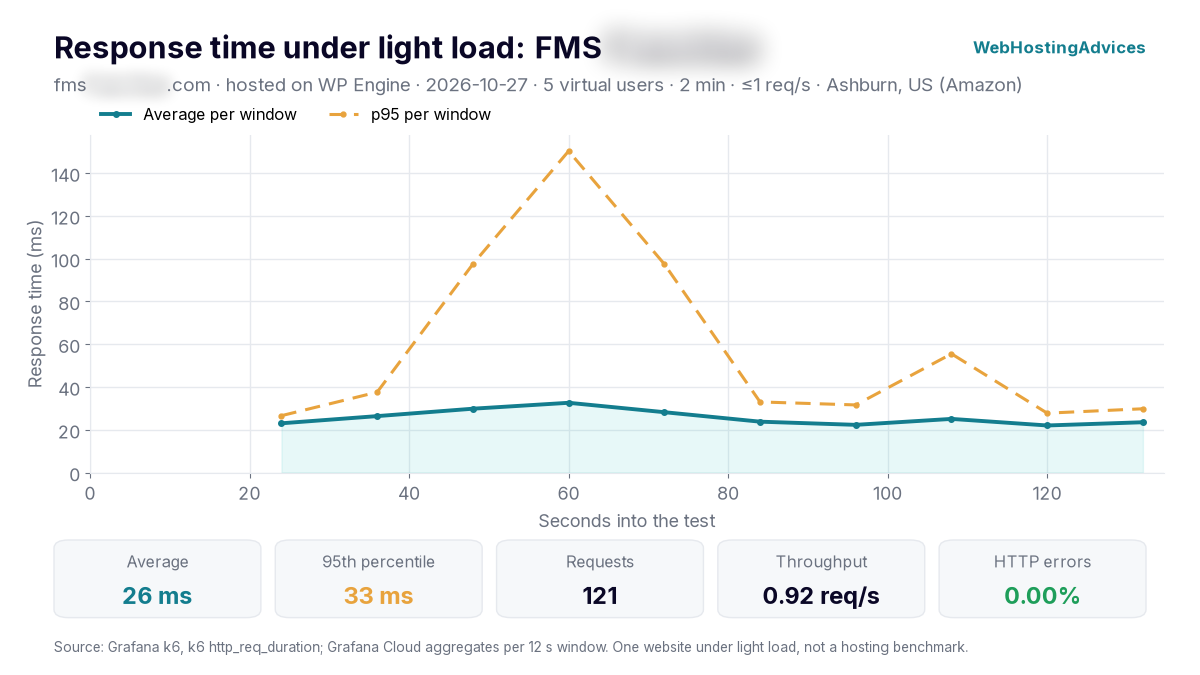
Grafana k6, 27 October 2026, from Ashburn (US): 5 virtual users for 2 minutes, at most 1 request per second. One website under light load, not a hosting benchmark.
The consulting site answered all 121 requests without an error, with a 26 ms average response and 95% of requests within 33 ms. Time to first byte averaged 19 ms, because the pages were served from cache through Cloudflare, the CDN WP Engine includes on its plans.
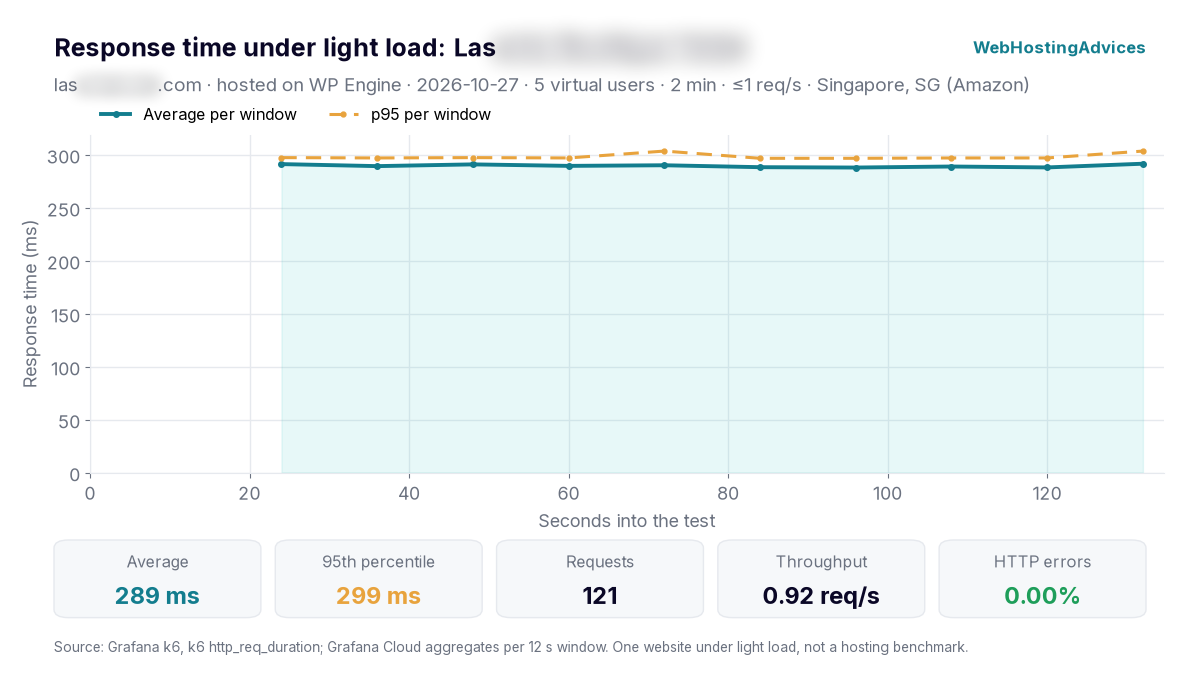
Grafana k6, 27 October 2026, from Singapore, the closest test location to the hotel’s guests in Asia, with the same settings.
The hotel site also answered all 121 requests without an error, with a 289 ms average response and 95% within 299 ms. Its pages came from WP Engine’s EverCache, and time to first byte averaged 147 ms; most of the remaining time was the page downloading.
Both results are very even from the first request to the last, which is what a page cache is for: logged-out visitors get a ready copy instead of waiting for WordPress to build the page.
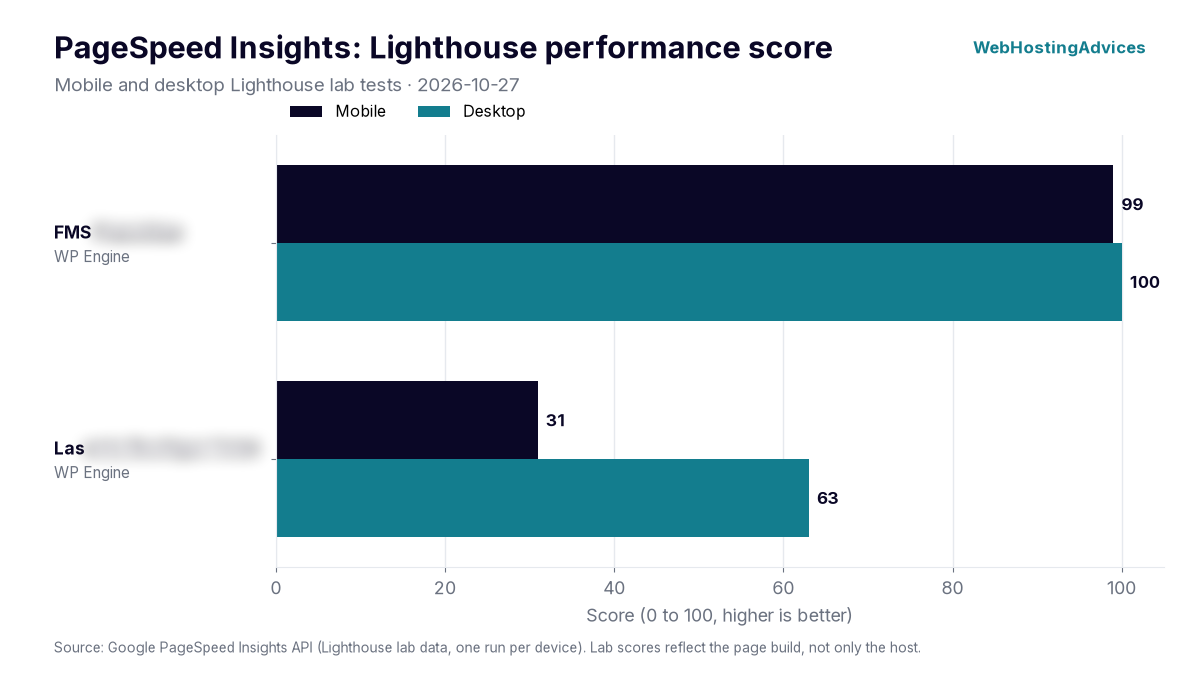
Google PageSpeed Insights lab tests, 27 October 2026, mobile and desktop.
The consulting site scored 99 on mobile and 100 on desktop, while the hotel site scored 31 and 63. Their largest elements appeared after 1.95 s and 20.68 s on mobile, and after 0.77 s and 1.59 s on desktop.
The two sites answer quickly from the server, so the hotel’s low mobile score comes from the page itself (large images and scripts), not from WP Engine. PageSpeed scores depend mostly on how a site is built, so treat these numbers as one real-world example, not a lab benchmark of WP Engine’s servers. Uptime figures come once the monitored sites have 30 days of data.
Uptime guarantee
WP Engine's standard SLA guarantees 99.95% uptime. If it misses that, you get a credit of 5% of the monthly fee for each full hour below the target, up to the full monthly fee.
Business and Enterprise plans, which run on isolated servers, get a 99.99% SLA. Credits are never paid as a refund, and you must claim them through support within 30 days.
Isolated or shared resources
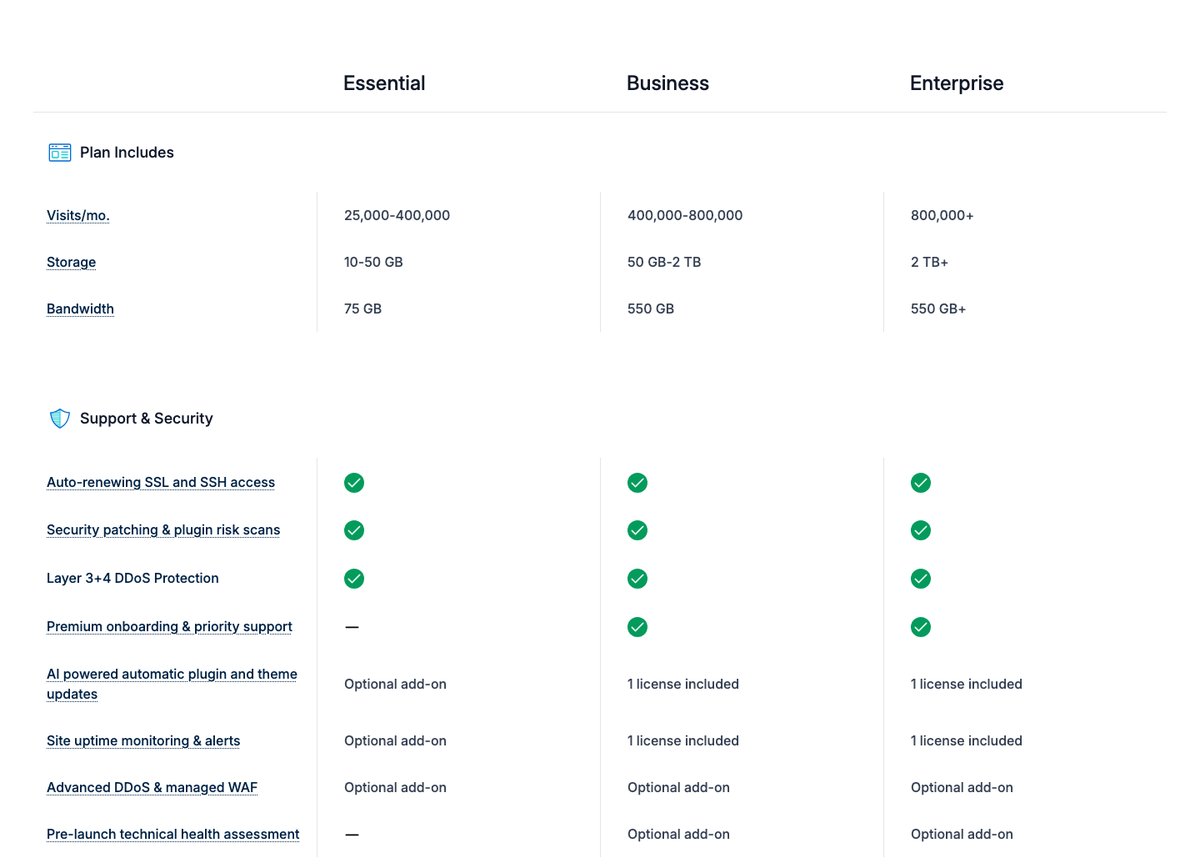
The Essential plan runs in a shared environment: your sites share server resources with other WP Engine customers. Business plans move to isolated resources, which protects a busy store or publication from other accounts.
For most small business sites, the shared environment is enough because EverCache serves most visits from cache. The upgrade matters once you have heavy logged-in traffic, like a WooCommerce checkout or a membership site.
Security
WP Engine patches security issues for you, scans plugins for known risks, renews free SSL certificates automatically, and filters layer 3/4 DDoS attacks on every plan. It says it blocks more than 10 billion malicious requests a month across its network.
Sites that need more can add Global Edge Security for a managed firewall and stronger DDoS mitigation, at an extra monthly cost on both Essential and Business.
Where the servers are
At signup, a shared-plan site lands in the nearest Google Cloud region by default, and support can move it later if your audience is elsewhere. Choosing the region near your visitors matters more on WP Engine than on hosts with a single data center, because you have 13 to choose from.

Ease of Use
Score: 9.0/10
WP Engine is easy to use if your site is WordPress. The User Portal puts backups, staging, domains and SSL in one place, and most tasks are a click or two.
Migration is simple too. WP Engine offers a free automated migration plugin, and managed migrations by its team come with the Business plan.
The learning curve is in the limits, not the interface. Visits, storage and bandwidth are capped per plan, and some plugins you may be used to aren't allowed, so read the plan details before you move a large site.

Price
Score: 7.4/10
WP Engine is one of the more expensive WordPress hosts. You're paying for the managed platform and support, not for more raw server resources than a cheaper host would give you.
Essential Plan
| Essential tier | Billed monthly | First year, billed annually | Regular annual price | Visits/month | Storage |
|---|---|---|---|---|---|
| 1 site | $35/month | $336 ($28/month) | $420 | 25,000 | 10 GB |
| Up to 3 sites | $65/month | $624 ($52/month) | $780 | 75,000 | 15 GB |
| Up to 10 sites | $130/month | $1,248 ($104/month) | $1,560 | 100,000 | 20 GB |
| Up to 30 sites | $330/month | $3,168 ($264/month) | $3,960 | 400,000 | 50 GB |
Only new customers get the 20% annual discount, and only for the first year. Every Essential tier includes 75 GB of bandwidth a month, and prices are also shown in GBP, EUR, CAD and AUD.
Business and Enterprise
Business starts at $400/month, billed annually, for 30 to 50 sites, 400,000 to 800,000 visits and isolated resources, and you buy it through the sales team. Enterprise is custom-priced for larger sites and contracts.
Add-ons and overages
Extra costs add up. An additional site is $20/month, Smart Plugin Manager is $10/month, site monitoring is $5/month, NitroPack is $20/month, and the WooCommerce performance pack is $99/month.
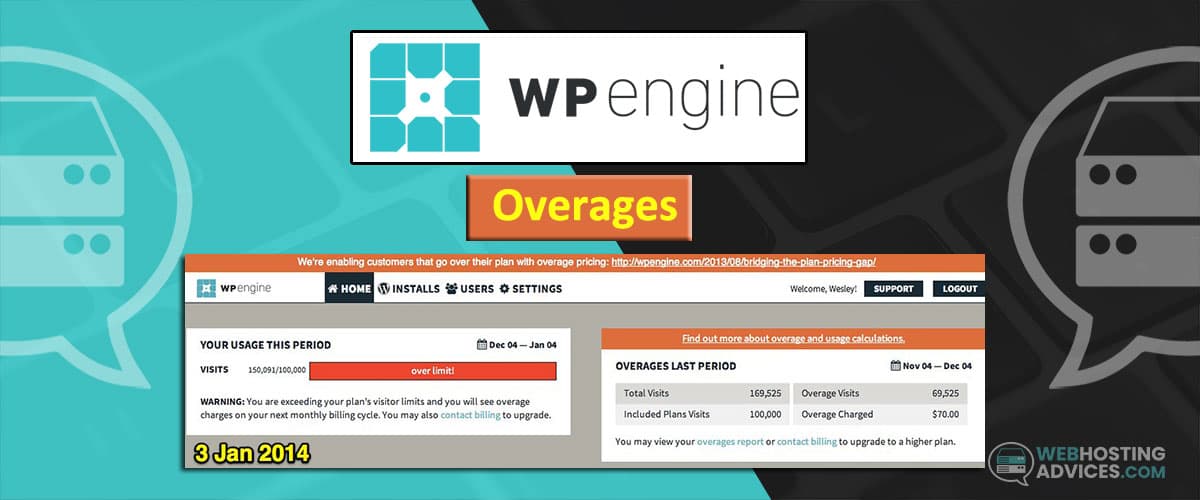
Traffic above your plan's visit allowance is billed at $2 per 1,000 extra visits. My guide to WP Engine overages explains how visits are counted and how to avoid surprise bills.
Refunds and payment
No money-back guarantee appears on today's plans page, and the terms of service treat fees as non-refundable except where they say otherwise. Some older WP Engine offer pages still mention a 60-day guarantee on new shared plans, so get the refund terms in writing from sales before committing to an annual plan.
Payments are made by credit or debit card. Plans renew automatically for the same term, and cancelling requires 30 days' notice.

Reliability and Support
Score: 8.8/10
WP Engine offers 24/7 support by live chat, including weekends and holidays. Phone support is included on Business and Enterprise plans but not on Essential.
Its support team handles WordPress itself, not only the server, which is the main reason people pay for managed hosting. It won't help with email, since WP Engine isn't an email host.
Customer feedback is mostly positive. On Trustpilot, WP Engine had a 4.3 rating from 1,780 reviews as of October 27, 2026, with praise for fast, helpful chat support and migration help.
Negative reviews mention wait times, billing and cancellation problems, high prices, and mistakes by the AI chat assistant. They're individual reports, but billing complaints are worth noting given the 30-day cancellation notice.
Conclusion: Is WP Engine Right for You?
For business WordPress sites, WP Engine is easy to recommend: updates, daily backups, EverCache, staging environments and round-the-clock WordPress support come with every plan.
What holds it back is cost. One site costs $35 a month before you add email or extras, several times the price of shared hosting, and the visit caps can push the bill higher as traffic grows.
I'd choose WP Engine for an agency, store or company site where downtime and maintenance cost more than the hosting. If you run a hobby blog or a site on a tight budget, good shared hosting or a managed cloud platform will get you most of that speed at a fraction of the price.