



 Tested by
HostArmada is a good pick for small business sites and blogs that want cPanel on shared hosting with real daily backups and a choice of nine data centers. The entry Start Dock plan costs $2.15/month on a 12-month term, includes a free domain for the first year, and every shared plan comes with 7 to 21 daily backups, free migration and a 45-day money-back guarantee.
The catch is the same as with most cheap hosts: Start Dock renews at $11.95/month, and only the top Speed Reaper plan runs on LiteSpeed with full caching. In this HostArmada review, I look at what each plan includes, what it costs after the first term, where the servers are and who should choose another host.
Overall score weights: Performance 30%, Price 20%, Support 20%, Features 15%, Ease of use 15%. Performance comes from my benchmark rating.
Pros
- cPanel and Softaculous on every shared plan.
- 7, 14 or 21 daily backups kept off the server.
- 9 data centers in North America, Europe, Asia and Australia.
- 45-day money-back guarantee on shared and reseller hosting.
- Free website migration and a free domain on yearly terms.
- Support by chat, ticket and phone, with help on themes, plugins and app updates.
Cons
- Renewal prices are roughly 4 to 5 times the first-term rate.
- Start Dock hosts only one website.
- LiteSpeed, dynamic caching, Memcached and OpCache only on Speed Reaper.
- No built-in CDN; Cloudflare is supported but you set it up.
- Only 7 days to ask for a refund on VPS, cloud and dedicated CPU servers.

HostArmada sells cPanel shared hosting, WordPress hosting, managed cloud servers, unmanaged VPS, reseller hosting and dedicated CPU servers. Its shared plans run on cloud infrastructure with NVMe storage, and HostArmada says it keeps the number of accounts on each shared server low.
Contents
Technical Features

Score 4.3/5
cPanel, Softaculous and developer tools
Every shared, WordPress and reseller plan uses cPanel, the control panel most hosts use. You get Softaculous for one-click installs of WordPress, Joomla, Drupal, PrestaShop, OpenCart and other apps, plus unlimited email accounts, databases and subdomains.
Developers get SSH access, Git, WP-CLI, Node.js and Python on all three shared plans, with PHP versions from 5.6 to 8.3. If shell access matters to you, my list of the best SSH hosting providers compares HostArmada with other cPanel hosts.
Resource limits
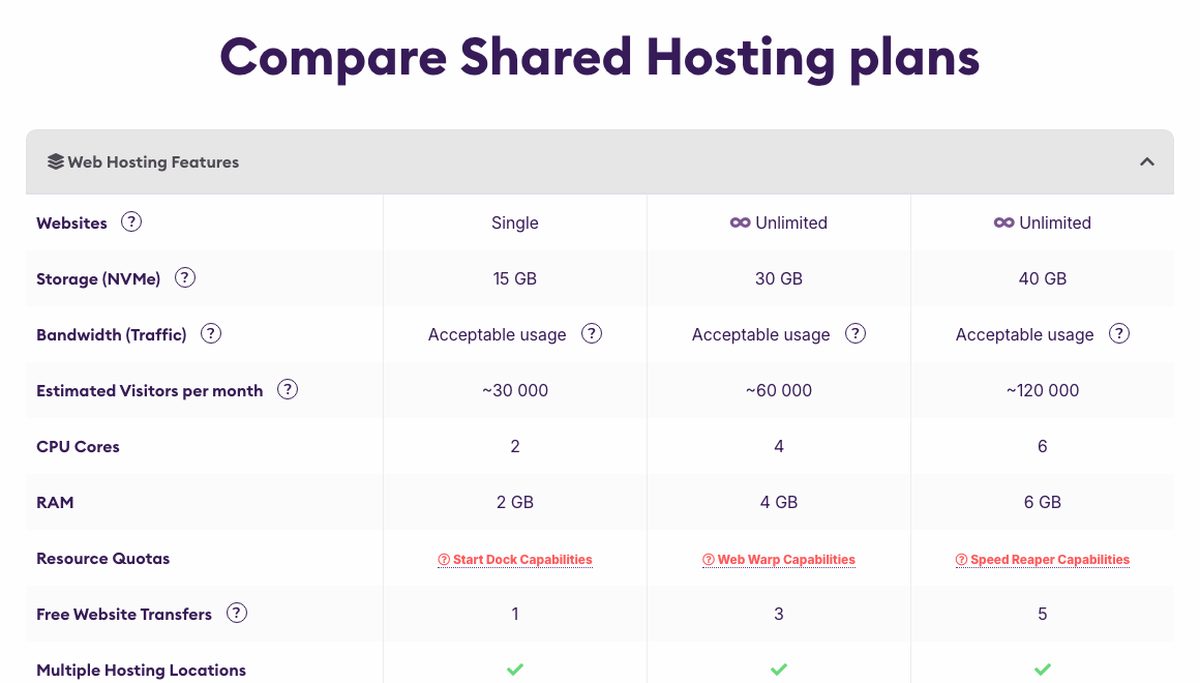
HostArmada publishes its shared hosting limits in the plan comparison table. Start Dock gets 2 CPU cores, 2 GB of RAM, 20 entry processes and 250,000 files. Web Warp gets 4 cores, 4 GB, 30 entry processes and 350,000 files, and Speed Reaper gets 6 cores, 6 GB, 50 entry processes and 500,000 files.
The same table's resource quotas (checked November 2026) add more limits: 40, 50 and 100 total processes, an I/O limit of 5 MB/s on Start Dock and Web Warp and 6 MB/s on Speed Reaper, and an average daily CPU usage of 40%, 60% and 90%. HostArmada doesn't publish the processors behind its shared plans, but its support agent showed me in a chat on November 14, 2026: a Start Dock server is a 16 vCPU virtual server on an AMD EPYC 7413 processor, and he said all 9 data centers use the same shared hosting hardware. How many accounts share one server "cannot be disclosed".
Going over the limits slows a site down: CloudLinux and CageFS cap the account, and cPanel's Resource Usage page shows when it happens. A site that overloads the whole server, for example under a DDoS attack or with too many MySQL queries, is suspended by HostArmada's monitoring team, which tells you by ticket.
On the bigger plans, the cloud server FAQ mentions Intel CPUs and ECC RAM, while the dedicated CPU servers list AMD EPYC cores and RAID 10 storage.
The file count (inodes) includes every file, cache and email message, so a site with lots of plugins, backups or mail can reach it before the disk is full. My guides on inode limits and entry processes explain what happens when you hit them.
Bandwidth has no hard cap, but HostArmada treats 30 GB, 60 GB and 90 GB per month as acceptable usage on the three plans. Databases are limited too: 350 MB per database on Start Dock, 750 MB on Web Warp and 1 GB on Speed Reaper.
Web server and caching
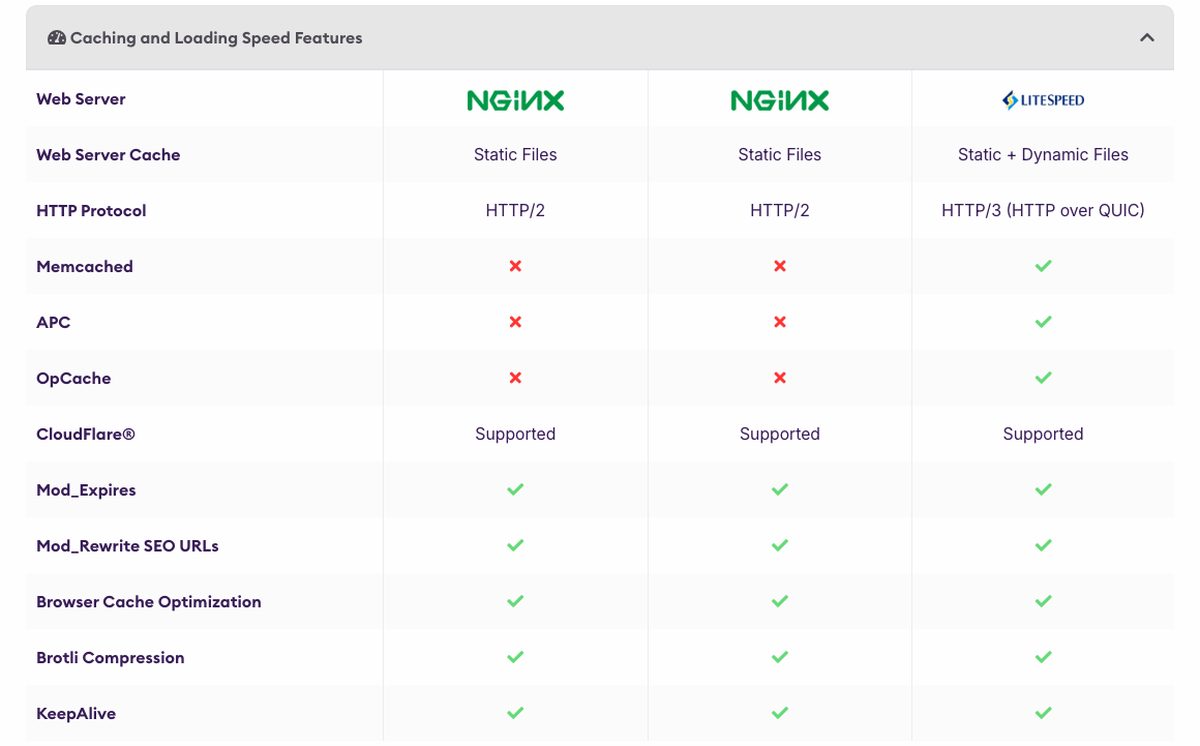
Columns from left to right: Start Dock, Web Warp and Speed Reaper.
Start Dock and Web Warp run on NGINX and cache static files only, over HTTP/2. Speed Reaper runs on LiteSpeed, caches static and dynamic pages, supports HTTP/3 and is the only shared plan with Memcached, APC and OpCache.
That difference matters most for WordPress. LiteSpeed works with the LiteSpeed Cache plugin for full-page caching, so a busy WordPress or WooCommerce site will get more from Speed Reaper than from a cheaper plan with more storage. My list of LiteSpeed hosting has other options.
Backups
All shared plans include automatic daily backups stored off-site. Start Dock keeps the last 7, Web Warp 14 and Speed Reaper 21, and cPanel lets you restore an account from backup yourself. Reseller plans keep 30 daily backups.
The unmanaged VPS gets one monthly backup for free, with extra backup slots as a paid option at checkout. Whatever plan you choose, keep your own copy of important sites outside HostArmada as well.
Email and free domain
Every shared plan includes unlimited email accounts with webmail, spam filtering by SpamExperts and the usual cPanel email tools. Mailboxes are capped at 750 MB on Start Dock, 1.5 GB on Web Warp and 3 GB on Speed Reaper.
Sending is limited to 400 emails per hour, and HostArmada's terms don't allow newsletters or marketing emails on shared hosting. My comparison of shared hosting email sending limits shows how that compares with other hosts.
Shared and WordPress plans on a 12, 24 or 36-month term include a free domain for the first year. In the cart on October 29, 2026, 21 extensions qualified, and a .com renewed at $13.49/year after the free year.
Performance and Security

Score 4.4/5
HostArmada Speed Test Results (November 2026)
In November 2026, I load-tested 2 live websites hosted on HostArmada, both on shared hosting. Each site's hosting was verified from its server IP, and the table notes the technology each site runs on and the datacenter its server sits in, since both affect the result.
Most hosting reviews quote the cached speed, which is really the cache or CDN talking, not the host. I show both: the cached TTFB your visitors normally get, and the uncached TTFB with the page cache bypassed. The ranking uses server time (uncached TTFB minus the network round trip from the test location), because a cache can hide a slow server. Each hosting type's figure is the median of its sites.
| Hosting type | Website | Technology | Datacenter | Cached TTFB | Uncached TTFB | Server time |
|---|---|---|---|---|---|---|
| Shared | Design studio | WordPress | Singapore | 852 ms | 889 ms | 660 ms |
| Shared | News site | WordPress | Singapore | 462 ms | 654 ms | 404 ms |
| Shared median | 2 sites | 657 ms | 772 ms | 532 ms |
Test settings, November 2026: 5 virtual users for 2 minutes, at most 1 request per second, every second request with a unique query string to bypass the page cache. Live websites under light load, not a controlled benchmark of HostArmada's plans.
The median server time was 532 ms across the 2 sites. Neither site showed a strong page cache: cached and uncached came back close together, so visitors lean on the server as much as the test does. Both sites answered every request without an error.
What each site runs:
- Design studio: WordPress, Singapore
- News site: WordPress, Singapore
Each hosting type has only 2 tested sites so far, so its median is less reliable. My Performance score for HostArmada uses the shared result. It is ranked against every other host on my benchmarks page.
Uptime figures will be added once the monitored site has 30 days of data.
HostArmada Under Load: 1 to 50 Visitors (November 2026)
The speed tests above use light traffic. For this test, k6 raised the number of visitors from 1 to 50 over 2 minutes, and every request skipped the page cache, so the server had to build every page. It puts real load on a live website, so I only run it on sites I manage or have permission to test, normally at a quiet hour for their visitors.
Each line is one website, every request uncached · k6 load from Ashburn, USA · November 2026 · lower is faster
- shared: design studio (Singapore)
- shared: news site (Singapore)
Server time = average TTFB in each 12-second window minus the network round trip to the site's server. Hover or tap the chart to see each site's value and the number of visitors at that moment.
| Hosting type | Website | Technology | Datacenter | Server time at 1-10 users | Server time at 40-50 users | Failed requests |
|---|---|---|---|---|---|---|
| Shared | Design studio | WordPress | Singapore | 597 ms | 2,106 ms | 2.3% |
| Shared | News site | WordPress | Singapore | 353 ms | 535 ms | 0% |
Server time as the load rose to 40 to 50 visitors at once:
- Design studio (WordPress, Singapore): 597 ms → 2,106 ms
- News site (WordPress, Singapore): 353 ms → 535 ms
HostArmada's under-load grade: A (1.3 s at 40 to 50 visitors). Like every grade on my benchmarks page, it compares HostArmada with the other shared hosts I load-tested, split into five near-equal groups: A for the best fifth, down to E for the slowest fifth. It's relative to this round of tests, not a pass or fail mark.
Real visitors mostly get cached pages, so this is the hard case: a traffic spike on pages the cache can't answer. Each site's technology, plan and plugins also affect the result.
This load grade counts in my HostArmada score. It's one of the three grades behind the host's benchmark rating and the Performance score of this review, next to server time and the slowest 5% of requests.
What to expect from HostArmada's speed
My speed tests above measure live HostArmada sites under light traffic. HostArmada's published setup adds context: NVMe storage on every plan, LiteSpeed and full-page caching on Speed Reaper, and nine locations to put your site close to visitors.
On Start Dock and Web Warp, pages that aren't cached by a plugin depend on NGINX with static caching only, 2 GB to 4 GB of RAM and 20 to 30 entry processes. That's fine for a small site, but a WordPress store with many logged-in users will do better on Speed Reaper.
Customer reviews on Trustpilot often mention speed and stability after a move to HostArmada. They're individual experiences, not measurements, so treat them as anecdotes.
HostArmada Uptime Guarantee
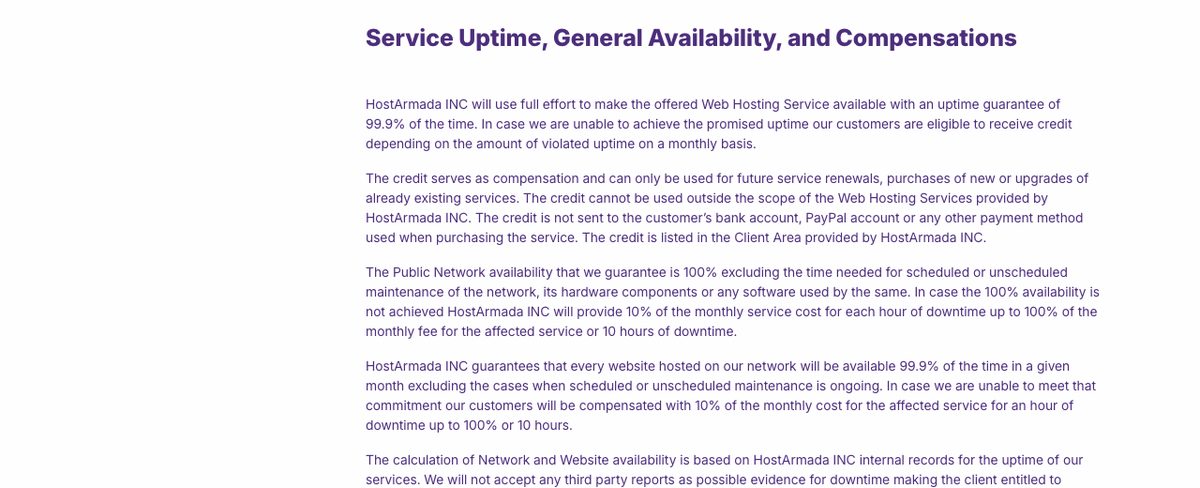
HostArmada's service level agreement includes a 99.9% monthly uptime guarantee for every hosted website, and 100% for its public network. If it falls short, you get 10% of that month's fee as credit for each hour of downtime, up to 100% after 10 hours.
That's a more generous credit than many shared hosts offer, but it has limits. The credit only pays for HostArmada services, scheduled and unscheduled maintenance is excluded, and downtime is measured by HostArmada's own records, not third-party monitors.
A guarantee isn't measured uptime either. It tells you what HostArmada promises and what it pays back, not how often your site will actually be up.
Security features
Shared plans come with Imunify360, which adds a network firewall, a web application firewall, proactive defense and malware scanning. HostArmada also lists malware removal on all three shared plans, plus brute-force protection, hardened PHP and CageFS account isolation on CloudLinux. Support told me the malware help is free but given on a "best effort" basis, and the automatic Imunify360 scans run about once a day.
Free SSL certificates come from Sectigo through cPanel AutoSSL, and the client area supports two-factor authentication. On an unmanaged VPS, you get DDoS filtering, but securing and updating the operating system is your job.
Ease of use

Score 4.3/5
Setting up a website
HostArmada uses cPanel, so anyone who has used another cPanel host will feel at home. WordPress and other apps install in one click with Softaculous, and the shared plans also include a free drag-and-drop website builder.
The builder deploys your site's files to your cPanel account, so you can move the site elsewhere later without losing it. Billing, plans, domains and tickets are managed from a separate client dashboard.
Migrating an existing site
Every shared plan includes free website transfers by HostArmada's support team: 1 on Start Dock, 3 on Web Warp and 5 on Speed Reaper. Cloud servers include 10 to 20 transfers, and reseller plans up to unlimited.
The free migration covers website files, databases and email. Moving your domain registration isn't part of it, and you still need to point your DNS records to HostArmada after the transfer.
Managing a VPS
The unmanaged VPS has a simple panel for snapshots, backups, rescue mode, resizing and reinstalling the OS. You can start with a clean OS or a control panel, with CyberPanel and aaPanel included for free.
It still needs Linux knowledge, since HostArmada doesn't help inside the server unless you pay for it. If you want cPanel without server work, the managed cloud servers are the better step up from shared hosting.
Price

Score 4.0/5
HostArmada bills every plan upfront for the whole term, and the discount only applies to the first term. On October 29, 2026, the prices below included a Halloween sale: up to 82% off shared and WordPress hosting, 55% off VPS, 50% off cloud servers and 25% off reseller hosting.
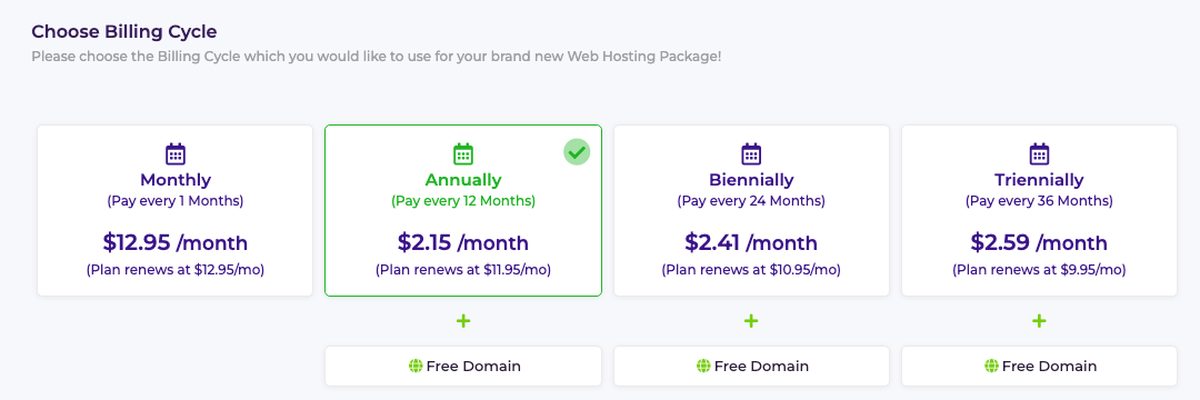
| Plan | 1 month | 12 months | 24 months | 36 months | Renewal (12 / 24 / 36 months) |
|---|---|---|---|---|---|
| Start Dock / WP Launcher | $12.95/mo | $2.15/mo | $2.41/mo | $2.59/mo | $11.95 / $10.95 / $9.95/mo |
| Web Warp / WP Evolver | $19.75/mo | $3.36/mo | $3.86/mo | $4.28/mo | $18.65 / $17.55 / $16.45/mo |
| Speed Reaper / WP Speed Reaper | $23.05/mo | $3.95/mo | $4.59/mo | $5.13/mo | $21.95 / $20.85 / $19.75/mo |
During the sale, the 12-month term is the cheapest way in: Start Dock costs $25.80 for the first year. Longer terms cost a little more per month at first, but they renew at a lower rate, so a 36-month Start Dock term renews at $9.95/month instead of $11.95.
Compare the renewal prices before you choose a plan. After the first term, Start Dock costs about as much as many hosts' regular rates, and it still hosts only one site.
| Plan | Resources | First month | Regular price |
|---|---|---|---|
| Web Shuttle | 1 core, 2 GB RAM, 50 GB NVMe | $29.95 | $59.90/mo |
| Web Voyager | 2 cores, 4 GB RAM, 80 GB NVMe | $35.73 | $71.45/mo |
| Web Raider | 4 cores, 8 GB RAM, 160 GB NVMe | $46.73 | $93.45/mo |
| Site Carrier | 6 cores, 16 GB RAM, 320 GB NVMe | $74.23 | $148.45/mo |
| Lift Off (dedicated CPU) | 4 cores, 8 GB RAM, 160 GB NVMe | $81.95 | $163.90/mo |
Cloud servers and dedicated CPU servers are billed monthly or quarterly. The 50% sale discount applies to the first month only, so budget for the regular price: about $60/month is what a managed cloud server with cPanel really costs at HostArmada.
| Plan | Resources | 12 months | Renewal |
|---|---|---|---|
| Spark | 1 core, 1 GB RAM, 40 GB NVMe, 2 TB | $3.69/mo | $8.20/mo |
| Flux | 2 cores, 4 GB RAM, 80 GB NVMe, 4 TB | $5.18/mo | $11.52/mo |
| Fusion | 4 cores, 8 GB RAM, 160 GB NVMe, 5 TB | $9.67/mo | $21.48/mo |
| Ignition | 8 cores, 16 GB RAM, 320 GB NVMe, 8 TB | $19.00/mo | $42.23/mo |
The unmanaged VPS is sold on 1, 12 and 24-month terms. The 55% sale price is for the 12-month term; on 24 months, the discount was only 10%, and monthly billing starts at $8.40 for Spark.
Even at the regular price, Flux gives you 4 GB of RAM for $11.52/month, which is a fair price for a self-managed VPS. A cPanel license costs extra on top.
Reseller plans start at $21.00/month for Sitedust on a 24-month term (regular price $28.00), up to $53.96/month for Site Nova (regular $71.94). They're also sold monthly, semiannually and annually, with the same 25% first-term discount.
Refund policy
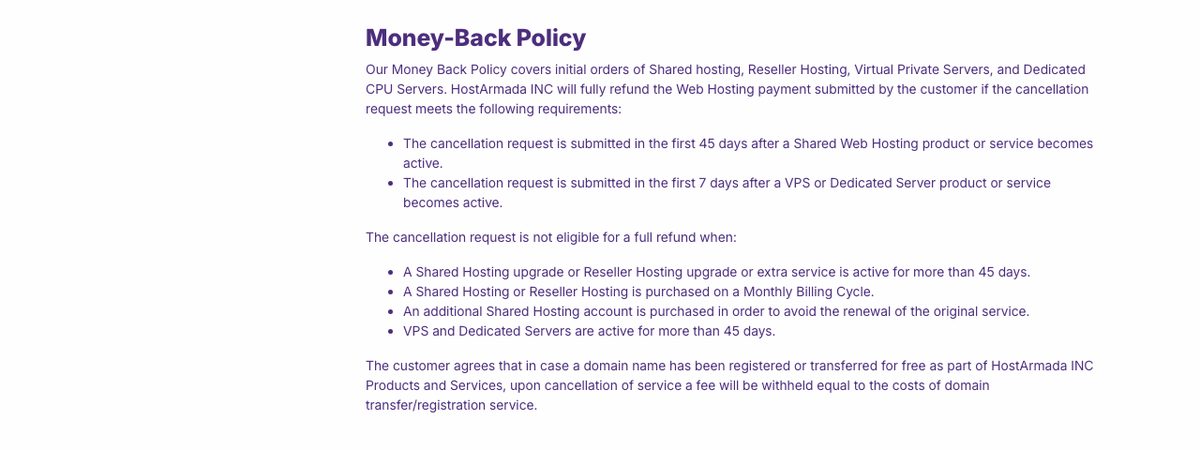
Shared, WordPress and reseller hosting come with a 45-day money-back guarantee. VPS, cloud and dedicated CPU servers get only 7 days, so test them quickly.
The guarantee covers first orders, not renewals, and a shared or reseller plan bought on monthly billing isn't eligible for a full refund. When I asked in chat, the agent first said the full amount is refunded within 45 days, and only confirmed that this doesn't apply to monthly plans after I quoted the refund policy. He couldn't say whether a monthly plan gets anything back and referred me to the Sales & Billing team. If you got a free domain, HostArmada keeps its registration cost when you cancel. Add-ons aren't refundable at all.
Reliability and support

Score 4.3/5
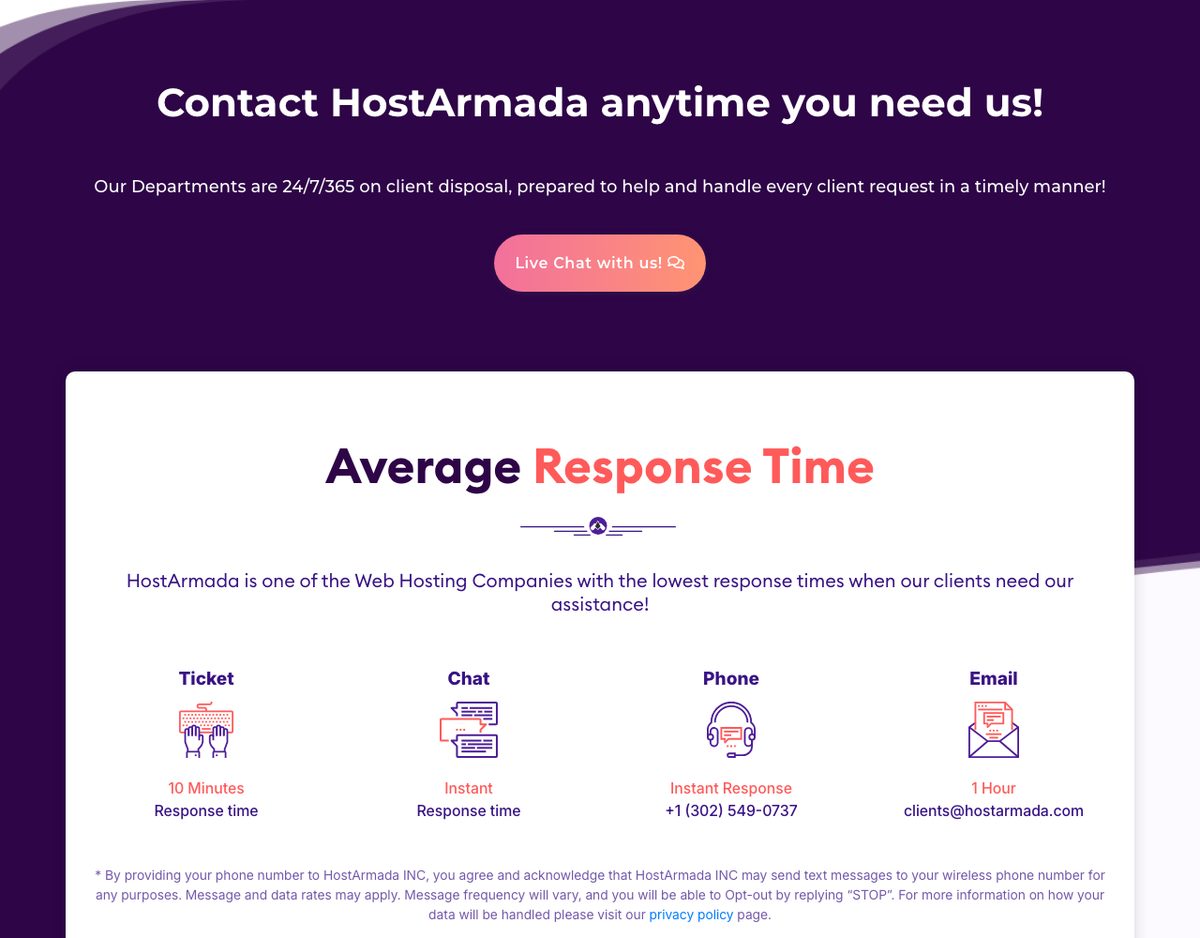
HostArmada offers 24/7 live chat and tickets, and the company says tickets get a first reply within 10 minutes. Phone support is free for existing customers, but its support page limits it to Monday to Friday, US business hours, and recommends tickets for anything complicated.
What stands out is the scope of the help. On shared hosting, HostArmada's support pages list installing and updating apps, themes and plugins, fixing common website errors, help with hacked sites and SSL setup, which many budget hosts won't touch.
On an unmanaged VPS, support stops at the hardware, network and virtualization layer, and anything inside the server is a paid add-on. Cloud and dedicated CPU servers are managed, with the same broad support as shared hosting.
HostArmada has a 4.8 rating from 1,126 reviews on Trustpilot (October 29, 2026), and most reviewers praise fast, helpful support. The few negative reviews describe renewal charges, a site that kept going down, and support asking for extra money to fix a problem.
Those reviews are individual experiences, and the renewal complaints are a reminder to turn off auto-renewal or cancel at least 7 days before the renewal date if you plan to leave.
My support test (November 2026)
On Saturday, November 14, 2026 (US Eastern time), I asked HostArmada's live chat six questions before signing up. The chat runs on Zendesk with no AI bot: a person from the technical support team, Den, joined 9 seconds after my first message. He told me the Sales team wasn't available on chat at that time.
The first real answer took 3.5 minutes; after that, replies came in 10 seconds to 1.5 minutes. They were specific: asked about the CPU, he pasted the server's system information instead of a stock answer.
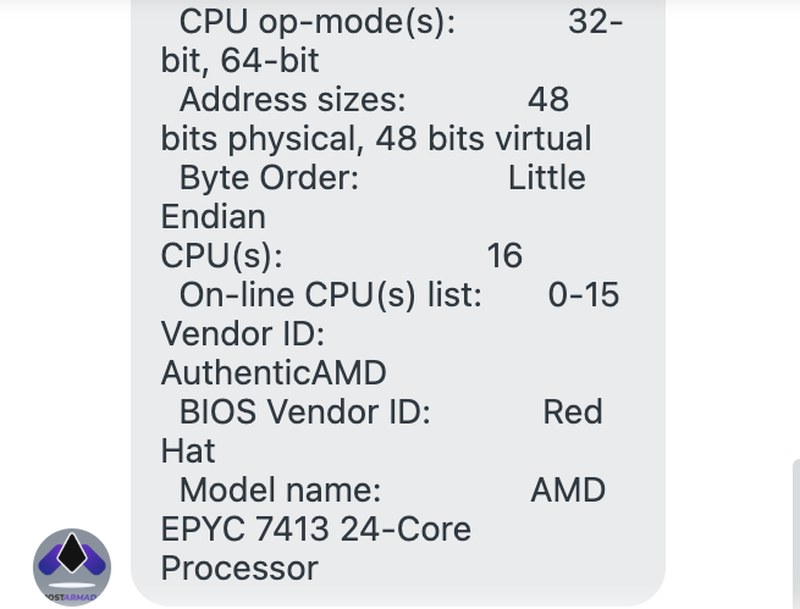
The agent's answer about the CPU of a Start Dock server (November 14, 2026, US time).
| Question | Answer |
|---|---|
| CPU on Start Dock | AMD EPYC 7413, a 16 vCPU virtual server; the same hardware in all 9 data centers |
| Accounts per server | "Cannot be disclosed" |
| Going over the CPU limit | Slowed down by CloudLinux; a site that overloads the server is suspended, with notice by ticket |
| Changing data center later | Free; the time depends on the size of the cPanel account |
| Plugin conflicts and malware | Plugins disabled, Imunify360 scan and obvious malware removed for free, on a "best effort" basis; no website development |
| Refund on monthly billing | Not the full 45-day refund; the agent couldn't say what is refunded |
One answer needed a correction. The agent first promised a full refund within 45 days for a monthly shared plan, and only after I quoted HostArmada's refund policy did he confirm that monthly plans don't qualify.
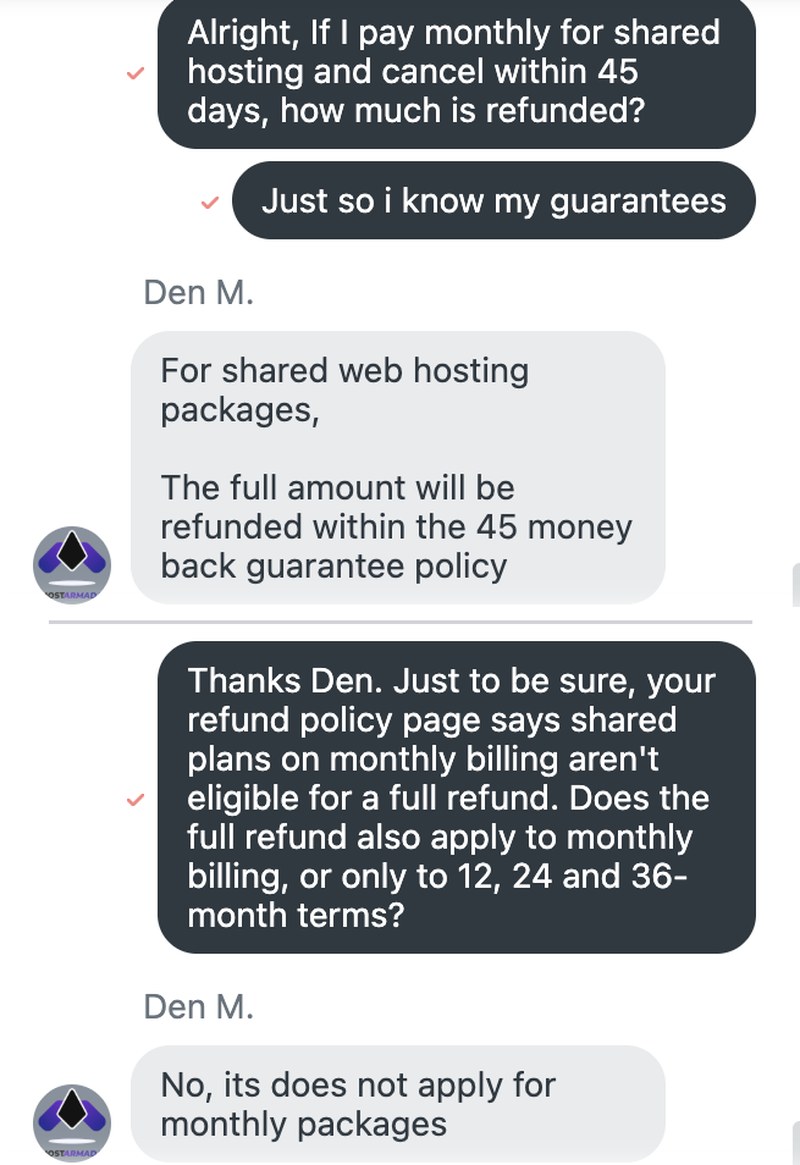
The agent's first refund answer and his correction after I quoted the refund policy (November 14, 2026, US time).
Overall, the answers were real and mostly clear, and the agent knew the platform well. I'd still check the refund terms in writing before paying, since the first answer left out the exception that mattered.
Frequently Asked Questions
Is HostArmada good for WordPress?
Yes, for small and medium WordPress sites. All plans include cPanel, Softaculous and daily backups, but only Speed Reaper runs on LiteSpeed with dynamic caching, so choose it for a busy site or a WooCommerce store.
Does HostArmada use cPanel?
Yes. Every shared, WordPress, reseller, cloud and dedicated CPU plan uses cPanel, and the cloud servers include WHM with 5 cPanel accounts. On the unmanaged VPS, cPanel is a paid license.
Does HostArmada offer a free domain?
Yes, on shared and WordPress plans billed for 12, 24 or 36 months. The domain is free for the first year only, and its cost is deducted if you cancel and ask for a refund.
How long is HostArmada's money-back guarantee?
It's 45 days for shared, WordPress and reseller hosting and 7 days for VPS, cloud and dedicated CPU servers. It only covers first orders, and shared plans bought monthly don't qualify for a full refund.
Where are HostArmada's data centers?
Shared hosting can be placed in Dallas, Newark, San Francisco, Montreal, Frankfurt, London, Mumbai, Singapore or Sydney. The unmanaged VPS has a shorter list of six locations. Support told me that moving an account to another data center later is free, and that it takes longer for a bigger cPanel account.
Conclusion: Is HostArmada Right for You?
HostArmada is a good choice for small business sites, blogs and agencies that want classic cPanel hosting with daily backups and support that helps with plugins and hacked sites. Web Warp is the better buy for most people, since it hosts unlimited sites for little more than Start Dock.
Choose another host if you only want to pay monthly, need a refund window longer than 7 days on a VPS, or want LiteSpeed caching on the cheapest plan. And plan for the renewal price, not just the first-term deal. If you'd rather compare it with a bigger name first, read my Hostinger review.
Your reviews are important and protected. Hosts on WebHostingAdvices can't pay or offer incentives to hide them.