
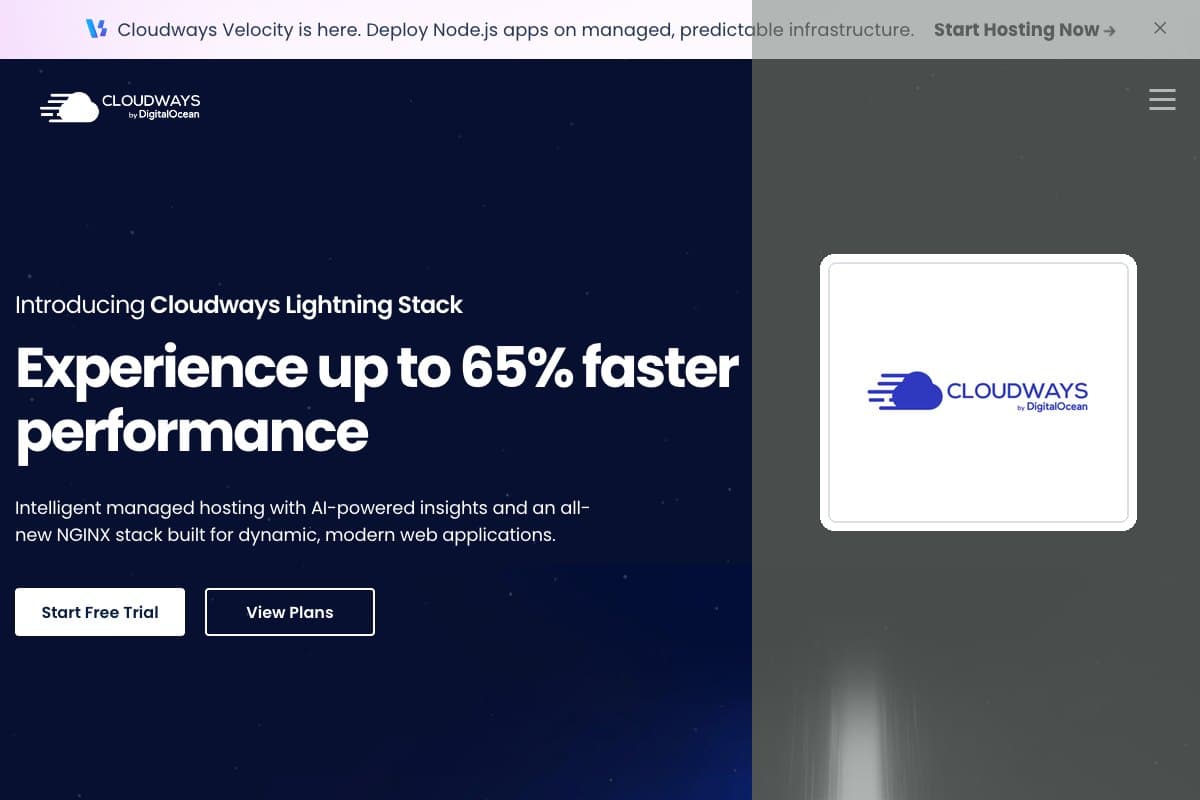


Cloudways is a managed cloud hosting platform owned by DigitalOcean. You pick a server on DigitalOcean, Vultr, Linode (Akamai), AWS or Google Cloud, and Cloudways installs, patches, secures and supports it for you. This Cloudways review is written for people whose sites need more than a shared plan, yet who would rather not administer a server.
Prices start at $11 per month for a 1GB DigitalOcean server, billed by the hour with no contract. Cloudways itself recommends 2GB or more for live sites, so most people will really start at $24 to $28 per month. I use Cloudways on Vultr for my Canadian clients and for some of my own sites, so parts of this review come from that work.
| Overall | Features | Performance | Ease of use | Price | Support |
|---|---|---|---|---|---|
| 8.2 | 9.0 | 8.5 | 8.0 | 7.5 | 8.0 |
Contents
Data sheet of the host

Cloudways sits between shared hosting and a self-managed cloud server. You get a dedicated cloud server with its own RAM and vCPUs, and Cloudways handles the operating system, web stack, firewall and backups through its own control panel.
There are no website limits on Cloudways Flexible. You can install as many WordPress, WooCommerce, Magento, Laravel or custom PHP applications as the server can handle, and you pay for the server, not per site.
Hosting Types
- Cloudways Flexible: managed cloud servers on 5 cloud providers (WordPress, WooCommerce, Magento, Laravel, PHP)
- Cloudways Autonomous: fully managed, autoscaling WordPress hosting
- Cloudways Velocity: managed Node.js hosting
- Managed AI Agents: managed hosting for always-on AI agents
Operating Systems and Stack
- OS: Debian, managed by Cloudways (SSH and SFTP through master and application credentials)
- Lightning Stack: NGINX + PHP-FPM (the new default on Flexible)
- Hybrid Stack: NGINX + Apache, for sites that need .htaccess and Apache modules
- Databases: MySQL or MariaDB
- Caching: Redis, Memcached, Varnish (Hybrid Stack), Object Cache Pro on 4GB+ servers
- PHP 7.4, 8.0, 8.1, 8.2 (default), 8.3 and 8.4 (8.4 on Flexible only)
- Elasticsearch can be installed from the server settings
DataCenters
Cloudways counts 150+ data centers in 50+ countries across its 5 cloud providers. Many cities are served by more than one provider, so its locations page lists 67 cities: 27 in North America, 16 in Europe, 9 in East Asia, 5 in South Asia, 4 in the Middle East, 2 each in South America, Australia and Africa.
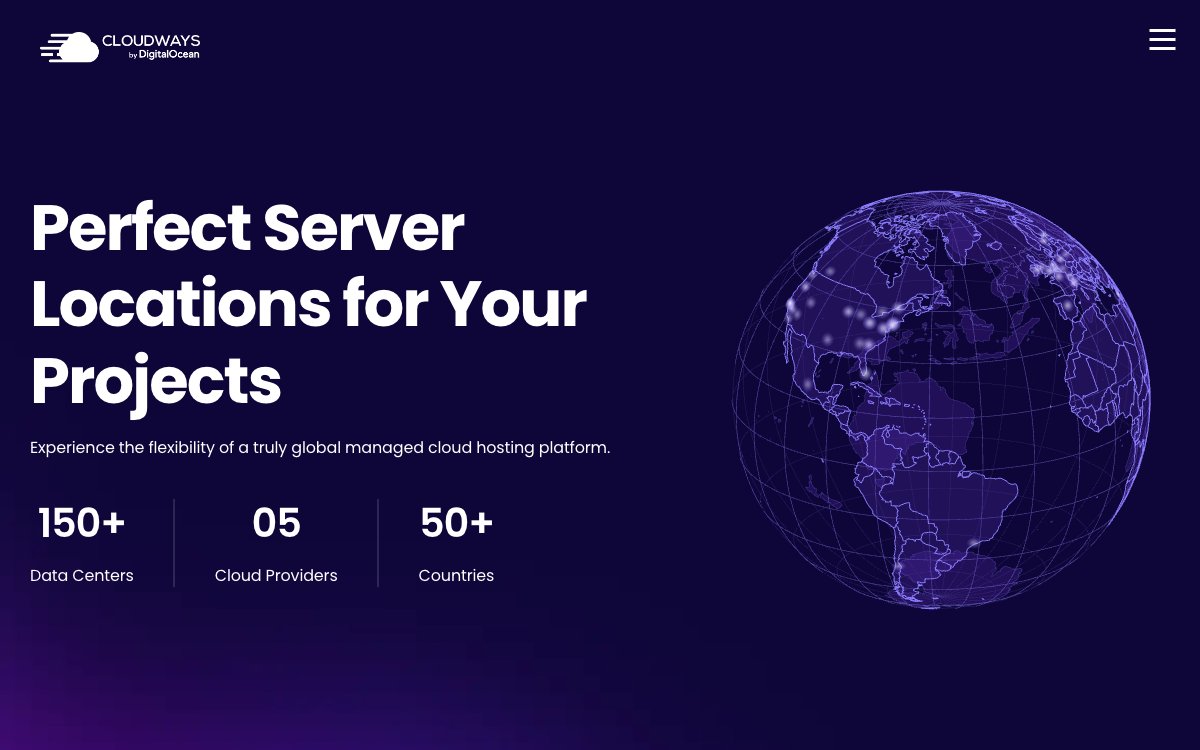
The pricing page lists 10 locations for DigitalOcean, 32 for Vultr, 27 for Linode, 33 for AWS and 36 for Google Cloud. For Canadian visitors, there is Toronto on DigitalOcean, Vultr and Linode, Calgary and Montreal on AWS, and Montreal on Google Cloud. The full city-by-city list is in my guide to Cloudways server locations.
Cloudways Flexible on DigitalOcean
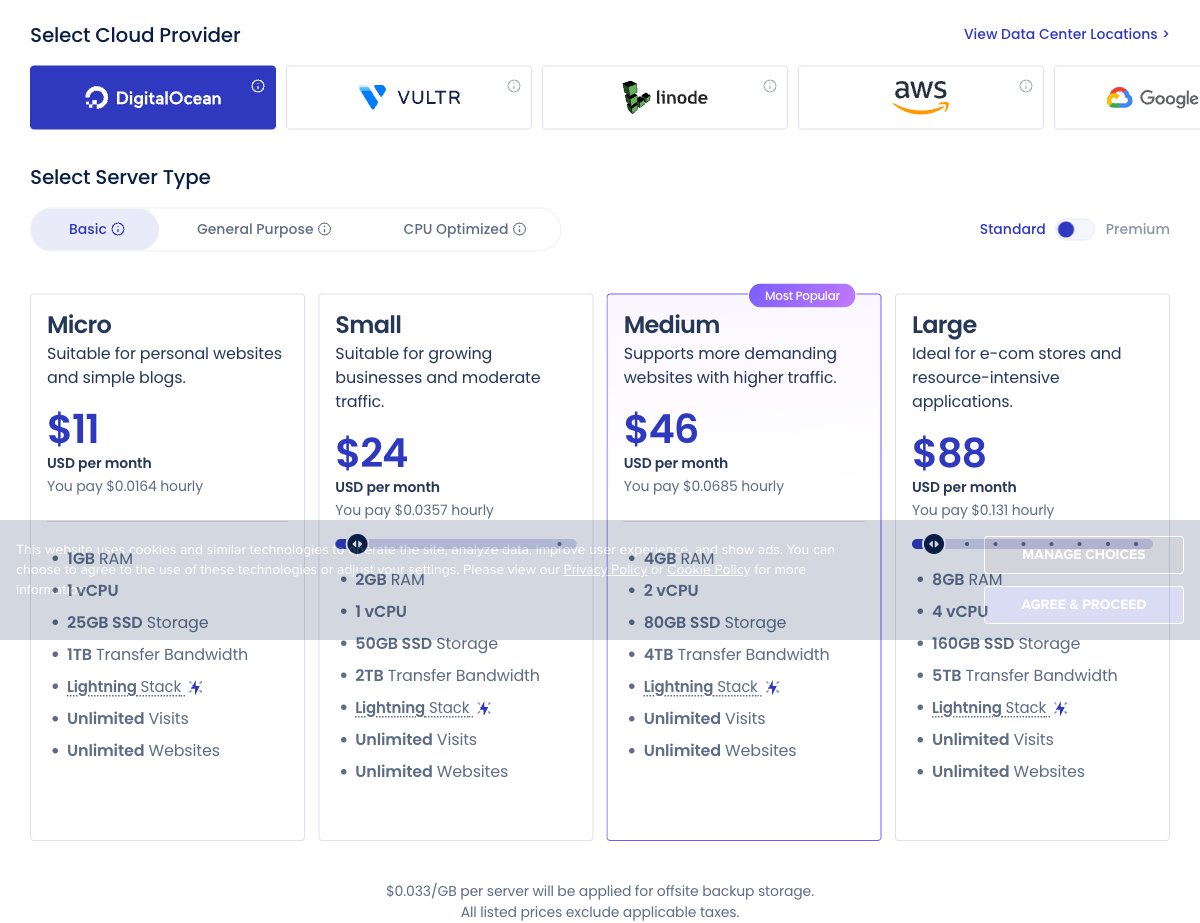
Basic Standard servers (SSD) shown. Premium servers with NVMe storage start at $14/month. Prices exclude taxes.
DigitalOcean is the cheapest entry point at $11 per month for 1GB RAM, 1 vCPU, 25GB SSD and 1TB of transfer. The 2GB server costs $24. General Purpose and CPU Optimized droplets start at $106 and $164 per month for heavier workloads.
Cloudways Flexible on Vultr
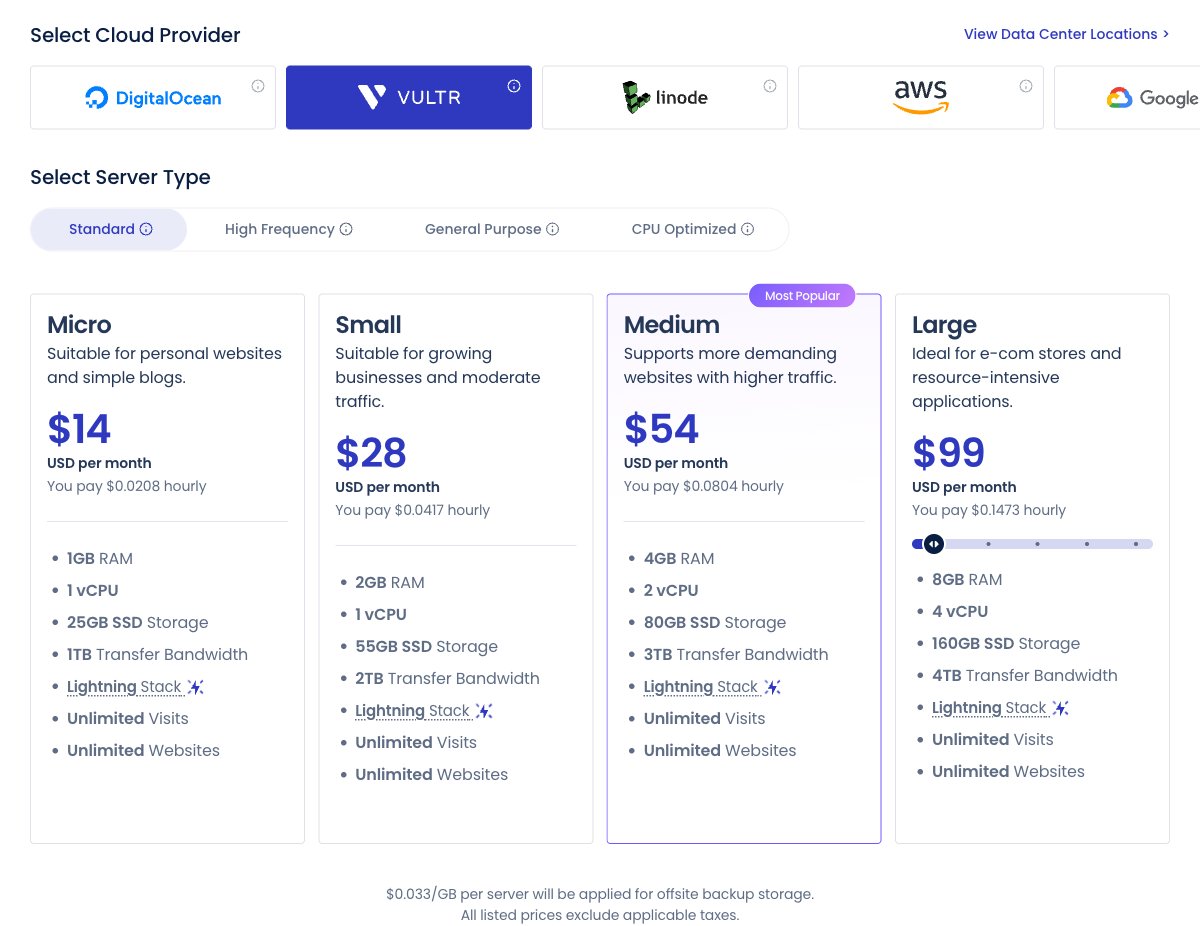
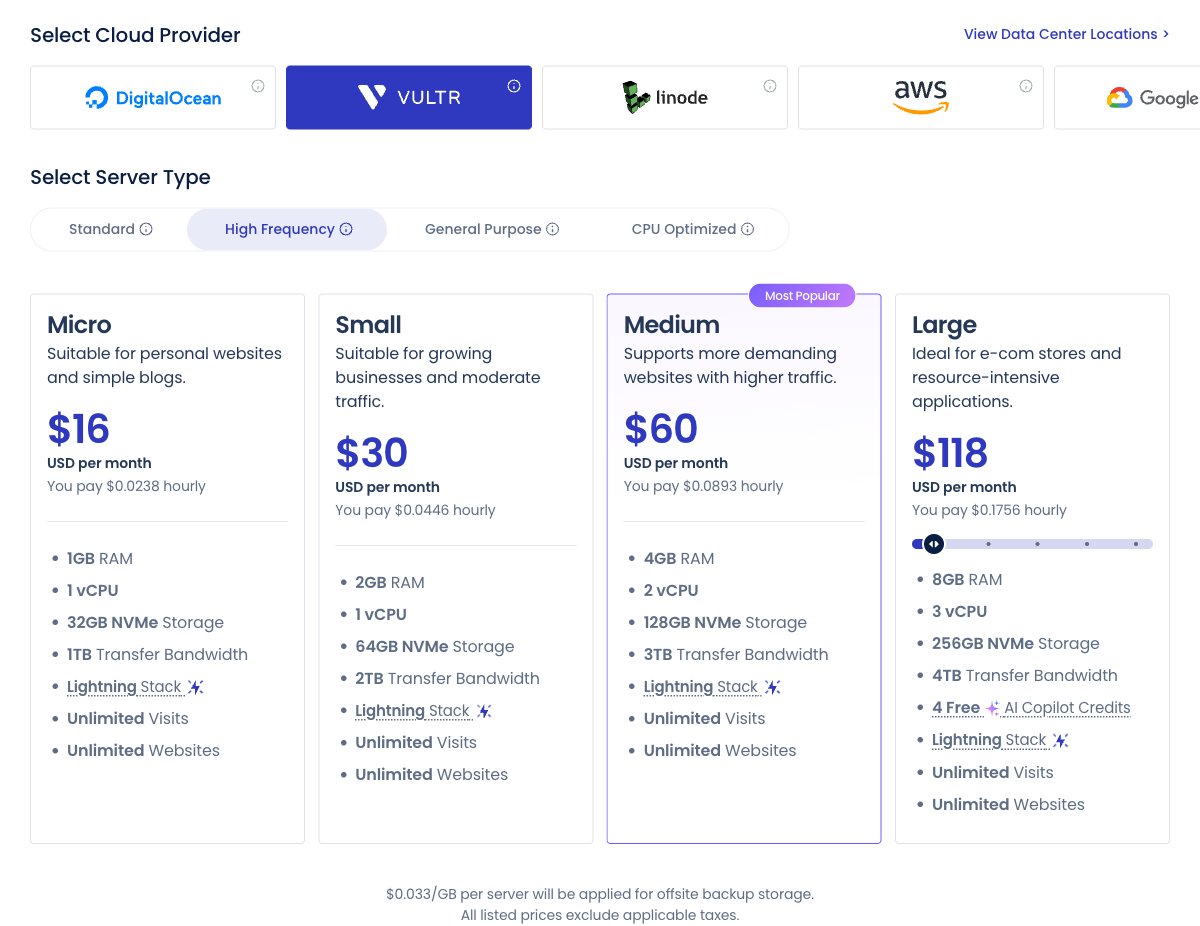
Vultr Standard (SSD) and High Frequency (NVMe) servers. Prices exclude taxes.
Vultr Standard servers start at $14 per month for 1GB RAM, 1 vCPU and 25GB SSD. High Frequency servers use NVMe storage and start at $16 per month, or $30 for 2GB RAM. Vultr lists 32 locations on Cloudways, close behind Google Cloud and AWS, and I cover them in my Vultr data centers guide.
Cloudways Flexible on Linode (Akamai)
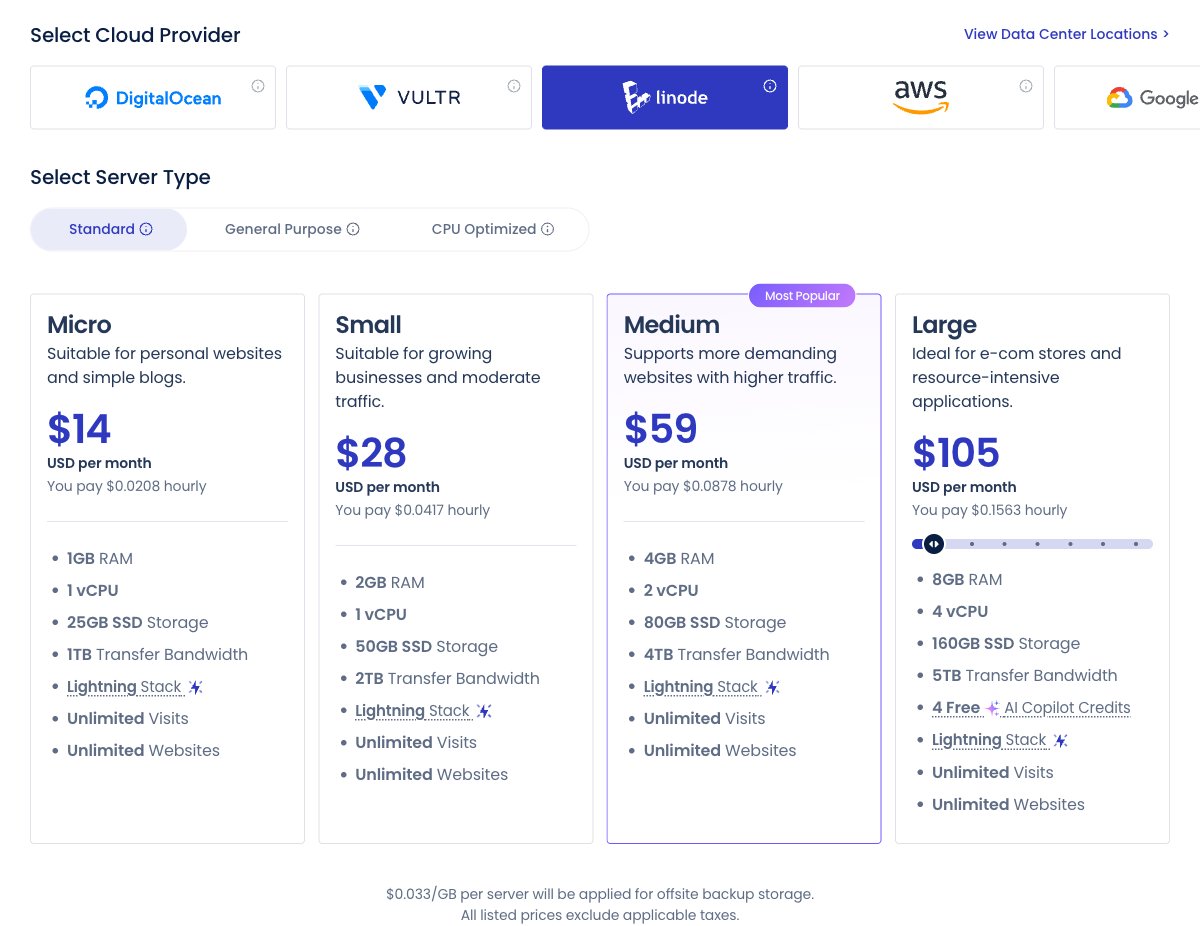
Linode Standard servers. Prices exclude taxes.
Linode starts at $14 per month for 1GB RAM and $28 for 2GB. The 4GB and 8GB servers cost a bit more than on DigitalOcean or Vultr ($59 and $105). General Purpose and CPU Optimized plans start at $69 and $89 per month.
Cloudways Flexible on AWS
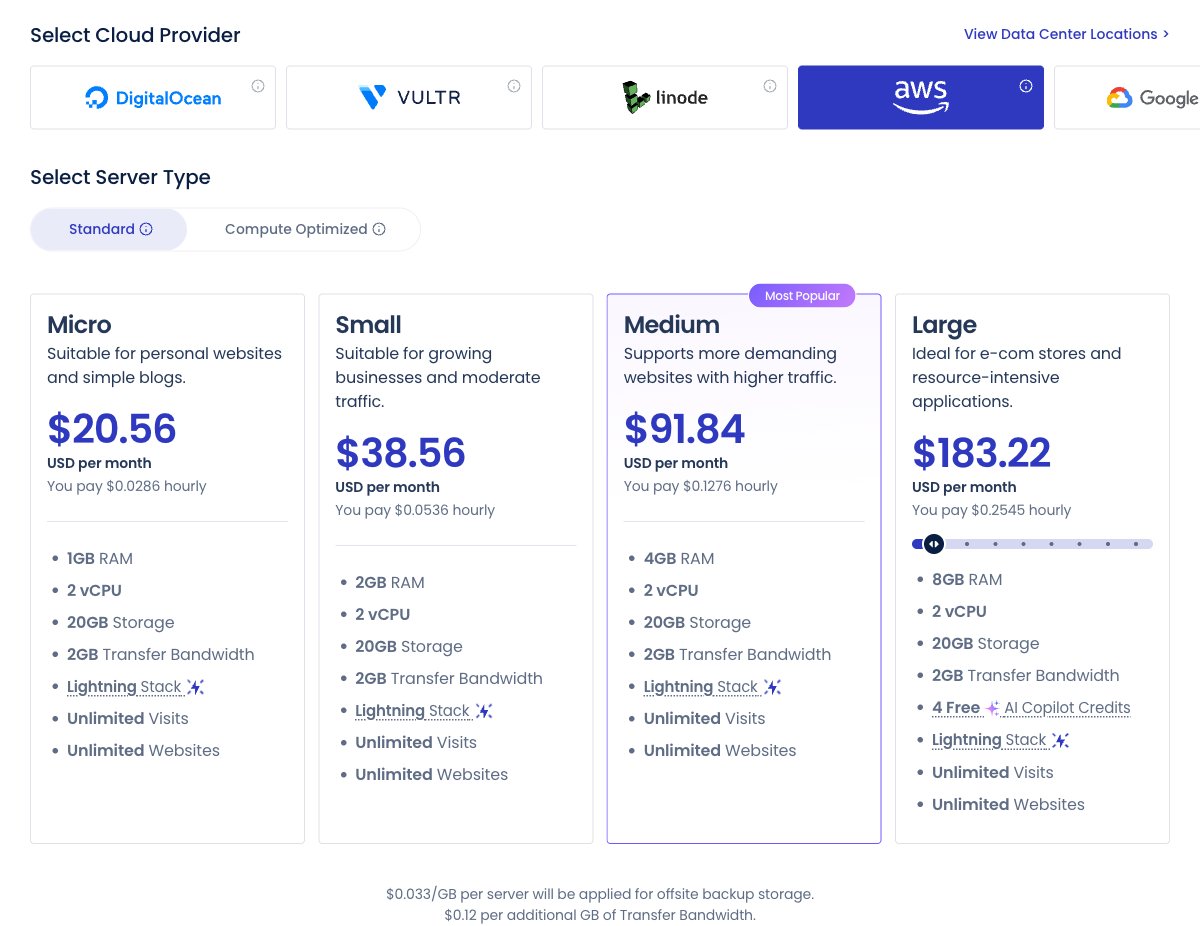
AWS Standard servers. Disk and bandwidth are billed separately.
AWS starts at $20.56 per month for 1GB RAM and 2 vCPUs, but that price includes only 20GB of storage and 2GB of transfer. Extra transfer costs $0.12 per GB and extra disk $0.10 per GB, and prices change by region.
Cloudways Flexible on Google Cloud
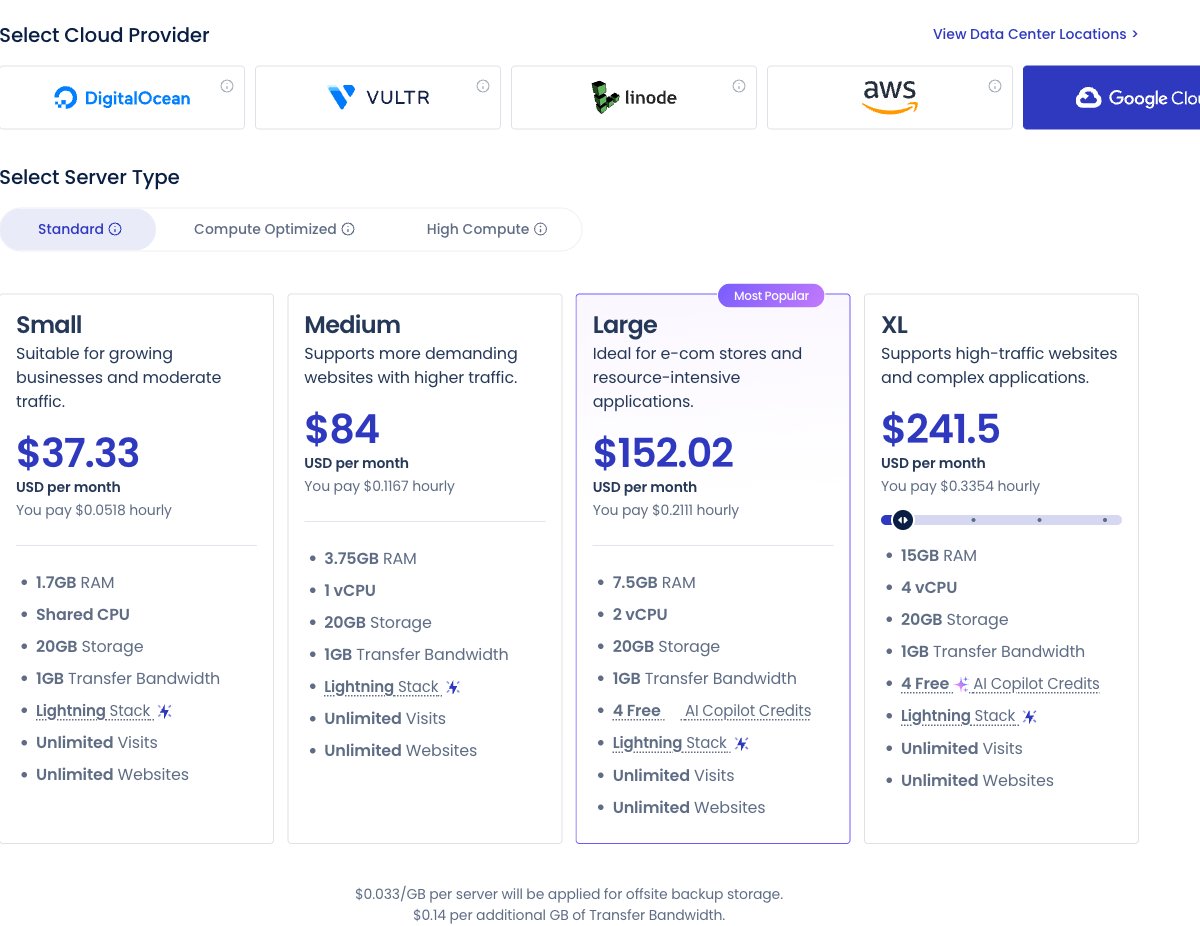
Google Cloud Standard servers. Disk and bandwidth are billed separately.
Google Cloud is the most expensive option, starting at $37.33 per month for 1.7GB RAM on a shared CPU. It also includes 20GB of storage and 1GB of transfer, with extra transfer between $0.10 and $0.17 per GB depending on the region.
Cloudways Autonomous
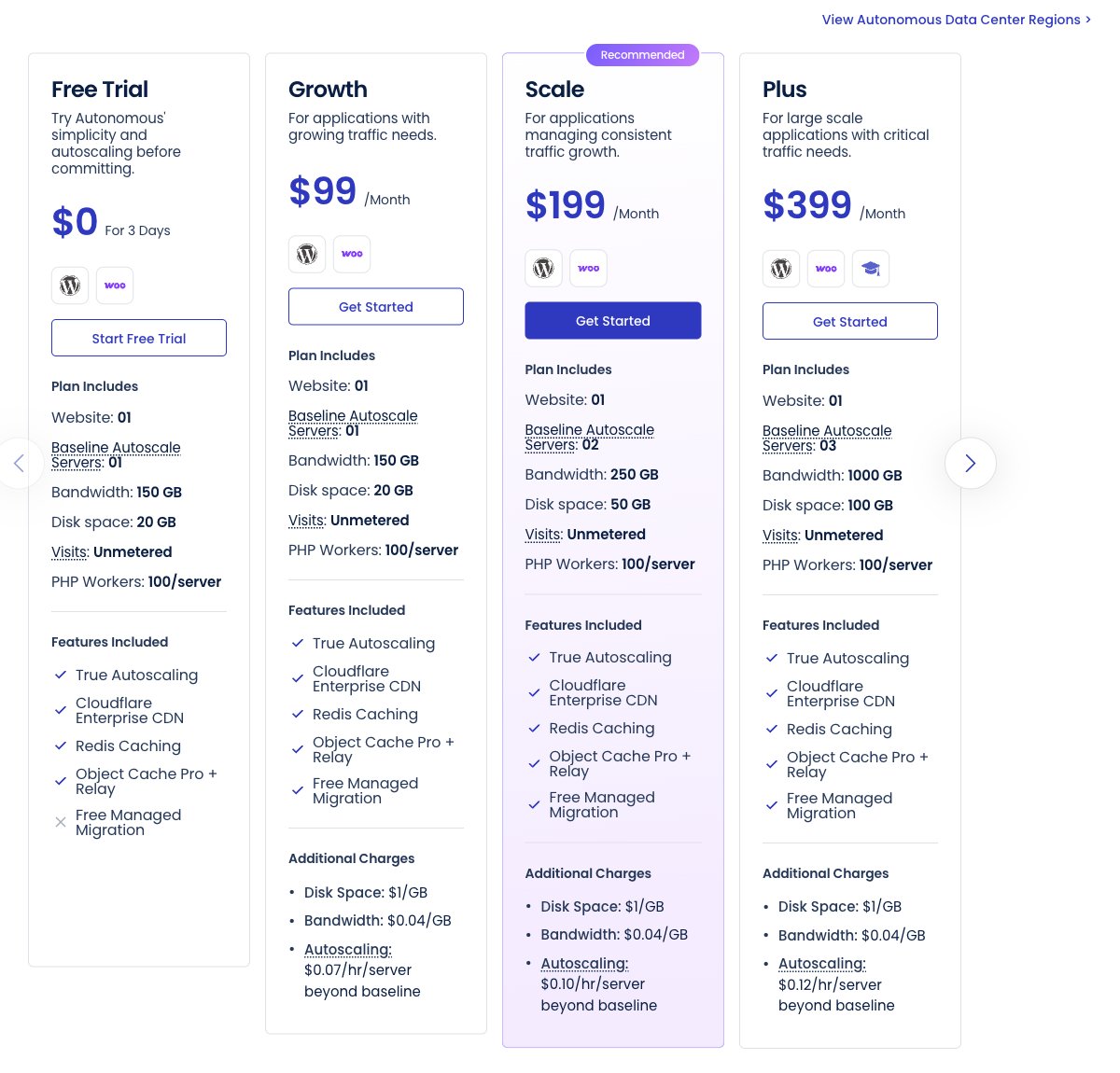
Autonomous plans host one WordPress site each. Extra disk, bandwidth and autoscaling are billed on top.
Autonomous is a different product: one WordPress or WooCommerce site on autoscaling servers, with Cloudflare Enterprise and malware protection included. Plans cost $99, $199 and $399 per month, with a 3-day free trial.
About Cloudways
Cloudways launched in 2012 and was bought by DigitalOcean for $350 million, a deal completed on September 8, 2022. Its invoices and support terms are now issued by DigitalOcean, LLC.
Pros
- Choice of 5 cloud providers and 150+ data centers.
- No website limit per server.
- Hourly, pay-as-you-go billing with no contract.
- 3-day free trial without a credit card.
- Free staging, Let's Encrypt SSL, Redis and server firewall.
- 24/7 live chat and tickets on every plan.
Cons
- 1GB servers are meant for testing only.
- AWS and Google Cloud get expensive fast.
- No email hosting, no cPanel, no file manager.
- Backup storage, CDN and malware cleaning cost extra.
- Phone support only on the $500/month Premium add-on.

Technical Features
Score: 9.0/10
A real server instead of a shared account
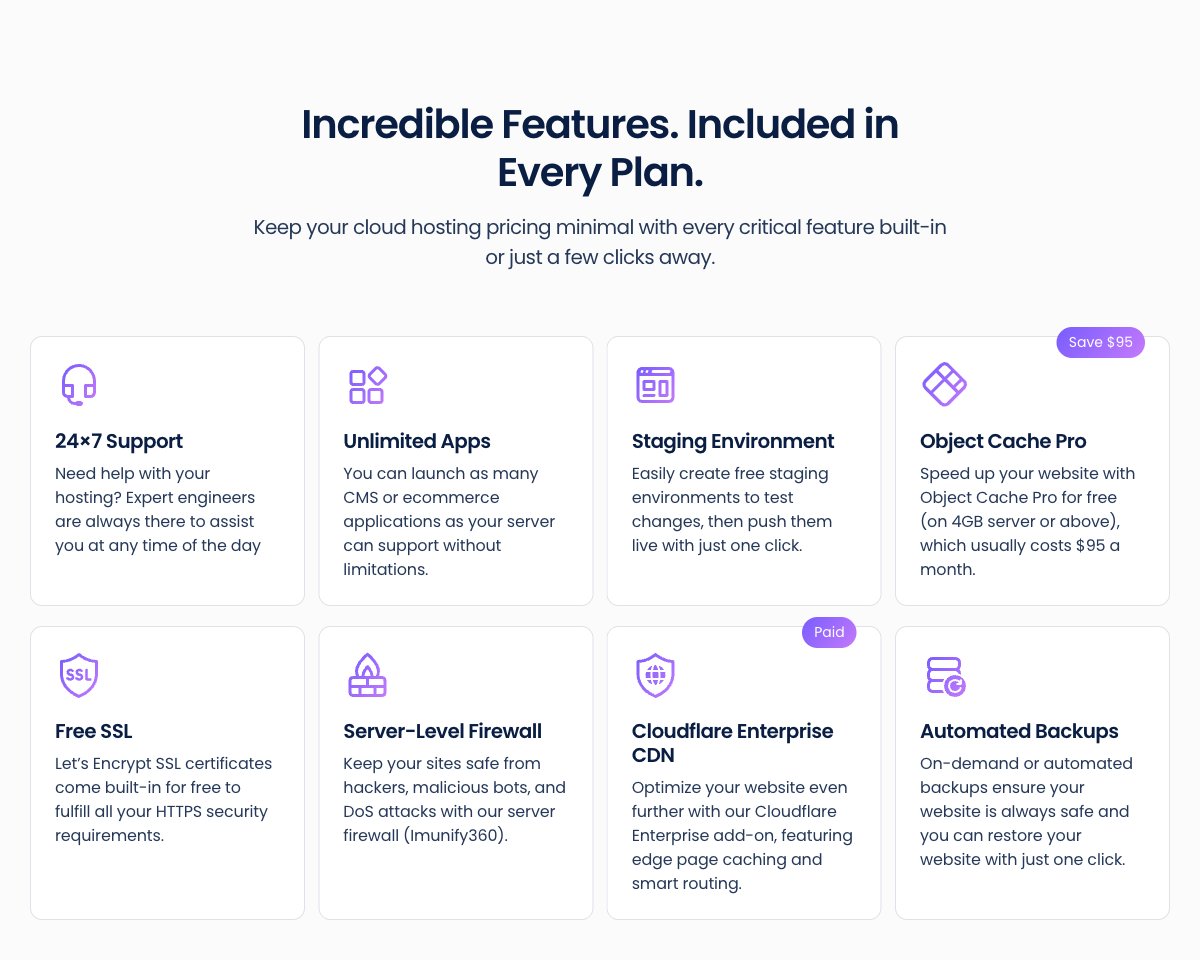
The main difference from shared hosting is that your sites run on their own cloud server. Nobody else's site uses the RAM and vCPUs you pay for, and there are no inode or CPU-second limits like on a shared plan.
That is why I moved some of my clients from SiteGround to Cloudways. They kept hitting resource limits on their shared plans, and on a Cloudways server the only limit is the size of the server you choose.
The Lightning Stack
In November 2025 Cloudways launched the Lightning Stack, an NGINX + PHP-FPM setup that replaces the older NGINX + Apache hybrid. It is free, available on every Flexible server, and aimed at dynamic sites like WooCommerce stores, membership sites and LMS platforms.
The catch is that .htaccess files no longer work on Lightning. Cloudways added Web Rules, a panel for redirects, rewrites and headers, which it says covers about 80% of real-world .htaccess use. Sites that depend on complex Apache rules can stay on the Hybrid Stack.
Features included on every Flexible server
- Unlimited applications per server
- One-click staging and cloning
- Free Let's Encrypt SSL
- Redis, plus Object Cache Pro on servers with 4GB RAM or more
- Imunify360 server-level firewall with IP and country blocking
- Automated and on-demand backups
- Vertical scaling in a few clicks
- Free WordPress vulnerability scanner
- Git deployment, SSH and SFTP access
Paid add-ons
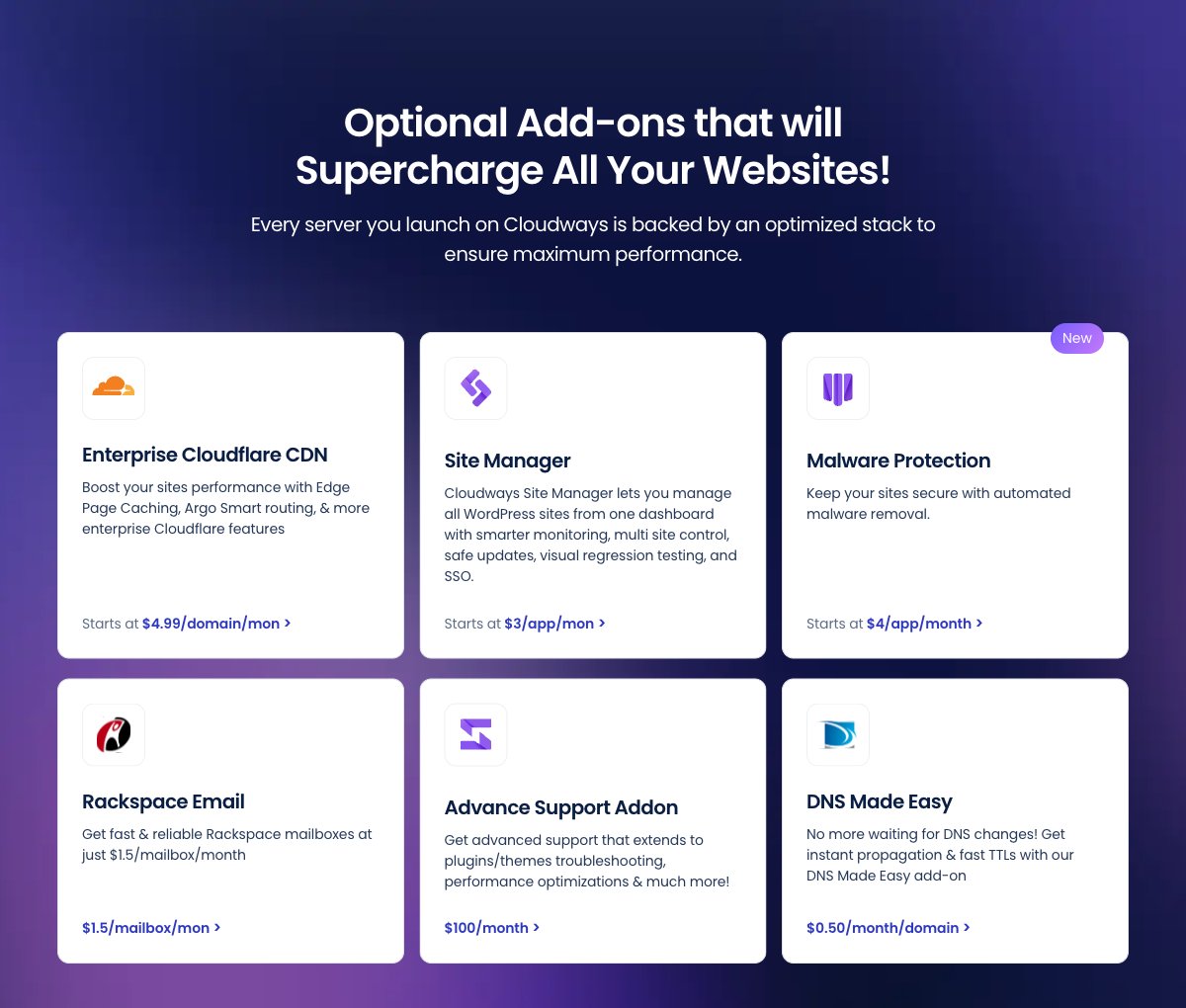
Several things that other hosts bundle are add-ons here. Cloudflare Enterprise costs $4.99 per domain per month for fewer than 5 domains, dropping to $1.99 per domain at 25 or more, plus $0.20 per 10GB of CDN overage.
- Email: Rackspace Email at $1.50 per mailbox per month (Cloudways has no built-in email hosting)
- Malware Protection: $4 per app per month (1-5 apps), $3 (6-15 apps), $2 (15+ apps)
- SafeUpdates: automated WordPress updates with testing, $3 per app per month ($2 from 6 apps)
- Site Manager: multi-site WordPress dashboard, from $3 per app per month
- DNS Made Easy: $0.50 per domain per month
For developers, Cloudways now also offers Velocity for Node.js apps and a free migrator plugin for WordPress. If you compare it with a panel that only manages your own server, my Cloudways vs ServerPilot comparison explains where each one fits.

Performance and Security
Score: 8.5/10
Speed depends on the server you pick
Cloudways performance is mostly the cloud provider and server size you choose, plus the stack on top. DigitalOcean Premium and Vultr High Frequency servers use NVMe storage, while the cheaper Standard tiers use SSD.
Cloudways commissioned Koddr.io to benchmark the Lightning Stack against its old hybrid stack (published November 2025). The report claims up to 65% faster dynamic response times and up to 58% more WooCommerce checkouts under load. That is a vendor-commissioned test, not an independent review, so treat the numbers as Cloudways' own claim.
What I have seen on client sites
One project I host on Cloudways is an online forum with members around the world. I measured it with Google PageSpeed Insights and ran an uptime monitor on it, which is the kind of check I'd recommend for any site you move.
A forum is a good test because most pages are dynamic and can't be fully cached. What you get from any host still depends on your theme, plugins and where your visitors are, so pick a data center close to most of them.
Security
Every server gets the Imunify360 firewall, bot and brute-force protection, IP and country blocking, and free SSL certificates. Cloudways patches the operating system and server software for you.
That mattered for the clients I moved from Bluehost. They had security vulnerabilities and hacked sites, and a managed, isolated server with a firewall was a better fit than another shared account. Automated malware cleanup, though, is a paid add-on on Flexible and only included on Autonomous.
Backups run automatically off the server, with a frequency and retention period you set. Offsite backup storage costs $0.033 per GB per server, so heavy sites with long retention will see it on the invoice.

Ease of Use
Score: 8.0/10
Cloudways uses its own control panel, not cPanel. Launching a server is a few clicks: choose the application, cloud provider, server size and location, and the server is ready in minutes with the stack already tuned.
Before Cloudways, I also worked on self-managed Vultr servers as a freelancer. On a self-managed server, OS updates, the firewall, PHP versions, caching and backups are your job. Cloudways on Vultr runs on the same infrastructure but takes that work off your plate, which is why I use it for clients who just want their site online.
The trade-off is control. You work through master and application credentials instead of a full sysadmin setup, there is no file manager (you use SFTP or SSH), and only some server settings can be changed from the panel. People used to cPanel will need a few days to find their way around.
Migration is simple. Cloudways includes one free managed migration by its team, and the free WordPress migrator plugin handles the rest. I migrated my willing clients to Cloudways myself, and you can request the managed migration through the Cloudways migration service.

Price
Score: 7.5/10
Cloudways bills by the hour and charges in arrears: you get an invoice in the first week of each month for the previous month's usage. There are no 1-year or 3-year contracts and no renewal price jumps.
| Provider | 1GB server | 2GB server | 4GB server |
|---|---|---|---|
| DigitalOcean (Standard) | $11 | $24 | $46 |
| Vultr (Standard) | $14 | $28 | $54 |
| Linode | $14 | $28 | $59 |
| AWS | $20.56 | $38.56 | $91.84 |
| Google Cloud | $37.33 (1.7GB) | $84 (3.75GB) | $152.02 (7.5GB) |
Monthly prices from Cloudways' pricing page in October 2026. Taxes not included.
The low entry price comes with a condition. Cloudways says 1GB servers are meant for testing and staging, so a real starting budget is $24 to $28 per month. You also pay $0.033 per GB of backup storage and any add-ons you use.
A server costs the same whether you host 1 site or 10 on it. For an agency or a freelancer with several small sites, that makes a 2GB or 4GB server cheaper per site than buying separate managed WordPress plans.
There is a 3-day free trial with no credit card. When you upgrade, Cloudways verifies your card with a temporary $1 to $10 charge that is reversed.
Payment is by Visa, Mastercard or American Express, with PayPal available on request. My guide to cloud server free trials without a credit card compares it with other trials.
WebHostingAdvices has its own Cloudways discount code for new accounts. Enter it when you sign up: Coupon: WHA25

Reliability and Support
Score: 8.0/10
Every account includes 24/7/365 live chat and tickets. Cloudways advertises a 90-second average response time and a 95% CSAT score on its support page, which are its own figures.
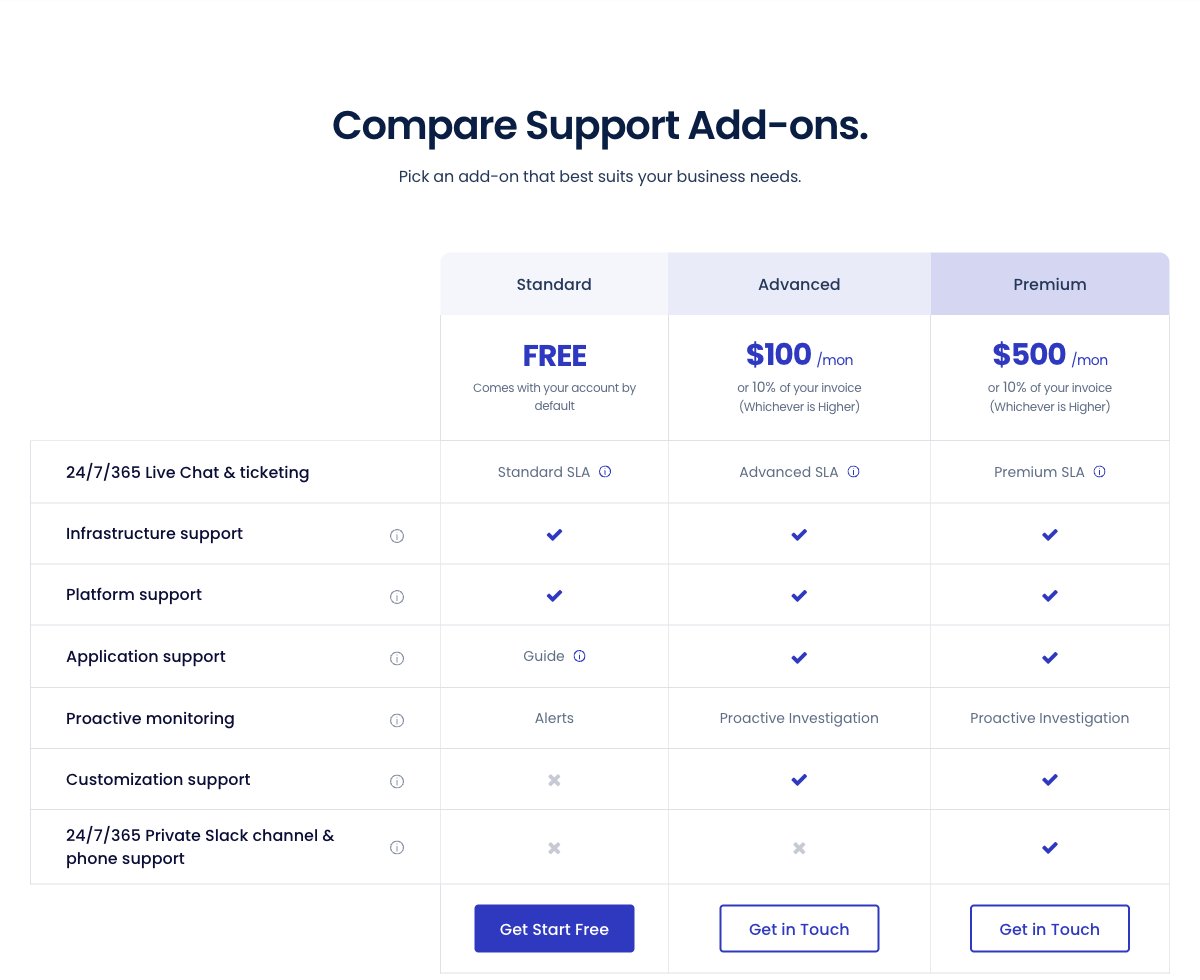
Standard support has limits. Live chats are capped at 15 minutes before they turn into a ticket, and help with themes and plugins is limited to guides. Advanced Support costs $100 per month or 10% of your invoice (whichever is higher) and adds application help and faster ticket handling.
Premium Support costs $500 per month or 10% of your invoice and adds a private Slack channel and phone support. Phone support is not available on any lower tier.
On uptime, the homepage advertises 99.99%, but the published SLA is narrower. It covers the availability and response times of Cloudways support, with a credit of 5% of your monthly fee per hour missed, and refers to DigitalOcean, AWS and Google Cloud for the infrastructure SLAs.
Conclusion: Is Cloudways Right for You?
Cloudways is a strong choice when shared hosting starts to hold you back. You get a real cloud server from a provider you choose, a tuned stack, staging, backups and 24/7 support, without having to manage the server yourself.
It is what I use for my Canadian clients on Vultr and for some of my own sites, and it solved the resource limits and security problems my clients had on SiteGround and Bluehost. Agencies and freelancers with several sites get the most value, because one server can host all of them.
It is not the cheapest option for a single small blog, since a usable server starts around $24 per month and email, CDN and malware cleaning cost extra. If you need cPanel, built-in email or phone support on a small budget, look elsewhere.
Cloudways suits website owners who want cloud performance and control over their server choice, without the sysadmin work.