


 Tested by
InterServer is a New Jersey hosting company, founded in 1999, that sells shared web hosting, cloud VPS, dedicated servers and colocation from its own U.S. facilities. It suits budget-minded site owners who want a low renewal price, and developers who want cheap, scalable VPS resources in the United States.
The headline price is $2.50/month for the first term on Standard web hosting, then $7/month on renewal. VPS hosting starts at $3/month per slice, and dedicated servers start at $166/month.
My InterServer review scores below are based on the current plans, policies and published customer feedback, checked on October 25, 2026.
Pros
- Low, published renewal price ($7/month on Standard hosting).
- $3/month VPS slices with 2 GB RAM, monthly billing and no contract.
- Free migration for web hosting accounts.
- Free DDoS protection, InterShield security and free Cloudflare CDN.
- 30-day full refund on web hosting plans.
- 24/7 support by ticket, phone and live chat.
Cons
- Data centers in the United States only.
- Standard hosting uses DirectAdmin; cPanel costs more ($8/month on renewal).
- Weekly backups only on the Standard plan.
- No refund or trial on VPS and dedicated servers.
- Managed VPS support starts at 8 slices ($24/month).
InterServer is an American host with all of its data centers in the United States: the New York City metro area, Dallas and Los Angeles.
Contents
Technical Features

Score 4.2/5
Unlimited storage, with real limits
The Standard plan lists unlimited storage, data transfer, email accounts and FTP accounts. The terms add the limits that matter: one account can't use more than 20% of a server's resources, and it is capped at 400,000 inodes (files and folders).
In practice, that's plenty for blogs, business sites and small stores. Backup archives, video files and file-sharing sites aren't allowed on shared hosting, so use InterServer's storage hosting or a VPS for those.
Resource limits you can actually read
InterServer publishes the account limits, which many budget hosts don't. The Standard plan gets 1 CPU core, 2 GB of memory, 1,024 IOPS, 100 processes and 30 entry processes, plus a 200 emails per hour sending limit.
Entry processes are the number of PHP requests your site can run at the same moment. Thirty is fine for a normal WordPress site with caching, but a busy WooCommerce store will hit it sooner.
Database work has its own allowance. According to InterServer's Boost hosting page (checked November 2026), the Standard plan lists 4 SQL cores and 1.43 GB/s of SQL I/O next to its single CPU core.
The Boost plans raise that to 8, 16 and 40 SQL cores, with 2,048 to 10,240 IOPS and up to 300 entry processes on Boost X. InterServer doesn't name the CPU model behind its shared or VPS servers, so the core counts are the useful figure.
Boost plans for busier sites
Boost keeps you on shared hosting but raises every limit. Boost 2 doubles the Standard plan (2 cores, 4 GB memory, 800,000 inodes), Boost 4 moves to 4 cores and 8 GB, and Boost X goes up to 10 cores and 20 GB of memory.
I'd pick Boost over a small VPS when you want more room without managing a server yourself. You keep the same control panel, the same email setup and the same support scope.
InterShield security and Inter-Insurance
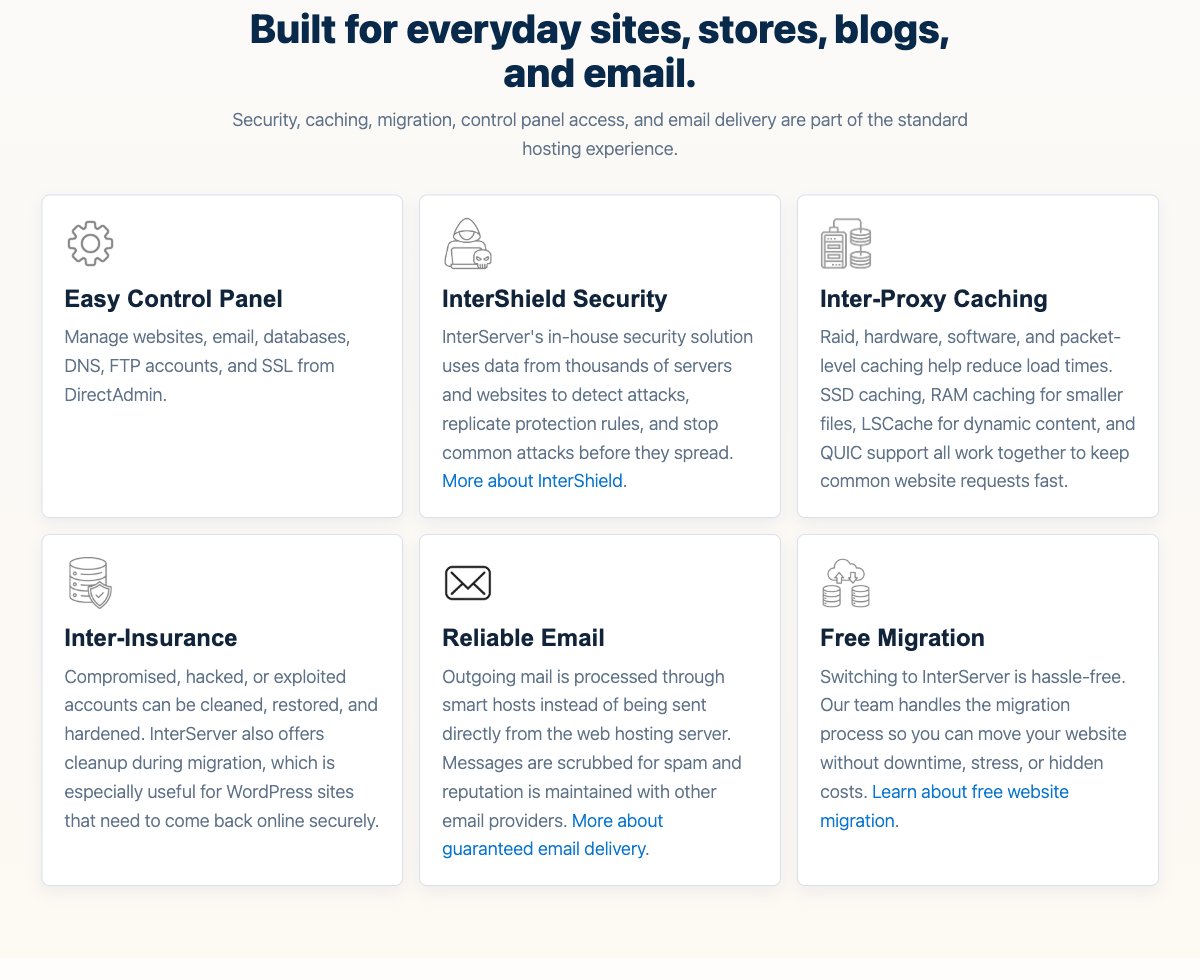
InterShield is InterServer's own security layer. It combines a machine-learning firewall with virus scanning and shares protection rules across its servers, so an attack spotted on one server can be blocked on the others.
Inter-Insurance is the cleanup side. If an account is hacked, InterServer says it can clean, restore and harden it, and it also offers cleanup during a migration.
Caching, CDN and email delivery
Shared servers use SSD caching, LSCache (LiteSpeed Cache) and QUIC, with free Cloudflare CDN on every plan. LSCache does the most for WordPress, since it serves cached pages instead of running PHP on every visit.
Outgoing mail goes through InterServer's smart hosts instead of leaving straight from the web server. Messages are filtered for spam first, which helps keep the sending IPs off blocklists.
Free migration for web hosting
New web hosting customers get a free website transfer. The catch is the control panel: migrations are only cPanel-to-cPanel or DirectAdmin-to-DirectAdmin, and VPS or dedicated server moves aren't included.
If you're leaving a cPanel host, choose the cPanel hosting plan so the move qualifies. InterServer also says migrations may take 24 hours to start, so keep your old hosting active for at least a week.
Cloud VPS slices
The VPS works in slices. One slice costs $3/month and includes 1 CPU core, 2 GB of RAM, 40 GB of SSD storage, 2 TB of monthly transfer, a shared 10 Gbps port and one IPv4 address.
Each extra slice adds RAM, storage and transfer, and CPU cores grow by one for every two slices. InterServer doesn't describe the cores as dedicated, and host-node processor models vary, so treat them as shared virtual cores. Linux VPS runs on KVM, and Windows VPS runs on Hyper-V from 2 slices ($10/month).
You can add slices at any time without a reinstall, as InterServer support confirmed to me on November 6, 2026. Managed support starts at 8 slices: below that, support covers the hardware, network and virtualization, and fixing software such as Nginx or PHP is up to you (see what support told me).
If you need a lot of disk space, the storage VPS gives you 1 TB of SATA storage and 2 GB of RAM per $3 slice. I compare it with other options in my guide to cheap storage VPS hosting.
Control panels on VPS
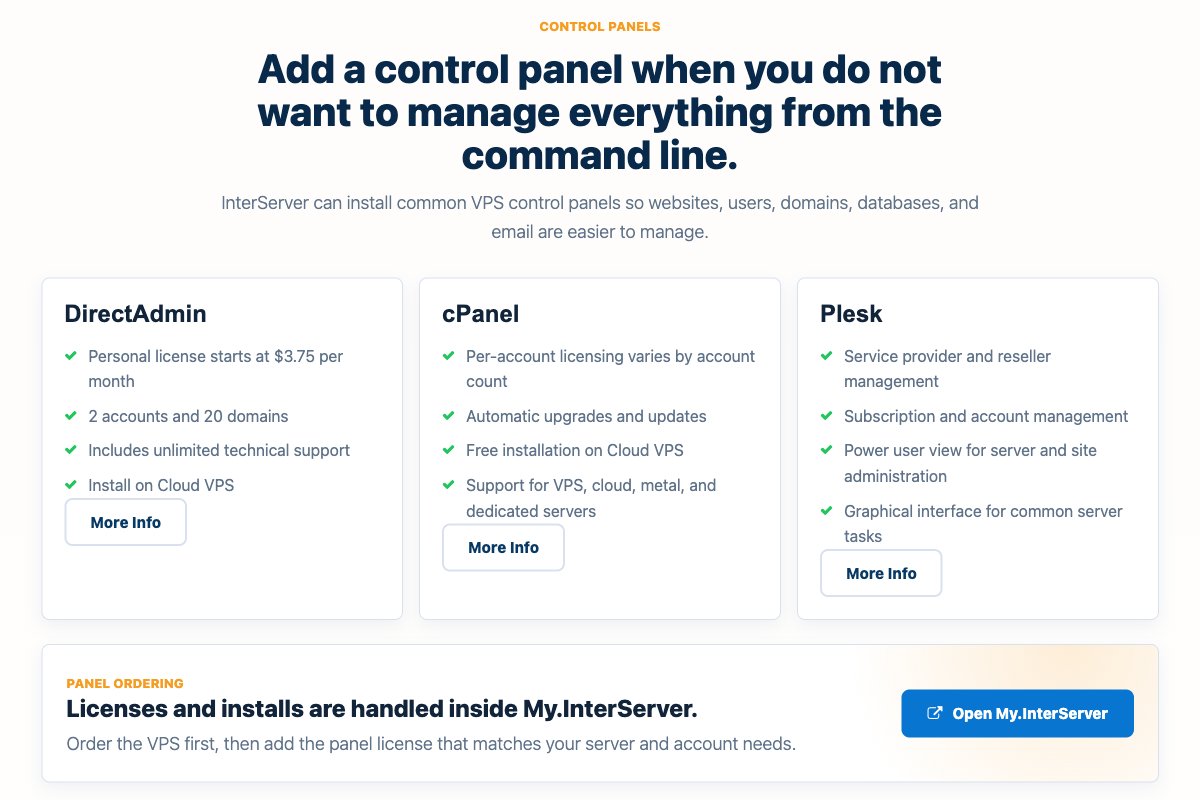
You can add DirectAdmin, cPanel, Plesk or Webuzo to a VPS. DirectAdmin's personal license costs from $3.75/month, while cPanel pricing depends on the number of accounts and is shown in the order flow.
That makes InterServer a good base for a cheap VPS with cPanel, as long as you add the license cost to the slice price before you compare.
Dedicated servers
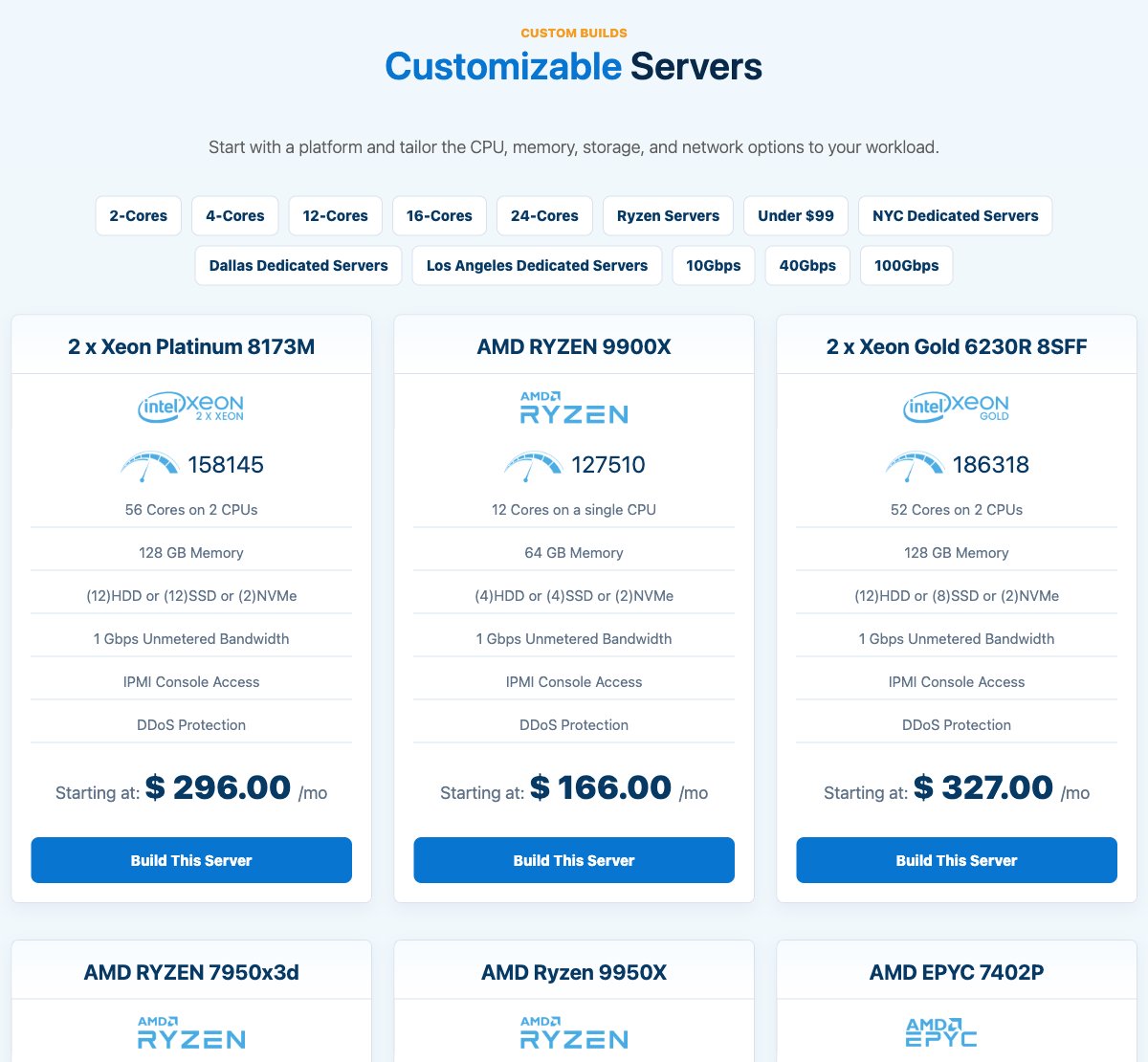
Dedicated servers are single-tenant physical machines with full hardware resources. Custom builds use AMD Ryzen, AMD EPYC or Intel Xeon processors, and every listed configuration includes 1 Gbps unmetered bandwidth, IPMI console access, DDoS protection and no setup fee.
Performance and Security

Score 4.4/5
InterServer Speed Test Results (November 2026)
In November 2026, I load-tested 2 live websites hosted on InterServer, both on VPS/cloud hosting. Each site's hosting was verified from its server IP, and the table notes the technology each site runs on and the datacenter its server sits in, since both affect the result.
Most hosting reviews quote the cached speed, which is really the cache or CDN talking, not the host. I show both: the cached TTFB your visitors normally get, and the uncached TTFB with the page cache bypassed. The ranking uses server time (uncached TTFB minus the network round trip from the test location), because a cache can hide a slow server. Each hosting type's figure is the median of its sites.
| Hosting type | Website | Technology | Datacenter | Cached TTFB | Uncached TTFB | Server time |
|---|---|---|---|---|---|---|
| VPS | Construction company | WordPress | Secaucus, United States | 7 ms | 212 ms | 206 ms |
| VPS | SaaS valuation tool | WordPress | Secaucus, United States | 117 ms | 117 ms | 110 ms |
| VPS median | 2 sites | 62 ms | 164 ms | 158 ms |
Test settings, November 2026: 5 virtual users for 2 minutes, at most 1 request per second, every second request with a unique query string to bypass the page cache. Live websites under light load, not a controlled benchmark of InterServer's plans.
The median server time was 158 ms across the 2 sites. One of the two sites had an effective page cache, where the cached page came back well under the uncached time; on the other the cached and uncached figures are close, so the cache either isn't caching or ignores the query string. Both sites answered every request without an error.
What each site runs:
- Construction company: WordPress, Secaucus, United States
- SaaS valuation tool: WordPress, Secaucus, United States
Each hosting type has only 2 tested sites so far, so its median is less reliable. My Performance score for InterServer uses the VPS/cloud result. It is ranked against every other host on my benchmarks page.
Uptime figures will be added once the monitored site has 30 days of data.
InterServer Under Load: 1 to 50 Visitors (November 2026)
The speed tests above use light traffic. For this test, k6 raised the number of visitors from 1 to 50 over 2 minutes, and every request skipped the page cache, so the server had to build every page. It puts real load on a live website, so I only run it on sites I manage or have permission to test, normally at a quiet hour for their visitors.
Each line is one website, every request uncached · k6 load from Ashburn, USA · November 2026 · lower is faster
- VPS/cloud: construction company (Secaucus, United States)
- VPS/cloud: SaaS valuation tool (Secaucus, United States)
Server time = average TTFB in each 12-second window minus the network round trip to the site's server. Hover or tap the chart to see each site's value and the number of visitors at that moment.
| Hosting type | Website | Technology | Datacenter | Server time at 1-10 users | Server time at 40-50 users | Failed requests | Grade |
|---|---|---|---|---|---|---|---|
| VPS | Construction company | WordPress | Secaucus, United States | 103 ms | 114 ms | 0% | A |
| VPS | SaaS valuation tool | WordPress | Secaucus, United States | 229 ms | 3,349 ms | 0% | D |
Server time as the load rose to 40 to 50 visitors at once:
- Construction company (WordPress, Secaucus, United States): 103 ms → 114 ms, grade A
- SaaS valuation tool (WordPress, Secaucus, United States): 229 ms → 3,349 ms, grade D
Grades use fixed limits on server time at 40 to 50 visitors:
- A: under 0.5 s
- B: under 1 s
- C: under 2 s
- D: under 4 s
- E: 4 s or more, more than 1% failed requests, or a test k6 had to stop
Real visitors mostly get cached pages, so this is the hard case: a traffic spike on pages the cache can't answer. Each site's technology, plan and plugins also affect the result.
This load grade counts in my InterServer score. It's one of the three grades behind the host's benchmark rating and the Performance score of this review, next to server time and the slowest 5% of requests.
Uptime guarantee
InterServer's SLA guarantees 99.9% network availability per month, not counting scheduled maintenance. If it misses that, credits are handled case by case and capped at 50% of the base monthly fee.
You have to open a ticket within 7 days of the outage to claim a credit. The SLA covers the network and power, not your server's software or hardware failures, so it's a promise about the infrastructure rather than measured uptime for your site.
Hardware and network
Shared hosting runs on RAID-10 storage with SSD caching, and VPS slices use SSD storage on RAID-10 arrays. InterServer doesn't advertise NVMe for shared or VPS plans, while several Buy It Now dedicated servers do come with NVMe drives.
The VPS port is a shared 10 Gbps port. That sets the maximum interface speed, but the real throughput depends on how busy the host node is and on the route to your visitors.
DDoS protection
Free DDoS protection is included for all customers. When an attack is detected, traffic is rerouted to InterServer's scrubbing systems, filtered, and the clean traffic is sent back to your server.
This is a real advantage for game servers and other common targets of DDoS floods. If that's your main concern, my list of DDoS-protected VPS providers compares it with other hosts.
Backups
Backups depend on the product. Standard shared hosting gets weekly offsite backups with JetBackup, so a restore could be up to 7 days old, while Boost plans get daily backups.
KVM VPS users can take manual snapshots and manual backups, stored for 45 days on services up to 1 TB. Dedicated servers have no backups by default, so plan your own remote copy from day one.
Where the servers are
All locations are in the United States. Visitors in Europe or Asia will see higher latency than they would from a closer server, although the free Cloudflare CDN helps with static files.
Choose the VPS region carefully at checkout. InterServer support told me it doesn't move a running VPS between data centers: to change region, you order a new VPS there and copy your data over. There's no relocation fee, but you pay for the new server.
Ease of Use

Score 4.1/5
Standard hosting uses DirectAdmin instead of cPanel. It covers the daily tasks (files, email, databases, DNS, SSL and FTP), but if you've used cPanel for years, the cPanel plan for $8/month on renewal will feel more familiar.
InterServer's app installer offers 461 scripts with one-click installs, including WordPress, Joomla, Drupal, Magento and PrestaShop. That's enough to launch most sites without touching the command line.
The VPS is a different story. Below 8 slices, it's an unmanaged server: you handle the operating system, updates, firewall and software yourself, and InterServer only supports the infrastructure.
At 8 slices or more, managed support covers server-level problems like a crashed service, a broken database or a supported control panel that stops working. InterServer's managed support guidelines list $160/hour for work outside that scope. A new VPS is often ready within about 15 minutes after payment approval, according to InterServer's FAQ.
Price

Score 4.7/5
InterServer's pricing is easy to understand. You pay a low first term, then a published renewal price, and the VPS is billed month to month with no contract.
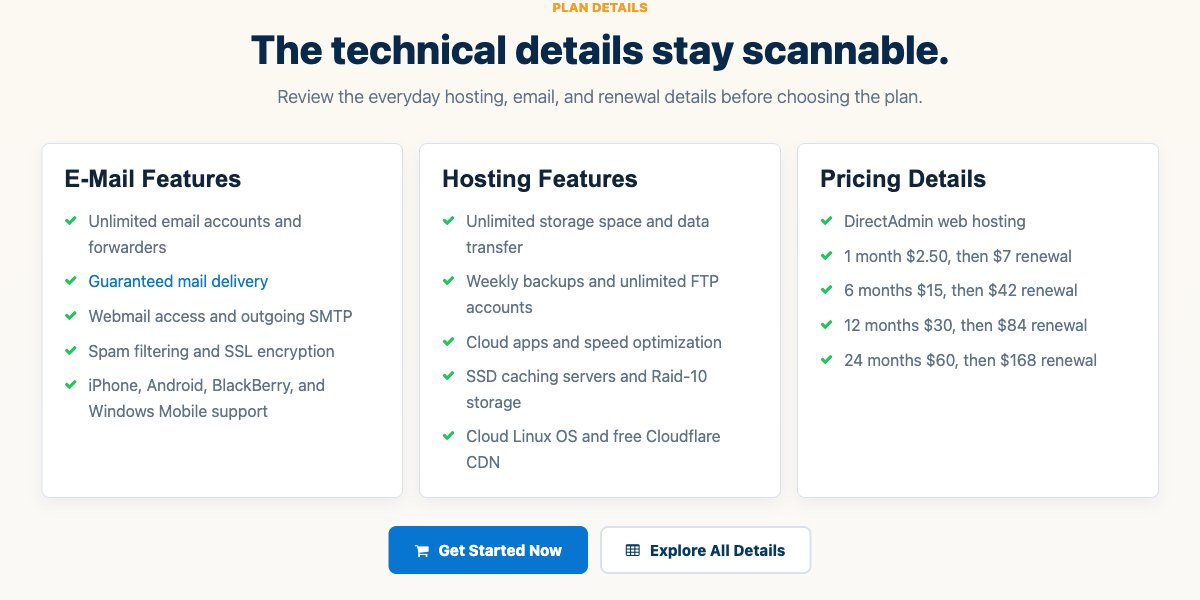
The $2.50/month price applies to the whole first term, up to 24 months. After that, every term renews at $7/month:
| Billing term | First term | Renewal |
|---|---|---|
| 1 month | $2.50 | $7 |
| 6 months | $15 | $42 |
| 12 months | $30 | $84 |
| 24 months | $60 | $168 |
The cPanel hosting plan has the same $2.50 first month, then renews at $8/month. A domain costs $7.99 when you buy it with any web hosting plan.
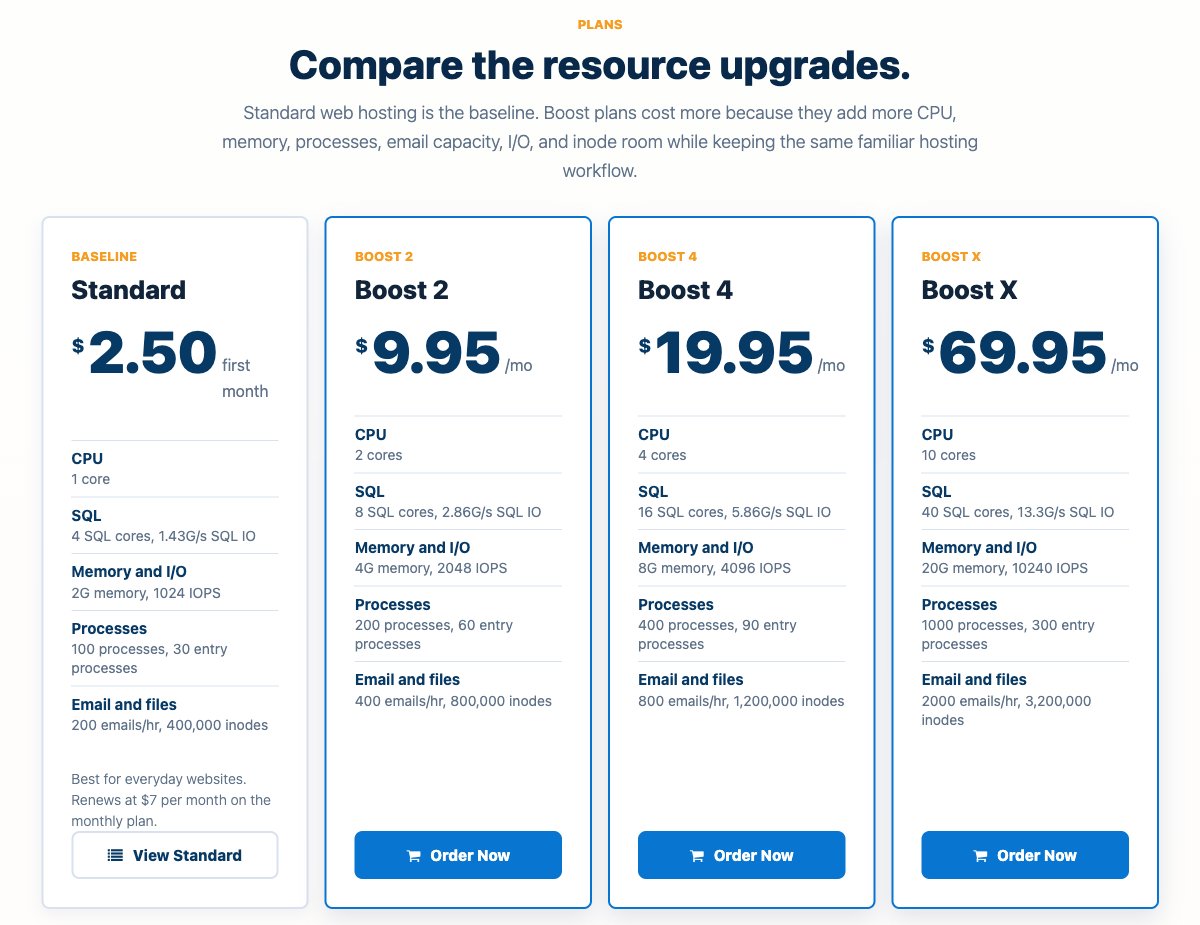
Boost 2 costs $9.95/month, Boost 4 costs $19.95/month and Boost X costs $69.95/month. There's no low intro price to watch out for, since these are the regular monthly rates.
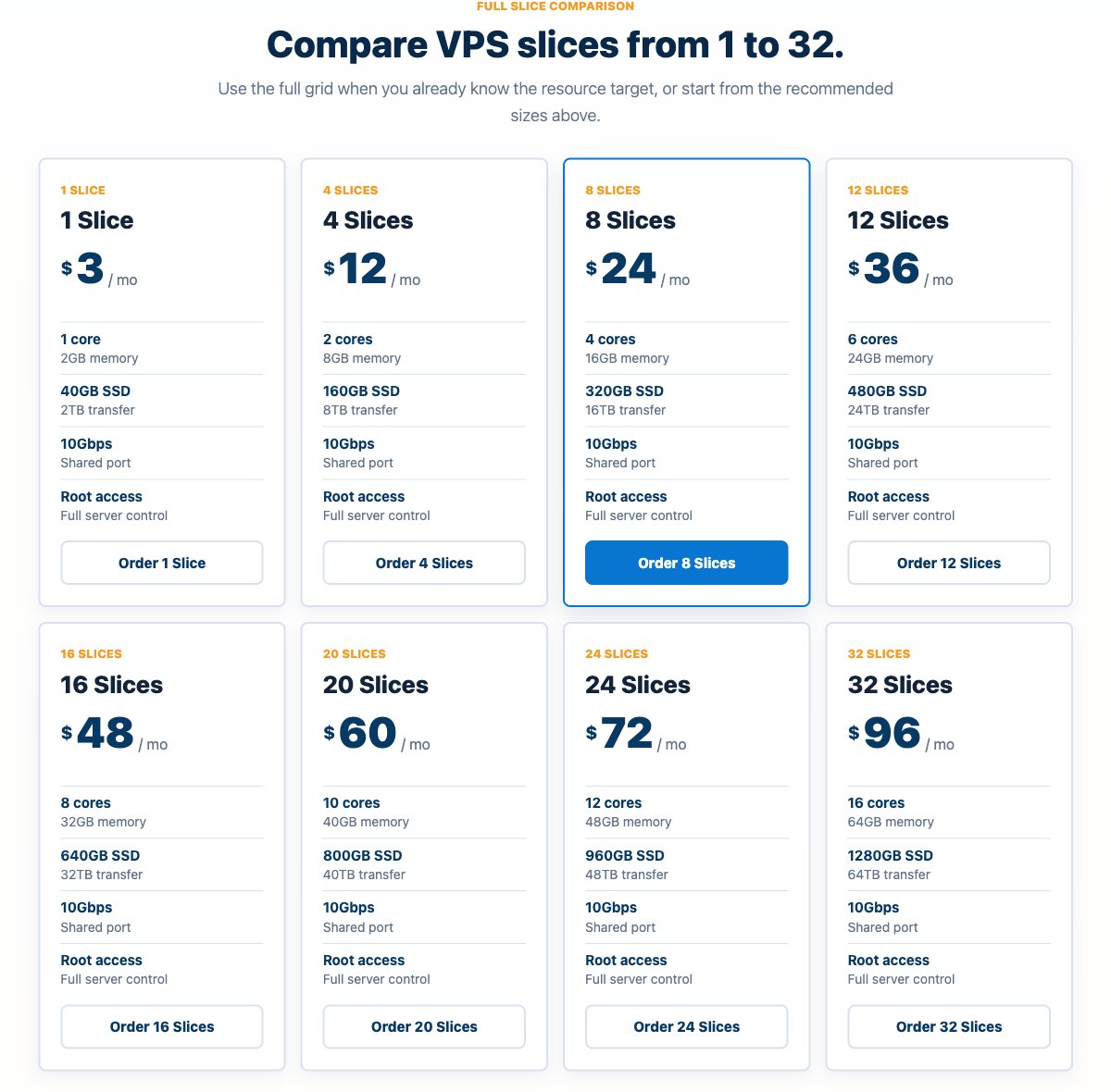
Linux VPS pricing is linear at $3 per slice per month: 4 slices cost $12, 8 slices cost $24 and 32 slices cost $96. Windows VPS costs $5 per slice, starting at 2 slices ($10/month).
VPS hosting is billed monthly only. Adding credit to your account in advance is possible, but there's no discount for it.
Extra IPv4 addresses are $3/month each, and control panel licenses are extra. For more VPS options, see my VPS hosting guide.
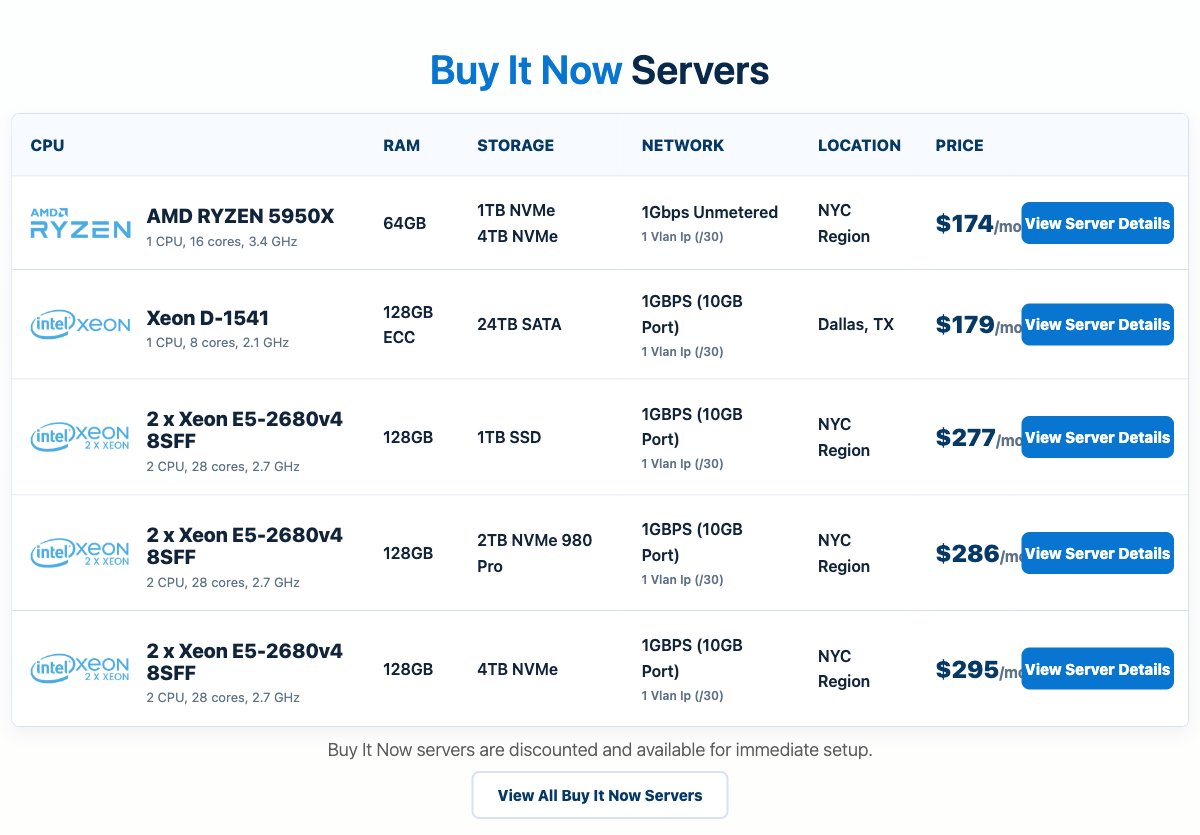
Custom builds start at $166/month for an AMD Ryzen 9900X server with 12 cores and 64 GB of memory. Buy It Now servers started at $318/month (2 x Xeon E5-2680v4, 28 cores, 128 GB, SSD storage) on November 5, 2026. That stock changes daily, so check the current list before you order.
Refunds and payment
Web hosting plans (Standard, Windows, Boost and WordPress) come with a 30-day full refund. VPS, dedicated servers, colocation and licenses aren't refundable once the service has started, so start with one month of VPS if you're testing.
InterServer accepts credit cards and PayPal, plus check or money order. Cancel at least 3 days before the renewal date, or the service renews for another period.
InterServer Coupon Code
WebHostingAdvices has its own InterServer coupon. It brings the first month of Standard web hosting down to $0.01, instead of $2.50. Enter it in InterServer's cart when you order: Coupon: WHA1CENT
The code was tested in InterServer's official cart on October 24, 2026. On monthly billing, the plan then renews at the regular $7/month.
That makes the coupon a cheap way to try InterServer for a month before you commit. If you already know you'll stay, the 12-month and 24-month terms keep the $2.50/month first-term price for longer (see the table above).
Reliability and Support

Score 4.3/5
InterServer offers 24/7 support by ticket, phone and live chat. Its knowledge base is open about staffing: the busiest shift runs 8 AM to 6 PM Eastern, Monday to Friday, and evenings, nights and weekends have fewer agents.
Sales and billing teams work business hours, though the 24/7 technical team can answer basic questions outside them. The on-site team is based at the TEB2 facility in Secaucus, New Jersey, so hardware work in Dallas or Los Angeles needs a technician to be dispatched.
Customer feedback is mostly positive. On Trustpilot, InterServer had a 4.3 rating from 2,528 reviews as of October 25, 2026, and the most common praise was for knowledgeable support during migrations.
Negative reviews mention slow ticket replies during urgent problems and a few cases of slow or unstable servers. Those are individual reports, but they're worth keeping in mind if you need guaranteed response times.
What InterServer Support Told Me
On Friday, November 6, 2026, I asked InterServer support the questions I had before ordering a cloud VPS. I sent a ticket from the client area at 18:50 UTC (1:50 pm US Eastern), then used the live chat on interserver.net, which doesn't need an account, at 19:06 UTC.
| What I checked | Result |
|---|---|
| Live chat: reaching a person | About 10 seconds after saying hi, no AI bot first |
| Live chat: reply speed | 1 to 2 minutes per message |
| Ticket: first reply | 26 minutes |
| New VPS setup time | About 20 minutes after payment |
| ID verification for new customers | Not needed |
| New IP after a blacklisting | Free |
| Adding slices | No reinstall needed |
| Fixing Nginx or PHP | Only on managed VPS (8 slices or more) |
| Ticket: follow-up reply | 18 minutes |
| VPS at 100% CPU for hours | Not throttled automatically, unless it affects other customers |
| Hardware failure | Automatic move to another server not guaranteed |
| Hardware team ticket: reply | 1 hour 29 minutes |
| Moving a VPS to another data center | Not possible: order a new VPS there, no relocation fee |
Reaching a person. Both times I opened the chat, an agent joined about 10 seconds after I said hi. My first chat ended before I'd asked anything, and the second one got a different agent just as quickly.
Quick answers in chat. A new VPS takes about 20 minutes to set up after payment, and new customers don't need ID verification. On blacklisted IPs, the agent said the VPS IP is fixed but can be changed for a valid reason. I had to ask again to learn that a blacklisting counts and that the change is free.
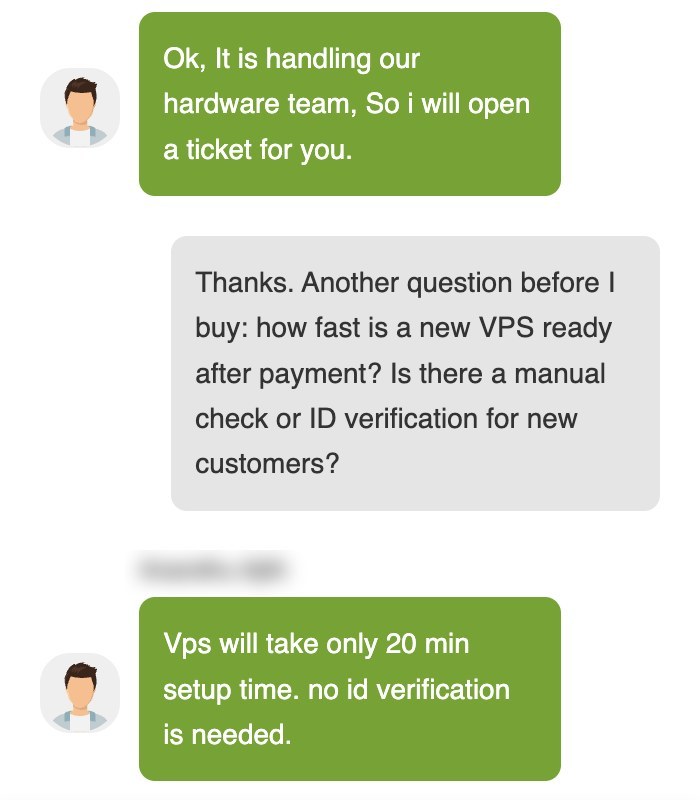
Live chat with InterServer support, November 6, 2026 (US time).
The technical question went to a ticket. The chat handled the quick questions well, but once a question got more technical and in-depth, the agent didn't answer it in the chat and forwarded it to a ticket instead. I asked whether a VPS can move from New York to Los Angeles without a reinstall. The agent first assumed I was already a customer and asked for my login email, then said the hardware team handles moves and opened a ticket for me. I checked the client area during the chat, and the ticket was already there. The hardware team answered 1 hour 29 minutes later: InterServer doesn't move a running VPS between data centers. To switch, you order a new VPS in the other region at checkout and copy your data over, at the regular slice price (from $3 a month), with no relocation fee.
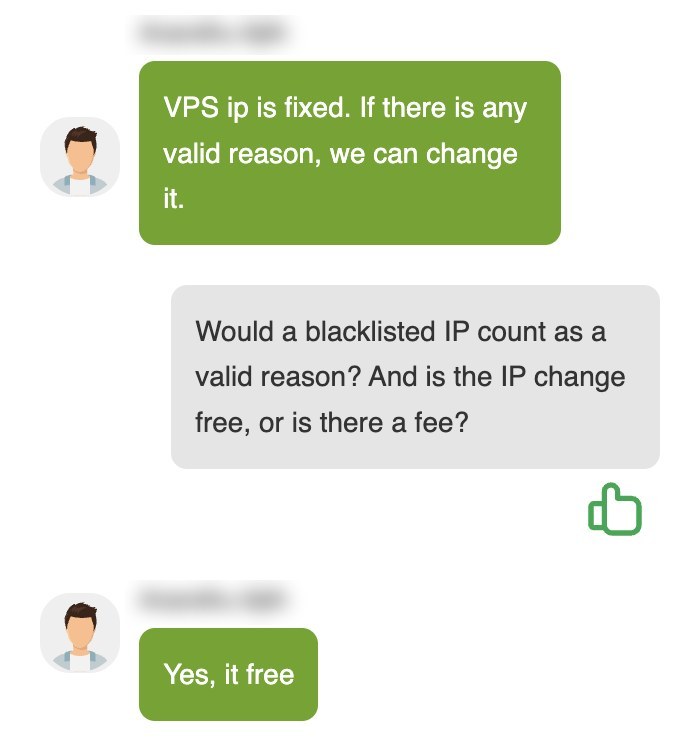
The agent's answer on changing a blacklisted VPS IP, November 6, 2026.
The ticket. My own ticket asked four questions about how the VPS works in practice, and one reply covered all four 26 minutes later. Two answers were clear:
- Adding slices: you can add slices at any time without starting from scratch, so no reinstall is needed.
- Support scope: under 8 slices, support covers the hardware, network and virtualization. Fixing a broken Nginx or PHP setup is managed support work, included from 8 slices.
The other two were only partly answered at first: the reply mentioned KVM isolation, RAID-10 storage and the 99.9% uptime guarantee, but not throttling or what happens when a server fails. I asked again, and the same agent answered 18 minutes later:
- Sustained 100% CPU: it doesn't automatically lead to throttling or suspension, but heavy use that affects the server or other customers' VPS may need intervention under InterServer's usage policies.
- Hardware failure: an automatic move to another server is not guaranteed. Recovery depends on the kind of failure and the recovery options available, so keep your own backups.
What you only notice as a customer:
- One request per ticket: the client area's ticket form asks you to keep each ticket to a single request, although my four-question ticket still got one reply covering all four.
- Server access: opening a ticket includes a box allowing InterServer to access and change your server, and a field for the root password, which the form says is stored in a separate encrypted database.
The limits of one test. One chat and two tickets on a Friday afternoon, US Eastern time, don't show how support handles nights or weekends, when InterServer's knowledge base says fewer agents work.
Conclusion: Is InterServer Right for You?
InterServer is one of the few budget hosts where the renewal price stays low. At $7/month after a $2.50 first term, Standard hosting is cheaper to keep than most shared plans, and the published resource limits tell you exactly what you're getting.
The VPS is the other strong point. A $3 slice with 2 GB of RAM is hard to beat for a small Linux server, as long as you're comfortable managing it yourself or buy 8 slices for managed support.
I'd choose another host if your audience is outside North America, or if you need daily backups and cPanel on the cheapest plan. For U.S. sites that want low long-term costs, InterServer is a sensible pick, and the 30-day refund on web hosting lets you try it without much risk.
Your reviews are important and protected. Hosts on WebHostingAdvices can't pay or offer incentives to hide them.