

Vultr is a Florida cloud provider, launched in 2014, that sells self-managed cloud servers, dedicated-CPU instances, bare metal and cloud GPUs in 34 regions worldwide. It suits developers and site owners who want a cheap, fast Linux or Windows server in a specific city, and who are happy to manage that server themselves.
Shared-vCPU Cloud Compute starts at $5/month (1 vCPU, 1 GB of RAM), or $6/month with NVMe storage on the High Performance and High Frequency plans. Everything is billed by the hour and capped at a monthly price, and new accounts can get $50 of free credit for 30 days.
My Vultr review scores below are based on the current plans, policies and published customer feedback, checked on October 27, 2026, and on my own work with Vultr servers.
| Overall | Features | Performance | Ease of use | Price | Support |
|---|---|---|---|---|---|
| 8.5 | 9.2 | 9.0 | 8.0 | 9.0 | 7.5 |
Contents
Data sheet of the host


Vultr is an American cloud provider owned by The Constant Company, LLC, with its head office in West Palm Beach, Florida. Its servers run in 34 regions across North America, South America, Europe, Asia, Australia, the Middle East and Africa.
Hosting Types
- Cloud Compute (shared vCPU: Regular, High Performance and High Frequency)
- Optimized Cloud Compute and VX1 (dedicated vCPU)
- Bare Metal servers
- Cloud GPU
- Kubernetes Engine (VKE)
- Managed databases (MySQL, PostgreSQL, Valkey, Kafka)
- Block storage, object storage, load balancers and CDN
Operating Systems
- Linux: AlmaLinux, Arch, CentOS, Debian, Fedora, Fedora CoreOS, Flatcar, openSUSE Leap, Rocky Linux and Ubuntu
- BSD: FreeBSD and OpenBSD
- Windows Server 2016, 2019, 2022 and 2025 (license fee added to the plan price)
- Your own image, uploaded as a custom ISO
DataCenters
- North America: Atlanta, Chicago, Dallas, Honolulu, Los Angeles, Miami, New York area (New Jersey), San Francisco Bay Area, Seattle, Toronto and Mexico City
- South America: São Paulo and Santiago
- Europe: Amsterdam, Frankfurt, London, Madrid, Manchester, Milan, Paris, Stockholm and Warsaw
- Asia: Tokyo, Osaka, Seoul, Singapore, Mumbai, Delhi NCR, Bangalore and Chennai
- Australia: Sydney and Melbourne
- Middle East and Africa: Tel Aviv and Johannesburg
I cover every region, and how to pick one, in my guide to Vultr server locations.
Cloud Compute (Regular Performance)
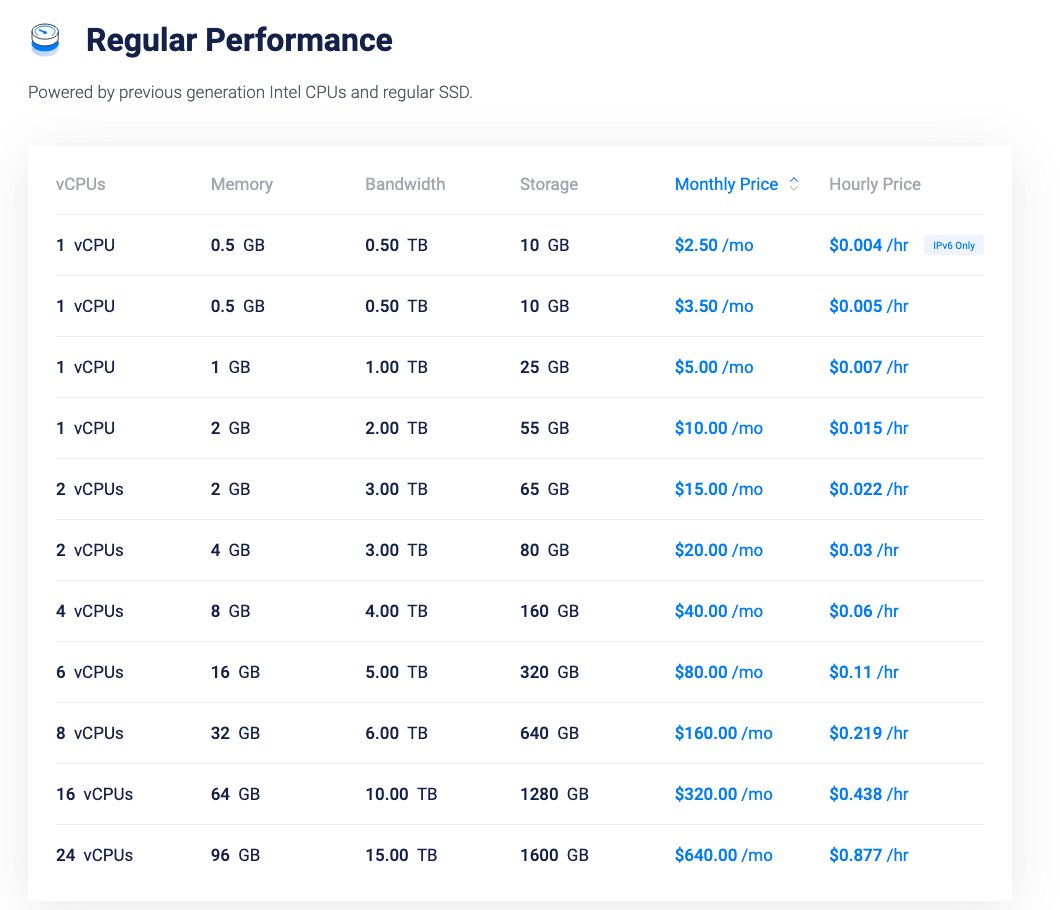
Regular plans start at $5 per month for 1 vCPU, 1 GB of RAM and 25 GB of SSD. The $2.50 and $3.50 plans are limited to a few locations.
High Performance Cloud Compute
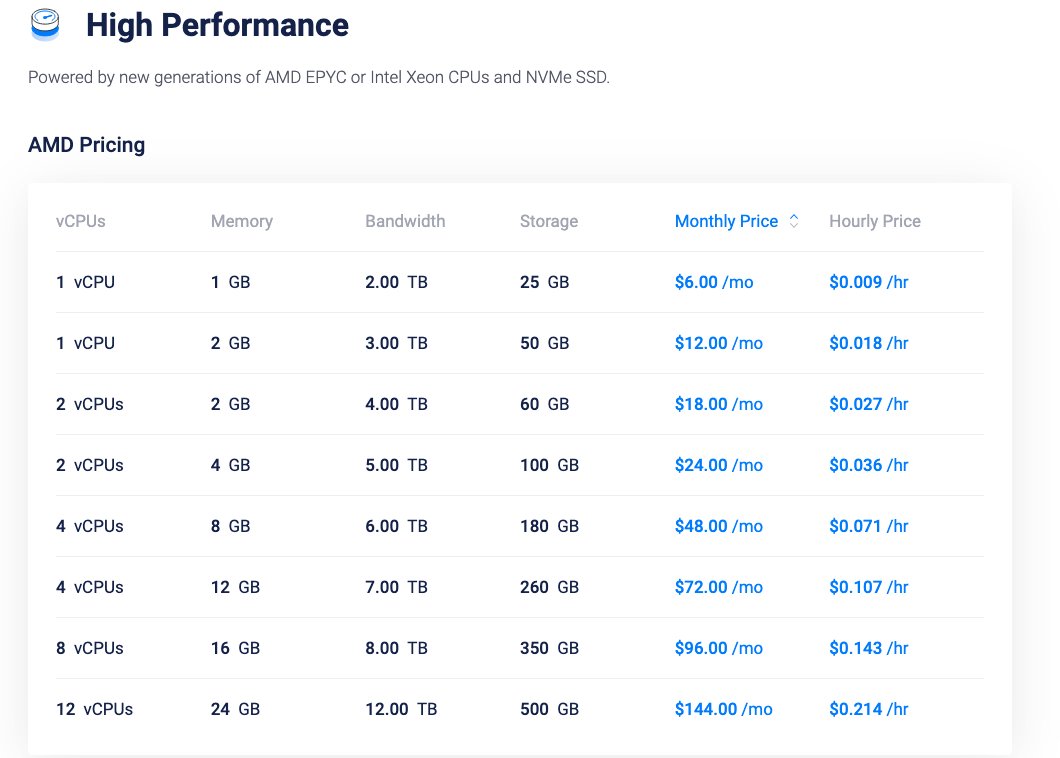
High Performance starts at $6 per month for 1 vCPU, 1 GB of RAM, 25 GB of NVMe and 2 TB of transfer, on AMD EPYC or Intel Xeon.
About Vultr
Vultr launched in February 2014, founded by David Aninowsky, who is now its executive chairman. J.J. Kardwell is the CEO. The company says it has served more than 1.5 million customers in over 150 countries.
It has grown fast in the last two years. In December 2024, Vultr announced financing at a $3.5 billion valuation from LuminArx and AMD Ventures, and it has been adding regions (Milan in May 2026, then Chennai) and GPU capacity for AI workloads.
I've worked directly on Vultr servers as a freelance developer: migrating sites, configuring servers and building web applications on them. I've also used Vultr through Cloudways, so I've seen both sides: a server you manage yourself, and the same infrastructure with a managed layer on top.
The main tradeoff is support. Vultr is unmanaged and ticket-based, so it's a great fit for people who can run a Linux server and a poor one for beginners who want someone to fix WordPress for them.
Pros
- Low entry prices: $5/month Regular, $6/month with NVMe.
- 34 regions, including cities few budget providers cover (Johannesburg, Santiago, Honolulu, Chennai).
- Hourly billing with a monthly cap and no contract.
- Dedicated-vCPU, bare metal and GPU plans when you outgrow shared vCPUs.
- 100% uptime SLA with service credits.
- Free $50 credit for 30 days for new users.
Cons
- Self-managed only: no help with your operating system, apps or WordPress.
- Support by ticket only, with no live chat or phone.
- No refunds on payments, and credits can't be refunded.
- Automatic backups cost 20% extra, and DDoS protection costs $10/month.
- cPanel licenses are expensive on top of the server price.

Technical Features
Score: 9.2/10
Shared vCPU or dedicated vCPU
Vultr is clear about this, which many cloud hosts aren't. Cloud Compute runs on shared vCPUs, so your virtual CPU shares physical cores with other customers. That's fine for websites, small apps and test servers, where the CPU is idle most of the time.
Optimized Cloud Compute and the newer VX1 line run on dedicated vCPUs. You pay more, but a busy neighbor can't slow your CPU down, which matters for databases, busy stores and CPU-heavy apps.
Regular, High Performance and High Frequency
The three Cloud Compute families differ in hardware, not management. Regular runs on previous-generation Intel CPUs with regular SSD storage. High Performance uses newer AMD EPYC or Intel Xeon CPUs with NVMe, and High Frequency uses Intel Xeon CPUs at 3 GHz or more, also with NVMe.
For a WordPress site, I'd skip Regular and start at $6/month with High Performance or High Frequency. NVMe storage helps database-heavy pages, and the price difference is only $1 at the entry level.
Bare metal and GPUs
Bare Metal servers are single-tenant machines: the whole physical server is yours. They start at $120/month for an Intel E3-1270 (4 cores, 8 threads at 3.8 GHz) with 32 GB of RAM and two 240 GB SSDs.
Vultr also rents NVIDIA and AMD GPUs by the hour for AI and rendering work. That's beyond what most websites need, but it shows how far you can grow without changing providers.
Kubernetes, databases and storage
Vultr Kubernetes Engine provides the control plane free of charge, so you only pay for the worker nodes. Managed databases cover MySQL, PostgreSQL, Valkey and Kafka, so you don't have to run a database server yourself.
Object storage starts at $18/month with 1,000 GB included, and block storage lets you add disk space to a server without resizing it. Load balancers cost $10/month.
Operating systems, ISO and marketplace apps
You can deploy all the main Linux distributions, FreeBSD and OpenBSD, or upload your own ISO. Windows Server is available too, but the license is added to the plan price (for example, +$16/month on the $10 plan).
The marketplace has one-click apps such as WordPress, Docker and control panels. Free panels like CyberPanel, CloudPanel and Webmin cost nothing extra, while cPanel starts at $31.99/month for 5 accounts and Plesk starts at $13.99/month. If you need cPanel, compare the total in my guide to a cheap VPS with cPanel.

Performance and Security
Score: 9.0/10
Vultr Speed Test Results (October 2026)
In October 2026, I tested two live WordPress sites on Vultr (a commercial roofing contractor and a fishing guide service, both aimed at US visitors) with a Grafana k6 load test for server speed and Google PageSpeed Insights for page performance.
- Hosting type, roofing site: cloud server (VPS) that runs many sites, likely through a reseller or control panel
- Hosting type, fishing guide site: cloud server (VPS)
- Type of site, roofing site: local business (commercial roofing contractor), WordPress
- Type of site, fishing guide site: local business (fishing guide service), WordPress
Detected from each site’s server and network; the exact plans aren’t public.
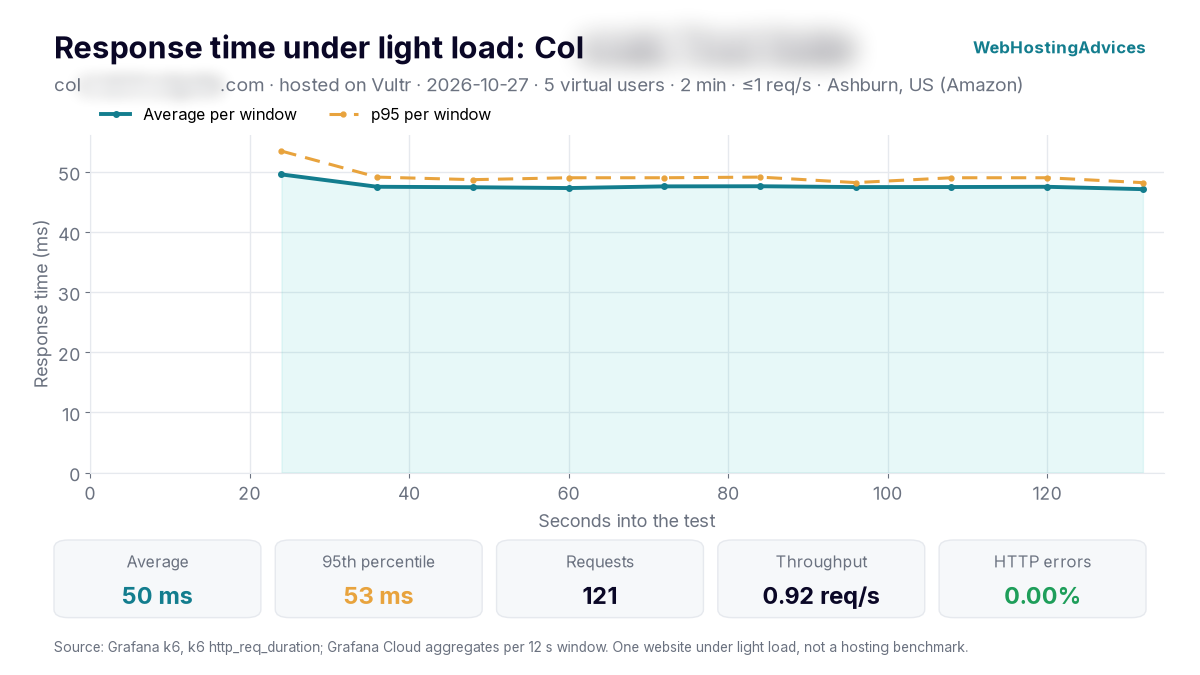
Grafana k6, 27 October 2026, from Ashburn (US): 5 virtual users for 2 minutes, at most 1 request per second. One website under light load, not a hosting benchmark.
The fishing guide site answered all 121 requests without an error, with a 50 ms average response and 95% of requests within 53 ms. Time to first byte averaged 35 ms, because the pages came straight from the server’s page cache.
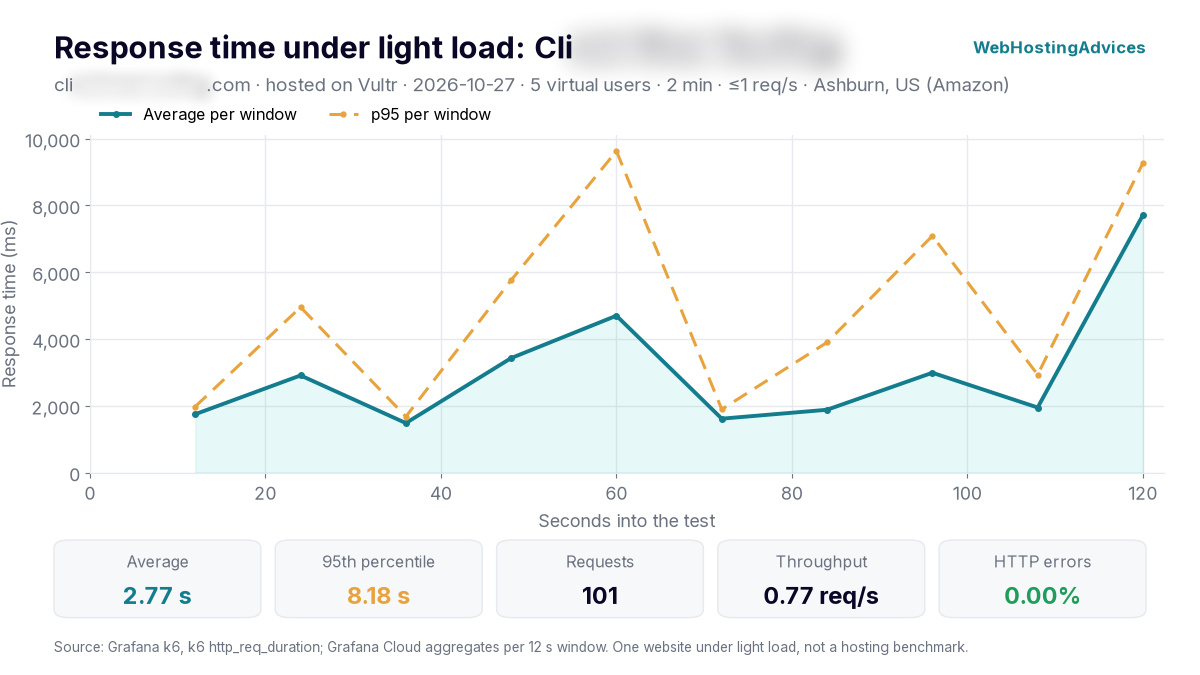
Grafana k6, 27 October 2026, from Ashburn (US), same settings as above.
The roofing site was much slower: a 2.77 s average response, 95% within 8.18 s, and time to first byte averaging 2.24 s. It had no errors, but pages took so long that k6 skipped 20 of the planned requests (101 were sent) instead of sending them in a burst.
No page cache was detected on that site, and its server hosts many other sites, so the server builds every page on request while sharing its resources. The same Vultr network served the cached site in 50 ms, which shows how much the setup matters on a self-managed server.
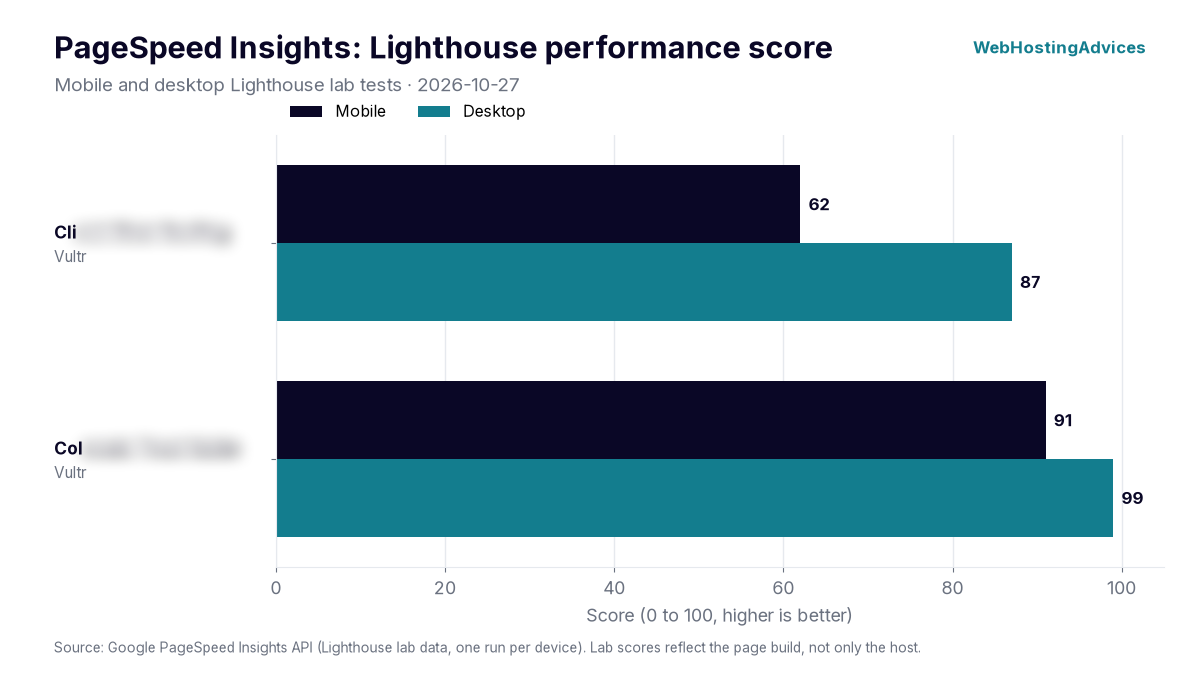
Google PageSpeed Insights lab tests, 27 October 2026, mobile and desktop.
The roofing site scored 62 on mobile and 87 on desktop, and the fishing guide site scored 91 and 99. Their largest elements appeared after 8.62 s and 2.85 s on mobile, and after 1.63 s and 0.74 s on desktop.
PageSpeed scores depend mostly on how a site is built (theme, images, plugins), so treat these numbers as one real-world example, not a lab benchmark of Vultr’s servers. Uptime figures come once the monitored sites have 30 days of data.
Uptime guarantee
Vultr's SLA promises 100% uptime for the network and host node of each service. If it misses that, credits start at 12 hours of service for a short outage and reach a full month (672 hours) for an outage of 7 hours or more.
You have to open a ticket and ask for the credit. Scheduled maintenance announced 24 hours ahead isn't covered, and GPU instances are excluded, so treat the SLA as a promise about the infrastructure, not measured uptime for your site.
Hardware and network
High Performance and High Frequency plans use NVMe SSD storage, while Regular plans use standard SSDs. Each plan includes a monthly transfer allowance (2 TB on the $6 High Performance plan), inbound traffic is free, and extra outbound traffic costs $0.01 per GB.
DDoS protection and firewall
Vultr's firewall groups filter traffic before it reaches your server. Paid DDoS protection adds 10 Gbps of mitigation capacity per instance for $10/month.
That's a reasonable price for a site that gets attacked occasionally. If DDoS is your main concern, my list of DDoS-protected VPS providers compares it with hosts that include protection for free.
Backups and snapshots
Automatic backups add 20% to the server's price. Snapshots, which you take yourself, cost $0.05 per GB per month.
Neither is on by default, so turn on backups from day one. A snapshot is handy before an update, but it lives in the same Vultr account, so keep an offsite copy of anything important too.
Where the servers are
With 34 regions, Vultr can put a server close to almost any audience. That's its biggest advantage over budget hosts with one or two data centers.
Location still isn't everything. Caching, the application and network routing matter too, so test from your visitors' region before you commit.

Ease of Use
Score: 8.0/10
The Vultr control panel is clean and fast. You pick a server type, a location, an operating system and a plan, then deploy the server from the same page.
The hard part comes after that. Vultr doesn't manage your server: in its own words, instances are entirely self-managed. You install updates, configure the firewall and web server, and fix WordPress or PHP problems yourself.
If you want Vultr's network without the server work, a managed platform on top of it is the easier route. That's what I use Cloudways for with some client sites: the same Vultr servers, with the setup, security updates and support handled for you.

Price
Score: 9.0/10
Vultr pricing is simple and published: an hourly rate with a monthly cap, no contract, and no low intro price that jumps on renewal.
Cloud Compute
| Plan | vCPU | RAM | Storage | Transfer | Price |
|---|---|---|---|---|---|
| Regular | 1 | 1 GB | 25 GB SSD | 1 TB | $5/month |
| High Performance (AMD or Intel) | 1 | 1 GB | 25 GB NVMe | 2 TB | $6/month |
| High Frequency | 1 | 1 GB | 32 GB NVMe | 1 TB | $6/month |
| Optimized Cloud (CPU) | 1 dedicated | 2 GB | 25 GB NVMe | 4 TB | $28/month |
| Bare Metal | 4 cores / 8 threads | 32 GB | 2 × 240 GB SSD | 5 TB | $120/month |
The $2.50/month plan is IPv6-only and the $3.50 plan adds an IPv4 address, but both are limited per account and only available in a few locations (New Jersey and Atlanta in October 2026). Prices can vary by location and don't include tax.
How hourly billing works
Most servers are billed by the hour and capped at 672 hours a month, so a server running all month costs the monthly price. VX1 and GPU servers are billed on a 730-hour month instead.
A stopped server is still billed until you destroy it, because it keeps its CPU, RAM, storage and IP reserved. Delete test servers when you're done with them.
Free trial credit
New users can get $50 of free credit, valid for 30 days. You need to link a valid credit card or PayPal account, there's one promo per user, and unused credit expires. I compare it with other offers in my guide to cloud server free trials with no credit card.
Refunds and payment
Vultr doesn't offer refunds: payments are final and account credit can't be refunded. Use the free credit or a few hours of hourly billing to test before you add a large deposit.
Vultr accepts Visa, Mastercard, American Express, Discover, JCB, PayPal, Alipay and UnionPay, plus cryptocurrency through BitPay and ACH or wire transfers.

Reliability and Support
Score: 7.5/10
Vultr support works through tickets in the control panel, by email, or through its Slack app. It doesn't publish live chat or phone support, and it doesn't offer server management.
Customer feedback is the weakest part of this review. On Trustpilot, Vultr had a 1.5 rating from 589 reviews as of October 27, 2026, with most negative reviews about sudden account suspensions, verification requests after a deposit, and slow ticket replies.
Those are individual reports, and positive reviews mention reliable uptime and low prices. Still, they're worth knowing: new accounts can be asked to verify their identity, and outgoing mail on port 25 is blocked by default, so a mail server needs a support request first.
Conclusion: Is Vultr Right for You?
Vultr is one of the best value self-managed cloud providers for developers. At $6/month you get an NVMe server in any of 34 regions, billed by the hour, with room to move to dedicated vCPUs, bare metal or GPUs later.
It's not the right pick for beginners. There's no managed support, no refunds and only ticket support, and the customer reviews show that account verification problems do happen.
I'd choose Vultr if you can manage a Linux server and want a cheap server near your visitors. If you'd rather not manage it yourself, run Vultr through a managed platform like Cloudways instead, and you can try Vultr itself first with the $50 free credit.