


Unlimited storage doesn’t always mean you can host as many files as you want, there is always a hidden catch. In the case of hosting, it’s inodes. You are here in this article because you probably know about inodes.
Short answer: WP Engine and Kinsta don’t publish a file-count limit on their managed WordPress plans, and MochaHost doesn’t enforce one on its Linux shared hosting. If you need even more room, a KVM VPS like Impreza has no account quota at all; the disk’s filesystem sets the number.
Let’s have a quick recap before we see the list of unlimited inodes hosting providers.
Contents
What is Inodes Limit & what is Unlimited inodes hosting?
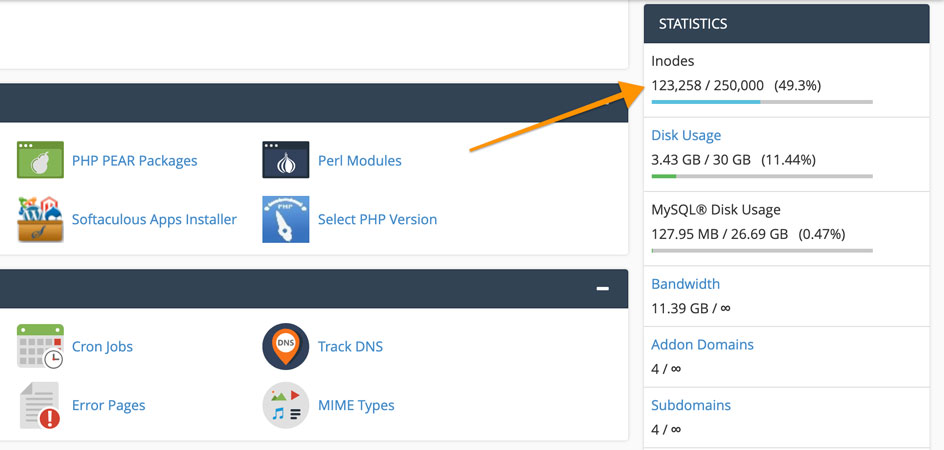
Inode comes from the Linux file system. An inode is a small record that holds the metadata of a file or folder: its owner, permissions, timestamps, and where its data sits on the disk. It doesn’t store the content itself, and every file, folder, and saved email message uses one. In cPanel, the count appears as “Inodes Usage” or “File Usage Limit”.
The number of inodes is equal to the combined number of files, folders, emails, etc stored in your account.
Let’s assume, your website has 15k files and 5k folders. In this case, you will have 20k total files and directories, right?
The number of inodes is also equal to 20k here. If you have 1k emails (all of them including sent and received), your inode count increases to 21k.
The hosting provider has a limit on the inodes you can use. Published caps on shared hosting today run roughly 200,000 to 600,000 inodes, and entry plans often sit at 200,000 to 250,000.
So, you can host your website here. When you reach the limit, you usually get a warning first, and then new file writes fail: uploads, plugin updates, cache files, and incoming emails can’t be saved. Depending on the host, the account may also be suspended, so it’s better to keep the number low.
Unlimited inode hosting is where the provider doesn’t set a file-count quota. Storage limits and fair-use rules still apply, but the number of files, folders, and emails isn’t capped by a fixed figure.
Usually, these types of unlimited inode hosting are for the cloud or managed services. However, few shared hosting services offer unlimited inodes hosting or they set a very high limit. We will see a complete list of them.
Managed WordPress without Inodes limit
Managed WordPress is the best fit if you run WordPress and your site creates a lot of files: big media libraries, WooCommerce stores, or busy cache folders. Neither of the two hosts below publishes an inode or file-count limit; what they meter is storage, bandwidth, and visits.
The price is higher than shared hosting because these are premium managed hosts. In return, you get daily backups, WordPress and PHP updates handled for you, and expert support. Very large file counts are still subject to each host’s fair-use rules. Here are the two options.
#1 WP Engine

WP Engine is one of the best-known managed WordPress hosts. It takes care of the server side for you: daily automated backups, WordPress, PHP, and MySQL updates, free SSL, and SSH access are all included in the entry plan.
WP Engine doesn’t publish an inode or file-count limit for its plans. The limits you’ll actually see are storage, bandwidth, and monthly visits, and an account that stores an unusual number of files is still subject to fair use.
- Starting price: $28 per month, billed annually (Essential plan)
- Inodes: No published file-count limit (fair use applies)
- Number of sites allowed: 1 on the entry configuration
- Storage: 10 GB to 50 GB on Essential
- Bandwidth: 75 GB per month, 25,000 to 400,000 visits depending on the configuration
- Free Migration: Yes, managed site migrations
#2 Kinsta

Kinsta has a good reputation for powerful managed WordPress hosting, and its entry plan is cheaper than many people expect. Each site runs in its own isolated container, so other customers’ traffic doesn’t eat into your resources.
Every plan includes automatic daily backups, a CDN, enterprise DDoS protection, and unlimited free migrations. New customers get the first month free on select plans, which gives you time to move a file-heavy site and see how it behaves.
- Starting price: $35 a month, or $30 a month billed annually (first month free on select plans)
- Inodes: No published file-count limit (fair use applies)
- Number of sites allowed: 1 WordPress installation
- Storage: 10 GB on the entry plan
- Bandwidth: 20 GB server bandwidth plus 125 GB CDN bandwidth per month
- Free Migration: Yes
- Money-back guarantee: 30 days
Hosting Providers with Unlimited Inodes
Most people prefer to go with shared hosting, so this part focuses on it. A provider in this group says plainly that it doesn’t enforce an inode limit on its shared plans.
The high-inode shared hosts in the next section do have a cap, but they set it well above the usual figure, so they are worth a look too.
#3 MochaHost

MochaHost states in its help center that it does not enforce specific inode limits on its Linux-based packages, and that covers the shared plans below. That is a rare written statement; most shared hosts publish a hard file count instead.
There is one condition. MochaHost says these plans aren’t meant for file storage, archives, or file-sharing sites. Run normal websites and email, keep large backups somewhere else, and the file count shouldn’t stop you.
All four plans use NVMe SSD storage, cPanel, LiteSpeed Web Server, Imunify360, free SSL, weekly offsite backups, and free migrations. You can choose the server location at checkout, with the US, India, and seven more regions on the list.
If you outgrow shared hosting, MochaHost says its VPS and dedicated cloud servers have no specific inode limit either.
- Starting price: $3.49 per month on a 3-year term (renews at $16.99)
- Inodes: No specific inode limit on Linux shared plans (not for file storage or archives)
- Number of sites allowed: 1 on Soho, unlimited on Business, Mocha, and Ultimate
- Storage: 30 GB, 50 GB, and 100 GB NVMe, unlimited on Ultimate
- Bandwidth: Unlimited
- Free Migration: Yes
- Money-back guarantee: 30 days
Shared Hosting with “High Inodes”
#4 BlackHOST

Blackhost has always been a unique host. They are mostly known for the privacy of their servers.
When you open their website, you can tell right away that it’s different. It’s not like all the other hosting providers. You will get a generous amount of resources with all their shared hosting plans.
I wanted to see this for myself. After BlackHOST's team suggested by email that I compare it on a real account, I created an account and logged in to its terminal. Running df -i showed 16,659,222 free inodes on the home filesystem:

That number covers the whole filesystem the account sits on, so it isn't an allowance reserved for one account. Still, no small inode cap showed up, unlike the 200k to 600k limit many shared hosts set.
All their plans support Node.Js, Ruby, and Python which is quite rare in shared hosting. You will get ImunifyAV for better security. This is how you can get things rolling with ease.
- Starting price: $1.95
- Inodes: No small cap; 16.6 million free on the home filesystem when I checked
- Number of sites allowed: Unlimited
- Storage: 10 GB to 50 GB
- Bandwidth: Unmetered
- Free Migration: Yes
- Money-back guarantee: 48 hours
#5 InterServer

InterServer is a New Jersey host known for low, flat renewal prices on shared hosting. Its web hosting plans are sold with unlimited storage, which makes the inode rule the part worth reading before you sign up.
InterServer's terms of service cap each Standard account at 400,000 inodes. The Boost plans raise it in steps: 800,000 on Boost 2, 1.2 million on Boost 4, and 3.2 million on Boost X, which is the highest published shared figure in this list.
In practice, 400,000 inodes is enough for several typical WordPress sites. Keep in mind that the terms ban file archives and email archives on shared hosting, so the extra inodes are meant for live sites, not for storing backups.
- Starting price: $2.50 for the first month, then $7/month
- Inodes: 400,000 on Standard; 800,000 on Boost 2 ($9.95), 1,200,000 on Boost 4 ($19.95), 3,200,000 on Boost X ($69.95)
- Number of sites allowed: Not capped on the plan page
- Storage: Unlimited (within the inode cap and fair use)
- Bandwidth: Unlimited data transfer
- Free Migration: Yes (cPanel to cPanel or DirectAdmin to DirectAdmin)
- Money-back guarantee: 30 days
#6 Hostinger

As you are browsing through the shared hosting, you might also want to get the most affordable plan, right?
If that’s the case, you can go with Hostinger. Of course, you won’t get unlimited inode hosting here but the inode limit is high enough for your websites.
So, you can surely consider them. Hostinger is one of the services where you will get a ton of features such as Litespeed Cache with WordPress acceleration and many more things.
You can surely consider their plan if you want to go with the cheapest hosting. They also have cloud hosting where you will get better speed.
- Starting price: $2.49 a month on a 48-month term (renews at $10.99)
- Inodes: 400,000 on Premium, 600,000 on Unlimited, and 2,000,000 on Cloud Startup
- Number of sites allowed: 3 websites on Premium and unlimited websites on the other plans
- Storage: 20 GB SSD, 50 GB NVMe, and 100 GB NVMe for respective plans
- Bandwidth: Unlimited on all plans.
- Free Migration: Yes, website migrations are free and unlimited
- Money-back guarantee: 30 days
#7 DreamHost

Dreamhost has been on the internet for a long time, and its shared plans give you more inodes as you move up. The top Scale plan allows 1,000,000 inodes, which is four times the usual entry-level cap.
When I emailed DreamHost earlier and asked whether its shared hosting plans have an inode limit, its sales team told me there was no hard inode limit. Here is the reply I got back then:
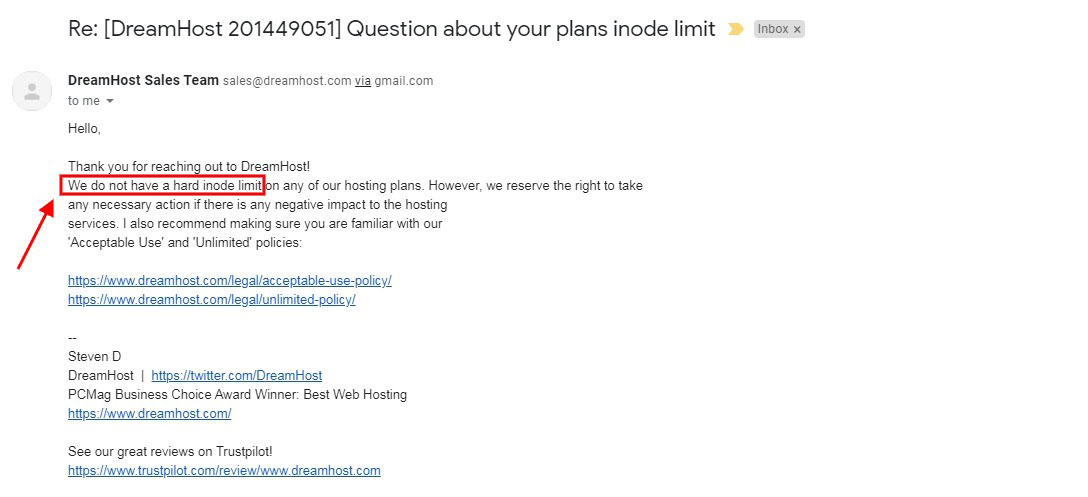
DreamHost has since published per-plan inode limits: 250,000 on Launch, 500,000 on Growth, and 1,000,000 on Scale. If you go over the limit, your site stays online, but uploads, installs, and other writes to the disk fail until you clean up.
- Starting price: $2.89 per month for the first year (renews at $10.99)
- Inodes: 250,000 on Launch, 500,000 on Growth, and 1,000,000 on Scale
- Multiple sites allowed: 25 websites on Launch, 50 on Growth, and 100 on Scale
- Storage: 25 GB to 100 GB NVMe
- Bandwidth: Unlimited
- Free Migration: Only for WordPress
- Money-back guarantee: 30 days
#8 Hosting.com (formerly A2 Hosting)
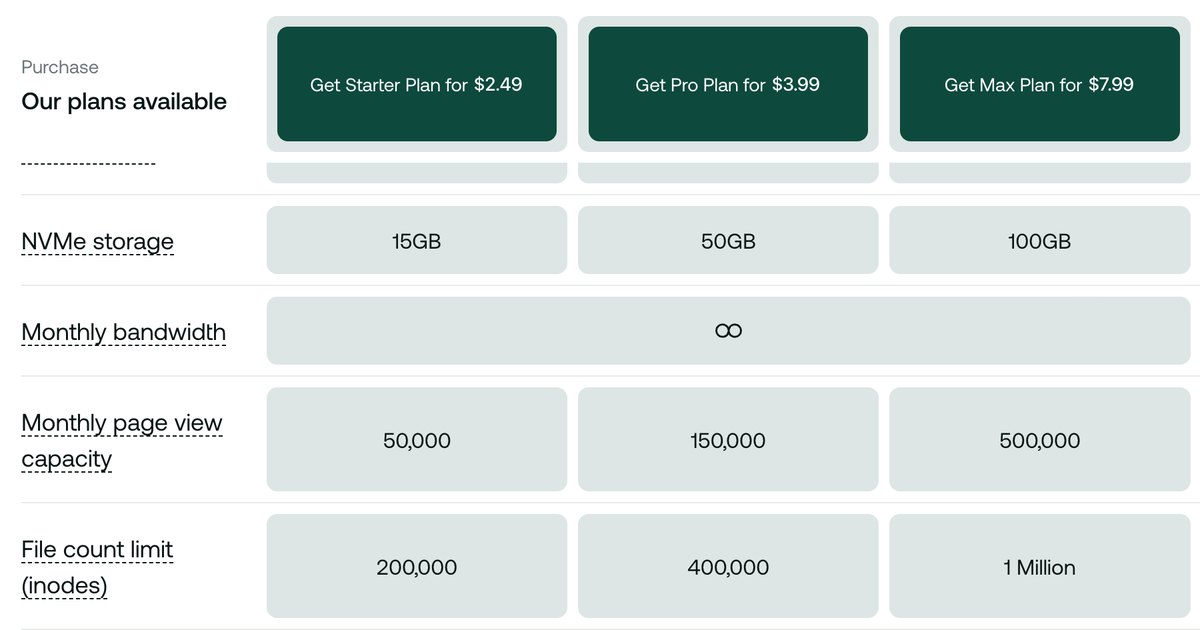
Hosting.com is known for its speed. If you are looking for a service that has a good number of inodes as well as the speed of the website is great, you can surely go with the Hosting.com plan. They offer various plans in various hosting types and all of them are the best.
We will surely mention them when we check out the VPS list for unlimited inode hosting. They have a great uptime along with high-speed servers. Finally, the inode limit is high here.
- Starting price: $1.99 a month on a 4-year term (renews at $13.99)
- Inodes: 200,000 on Starter, 400,000 on Pro, and 1 million on Max
- Number of sites allowed: 5 on Starter, 10 on Pro, and 50 on Max
- Storage: 15 GB, 50 GB, and 100 GB NVMe
- Bandwidth: Unlimited
- Free Migration: Yes
- Money-back guarantee: 30 days
#9 Hostarmada

HostArmada is one of the websites where you will find various discount offers. Therefore, you will get the hosting at an affordable price.
If you are looking for a hosting provider with high inode limits and with attractive colors, you can go with HostArmada.
Here, you get a 45-day money-back guarantee. The time is enough to check and test your website in all possible ways.
They provide a fast and reliable hosting experience. They are also known for their security.
- Starting price: $2.15/month (renews at $11.95)
- Inodes: The limits are 250k, 350k, and 500k respectively.
- Number of sites allowed: 1 website on Start Dock, unlimited on Web Warp and Speed Reaper
- Storage: 15 GB, 30 GB, and 40 GB NVMe
- Bandwidth: Acceptable usage (HostArmada estimates about 30k, 60k, and 120k visitors per month)
- Free Migration: Yes
- Money-back guarantee: 45 days
VPS Hosting with Highest Number of Inodes
Now, we will see some of the best VPS hosting providers for a high number of inodes.
On an unmanaged VPS, there is usually no inode quota from the host; the filesystem on your disk decides the number. Some managed VPS plans do set a cap, so it’s worth checking before you buy.
So, here are a couple of options from which you can choose.
#10 Impreza VPS (no limitation)

Impreza is also a great website where you can find the best hosting services. They are known for their High-privacy and Security.
Impreza doesn’t publish an inode or file-count limit for its KVM VPS plans. On a KVM VPS you get root access and your own virtual disk, so the number of inodes depends on how that disk’s filesystem was created, not on a hosting-account quota.
With ext4’s default of one inode per 16 KB, a 40 GB disk gets roughly 2.6 million inodes. Run df -i after deployment to see the exact figure. You can ignore the addons if they ask you to buy them because you don’t need them.
- Starting price: $18.00 per month for this plan (KVM plans start at $9)
- Inodes: No published limit; set by the disk’s filesystem (about 2.6 million on 40 GB with ext4 defaults)
- RAM: 2 GB
- Cores: 2
- Storage: 40 GB (SSD)
- Bandwidth: 5 TB
- Free Migration: None
#11 Hosting.com VPS

Deja vu? Probably not. We already looked at Hosting.com when we were checking the shared hosting.
If you remember, we even mentioned that they have amazing VPS. So, here we are.
In VPS, you get two types of servers. One of them is an unmanaged server and the second is the managed server where you will also get the cPanel.
There are a lot of differences between both of them. Hosting.com’s service terms cap VPS accounts at 2,000,000 inodes, which is twice the 1 million on its top shared plan. It’s a fixed ceiling set by the host, though, so a file-heavy project that needs more is better off on a VPS without an account quota.
- Starting price: Unmanaged from $6.49/month on a 3-year term; managed cPanel from $23.20/month billed annually
- Inodes: 2M (cap set in the service terms)
- RAM: 4 GB on both entry plans
- Cores: 2 cores on both entry plans
- Storage: 80 GB NVMe for unmanaged, 100 GB NVMe for managed
- Bandwidth: 1 TB on the managed entry plan
- Free Migration: Yes
- Money-back guarantee: 30 days
Final Words
To conclude, these are some of the best unlimited inode hosting providers. Not all of them have unlimited inodes, but the ones with a cap set it well above the usual shared hosting figure.
For a file-heavy WordPress site, I recommend WP Engine or Kinsta. Both are fully managed, include daily backups, and don’t publish a file-count limit. If you want a cheaper option or a site that isn’t built on WordPress, MochaHost doesn’t enforce an inode limit on its Linux shared plans.
- For Managed WordPress, WP Engine is the best one, with Kinsta a close second.
- You can go with MochaHost if you want budget shared hosting without a set inode limit.
If you are looking for cheaper prices, feel free to check these affordable VPS selections.
WP Engine doesn’t publish a file-count limit; storage, bandwidth, and visits are the limits it meters, and fair use still applies.
FAQ (Frequently Asked Questions)
What are inodes in cPanel?
An inode is the record that stores the metadata of one file or folder, such as its owner, permissions, and location on the disk. In cPanel, the inode count is the number of files, folders, and emails in your account. If you have 100 files with 5 folders and 4 emails, your inode count is 100+5+4=109.
What happens when the inode is full?
When the inodes are full, you won’t be able to store more files or create a new folder. You won’t even receive new emails.
Along with this, you will usually get a warning from your hosting provider. If you don’t take action, your account may be suspended, depending on the host.
How many inodes will I need for my website?
This depends on the website. A fresh WordPress install has about 4,250 files and folders, and large sites with big media libraries and cache folders often pass 100,000.
So, depending on the number of plugins, uploads, and cache files, the inodes will change. A 200k to 250k entry-level limit is enough for a few small sites, but busy stores and image-heavy blogs need more.
Does unlimited storage mean unlimited inode?
No. Unlimited storage means the host doesn’t sell you a fixed number of gigabytes, but files and folders still count against the inode limit. Large files are also subject to the host’s fair-use rules, so “unlimited” storage doesn’t mean you can keep archives or backups of any size.
What is the Inodes limit on most of the shared hosting?
Published inode limits on shared hosting are roughly 200k to 600k, and entry plans often start at 200k to 250k.
What is the Inodes limit on most VPS hosting?
An unmanaged VPS usually has no inode cap from the host. The filesystem on your disk sets the number (with ext4 defaults, about 2.6 million on a 40 GB disk). Some managed VPS plans do set a cap, for example Hosting.com’s 2 million.
What is the Inodes limit in dedicated servers?
Like an unmanaged VPS, a dedicated server usually has no host-imposed inode limit. The count depends on the disk size and how the filesystem was formatted.
How to check Inode usage in your cPanel account?
When you open your cPanel, you will see inodes or file usage on the right side where all the statistics are shown. If not, you can directly head over to the inodes option by searching for it.
How do you reduce inode usage?
Deleting the files you don’t need will do the job. You can remove the plugins which you are no longer using, and delete your emails.
There will be many empty directories, you can remove them too. If you have a backup, you can create a zip file and save it. This will decrease inode usage.