


 Tested by
Contabo is a German hosting company, founded in 2003 and based in Munich, that sells self-managed VPS, virtual dedicated servers (VDS), dedicated servers and GPU servers in 9 regions across Europe, North America, Asia and Australia. It suits developers, hobbyists and small businesses who want a lot of RAM and disk space for little money and can manage a Linux server themselves.
The entry Cloud VPS 4 costs $6.60/month on a monthly contract (plus a one-time $2.40 setup fee), or $5.28/month on a 24-month term, for 4 vCPU, 8 GB of RAM and 100 GB of SSD storage. Billing is by contract, not by the hour, and the cheapest prices need a long prepaid term.
My Contabo review scores below are based on the current plans, prices and policies, checked on November 8, 2026, on published customer feedback, on my own k6 tests of a live website hosted on Contabo, and on my own Contabo Cloud VPS 4, which I ordered on November 27, 2026.
Overall score weights: Performance 30%, Price 20%, Support 20%, Features 15%, Ease of use 15%. Performance comes from my benchmark rating.
Pros
- Very high specs for the price: 4 vCPU, 8 GB RAM and 100 GB SSD from $5.28/month on 24 months.
- Unlimited traffic on every plan, under a fair use policy.
- DDoS protection, a firewall and snapshots included at no extra cost.
- Nine regions, including Sydney, Tokyo, Navi Mumbai and Singapore.
- A dedicated-core VDS line when shared vCPUs aren't enough.
- A 4.6 Trustpilot score from more than 11,600 reviews.
Cons
- My tests: median server time of 333 ms, rating C and rank 17 of 29 VPS hosts.
- Your server stays on hold until you pass an ID check, even after you've paid.
- The CPU model of the Core VPS line isn't published, and its vCPUs are shared.
- Slow ports on small plans: 200 Mbit/s on Cloud VPS 4.
- No hourly billing, and the best prices need a 12- or 24-month prepaid term.
- Surcharges for every location outside the EU, and a setup fee on the monthly Cloud VPS 4.
- No money-back guarantee beyond the legal withdrawal right for consumers.
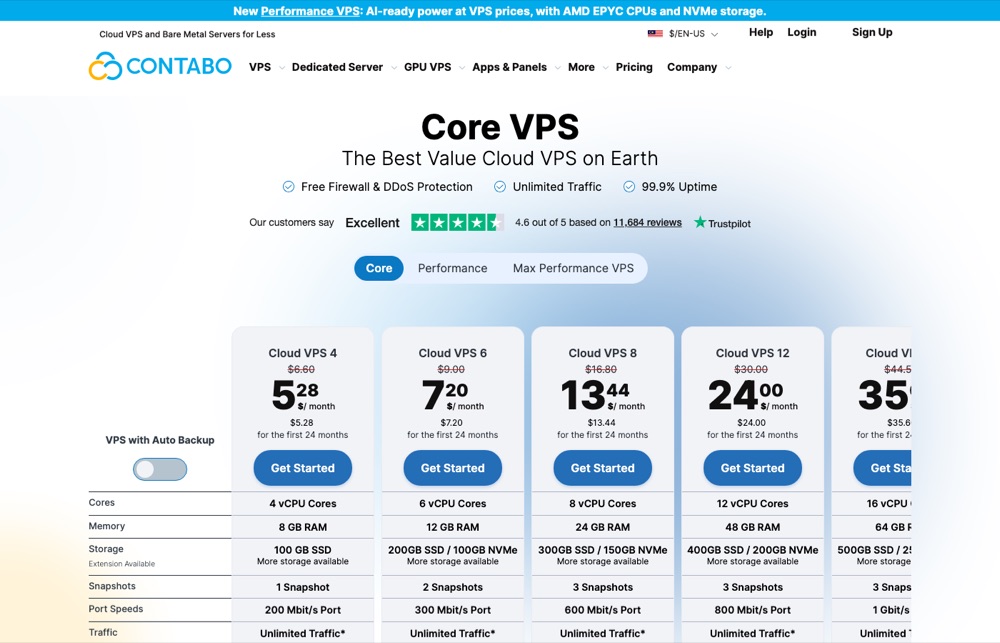
Contabo's Core VPS plans in US dollars, with the 24-month price in large type and the monthly price struck through above it (November 8, 2026).
Contents
Technical Features

Score 4.1/5
Contabo earns a high features score for the amount of hardware each plan includes, plus free DDoS protection, snapshots and nine regions. It loses points for unpublished CPU details on the Core line and slow ports on the small plans.
Shared vCPU, Performance VPS or dedicated cores
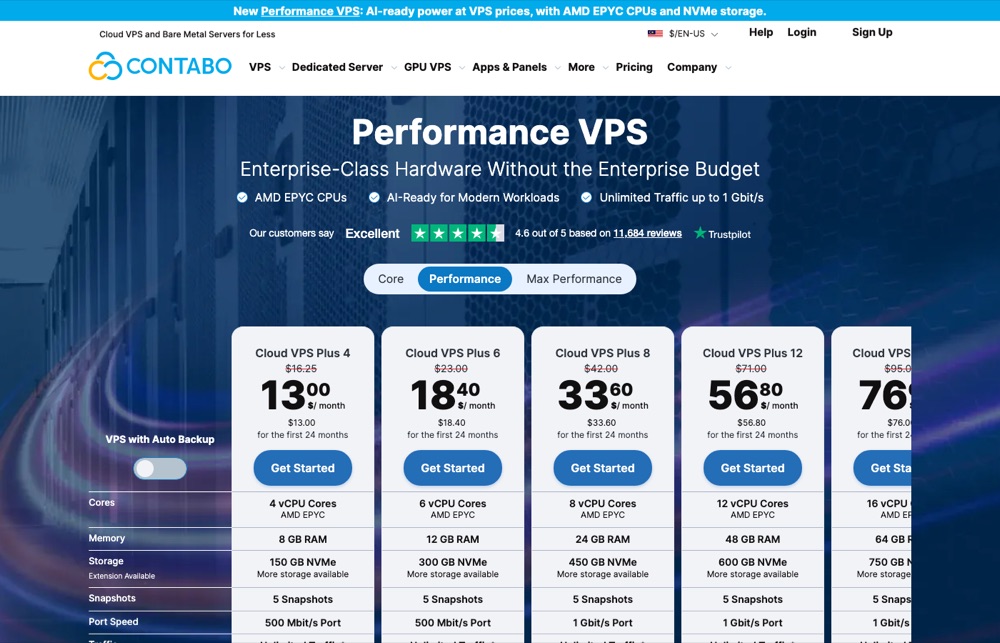
Performance VPS (Cloud VPS Plus) plans with AMD EPYC vCPUs and NVMe storage, in US dollars (November 8, 2026).
Contabo sells three VPS lines, and the CPU is the main difference between them. Core VPS is the cheap line. Contabo's FAQ says it runs on "proven infrastructure across multiple CPU generations," virtualized with KVM, and it doesn't name a processor model or say that the cores are dedicated.
That wording matters. A vCPU on a shared host is a share of a physical core, and when neighbors are busy, your server gets less CPU time. Contabo argues that for websites, mail and dev servers, RAM and network throughput matter more than the CPU, which is true for idle workloads but not for uncached PHP pages under traffic.
Independent data gives a hint about the hardware. VPSBenchmarks, which buys and tests VPS plans itself, has reported AMD EPYC processors on several Contabo Cloud VPS plans between March 2025 and September 2026, without a model number. That's their measurement, not a Contabo promise, and the host machine can differ from one server to the next.
The Performance VPS line names AMD EPYC CPUs and Gen 4 NVMe storage, but Contabo's FAQ says it's still shared at the hypervisor level. Only the Max Performance VPS (Cloud VDS) line gives you cores assigned to your instance alone, on an AMD EPYC 7282 at 2.8 GHz, which is a 2019 server chip.
RAM and storage
Every Core plan pairs its vCPUs with 2 GB of RAM or more per vCPU, from 8 GB on Cloud VPS 4 to 96 GB on Cloud VPS 18. That's the headline reason people choose Contabo: a mail server, Nextcloud or a few WordPress sites rarely run out of memory here.
Storage is SSD by default. From Cloud VPS 6 up, you can swap to NVMe at half the size (for example 200 GB SSD or 100 GB NVMe on Cloud VPS 6), and a storage extension doubles the disk for a monthly fee, up to 1.2 TB on the top Core plan.
NVMe is faster for databases, so I'd take it for a busy WordPress or WooCommerce site and keep SSD for backups and files. Contabo doesn't publish RAID levels or IOPS figures for these disks.
Traffic and port speed
All plans include unlimited traffic, with an asterisk. Incoming traffic is unmetered, and outgoing traffic falls under a fair usage policy "based on average server workloads," with Contabo reserving the right to throttle servers with "exceptionally high or disruptive usage patterns."
The port speed is the real limit. Cloud VPS 4 is limited to 200 Mbit/s, Cloud VPS 6 to 300 Mbit/s, and only the 16- and 18-vCPU plans reach 1 Gbit/s. On my own Cloud VPS 4, downloads ran at 194 to 199 Mbit/s, with one file or with four at once, so the plan gets exactly its advertised port speed and no more. That's plenty for web pages, but slow for large downloads, backups to another provider or video streaming.
Operating systems, panels and apps
Linux images and FreeBSD are free, and you can upload your own ISO for anything that runs on KVM. Windows Server costs extra each month, and the price grows with the plan ($9.60 on Cloud VPS 4, $20.40 on Cloud VPS 6).
Webmin is free. cPanel costs $29.50/month and Plesk with Linux $16.50/month in the configurator, and Contabo's FAQ says Plesk costs nothing in its first month when you drop it before that month is over. Contabo's API and command-line tool work with Terraform, and cloud-init is supported for automatic first-boot setup.
Performance and Security

Score 4.0/5
I test Contabo on two servers: a live customer website and my own Contabo Cloud VPS 4 in the US East region, running a WooCommerce test shop. Here are the numbers, followed by what they mean for a buyer.
Contabo Speed Test Results
I load-tested 2 websites on Contabo VPS: a live customer website, whose hosting was verified from its server IP, and my own Cloud VPS 4. The table notes the technology each site runs on and the data center its server sits in, since both affect the result.
Most hosting reviews quote the cached speed, which is really the cache or CDN talking, not the host. I show both: the cached TTFB your visitors normally get, and the uncached TTFB with the page cache bypassed. The ranking uses server time (uncached TTFB minus the network round trip from the test location), because a cache can hide a slow server. Each hosting type's figure is the median of its sites.
| Hosting type | Website | Technology | Datacenter | Cached TTFB | Uncached TTFB | Server time |
|---|---|---|---|---|---|---|
| VPS | My own test shop (Cloud VPS 4) | WordPress + WooCommerce | Carlstadt, United States | 216 ms | 218 ms | 211 ms |
| VPS | Networking blog | WordPress | Carlstadt, United States | 454 ms | 462 ms | 455 ms |
| VPS median | 2 sites | 335 ms | 340 ms | 333 ms |
Test settings, November 2026: 5 virtual users for 2 minutes, at most 1 request per second, every second request with a unique query string to bypass the page cache. Live websites under light load, not a controlled benchmark of Contabo's plans.
The median server time was 333 ms across the 2 sites. Neither site uses a page cache: cached and uncached came back close together, so visitors lean on the server as much as the test does. Both sites answered every request without an error.
What each site runs:
- My own test shop: WordPress with WooCommerce (an 18-product shop as the home page), Elementor, Yoast and Contact Form 7, no page cache, on my Cloud VPS 4 (4 vCPUs, 8 GB RAM) in Carlstadt, United States. Tested on November 27, 2026.
- Networking blog: WordPress, Carlstadt, United States
Each hosting type has only 2 tested sites so far, so its median is less reliable. My Performance score for Contabo uses the VPS/cloud result. It is ranked against every other host on my benchmarks page.
Contabo Uptime
I monitor one Contabo customer site, a WordPress blog on a VPS in the US, with UptimeRobot every 5 minutes. The graph below shows its daily uptime and updates every day. You can compare it with the other hosts in the uptime ranking.
Uptime monitoring has started. The graph appears once the site has 30 days of data.
Contabo Under Load: 1 to 50 Visitors
The speed tests above use light traffic. For this test, k6 raised the number of visitors from 1 to 50 over 2 minutes, and every request skipped the page cache, so the server had to build every page. It puts real load on a live website, so I only run it on sites I manage or have permission to test, normally at a quiet hour for their visitors.
Each line is one website, every request uncached · k6 load from Ashburn, USA · November 2026 · lower is faster
- VPS/cloud: my own test shop (Carlstadt, United States)
- VPS/cloud: networking blog (Carlstadt, United States)
Server time = average TTFB in each 12-second window minus the network round trip to the site's server. Hover or tap the chart to see each site's value and the number of visitors at that moment.
| Hosting type | Website | Technology | Datacenter | Server time at 1-10 users | Server time at 40-50 users | Failed requests |
|---|---|---|---|---|---|---|
| VPS | My own test shop | WordPress + WooCommerce | Carlstadt, United States | 236 ms | 614 ms | 0% |
| VPS | Networking blog | WordPress | Carlstadt, United States | 644 ms | 2,563 ms | 0% |
Server time as the load rose to 40 to 50 visitors at once:
- My own test shop (WordPress + WooCommerce, Carlstadt, United States): 236 ms → 614 ms
- Networking blog (WordPress, Carlstadt, United States): 644 ms → 2,563 ms
Contabo's under-load grade: C (1.6 s, the median of the two sites at 40 to 50 visitors). Like every grade on my benchmarks page, it compares Contabo with the other VPS/cloud hosts I load-tested, split into five near-equal groups: A for the best fifth, down to E for the slowest fifth. It's relative to this round of tests, not a pass or fail mark.
Real visitors mostly get cached pages, so this is the hard case: a traffic spike on pages the cache can't answer. Each site's technology, plan and plugins also affect the result.
This load grade counts in my Contabo score. It's one of the three grades behind the host's benchmark rating and the Performance score of this review, next to server time and the slowest 5% of requests.
What the results mean: lots of hardware, modest speed
Contabo's median server time of 333 ms puts it at rank 17 of the 29 VPS hosts I've tested so far, with benchmark rating C.
On my own server, the WooCommerce shop page took about 0.2 s to build, and a plain WordPress install on the same server took 0.1 s. That's a usable result for a shop, though slower than the hosts at the top of my VPS ranking.
The load tests matter more for buyers. My own server stayed under 0.3 s up to about 37 visitors and reached about 0.6 s at 47, while the networking blog got about 4 times slower at 40 to 50 visitors. Neither returned errors.
In a harder test I raised my own server to 96 visitors at once: still no failed requests, but pages took about 4 seconds at the end, because 4 vCPUs can only build so many uncached WooCommerce pages at a time.
This fits how Contabo builds its plans. A plan with 8 GB of RAM doesn't build a PHP page faster than one with 2 GB: CPU time per request does, and on the Core line that CPU time is shared and the model isn't published. My guess is that busy shared hosts and older CPUs explain part of the gap, but I can't separate that from each site's own setup.
Keep the limits in mind. One of the two sites is a customer website, with a plan, theme, plugins and server tuning I don't know, and my own server runs one test shop without a page cache, so a well-tuned server with caching could do much better.
Contabo's FAQ also points CPU-heavy workloads to the Performance and Max Performance lines, and I don't know whether the customer site uses one of them. My own server is a regular Cloud VPS 4.
Uptime guarantee
Contabo's terms promise that physical connectivity is available at an annual average rate of 99.9%, excluding maintenance and causes outside its control. The terms don't mention service credits, so there's no published payout if Contabo misses that figure.
That's a weaker promise than SLAs with monthly credits. Contabo runs a public status page at contabo-status.com, and my own uptime monitor on a Contabo site will show figures here once it has 30 days of data.
DDoS protection and firewall
Every Cloud VPS, Performance VPS and Storage VPS plan comes with always-on DDoS protection, along with a firewall you configure in the Customer Control Panel. Contabo doesn't publish the mitigation capacity per server.
Including it for free is a real plus at this price. The panel's firewall is only a network filter, though, so you still need to keep the operating system, SSH access and your web apps patched yourself.
In my own panel, a new firewall blocks all inbound traffic by default once you assign a server to it, so add allow rules for SSH and HTTP first, or you lock yourself out.
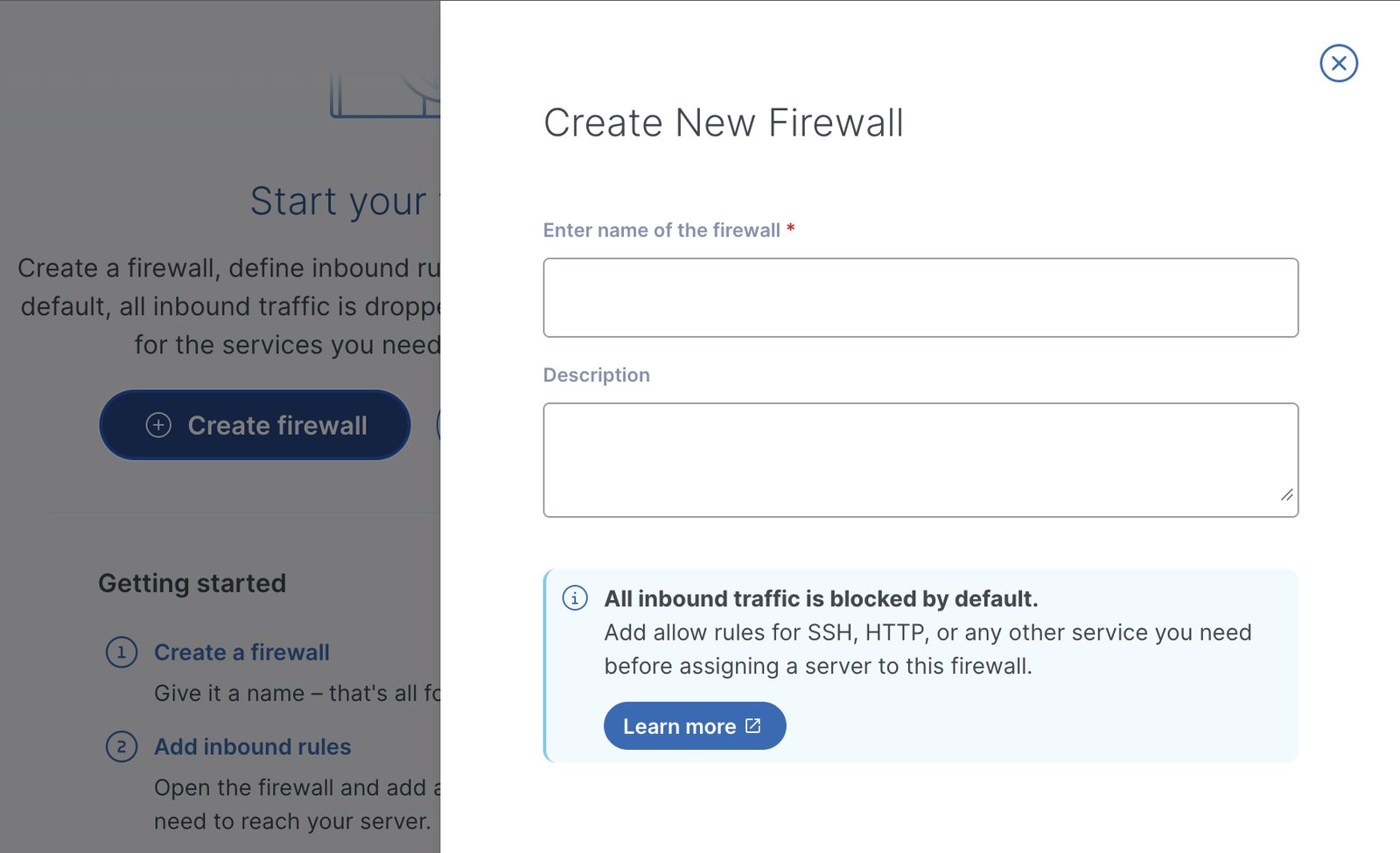
Creating a firewall in my Contabo panel, November 2026.
Backups and snapshots
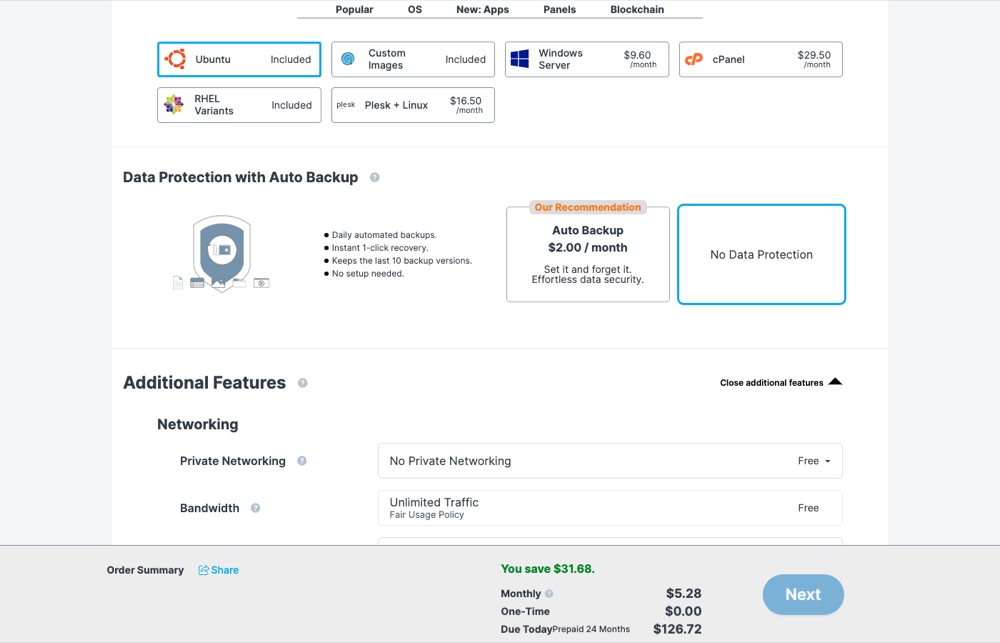
The Cloud VPS 4 configurator: Windows, cPanel and Plesk prices, and the Auto Backup add-on at $2.00/month (November 8, 2026).
Snapshots are included: one on Cloud VPS 4, two on Cloud VPS 6, three on the larger Core plans and five on every Performance VPS plan. They're handy before an update, but they live with the server, so they aren't a backup strategy on their own.
Auto Backup is a paid add-on: daily backups stored off the server, with the last 10 versions kept and one-click restore. It costs $2.00/month on Cloud VPS 4 and $4.00/month on Cloud VPS 6, which I'd add from day one on any server that holds real data.
I added it to my own Cloud VPS 4 in the US East region. On the day I ordered, the Auto Backup tab showed a red warning that the service in US-east had performance problems, so backups could be delayed and restores could be temporarily unavailable.
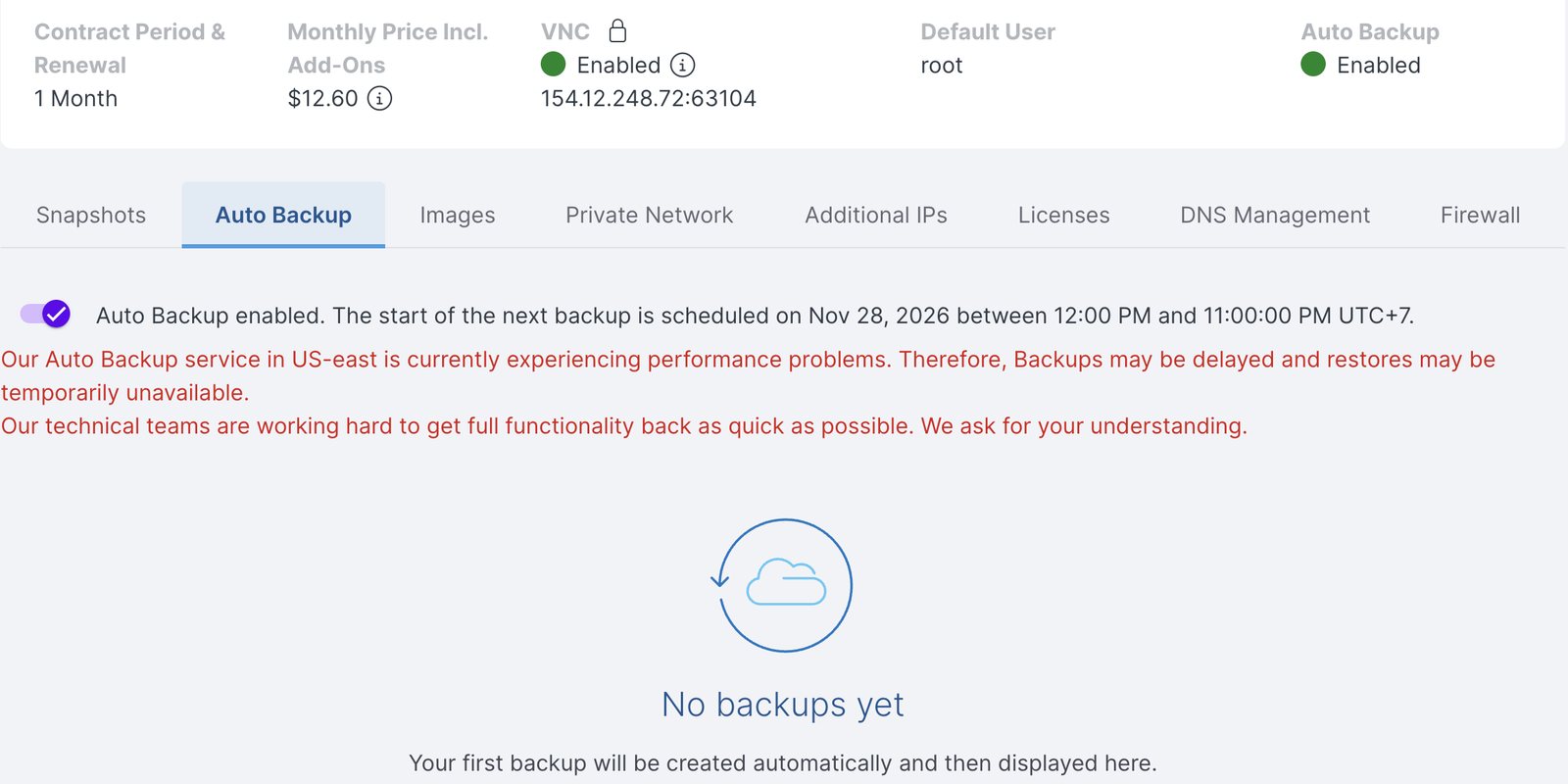
My Cloud VPS 4's Auto Backup tab on November 27, 2026: the first backup was scheduled for the next day, with a warning about delays in US-east.
Where the servers are
The European Union region is the default and the only one without a surcharge, so it's the cheapest choice for visitors in Europe. US buyers pay $1.30 to $1.90 a month extra on Cloud VPS 4 for St. Louis, Seattle or New York.
Location helps latency, but it isn't the whole story. My test measures server time with the network round trip removed, so a server isn't penalized for its distance from the test location in Ashburn, USA. Both Contabo servers in my benchmark run in the US anyway.
Ease of Use

Score 3.5/5
Contabo is easy to buy and harder to run. The order form is simple, but the servers are fully self-managed, so you install and secure everything yourself.
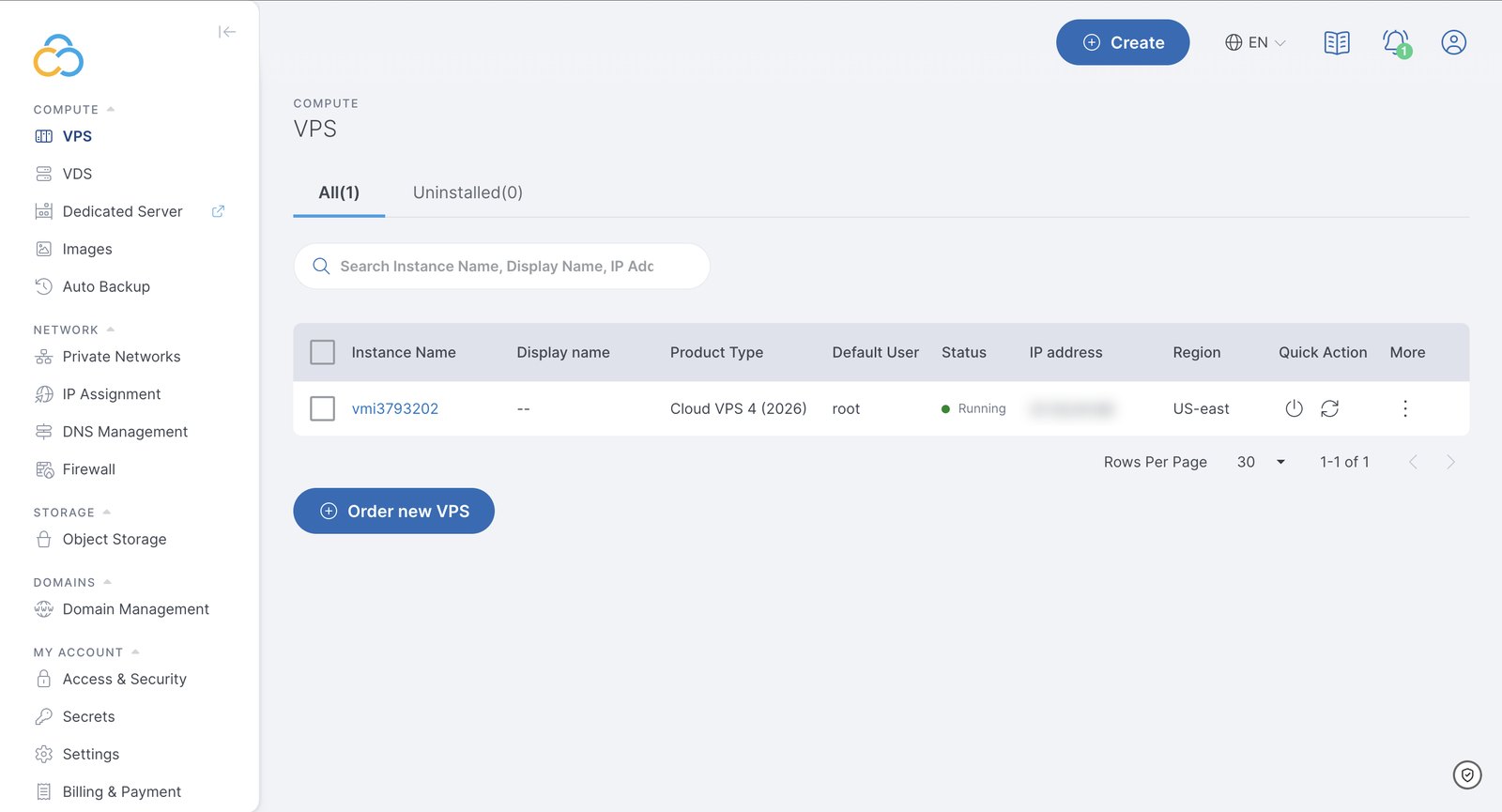
My Contabo customer panel, November 2026: every section sits in the left sidebar, and each server gets its own row with quick power and reboot buttons (IP address blurred).
The configurator asks for a term, a region, storage, an image, backups and networking, then shows the monthly price, any one-time fee and the amount due today. Contabo's FAQ says the server is ready a few minutes after payment clears, but support told me it actually takes a few hours, with a verification step.
That matched my own order on November 27, 2026. After I paid by PayPal, Contabo emailed me a mandatory verification request: my name, address and phone number, plus a scan of an ID and a utility bill. The server stayed on hold until I sent them.
The login data for the server arrived about 17 minutes after I sent the documents. If you don't pay by credit card, you send the first payment yourself, so a bank transfer or a manual PayPal payment can hold up the start.
After that, you manage the server in the Customer Control Panel: snapshots, reinstalls, firewall rules, networking, DNS and upgrades.
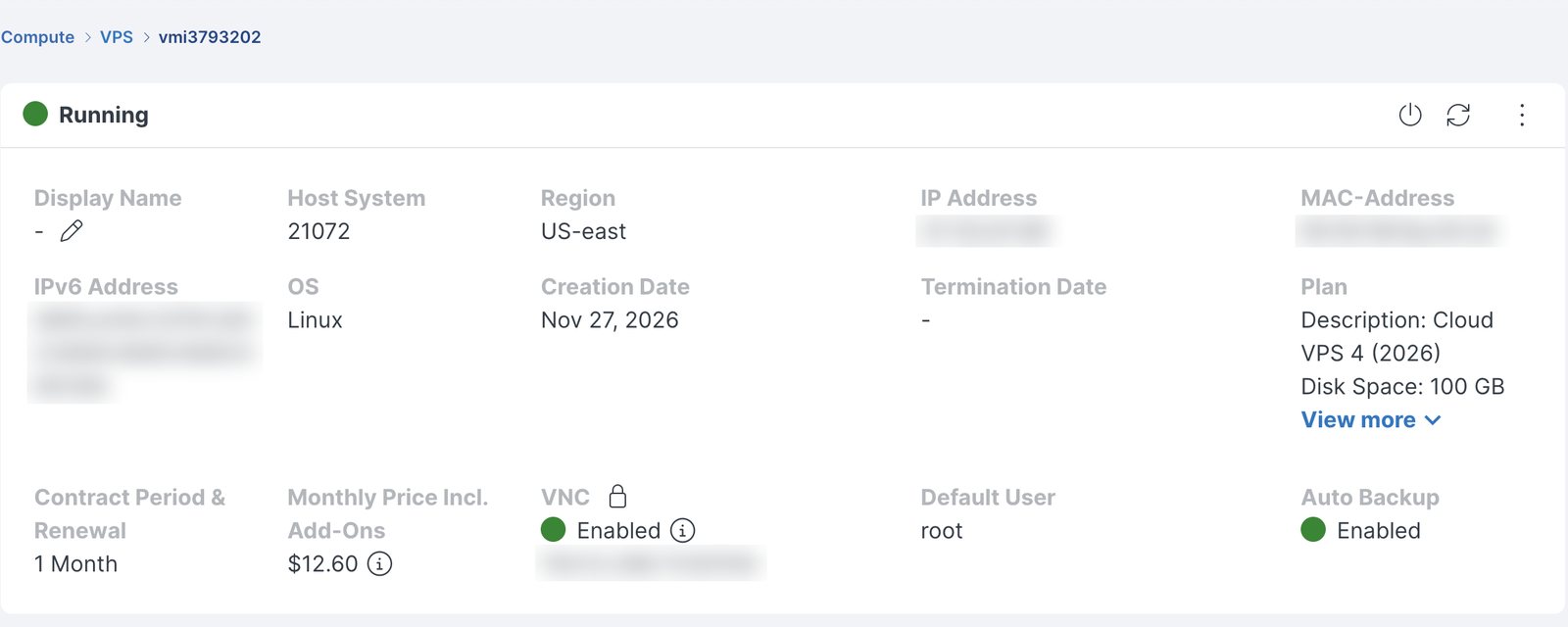
My Cloud VPS 4 in the Contabo panel, November 27, 2026 (IP addresses blurred). The menu behind the three dots holds reinstall, rescue system, VNC, firewall, snapshots, upgrades and the region move. Contabo's support covers the network, the hardware and getting its one-click add-ons installed, and says that maintaining and troubleshooting the software is the customer's job.
Upgrades are simple, since you can add vCPUs, RAM and storage from the panel. Downgrades aren't: you buy a smaller plan, move your data and cancel the old server yourself. If you'd rather not manage a server at all, compare the managed options in my VPS hosting guide.
Price

Score 4.5/5
Contabo is one of the cheapest VPS hosts per GB of RAM I've reviewed. It loses a point for setup fees, location surcharges and the long prepayment needed for the lowest price.
Core VPS plans
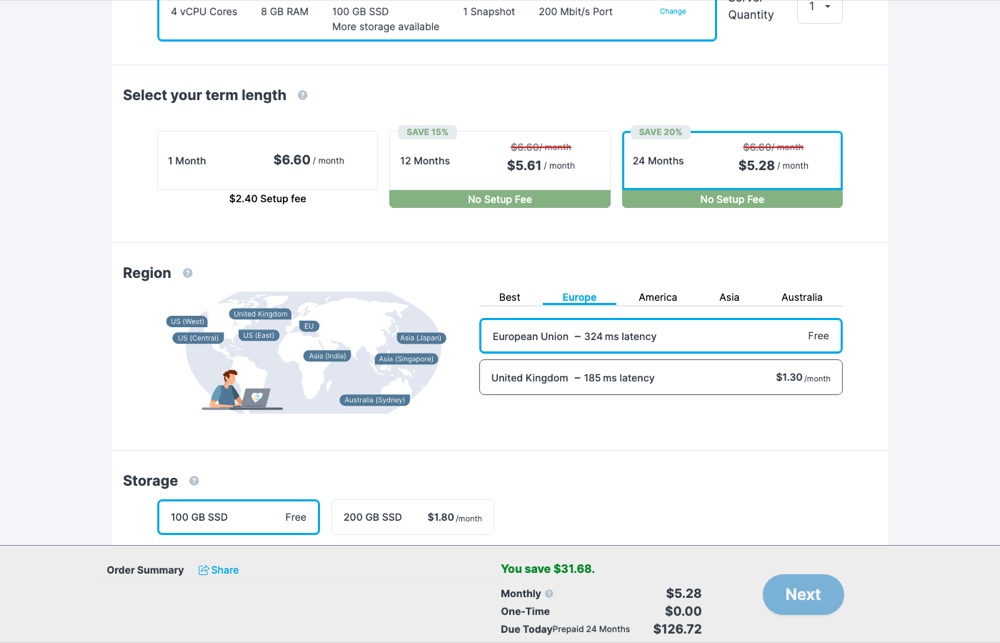
The Cloud VPS 4 order page: $6.60/month with a $2.40 setup fee on a monthly contract, $5.61 on 12 months and $5.28 on 24 months (November 8, 2026).
| Plan | vCPU | RAM | Storage | Port | Monthly contract | 24-month term |
|---|---|---|---|---|---|---|
| Cloud VPS 4 | 4 | 8 GB | 100 GB SSD | 200 Mbit/s | $6.60/month + $2.40 setup | $5.28/month |
| Cloud VPS 6 | 6 | 12 GB | 200 GB SSD or 100 GB NVMe | 300 Mbit/s | $9.00/month | $7.20/month |
| Cloud VPS 8 | 8 | 24 GB | 300 GB SSD or 150 GB NVMe | 600 Mbit/s | $16.80/month | $13.44/month |
| Cloud VPS 12 | 12 | 48 GB | 400 GB SSD or 200 GB NVMe | 800 Mbit/s | $30.00/month | $24.00/month |
| Cloud VPS 16 | 16 | 64 GB | 500 GB SSD or 250 GB NVMe | 1 Gbit/s | $44.50/month | $35.60/month |
| Cloud VPS 18 | 18 | 96 GB | 600 GB SSD or 300 GB NVMe | 1 Gbit/s | $58.80/month | $47.04/month |
A 12-month term saves 15% and a 24-month term saves 20%, and both are paid upfront: $126.72 for two years of Cloud VPS 4. The one-time setup fee applies only to a monthly Cloud VPS 4; Contabo blames the fee on RAM prices, which have climbed sharply.
Prices are for the European Union region. Add the location surcharge for any other region, plus extras such as Windows, cPanel or Auto Backup, and the small plans lose some of their lead.
Performance and Max Performance VPS
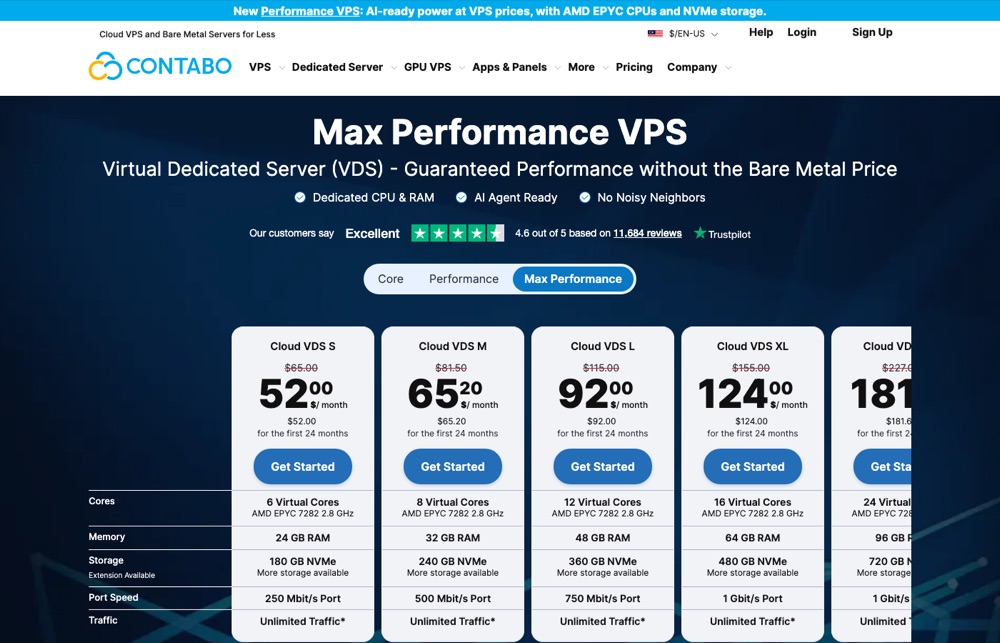
Max Performance VPS (Cloud VDS) plans with dedicated AMD EPYC 7282 cores, in US dollars (November 8, 2026).
| Plan | Cores | RAM | Storage | Monthly contract | 24-month term |
|---|---|---|---|---|---|
| Cloud VPS Plus 4 (Performance) | 4 vCPU, AMD EPYC | 8 GB | 150 GB NVMe | $16.25/month | $13.00/month |
| Cloud VPS Plus 8 (Performance) | 8 vCPU, AMD EPYC | 24 GB | 450 GB NVMe | $42.00/month | $33.60/month |
| Cloud VDS S (Max Performance) | 6 dedicated, EPYC 7282 | 24 GB | 180 GB NVMe | $65.00/month | $52.00/month |
| Cloud VDS M (Max Performance) | 8 dedicated, EPYC 7282 | 32 GB | 240 GB NVMe | $81.50/month | $65.20/month |
The dedicated-core VDS plans are where Contabo stops being a bargain on CPU. $52/month for 6 dedicated cores is fair, but it's no longer the giant price gap you see on the Core plans.
Contracts, refunds and payment
There's no hourly billing. The configurator offers 1-month, 12-month and 24-month terms, and contracts renew for the same length unless you cancel; prepaid contracts need no notice, while postpaid ones need 4 weeks' notice.
Contabo doesn't offer a money-back guarantee. Its terms give consumers the legal right to withdraw within 14 days, and say plainly that this right doesn't apply to businesses, so test with a monthly plan before you prepay two years.
Payment in US dollars works by credit card or PayPal. Euro accounts can also use Skrill, bank transfer and, for qualifying customers, direct debit. Contabo doesn't accept cryptocurrency, and the currency you pick at the first order stays fixed for the account.
Reliability and Support

Score 3.4/5
Contabo support works through the Customer Control Panel. You first chat with ContaBro, a virtual assistant, and if it can't help, you're passed to a person; tickets handle more complex problems. Contabo's help center says you need to be logged in to use the support chat, so pre-sales questions go through the contact links on its sales page.
The company says it has 64 support specialists in three tiers, an average response time of 2 hours, and support in English and German only. I emailed Contabo's pre-sales support before ordering and got clear, helpful answers, though each reply took about a day rather than the advertised 2-hour average, which Contabo ties to logged-in tickets. I found no published phone line or support hours on its official pages.
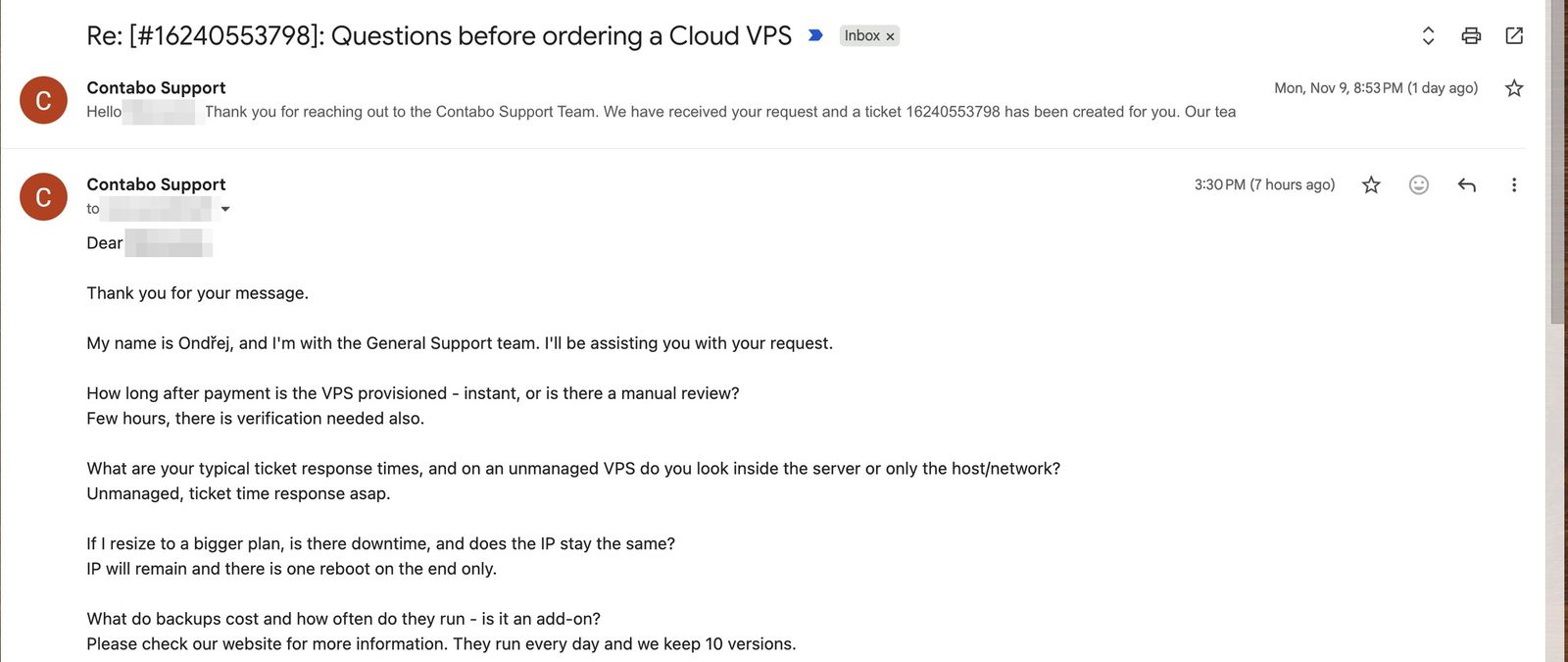
My pre-sales ticket: opened Monday, November 9, 2026, and answered by Ondřej from General Support the next afternoon, about 19 hours later.
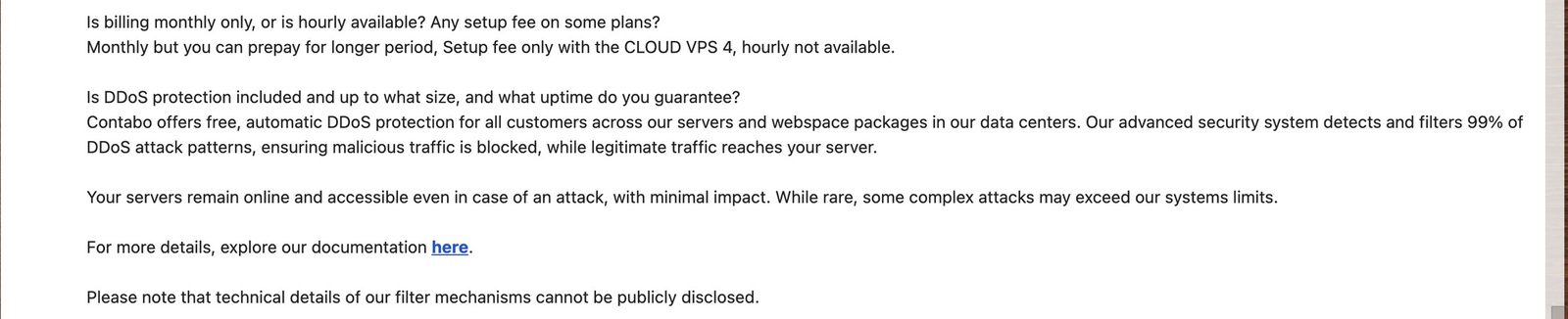
Contabo's answer about DDoS protection in the same ticket: free and automatic, filtering about 99% of attack patterns, with the filter details kept private.
Customer feedback is mostly positive. On Trustpilot, Contabo had a 4.6 rating from 11,684 reviews, with 77% five-star and 11% one-star reviews. Happy customers praise the price and the hardware; unhappy ones describe slow or templated ticket replies, billing problems that led to suspensions, and slowdowns at peak hours, which one reviewer blamed on overbooking.
Those are individual reports, not measurements. The terms also let Contabo ask for extra proof of identity when it doubts a customer's details, and suspend a server for unpaid invoices, with a possible reactivation fee.
Conclusion: Is Contabo Right for You?
Contabo gives you more RAM and disk space per dollar than almost any VPS host. For a mail server, Nextcloud, a staging server, a VPN or a handful of cached WordPress sites, $5.28 to $7.20 a month buys a lot of room.
It's a weaker choice when speed under load matters. My tests of a customer site and my own Contabo server gave a median server time of 333 ms, rating C, and rank 17 of 29 VPS hosts. Both handled 47 visitors without errors, but my own WooCommerce test server needed about 4 seconds per page at 96 visitors. The Core line's shared, unnamed CPUs are the likely limit, along with each site's own setup.
If you're comparing, the closest rival is Hetzner, which I cover in Contabo vs Hetzner. If you want hourly billing and a more polished cloud platform, read Contabo vs DigitalOcean before you prepay two years.
I'd choose Contabo for RAM-hungry, CPU-light projects run by someone who can manage Linux. For a busy store or a site that must stay fast under traffic, pick its dedicated-core VDS line or a host higher in my benchmarks.
Your reviews are important and protected. Hosts on WebHostingAdvices can't pay or offer incentives to hide them.