

 Tested by
Founded in 2012, DigitalOcean sells self-managed virtual servers called Droplets, plus managed databases, Kubernetes, object storage and a platform for deploying apps without running a server. It suits developers, startups and site owners who can manage a Linux server and want simple, published pricing in 16 data centers across North America, Europe, Asia and Australia.
Basic Droplets start at $4/month (1 shared vCPU, 512 MiB of RAM, 10 GiB SSD, 500 GiB transfer). Since January 1, 2026, Droplets are billed per second and capped at the monthly price, and new accounts get a $5 signup credit valid for 90 days.
My DigitalOcean review scores below are based on the current plans, prices and policies, checked on November 8, 2026, on published customer feedback, and on my own k6 tests of live websites hosted on DigitalOcean.
| Overall | Features | Performance | Ease of use | Price | Support |
|---|---|---|---|---|---|
| 8.0 | 8.6 | 8.8 | 7.8 | 8.0 | 7.0 |
Contents
Data sheet of the host
DigitalOcean's Droplets page, which leads with the 99.99% SLA (November 2026).
DigitalOcean is a publicly listed American company that started in 2012. Its company timeline lists two acquisitions that matter for website owners: Cloudways (managed hosting, 2022) and Paperspace (GPU cloud, 2023).
Its core product is the Droplet, a Linux virtual machine you manage yourself. Around it, DigitalOcean sells managed services that take work off your hands, such as App Platform, managed databases and Kubernetes.
Hosting Types
Shared vCPU servers for websites, small apps and test servers, where the CPU is idle most of the time.
- Regular: from $4/month (1 vCPU, 512 MiB RAM, 10 GiB SSD, 500 GiB transfer)
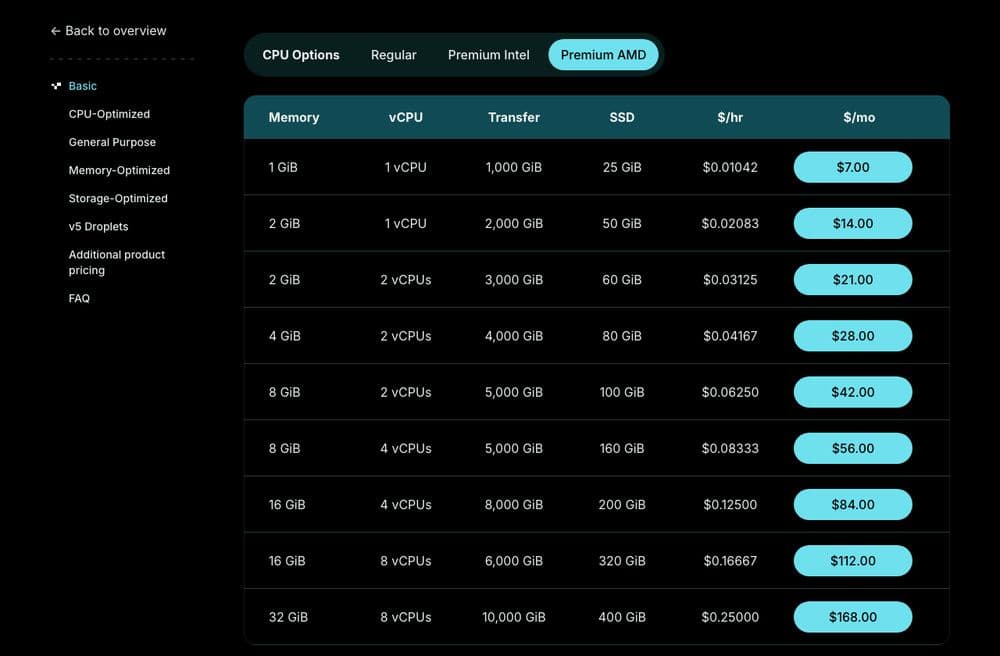
- Premium AMD: from $7/month (1 vCPU, 1 GiB RAM, 25 GiB NVMe SSD, 1,000 GiB transfer)
- Premium Intel: from $8/month (1 vCPU, 1 GiB RAM, 35 GiB NVMe SSD, 1,000 GiB transfer)
Best for blogs, small business sites and side projects.
Dedicated vCPU Droplets, so a busy neighbor can't slow your CPU down.
- CPU-Optimized from $42/month (2 vCPU, 4 GiB RAM, 25 GiB SSD, 4,000 GiB transfer)
- General Purpose from $63/month (2 vCPU, 8 GiB RAM, 25 GiB SSD, 4,000 GiB transfer)
The Premium Intel versions switch to NVMe disks and raise the outbound network ceiling to 10 Gbps. Best for busy stores, databases and CPU-heavy apps.
- Memory-Optimized from $84/month (2 vCPU, 16 GiB RAM), with 8 GiB of RAM per vCPU
- Storage-Optimized from $131/month (2 vCPU, 16 GiB RAM, 300 GiB SSD)
Best for caches, large databases and data-heavy workloads.
The newer configurable line: you pick vCPU, memory and storage separately, up to 64 vCPU and 512 GB of RAM.
- Shared, 1 vCPU and 1 GB: from $0.024/hour
- General Purpose (dedicated), 4 vCPU and 16 GB: from $0.181/hour
v5 Droplets charge for the hours they actually run, with no monthly cap.
A managed platform for apps and static sites: you push code, DigitalOcean builds and runs it.
- Free tier with 3 static-site apps
- Paid containers from $5/month (shared 1 vCPU, 512 MiB RAM, 50 GiB transfer)
PostgreSQL, MySQL, MongoDB, Kafka, Valkey and OpenSearch, managed by DigitalOcean, from about $15/month for a 1 GiB node.
- Kubernetes (DOKS): free control plane, worker nodes from $12/month
- Spaces object storage: $5/month with 250 GiB of storage
- Load balancers: from $12/month
Operating Systems
- Linux: AlmaLinux 8, 9 and 10, CentOS Stream 9 and 10, Debian 13, Fedora 43 and 44, Rocky Linux 8, 9 and 10, and Ubuntu LTS 22.04, 24.04 and 26.04
- Your own Linux or Unix-like image, uploaded as a custom image (BIOS boot, under 100 GB)
- 1-Click apps from the Marketplace, such as WordPress
- No Windows images and no ISO uploads
DataCenters
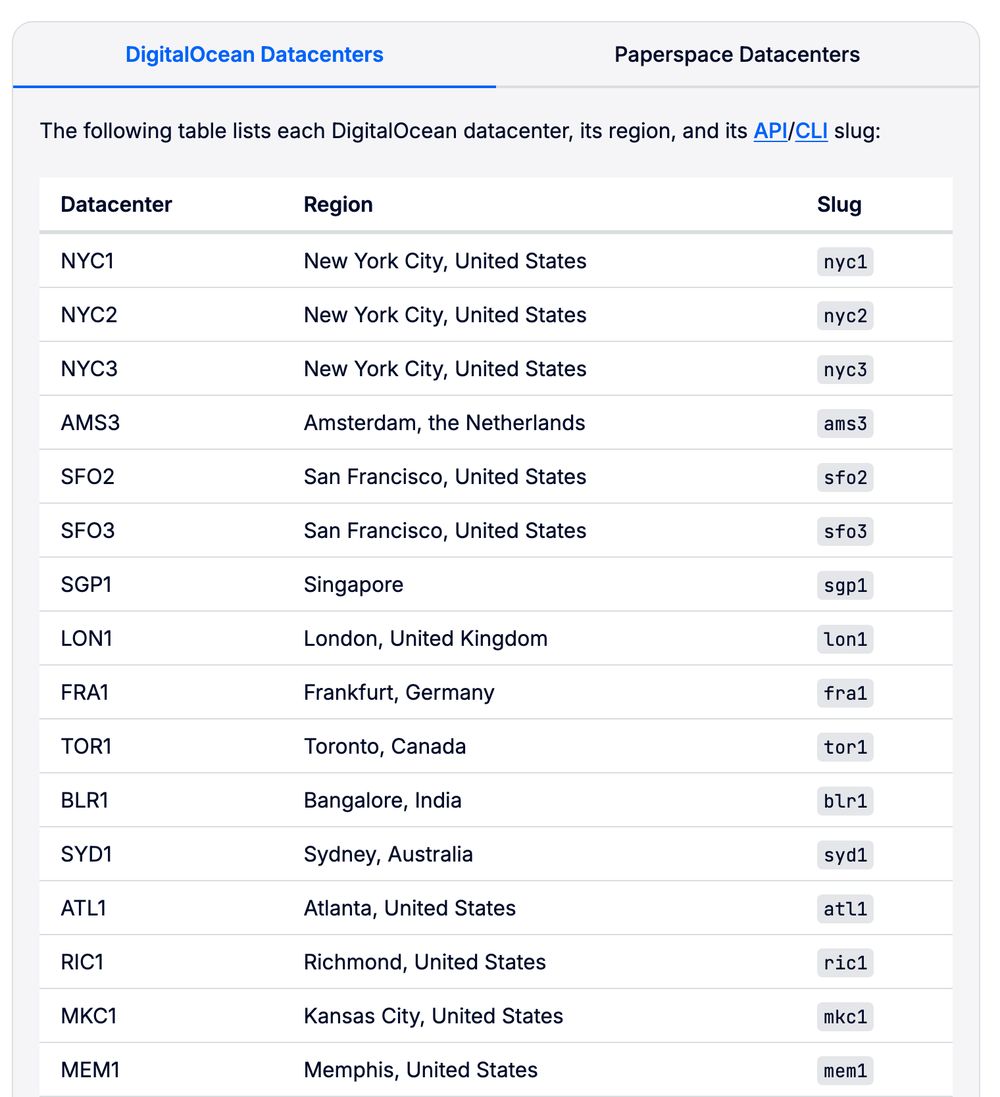
DigitalOcean's list of datacenters and their API slugs, from its regional availability docs (November 2026).
| Region | Locations | Number |
|---|---|---|
| United States | New York City (NYC1, NYC2, NYC3), San Francisco (SFO2, SFO3), Atlanta (ATL1), Richmond (RIC1), Kansas City (MKC1) and Memphis (MEM1) | 9 |
| Canada | Toronto (TOR1) | 1 |
| Europe | Amsterdam (AMS3), London (LON1) and Frankfurt (FRA1) | 3 |
| Asia | Singapore (SGP1) and Bangalore (BLR1) | 2 |
| Australia | Sydney (SYD1) | 1 |
Not every datacenter offers every plan. Atlanta and Kansas City mostly offer Premium CPUs, Richmond mostly Premium Intel, and Memphis only v5 Droplets. I explain each one, and how to choose, in my guide to DigitalOcean datacenter locations.
About DigitalOcean
DigitalOcean built its name on simple cloud servers for developers, with clear prices and a large library of free tutorials. That focus still shows: the control panel is plain, and the documentation lists limits and prices openly.
The company has grown into managed services and AI infrastructure, with GPU Droplets and its Paperspace platform. For a website owner, the parts that matter are still the Droplets, App Platform and managed databases.
The tradeoff is management. Droplets are self-managed, free support answers by ticket within 24 hours, and live chat needs a paid plan. It's a strong fit for people who can run a server and a weak one for beginners who want WordPress fixed for them.
Pros
- Clear published pricing from $4/month, billed per second with a monthly cap.
- Free always-on DDoS protection and free cloud firewalls.
- 99.99% uptime SLA per Droplet.
- Dedicated-vCPU, memory-heavy and storage-heavy Droplets when you outgrow shared plans.
- Managed databases, Kubernetes and App Platform in the same account.
- Strong customer rating on Trustpilot (4.6 from 2,632 reviews in November 2026).
Cons
- Self-managed: no help with your server's software or WordPress.
- Free support is ticket only, with a response target under 24 hours; live chat starts at $99/month.
- Only a $5 signup credit for new accounts, and no refunds.
- Backups cost 20% to 30% extra.
- No Windows Droplets, and SMTP ports are blocked on all Droplets.
Technical Features

Score: 8.6/10
DigitalOcean gets a high features score for its wide Droplet range, managed add-ons and free security tools. It loses points for having no Windows images, no ISO uploads and fewer locations than the largest cloud providers.
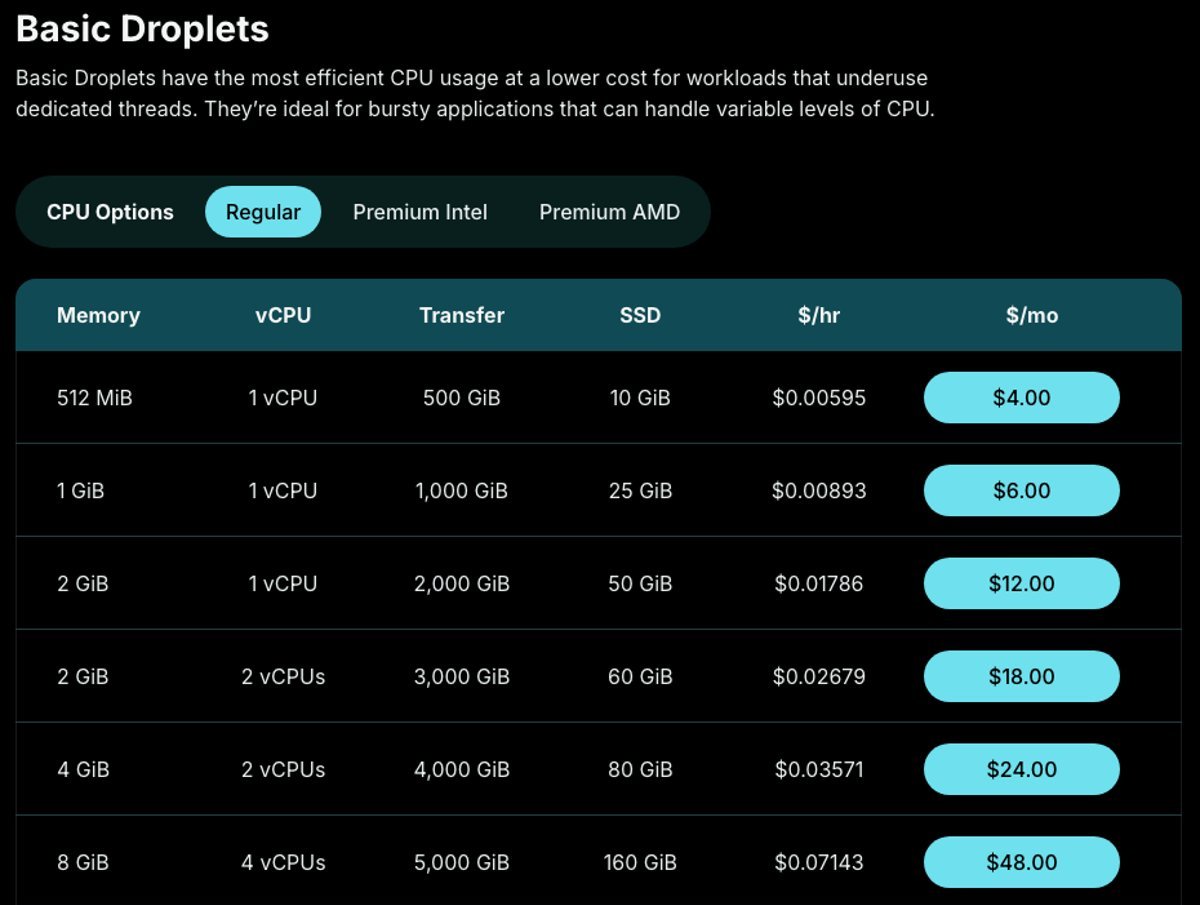
Basic Droplets with Regular CPUs, from $4/month (November 2026).
Shared vCPU or dedicated vCPU
Basic Droplets run on shared vCPUs. DigitalOcean describes them as made for bursty workloads that don't use a full CPU thread all the time, which describes most small websites.
General Purpose, CPU-Optimized, Memory-Optimized and Storage-Optimized Droplets use dedicated vCPUs. You pay a lot more (from $42/month), but the CPU time is reserved for you, which matters for databases, busy WooCommerce stores and background jobs.
Regular or Premium CPUs
Basic Droplets come in three CPU options. Regular uses older Intel CPUs (DigitalOcean doesn't name the model) with standard SSD storage. Premium Intel and Premium AMD use newer CPUs with NVMe storage, and DigitalOcean says Premium CPUs are guaranteed to be from one of the latest two generations.
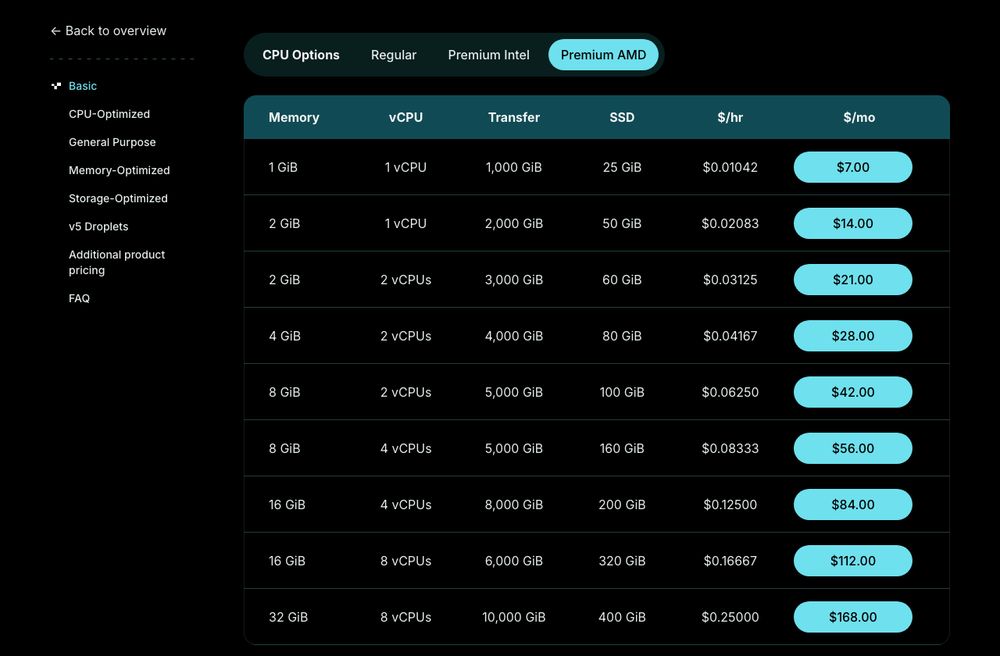
Basic Droplets with Premium AMD CPUs and NVMe storage, from $7/month (November 2026).
For a WordPress site, I'd start on Premium AMD at $7/month rather than the $4 or $6 Regular plans. You get NVMe storage and a newer CPU for $1 more than the 1 GiB Regular plan, and the 512 MiB plan is too small for most CMS sites.
Dedicated-CPU Droplets
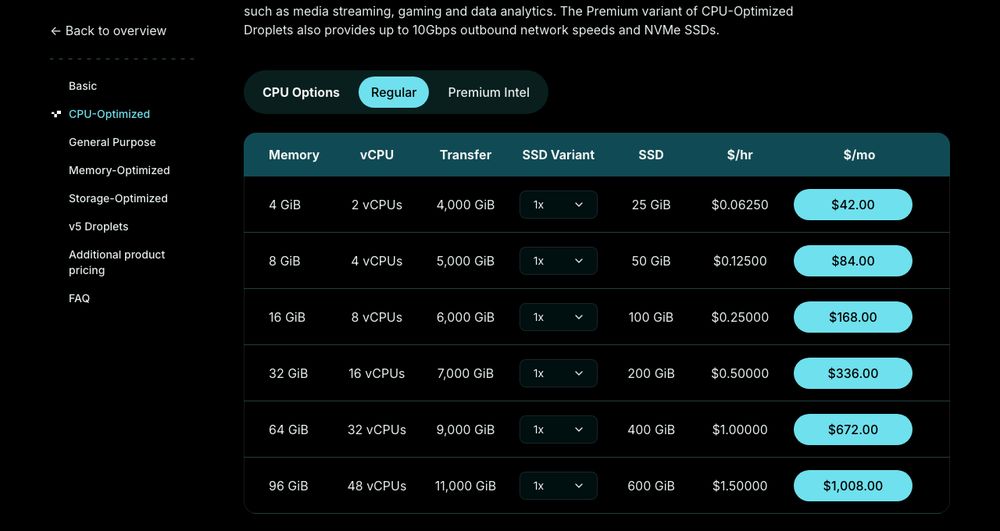
CPU-Optimized Droplets with dedicated vCPUs, from $42/month (November 2026).
CPU-Optimized Droplets have a 2:1 memory-to-CPU ratio and dedicated vCPUs at 2.6 GHz or faster. General Purpose doubles the memory per vCPU, while Memory-Optimized and Storage-Optimized Droplets add more RAM or disk for the same CPU count.
The v5 Droplets are the newer, configurable line. You choose vCPU, memory and storage separately, which helps when a fixed plan gives you too much of one resource.
App Platform, databases and Kubernetes
App Platform lets you deploy code from a Git repository without managing a server. It has a free tier for three static sites, and paid containers start at $5/month.
Managed databases cover PostgreSQL, MySQL, MongoDB, Kafka, Valkey and OpenSearch, from about $15/month. Kubernetes (DOKS) has a free control plane, so you pay only for the worker Droplets, from $12/month per node.
Operating systems and images
All Droplet images are Linux: AlmaLinux, CentOS Stream, Debian, Fedora, Rocky Linux and Ubuntu, including Ubuntu 26.04. You can upload a custom Linux image, but DigitalOcean's docs say Windows images and ISO files aren't supported.
The Marketplace adds 1-Click apps such as WordPress. If you need Windows Server, DigitalOcean isn't the right host.
Performance and Security

Score: 8.8/10
DigitalOcean rated B and ranked 12th of 31 VPS hosts in my benchmarks, but that result rests on one customer website. Two more DigitalOcean sites I tested returned more than 10% failed requests and were excluded from the median, and I'm testing more sites now.
DigitalOcean Speed Test Results (November 2026)
In November 2026, I load-tested one live website on DigitalOcean cloud servers (VPS). Each site's hosting was verified from its server IP.
I compare hosts on uncached server time. The test skips the site's page cache, so DigitalOcean's server has to build the page, and the network round trip from the test location is subtracted from the result. Each hosting type's figure is the median of its sites, the middle result, so one unusually slow or fast site doesn't decide it.
| Hosting type | Website | Server location | Uncached TTFB | Server time |
|---|---|---|---|---|
| VPS | Payment platform (Laravel) | United States | 226 ms | 219 ms |
| VPS median | 1 site | 226 ms | 219 ms |
Test settings, 4 November 2026: 5 virtual users for 2 minutes, at most 1 request per second, every second request with a unique query string to bypass the page cache. Live websites under light load, not a controlled benchmark of DigitalOcean's plans.
The site answered every request without an error. Each site's plan, theme, plugins and page weight also affect how long its server takes to build a page.
VPS has fewer than 3 tested sites so far, so its median is less reliable.
Uptime figures come once the monitored site has 30 days of data.
DigitalOcean Under Load: 1 to 50 Visitors (November 2026)
The speed tests above use light traffic. For this test, k6 raised the number of visitors from 1 to 50 over 2 minutes, and every request skipped the page cache, so the server had to build every page. It puts real load on a live website, so I only run it on sites I manage or have permission to test, normally at a quiet hour for their visitors.
Each line is one website, every request uncached · k6 load from Ashburn, USA · 6 November 2026 · lower is faster
- VPS: payment platform site (United States)
Server time = average TTFB in each 12-second window minus the network round trip to the site's server. Hover or tap the chart to see each site's value and the number of visitors at that moment.
| Hosting type | Website | Server location | Server time at 1-10 users | Server time at 40-50 users | Failed requests | Grade |
|---|---|---|---|---|---|---|
| VPS | Payment platform site | United States | 222 ms | 659 ms | 0% | B |
On the payment platform site, server time climbed from 222 ms to 659 ms at 40 to 50 visitors, about 3 times slower. Requests still succeeded, but visitors would have waited about a second for each uncached page.
Grades use fixed limits on server time at 40 to 50 visitors: A under 0.5 s, B under 1 s, C under 2 s, D under 4 s, E 4 s or more, more than 1% failed requests, or a test k6 had to stop. Real visitors mostly get cached pages, so this is the hard case: a traffic spike on pages the cache can't answer, such as carts, searches or logged-in pages. Each site's plan, theme and plugins also affect the result.
This load grade counts in my DigitalOcean score. It's one of the three grades behind the host's benchmark rating and the Performance and Security score of this review, next to server time and the slowest 5% of requests.
A second vps site will be added to this test, so the grade doesn't rest on one website.
What one site can and can't tell you
A 219 ms server time and a B grade under load are good results, and they put DigitalOcean in the upper half of the VPS hosts I've tested. Still, it's one Laravel application whose Droplet size and setup I don't know.
The two excluded sites failed too many requests to give a fair number. That can come from a site's own firewall or rate limits as easily as from the server, so I don't count it against DigitalOcean, and I don't count it in its favor either. For a rough idea of what a Droplet can serve, see my guide on how much traffic DigitalOcean can handle.
Uptime guarantee
DigitalOcean's SLA promises 99.99% monthly uptime for each Droplet. If a Droplet falls below that, you can claim a credit of 100% of that Droplet's charges for the month.
You have to email DigitalOcean within two billing cycles with the outage details, and the credit only applies to future Droplet charges. Scheduled maintenance, your own configuration errors and third-party outages are excluded, so treat it as a promise about the platform, not measured uptime for your site.
Hardware and network
Regular Basic Droplets use standard SSDs, while Premium CPUs come with NVMe SSDs. Premium Droplets have a network limit of 10 Gbps.
Each plan includes outbound transfer, from 500 GiB on the $4 plan to several TB on larger Droplets. The allowance is pooled across all Droplets in your team, inbound traffic is free, and extra outbound traffic costs $0.01 per GiB.
DDoS protection and firewall
DigitalOcean includes free, always-on DDoS protection for Droplets, Kubernetes clusters, managed databases, load balancers and reserved IPs. It covers network-layer (layer 3 and 4) attacks, not attacks on your application itself.
Cloud Firewalls are free too. They block every connection you haven't allowed with a rule, before it reaches the Droplet, which is safer than relying only on a firewall inside the server.
DigitalOcean also blocks SMTP ports 25, 465 and 587 on all Droplets and recommends a mail delivery service such as SendGrid. If you want to run your own mail server, keep that in mind.
Backups and snapshots
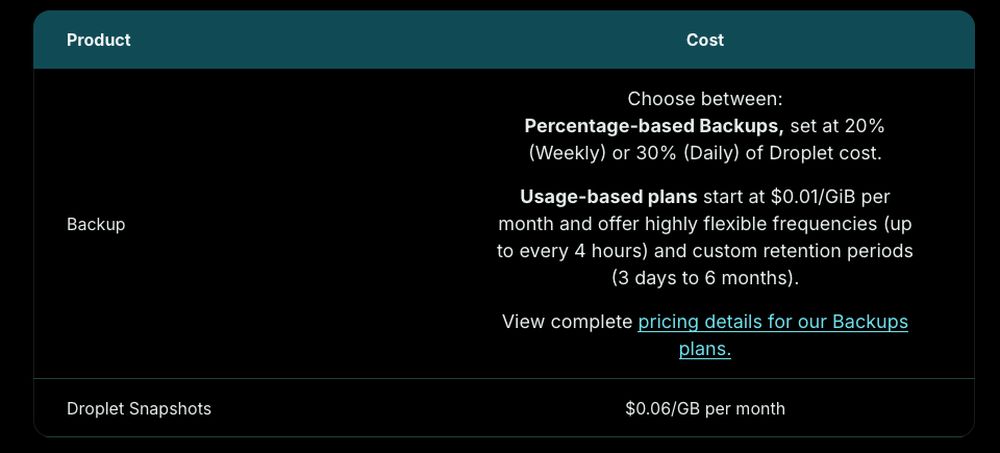
Backup and snapshot prices on DigitalOcean's Droplet pricing page (November 2026).
Automatic backups are off by default. Weekly backups cost 20% of the Droplet's price and daily backups 30%, or you can choose usage-based backups from $0.01 per GiB per month, which can run as often as every 4 hours and keep copies for anywhere between 3 days and 6 months.
Snapshots you take yourself cost $0.06 per GB per month. Backups are stored in the same datacenter as the Droplet, so keep an offsite copy of anything you can't afford to lose.
Where the servers are
With 16 datacenters in 13 cities, DigitalOcean covers the main markets: the US East and West Coasts, Toronto, Western Europe, Singapore, India and Australia. Large parts of the world have no DigitalOcean datacenter, including South America, Africa, the Middle East and Japan.
Location still isn't everything. Caching, the application and network routing matter too, so test from your visitors' region before you commit.
Ease of Use

Score: 7.8/10
DigitalOcean's control panel is one of the easiest cloud panels to learn, and its tutorials cover most server tasks. The score stays under 8 because Droplets are still self-managed.
Creating a Droplet takes a few choices on one page: a datacenter, an image, a plan and an SSH key or password. Resizing, snapshots, backups and firewalls sit in the same panel, and the API and CLI let you automate all of it.
After that, the server is yours to run. You install updates, set up the web server, PHP and database, and fix WordPress problems yourself, or you use a 1-Click app from the Marketplace as a starting point.
If you don't want to manage a server at all, App Platform and the managed databases take most of that work away. For a plain WordPress site, a managed platform running on DigitalOcean's infrastructure is the easier route.
Price

Score: 8.0/10
DigitalOcean pricing is published and simple: one monthly price per plan, billed per second, with no low intro rate that jumps on renewal. It scores lower than the cheapest VPS hosts because Premium plans, backups and paid support add up.
Droplet prices
| Plan | vCPU | RAM | Storage | Transfer | Price |
|---|---|---|---|---|---|
| Basic Regular | 1 shared | 512 MiB | 10 GiB SSD | 500 GiB | $4/month |
| Basic Regular | 1 shared | 1 GiB | 25 GiB SSD | 1,000 GiB | $6/month |
| Basic Premium AMD | 1 shared | 1 GiB | 25 GiB NVMe | 1,000 GiB | $7/month |
| Basic Premium Intel | 1 shared | 1 GiB | 35 GiB NVMe | 1,000 GiB | $8/month |
| Basic Regular | 2 shared | 4 GiB | 80 GiB SSD | 4,000 GiB | $24/month |
| CPU-Optimized | 2 dedicated | 4 GiB | 25 GiB SSD | 4,000 GiB | $42/month |
| General Purpose | 2 dedicated | 8 GiB | 25 GiB SSD | 4,000 GiB | $63/month |
Prices are in US dollars and don't include tax. Public IPv4 is included in these bundled plans, while v5 Droplets list it as a separate line item (currently $0.00 an hour).
For a cheaper unmanaged VPS with more RAM per dollar, I compare DigitalOcean with a budget host in Contabo vs DigitalOcean.
How per-second billing works
Since January 1, 2026, Droplets have been billed by the second; the smallest charge for any Droplet is 60 seconds of use or one cent, whichever costs more. Bundled Droplets are capped at 672 hours (28 days) a month, so a Droplet that runs all month costs its monthly price.
v5 Droplets have no monthly cap, so every hour counts. Turning a Droplet off doesn't help either: it's still billed because DigitalOcean keeps its CPU, RAM and disk set aside, and billing only ends when you destroy it.
Signup credit
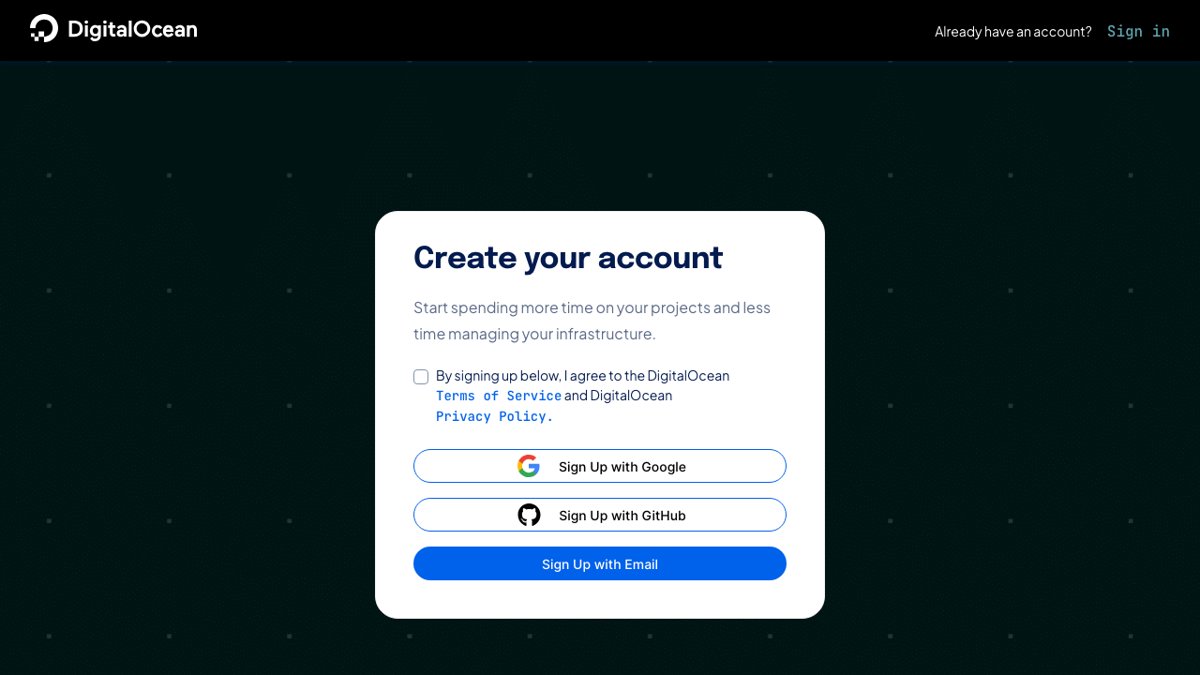
DigitalOcean's sign-up page, with Google, GitHub and email options (November 2026).
New accounts get a $5 signup credit, applied automatically to the first team and valid for 90 days. It works on all products except SaaS add-ons, and you must add a valid payment method before you can create a Droplet.
DigitalOcean's older $200, 60-day trial pages now redirect to its homepage, so don't count on that offer. $5 covers a $4 Droplet for about five weeks, enough to try the panel and deploy a test site.
Refunds and payment
DigitalOcean's billing docs say plainly: "We do not offer refunds." Per-second billing limits the risk, because a test Droplet you destroy after an hour costs a few cents.
You can pay by credit or debit card (Visa, Mastercard, American Express, Discover, UnionPay, Diners Club and JCB), PayPal, Google Pay or Apple Pay. Qualifying US customers can pay by ACH direct debit, and the billing docs also list crypto wallets as a payment method. A new account without payment history is charged mid-month once its balance reaches $25.
Reliability and Support

Score: 7.0/10
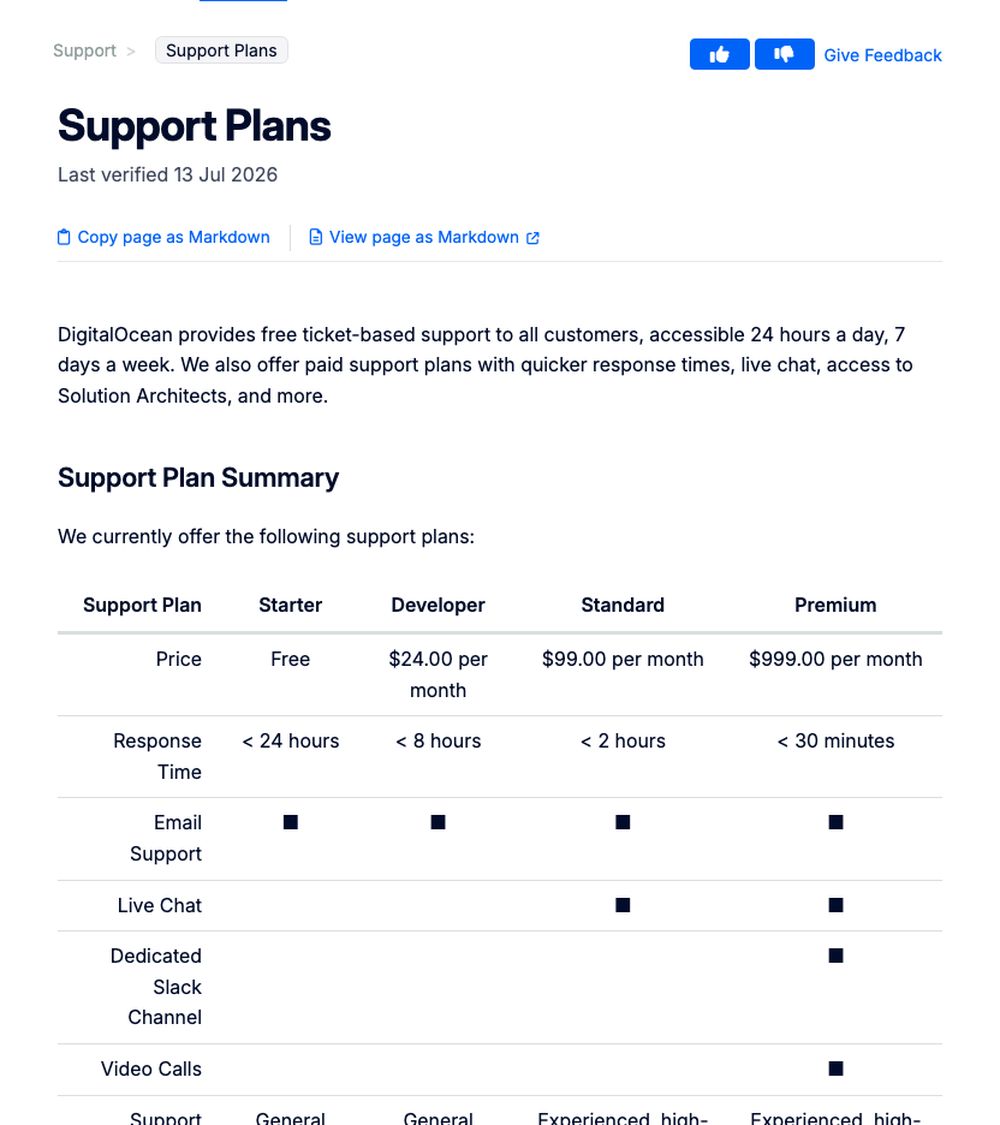
DigitalOcean's support plans, from free Starter to $999/month Premium (November 2026).
Every customer gets free ticket support 24/7, with a response target of under 24 hours on the free Starter plan. Faster answers and live chat cost extra, which is why support scores lowest in this review.
| Support plan | Price | Response time | Channels |
|---|---|---|---|
| Starter | Free | Under 24 hours | Tickets and email |
| Developer | $24/month | Under 8 hours | Tickets and email |
| Standard | $99/month | Under 2 hours | Adds 24/7 live chat |
| Premium | $999/month | Under 30 minutes | Adds a Slack channel, video calls and a Solution Architect |
DigitalOcean doesn't list phone support, and support doesn't manage your server. Staff help with the platform (billing, networking, the host machine), while the operating system and apps inside the Droplet are your job.
Customer feedback is a strength. On Trustpilot, DigitalOcean had a 4.6 rating from 2,632 reviews as of November 8, 2026, with positive reviews praising fast, helpful replies even without a paid plan, and a simple interface.
The negative reviews, about 19% one-star, mostly describe strict account verification that locks new users out, a support chatbot that comes before a person, and prepayment needed to raise resource limits. Those are individual reports, but expect identity checks on a new account.
I haven't contacted DigitalOcean support myself yet, so this section relies on its published plans and customer reviews.
Conclusion: Is DigitalOcean Right for You?
DigitalOcean is one of the most developer-friendly cloud providers for small and medium projects. At $7/month you get an NVMe Droplet with free DDoS protection and firewalls, billed per second, with dedicated-CPU Droplets, managed databases and App Platform ready when you grow.
Its weak spots are support and management. Free support aims to answer within a day, live chat costs $99/month, there are no refunds, and you run the server yourself.
I'd choose DigitalOcean if you can manage a Linux server and want clear pricing in the US, Europe, India, Singapore or Australia. My test result is good, but it rests on one site so far, so I'll update this review as more DigitalOcean sites finish testing. For other options, see my lists of the best VPS hosting and cloud hosting providers.