

So, you’re planning to go with Hostinger shared hosting? It’s important to know how much traffic can Hostinger shared hosting handle.
Can Hostinger web hosting handle the traffic they mention in their plans, or are other factors affecting it? We will answer all these questions.
Let’s begin.
Contents
How much traffic can Hostinger Shared Hosting handle?
Hostinger shared hosting can handle a lot of traffic, from about 25,000 visitors a month to 200,000 visitors a month depending on the plan you choose. Those are the estimates Hostinger used to print on its plans. Its current plan pages list resource limits instead, so the limits below are the better guide.
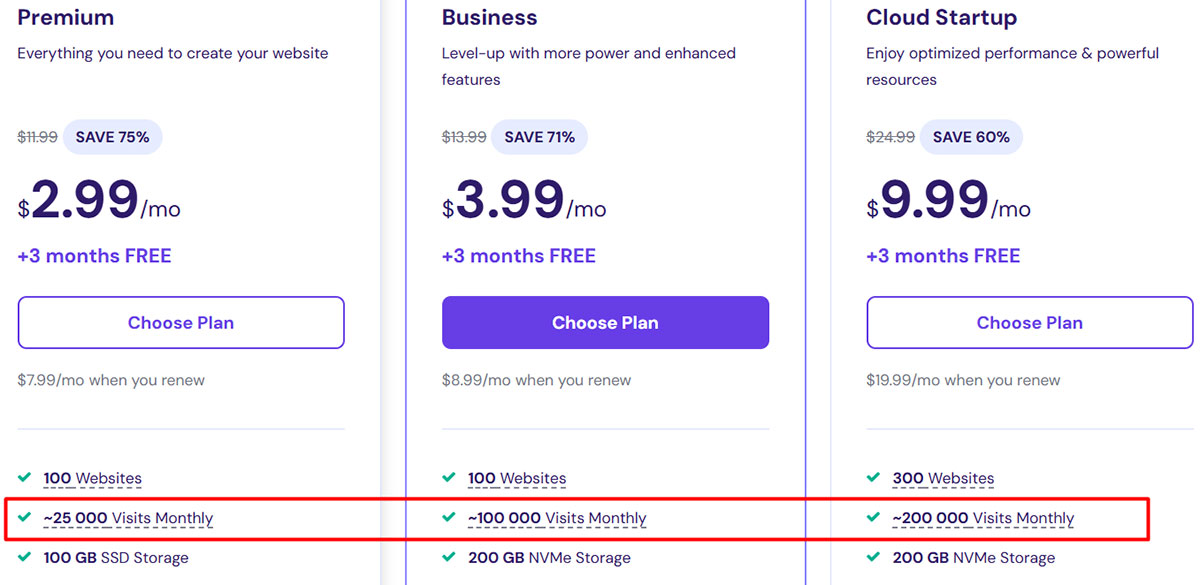
Please note that the limits given here are the approximate limits. There are many other factors that you need to consider.
Before we discuss the factors in detail, let’s talk about the resources allocated to each plan.
Let’s consider the first two plans in detail.
Premium plan
- Former traffic estimate: 25,000 visitors per month (approximately 833 visitors a day)
- Websites: 3
- CPU: 1 core
- Memory (RAM): 2 GB
- PHP workers: 40
- Bandwidth: Unlimited
- Disk space: 20 GB
Business plan (now sold as Unlimited)
- Former traffic estimate: 100,000 visitors per month (approximately 3333 visitors a day)
- Websites: Unlimited
- CPU: 2 cores
- Memory (RAM): 3 GB
- PHP workers: 60
- Bandwidth: Unlimited
- Disk space: 50 GB
Hostinger changed its Web Hosting limits on March 18, 2025. Customers who bought the Business plan before that keep its old limits.
Hostinger traffic limits
Hostinger traffic limits are based on the plans you choose. So, the lower plan has lower limits while the higher plan has more limits.
However, the number of concurrent connections could be much higher for all the plans. So, you need to see the total traffic and remember the concurrent visitors you’re expecting.
WebHostingAdvices ensures all our readers get the accurate information. So, here’s a breakdown of all the factors you must keep in mind to determine how much traffic Hostinger shared hosting can handle.
Bandwidth
They claim the bandwidth is unlimited. However, you must keep in mind that no resource is unlimited.
There are always some hidden limits. In the case of Hostinger, they have PHP worker limits, CPU and memory limits, and an Acceptable Usage Policy as well.
PHP workers (formerly entry processes)
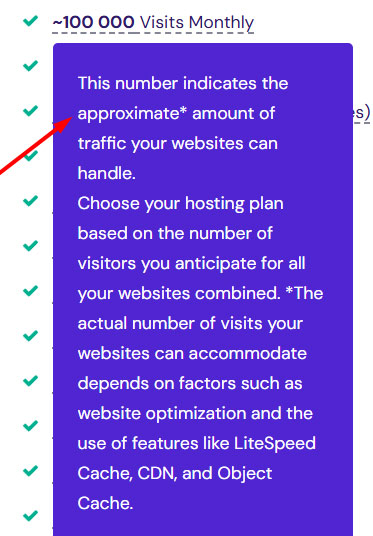
Hostinger used to limit entry processes to 20. It now publishes a PHP worker limit instead: 20 on Single, 40 on Premium, and 60 on Unlimited. A PHP worker handles one uncached PHP request at a time, so if more requests arrive at once than you have workers, your website will slow down.
The extra requests have to wait for a worker to finish before they are handled.
In a broad scenario, one can say that on Premium you shouldn’t have more than 40 uncached page requests at the same time. Pages served from the LiteSpeed cache don't need a PHP worker, which is why caching matters so much on shared hosting.
Total number of all processes (NPROC)
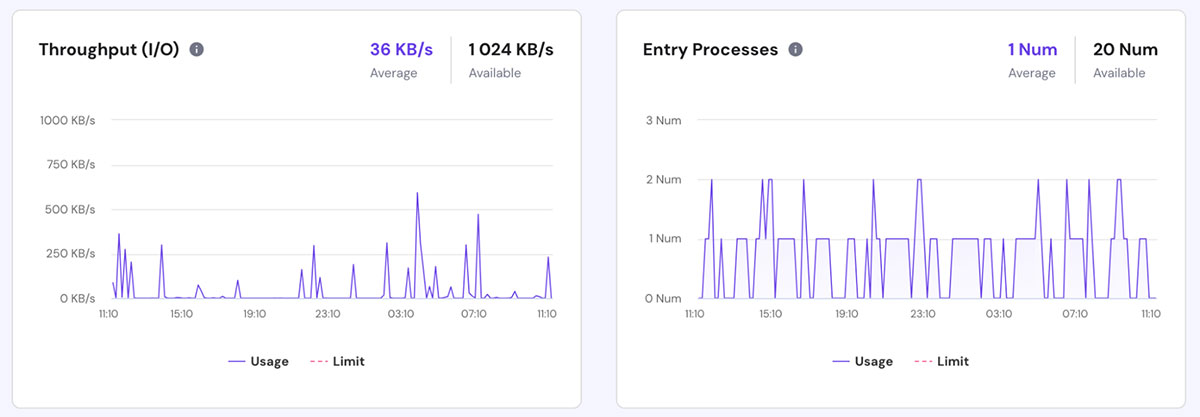
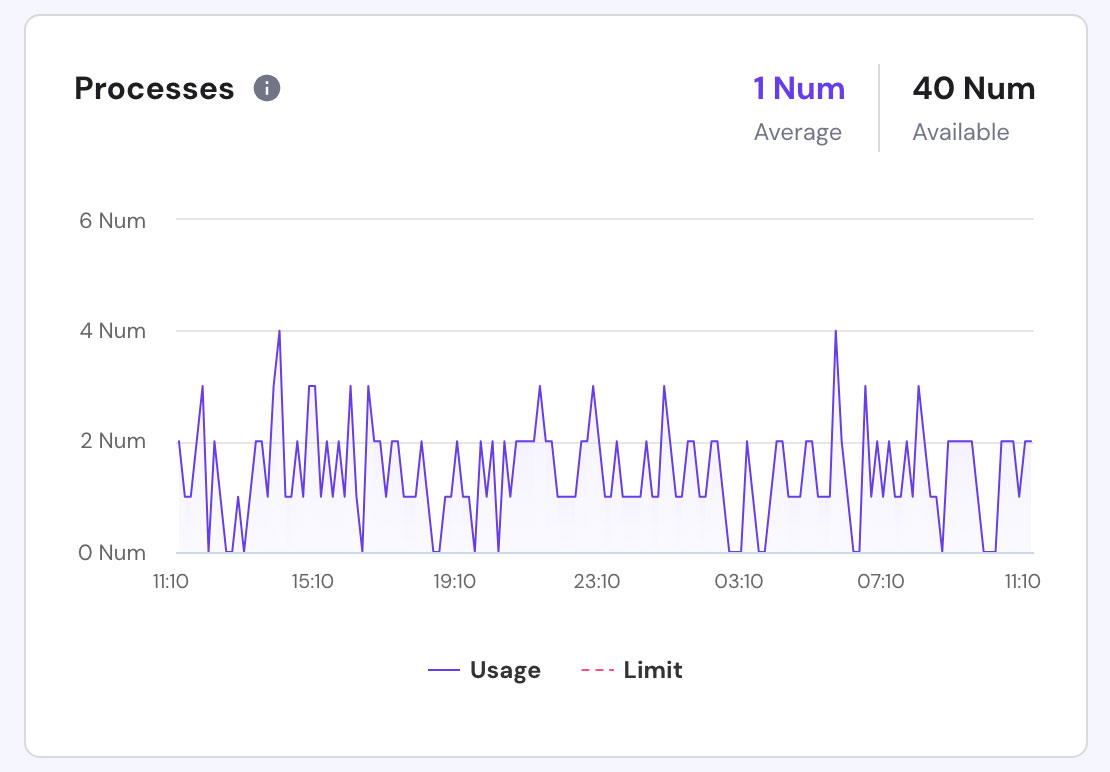
Hostinger's older plans allowed up to 40 processes per account, so two busy websites could use up the whole account limit. Its current limits page no longer lists a process count for Web Hosting plans, but the resource usage graphs still show how close you are to your limits.
You will get a warning email or your account will be suspended if you exhaust the limit multiple times.
Database User Limit
There are various database limits placed in Hostinger. You need to take care of two limits.
MySQL max connections: Number of maximum database connections at the same time.
MySQL max connections per user: How many connections your database user can open at the same time.
Usually, you can take database limits as one of the least concerning limits as most of you won’t exhaust it.
| Database limit | Single | Premium | Unlimited |
|---|---|---|---|
| Databases | 2 | 10 | 150 |
| Database size | 3 GB | 3 GB | 3 GB |
| MySQL max connections (global) | 500 | 500 | 500 |
| MySQL max connections per user | 25 | 50 | 75 |
| MySQL max query time | 60 s | 60 s | 120 s |
| MySQL max import size | 200 MB | 200 MB | 200 MB |
Source: Hostinger's parameters and limits of hosting plans, checked October 17, 2026.
Hostinger VPS Traffic test results
VPS Benchmark did a test on Hostinger VPS. Here are the results.
The first plan of VPS (KVM 1)
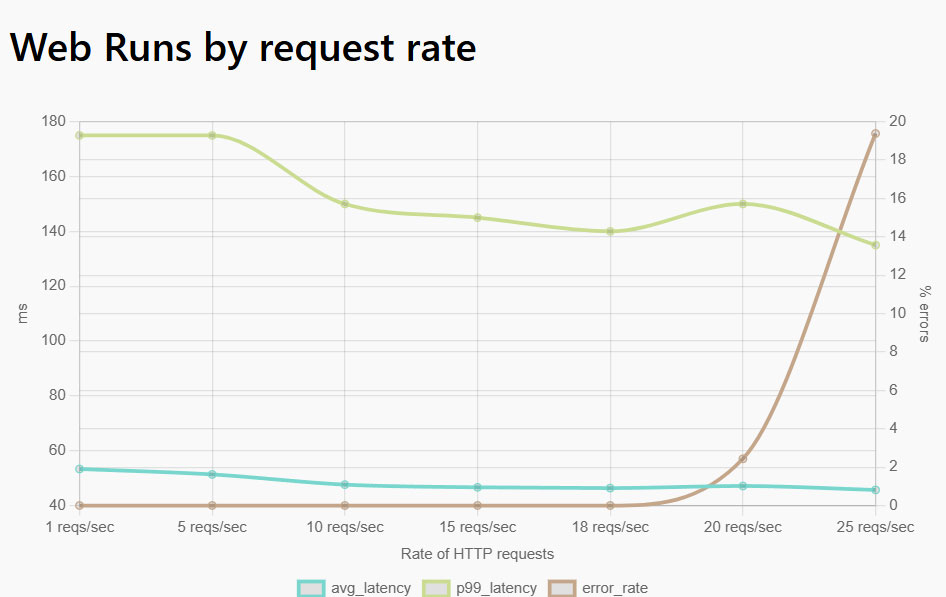
As you can see while there were up to 20 requests/seconds, the server was doing fine. However, as it increased to 25, the server started throwing errors at a much higher rate.
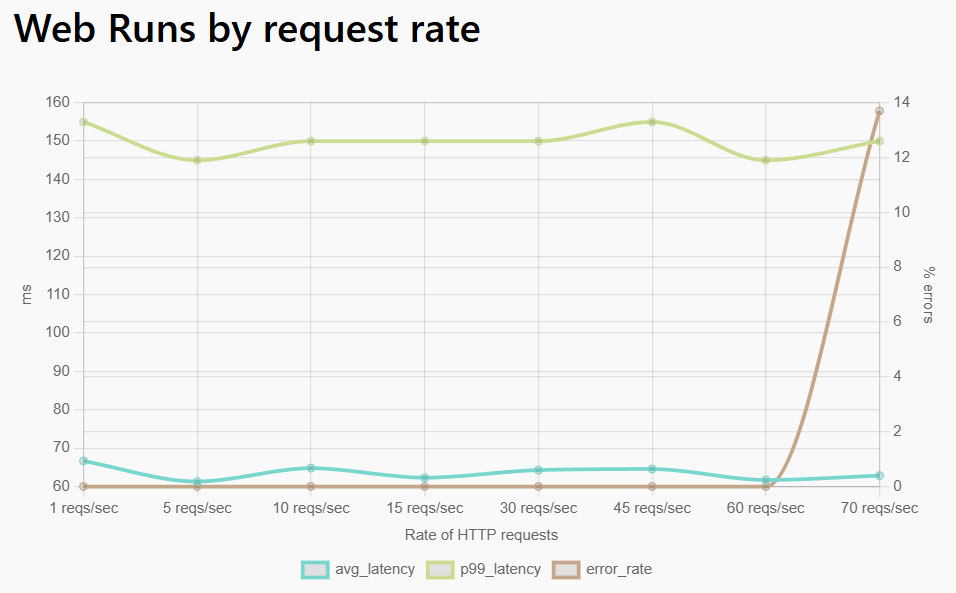
For KVM 4, the server started showing errors after 60 requests/second.
Tips on Managing Heavy Traffic on Hostinger Shared Hosting
As mentioned, the exact answer on How much traffic can Hostinger shared hosting handle will depend on multiple factors such as the plan you choose, optimization, the website’s script, visitor’s behavior, etc.
Here are a few tips on managing heavy traffic on Hostinger shared hosting services.
Use Cache plugin
You can use cache plugins for your website. It will load the cached version of your website for static resources which significantly increases the speed and decreases resource usage.
For smaller websites, free cache plugins will do. We use Nitropack for WebHostingAdvices.
Make sure you clear the cache occasionally to ensure the new updates are properly pushed.
Use Content Delivery Network (CDN)
CDN serves the page from the nearest location to the visitors. Cloudflare’s free version is enough for most websites. Even we use the free version of Cloudflare CDN.
You can use the CDN for better security as well as performance.
It will ensure that your website loads at a faster speed from all the locations. With this, you no longer need to worry about Hostinger data center locations.
Filter bad traffic with a Firewall
Firewall and malware detector – Wordfence is our #1 choice. Why do you need it?
It will filter out the bot traffic. These bot visitors use a lot of resources and are of no use.
The bad traffic will only negatively impact your website, it’s best to filter it out.

Conclusion
So, to answer how much traffic Hostinger shared hosting can handle, you need to consider many things, mainly optimization and hosting plan. You can expect between 25k to 200k visitor handling capabilities.
If your website is generating revenue for you, I would recommend going with a VPS rather than shared hosting. Shared hosting has a lot of limitations. On the other hand, you get better resources and performance with a VPS.
FAQ (Frequently Asked Questions)
Can Hostinger handle high traffic?
Hostinger shared hosting can handle a moderate amount of traffic. For high traffic, you should shift to a VPS.
Does Hostinger have unlimited bandwidth?
Yes, Hostinger provides unlimited bandwidth. However, there are various limits on CPU, memory, PHP workers, etc.
How to check website traffic in Hostinger?
As soon as you log in to the h-panel (Hostinger panel), you can see the stats on the left side. Alternatively, you can head over to the “Resource usage” section to know the traffic and resource utilization.
Is Hostinger good for big websites?
Hostinger shared hosting is good for small to medium websites. For big websites, you should prefer Hostinger VPS.
What are the limitations of shared hosting?
The server is shared with a number of other users. So, you get limited control over your server along with many server restrictions.
Get Hostinger Shared Hosting
If Hostinger's shared hosting fits your traffic, the Premium plan is the cheapest way in, with the lowest price on the 48-month term: