

Hosting.com (formerly A2 Hosting) lets you pick your data center at checkout. When I went through the shared hosting checkout for the Starter plan on November 14, 2026, the location menu offered six data centers: Dallas, London, Singapore, Frankfurt, Sydney and Mumbai.
The old A2 Hosting setup of Michigan, Arizona, Amsterdam and Singapore no longer matches what Hosting.com sells. Below I cover where each location is, what different Hosting.com sources say, and how to choose one.
Contents
Where are A2hosting servers located?
These are the six locations in the Server Location menu of the shared hosting checkout:
| Region | Locations |
|---|---|
| North America | Dallas (Texas, USA) |
| Europe | London (UK), Frankfurt (Germany) |
| Asia | Singapore, Mumbai (India) |
| Australia | Sydney |
North America
Dallas is the only North American location for shared hosting. It's central, which keeps delays fairly even across the US, and it's also a reasonable pick for Canada and Mexico. Hosting.com's dedicated servers are hosted in Dallas by default too.
If you need the US East Coast, Hosting.com's VPS checkout offers Ashburn, Virginia, next to one of the biggest internet hubs in the world.
Europe
There are two European locations: London and Frankfurt. London is the natural pick for UK visitors, and Frankfurt covers Germany and central Europe well.
The old Amsterdam data center doesn't appear in any current Hosting.com list I checked, so don't count on it for a new plan.
Asia
Singapore is still there, and it's the best fit for Southeast Asia. Mumbai is the better choice if most of your visitors are in India.
Australia
Sydney covers Australia and New Zealand. Without it, Australian visitors would have to wait for every request to cross the Pacific or reach Singapore.
Which source says what
Hosting.com's own sources gave me four different lists in November 2026:
| Source | Locations given |
|---|---|
| Starter checkout (what you can actually order) | Dallas, London, Singapore, Frankfurt, Sydney, Mumbai |
| Plan comparison page (hosting.com) | USA, London, Frankfurt, Singapore, Mumbai, Sydney |
| Live chat (assistant, confirmed by a human agent) | Ashburn, Dallas, Toronto, Mexico, London, Frankfurt, Singapore, Mumbai, Sydney |
| Email ticket reply (written by the AI assistant) | Buffalo, Toronto, Mexico, London, Frankfurt, Singapore, Sydney, Mumbai |
The checkout is the one that counts, and it matches the plan comparison page. Treat the extra locations from support as unconfirmed.
How to choose the best A2hosting server location?
The data centers run the same hosting plans, so the choice mostly comes down to where your visitors are.
Steps to Select the Location
- Pick a hosting plan on hosting.com and click its order button.
- On the checkout page, choose the data center location before you pay.
- Finish the order. Your site is set up in that location.
The location is set when you order, so it's worth getting it right the first time.
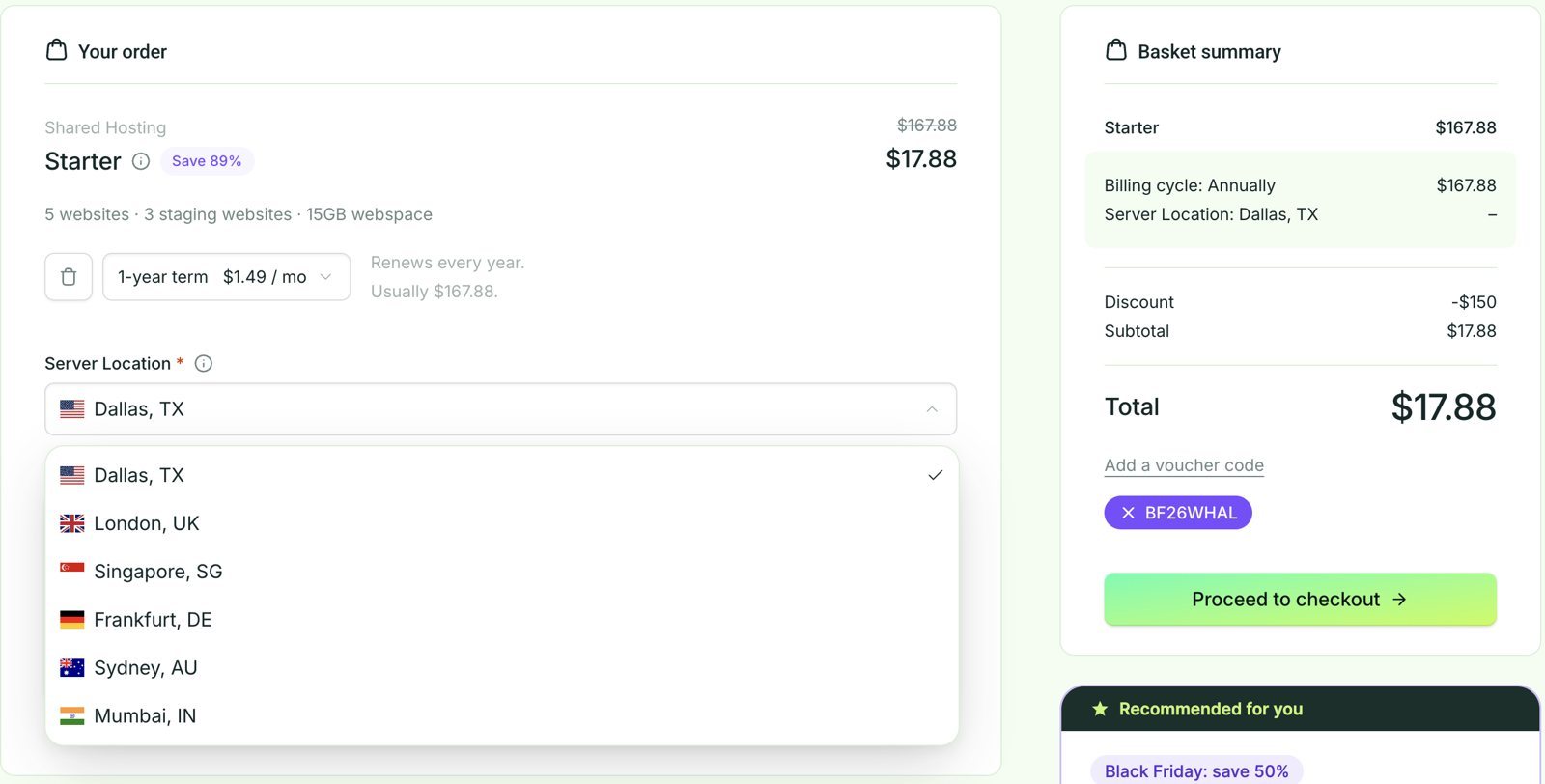
The Server Location menu in the Starter checkout on November 14, 2026: six data centers, with Dallas selected by default.
Selecting the Right Data Center
Audience location
Choose the location closest to most of your visitors. Every request travels to the server and back, so distance adds delay to each page load.
If most of your audience is in Asia, pick Singapore or Mumbai. For a US, Canadian or Mexican audience, pick Dallas, and for the UK, London.
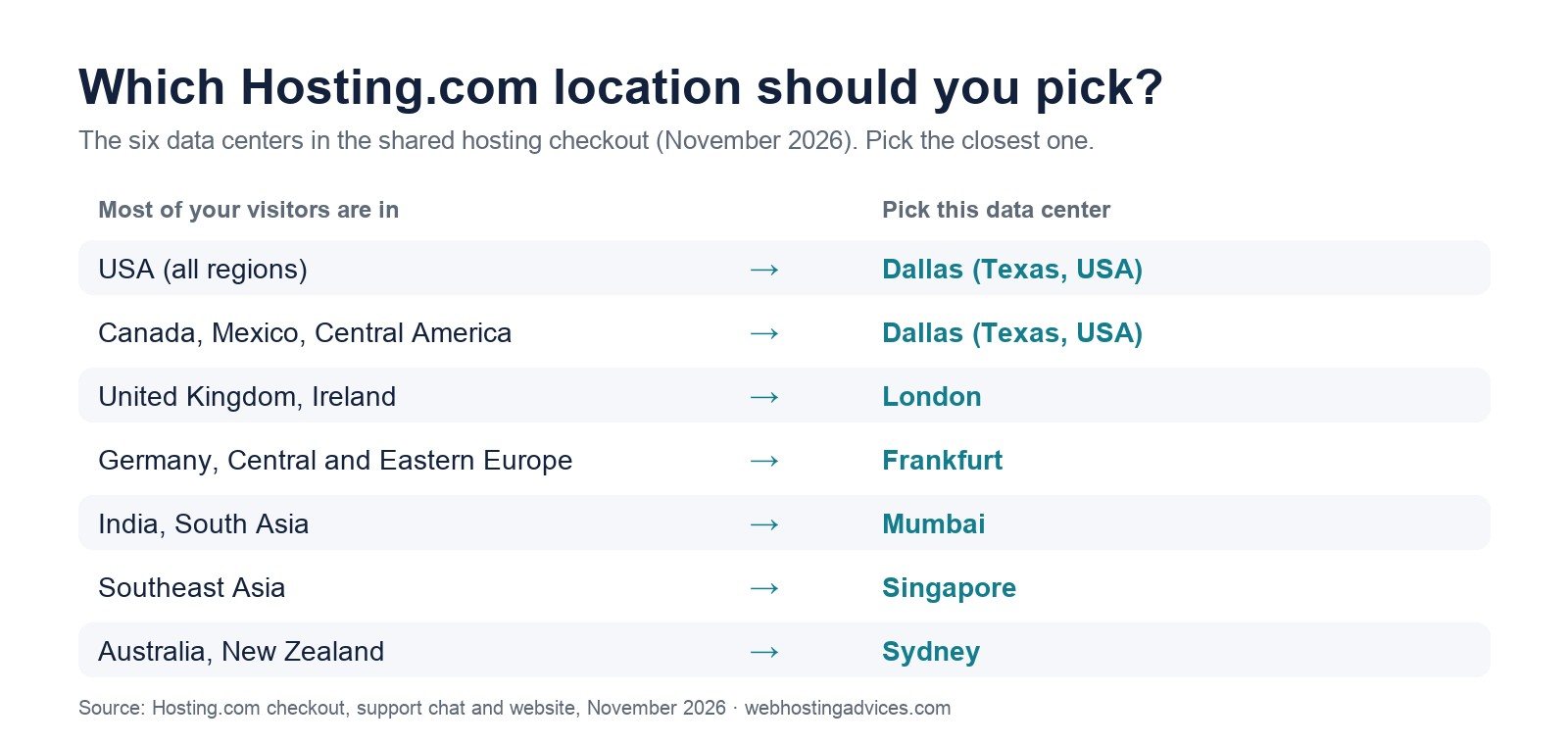
A quick guide to the six locations in the shared hosting checkout (November 2026).
Speed of the Data Center
A2 Hosting used to publish a speed test page for each data center. Hosting.com no longer offers those pages, so there is no official way to test a location before you buy.
The simplest rule still works: pick the data center closest to most of your visitors, since distance adds delay to every request.
Privacy
The last thing to look at is privacy, and it doesn't apply to most people.
Each country has its own laws, and your site has to follow the laws of the country where it's hosted. If you publish sensitive or political content, or you store confidential data, you may prefer to keep it in your own country.
A2hosting change of server location
You can move to another data center later, but support gave me different answers about the cost. In my live chat, the assistant said support would migrate the account for free on request.
The written ticket reply was more careful. It said to open a ticket with your service details and preferred location, and that the team would check feasibility, schedule the move, and tell you about any downtime or migration cost. Hosting.com's billing terms are clearer: a move without an upgrade costs a $25 migration fee, and it's free if you move while upgrading to a bigger plan.
So ask support for the price in writing before you request a move.
To request a move, open a support ticket from the Hosting Panel:
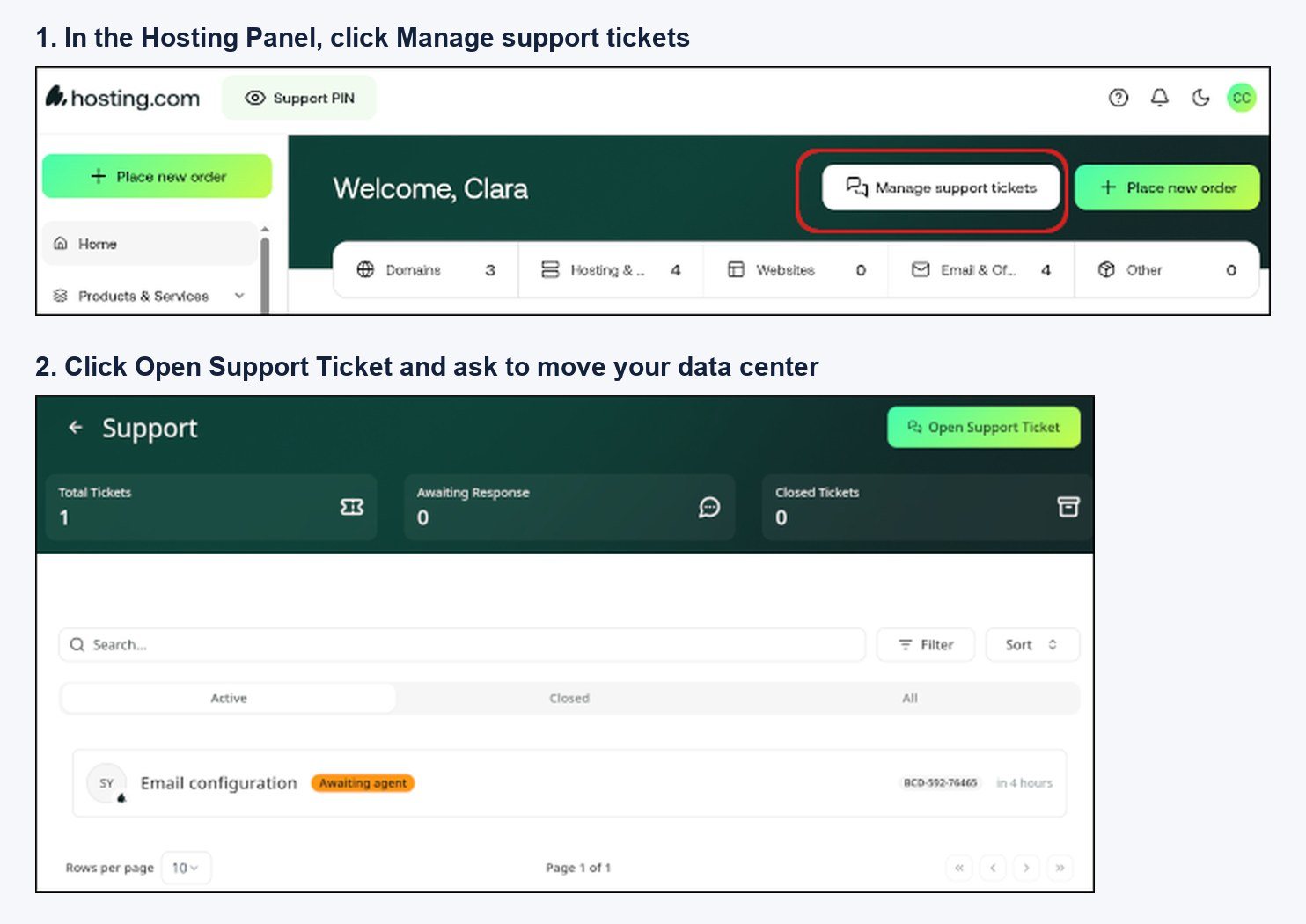
Opening a support ticket in the Hosting Panel (screenshots: hosting.com knowledge base).
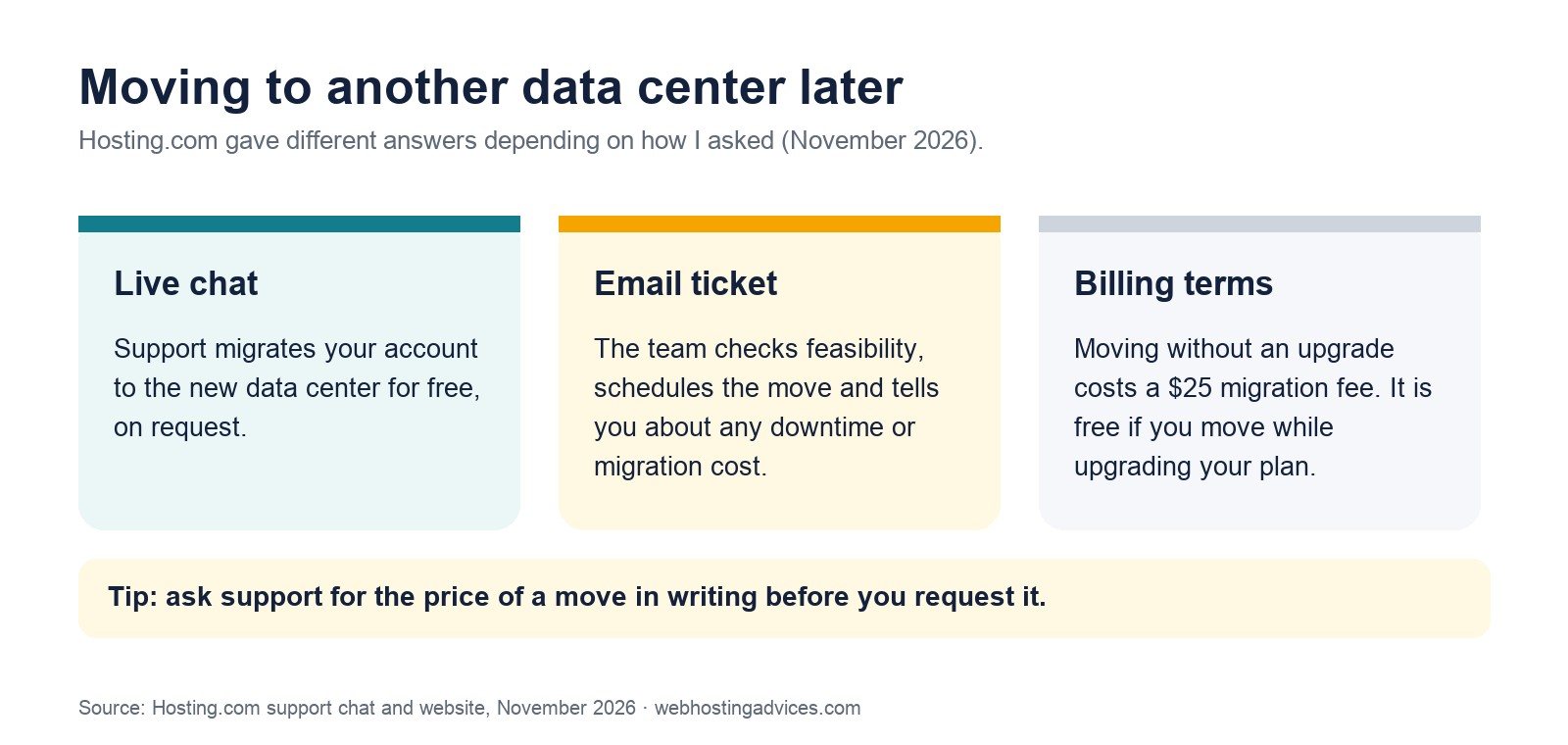
What the live chat, the email ticket and the billing terms say about moving data centers (November 2026).
If none of the locations is close to your audience, a CDN helps. It caches your site's static files in many cities and serves them from the one nearest each visitor.
Hosting.com's shared plans include Cloudflare DNS sync, but not a CDN service itself; the CDN is included on its cloud servers and bare metal. You can still put the free Cloudflare plan in front of a shared hosting site yourself.
Where is A2 Hosting based?
A2 Hosting started in Ann Arbor, Michigan, the city that gave it its name ("A2" is a local nickname for Ann Arbor). It rebranded as Hosting.com in April 2025.
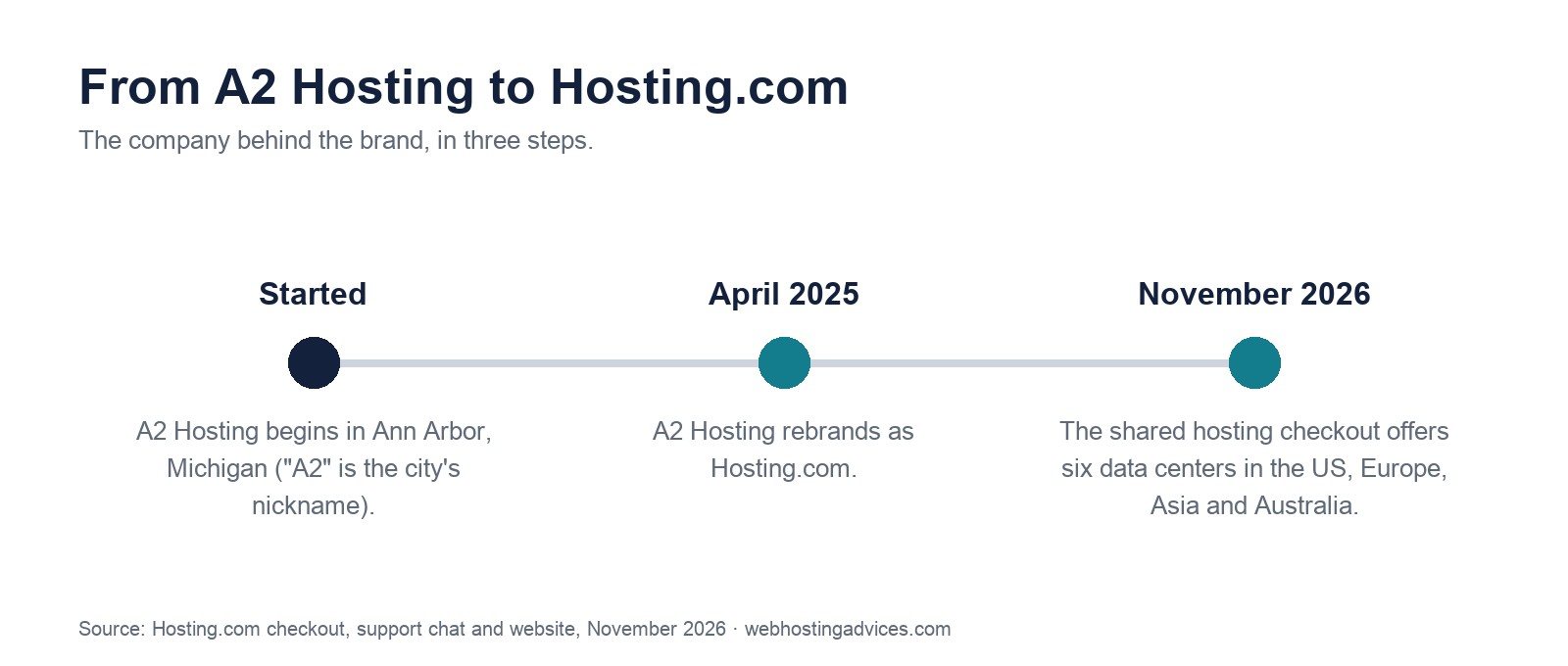
From A2 Hosting in Ann Arbor to the six data centers in Hosting.com's shared hosting checkout.
A2 Hosting used to describe itself as 100% carbon neutral. Hosting.com's current pages don't repeat that claim, so ask the company directly if green hosting matters to you.
Final Words
Hosting.com now offers more locations than A2 Hosting did: six in the shared hosting checkout, in the US, Europe, Asia and Australia. Pick the one closest to your visitors, and trust the location menu at checkout over support's answers, which listed locations the checkout doesn't offer.
So, which data center location have you decided on? Feel free to comment below about your choice.