

The best Tomcat hosting depends on where you want Tomcat to run. My top picks are Kamatera for a cloud VPS with a one-click Tomcat image, Infomaniak Jelastic Cloud for a managed Java platform where you only deploy your app, and MochaHost for shared Tomcat hosting with a private JVM.
Tomcat is an open-source software by Apache Foundation. It works under the Jakarta project. Java Serverlet and Java server pages technologies are directly implemented as java servlets containers using Tomcat.
Developers use Tomcat to create interactive web apps. It’s free to use and you can surely rely on it.
If you are creating an app on java, you can certainly go with Apache Tomcat as it’s the most suited one. The same goes true for the people using JSP.
So, the next thing that you might want to know is what is Tomcat hosting, right? Let’s get to the point.
Contents
7 Best Tomcat hosting providers (2026)
We will now have a look at the best Tomcat providers. Each one says where Tomcat runs (shared hosting, VPS or cloud, or a managed Java platform) and whether you install it yourself.
#1 Kamatera (Quick Setup)
Hosting type: Cloud VPS with a one-click Tomcat image (Tomcat 11 or 10 on Ubuntu 24.04). Kamatera installs Tomcat when it creates the server, and you manage the server and Tomcat from there.
Kamatera is a cloud service that allows you to host Tomcat-based web apps on their server. They have various products you can choose from. Kamatera’s marketplace has a ready Tomcat image (Tomcat 11 or 10 on Ubuntu Server 24.04), and you keep full root access to the server.
The cloud infrastructure allows you to increase the app’s performance. It combines various resources and you can use all of them at once.
When you choose the server, it asks you which service you want to deploy. You can simply select Tomcat and they will install it on the server.
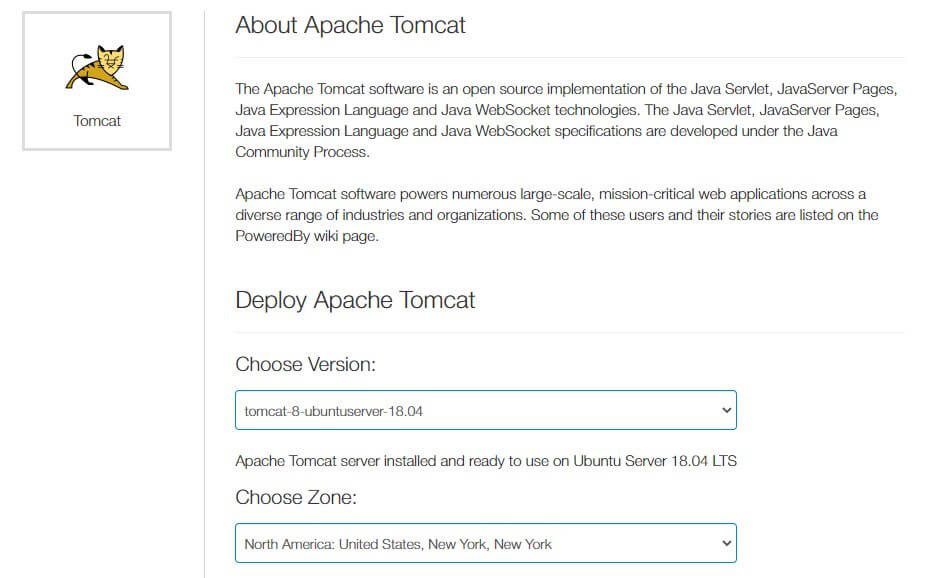
Kamatera allows you to choose the server and then install it on the server directly. There are configurations from which you can choose the best one suitable for you. The pricing will depend on the server you choose.
Why Kamatera?
- Fast-Deployment of Tomcat
- Custom configuration
- Various data center locations
- SSD storage
- Easy to setup
- No setup fee or commitment
- Better access control
- Great backup options
- CPU monitoring and demand monitoring
#2 Infomaniak (Jelastic Cloud)
Hosting type: Managed Java PaaS. Tomcat runs in a ready-made application container on Infomaniak's platform, so you deploy your app instead of installing Tomcat or running a server.
Jelastic Cloud is Infomaniak's platform as a service. You build an environment from containers in a web dashboard, and Tomcat is on the list of supported application servers, next to TomEE, Jetty, GlassFish, Payara, WildFly and Spring Boot.
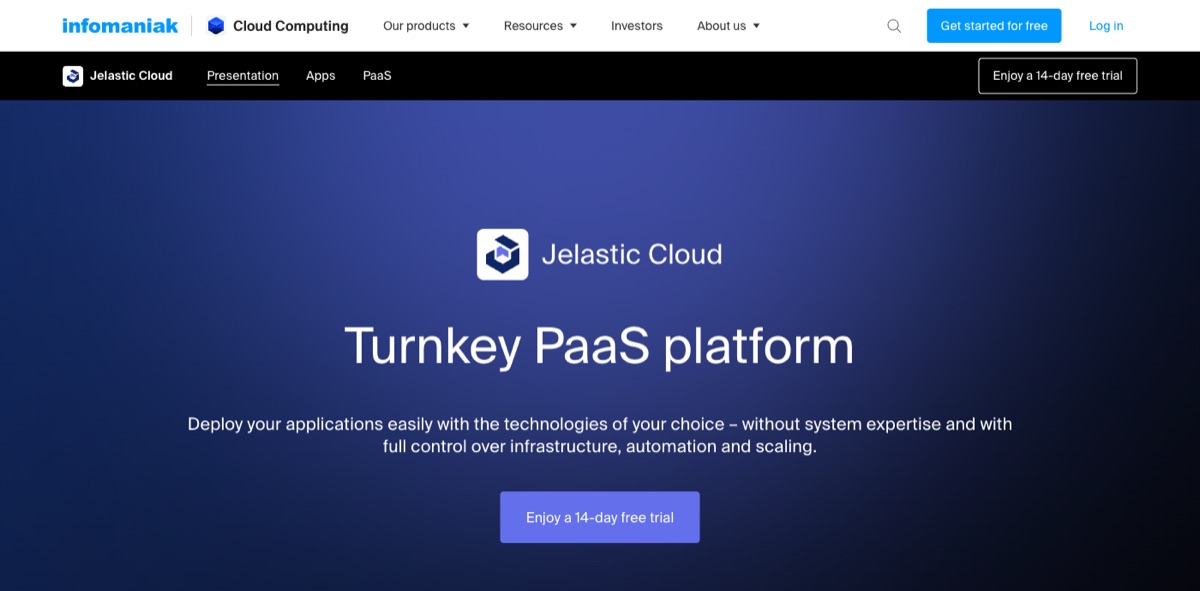
Deployment works the way Java developers expect. You upload a WAR, EAR or ZIP file, or connect a Git or SVN repository with automatic updates. Maven, Jenkins, Ant, Eclipse, NetBeans and IntelliJ IDEA are supported through extensions, and databases such as MySQL, MariaDB and PostgreSQL run in their own containers.
Billing is pay-per-use with cloudlets. One cloudlet equals 128 MB of RAM and 400 MHz of CPU, and you pay per hour for CPU, RAM, storage and the IP address from prepaid credit.
Infomaniak's calculator puts the smallest setup (one container with one cloudlet, 20 GB of SSD storage and a public IP) at €5.32 a month, or CHF 6.31, before VAT. Treat that as a floor rather than a Tomcat budget: a JVM needs much more than 128 MB of RAM, so price your real setup in the calculator.
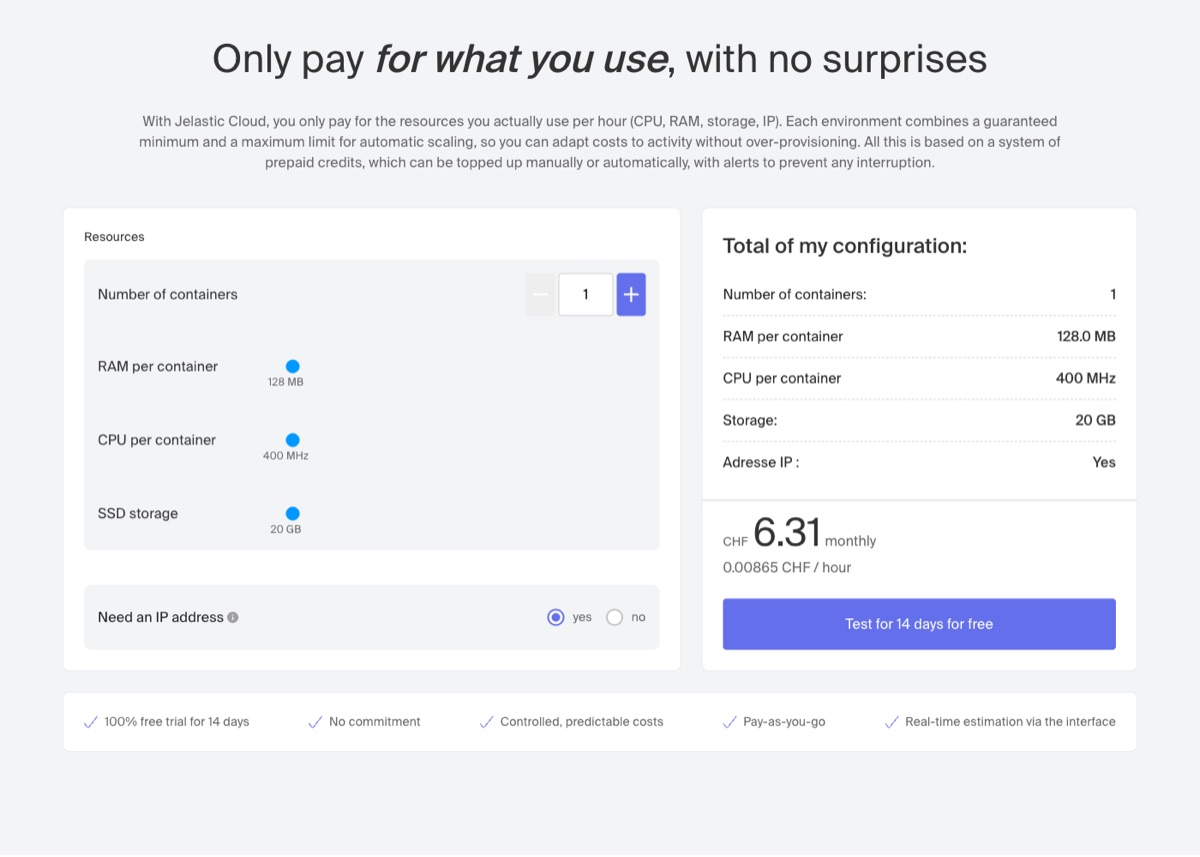
You reserve cloudlets for the steady load and add dynamic cloudlets for peaks, which are only billed when they're used. Scaling is automatic, both vertical (more resources per container) and horizontal (more containers).
Paid accounts include 20 GB of SSD storage per environment (expandable to 100 GB) and 2.8 GB of external traffic per hour, about 2.4 TB a month, with extra traffic billed per GB. Internal traffic is free, and Jelastic Cloud runs only in Infomaniak's own data centers in Switzerland, under Swiss data protection law (FADP) and the GDPR.
The 14-day free trial lets you test your app before you buy credits. It's limited to 5 environments, 8 cloudlets (1 GB of RAM and 3.2 GHz of CPU) and 10 GB of SSD, and public IPs, custom SSL certificates and Docker images unlock only on a paid account.
I recommend Jelastic Cloud if you want Tomcat without looking after a Linux server. The trade-off is cost planning: pay-per-use bills follow your usage, so set the scaling limits before traffic grows.
Why Infomaniak?
- Tomcat, TomEE, Jetty and GlassFish as ready containers
- Deploy WAR or EAR files, or from Git and SVN
- Hourly billing with reserved and dynamic cloudlets
- Automatic vertical and horizontal scaling
- 2.8 GB of external traffic per hour included
- Swiss data centers only
- Anti-DDoS protection included
- 14-day free trial
#3 Mochahost (Shared Tomcat with Private JVM)
Hosting type: Shared Tomcat hosting (Tomcat pre-configured and managed by MochaHost, with a private JVM). Tomcat is also available on MochaHost's VPS and cloud servers.
If you are looking for shared hosting and don’t want to go with the VPS one, you can surely go with Mochahost. It’s affordable and will give you the best features.
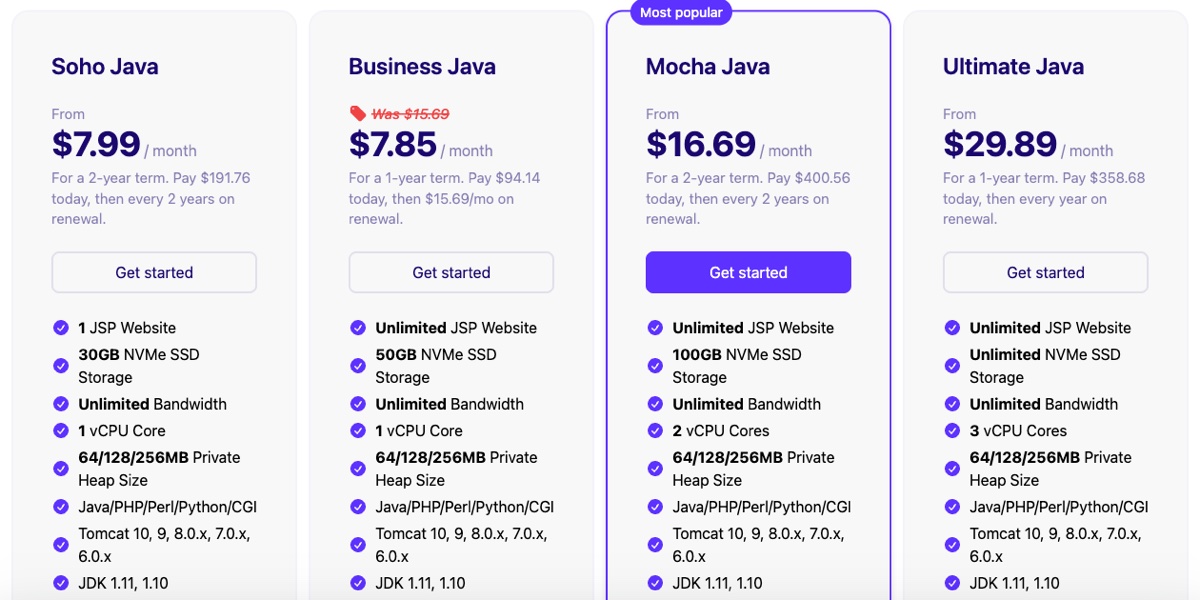
They have four shared Java plans, and every plan except the entry Soho Java plan allows unlimited JSP websites. MochaHost backs them with a 99.9% uptime guarantee.
The plans list Tomcat 10, 9, 8.0.x, 7.0.x and 6.0.x with JDK 1.11 and 1.10 (Java 11 and 10). Tomcat 11 isn’t on that list, so check with their support first if your app needs Java 17 or newer.
Business Java starts at $7.85/month on a 1-year term ($94.14 upfront) and renews at $15.69/month. Soho Java is $7.99/month on a 2-year term, but it only hosts one JSP site. They also sell VPS and cloud servers with JSP/Tomcat support.
If you don’t have a money issue and want better speed and control, you can certainly go with the cloud server. Things like java heap size will increase as well as you will get better performance.
They support the major Java frameworks in shared hosting, including JSF, Spring, Hibernate, Struts and ZK. You will get a private JVM.
This will increase the security and performance of your hosting. They are more stable and secure as compared to the public ones. Other websites won’t affect your JVM.
The plan cards list a private heap of 64, 128 or 256 MB. MochaHost’s knowledge base describes the larger heaps as a paid upgrade, so check in the cart which heap size your price includes.
Mocha Host has a huge list of features we could cover. We will surely cover the best ones.
Why Mocha Hosting?
- Attractive price in shared hosting
- JSF, Spring, Hibernate, Struts and ZK support
- Unlimited free SSL certificates
- Java Servlet container support
- MariaDB and PostgreSQL databases
- Web-based Tomcat Manager
- Free migrations
- Free weekly backups
#4 Contabo (Most RAM per Dollar)
Hosting type: Unmanaged cloud VPS. Tomcat isn't pre-installed: you install Java and Tomcat yourself over SSH.
Java apps need plenty of memory. The JVM heap, Tomcat’s threads and a database all share the same RAM, and a 1 GB or 2 GB plan fills up fast. Contabo gives you a lot of RAM per dollar, which makes it a good fit for a Tomcat server on a tight budget.
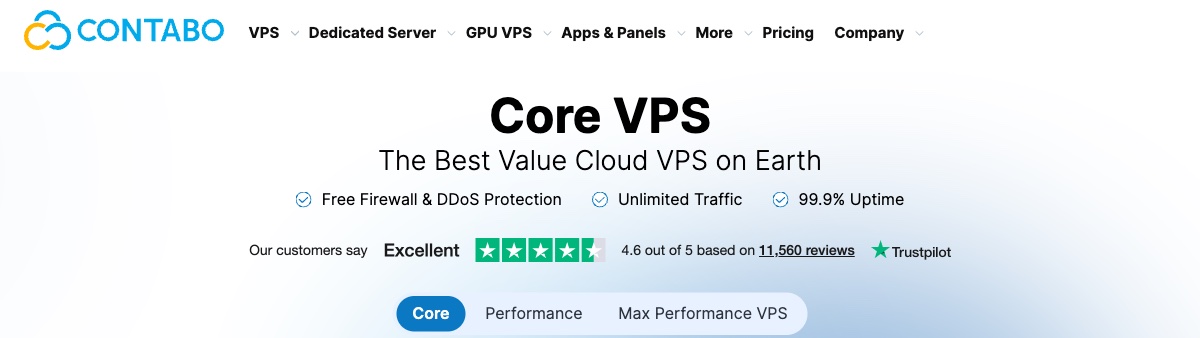
The entry plan is Cloud VPS 4 with 4 vCPU, 8 GB RAM, 100 GB SSD storage and a 200 Mbit/s port. Traffic is unlimited, with a fair usage policy on outgoing traffic. It costs $6.60/month on monthly billing or $5.28/month on a 24-month term ($126.72 paid upfront), with no setup fee.
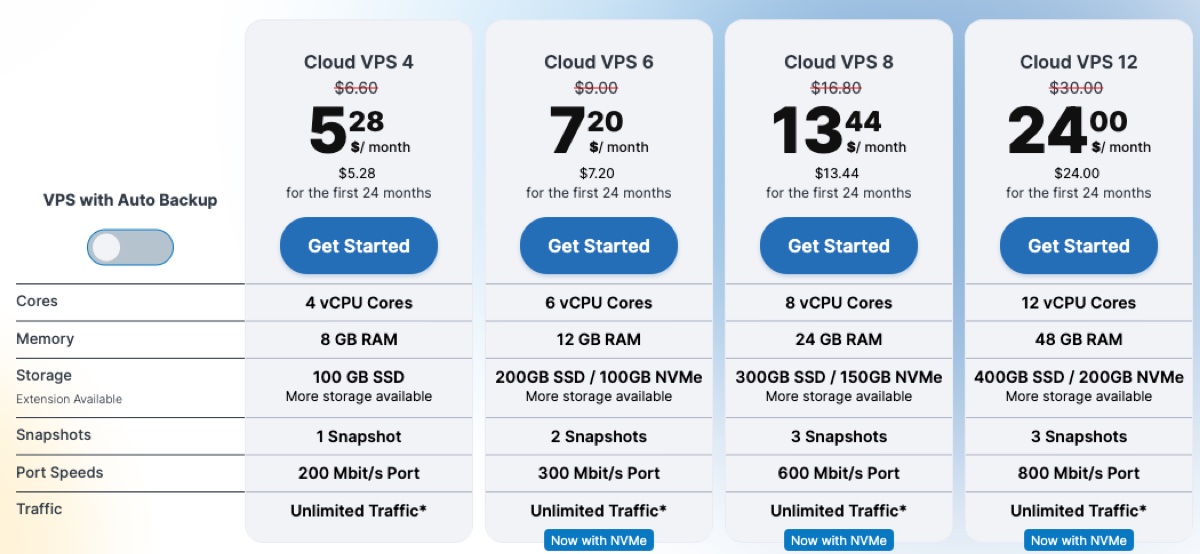
This is an unmanaged KVM VPS. Contabo looks after the hardware and the network, and you install Java and Tomcat yourself over SSH with full root access. Contabo has its own Apache Tomcat guide that covers the install on Linux, Windows and Docker.
8 GB leaves room for a JVM heap of a few gigabytes next to MySQL or PostgreSQL on the same server. The trade-off is CPU: the vCPUs are shared, and Contabo itself positions this Core VPS line for lighter workloads. If your app is CPU heavy, look at their Performance VPS line instead.
Contabo has 11 locations in 9 regions, including Germany, the UK, three US regions, Singapore, Tokyo, Sydney and India. The EU region is included in the price, while the other regions add a monthly fee (from $1.30 in the UK).
Why Contabo?
- 8 GB RAM on the entry plan
- 4 vCPU and 100 GB SSD
- No setup fee
- Unlimited traffic (fair use)
- Full root access on a KVM VPS
- Official Tomcat installation guide
- 11 locations in 9 regions
- 1 snapshot included (Auto Backup is a paid add-on)
#5 InterServer
Hosting type: VPS. Tomcat isn't pre-installed, so you install Java and Tomcat yourself (or ask InterServer's support). For Java apps, use the VPS rather than InterServer's shared web hosting.
InterServer is one of the oldest Java hosting solutions out there. The awesome new features are just one reason why you should go with the hosting. Its VPS comes with full support for Tomcat, and you run the Java app on the VPS with full root access.
It offers a 99.99% uptime guarantee. There are many features available here that you should surely check out. The VPS has great server features and comes with a self-healing service.
You can choose from various plans available. Their servers are super optimized for Tomcat. Therefore, you will get the best performance here.
Why Interserver?
- Free fully managed support
- Full root access
- Control panel availability (extra charge)
- Server optimized for Tomcat
- You can easily scale your server resources
#6 Hostinger
Hosting type: VPS only. You install Java and Tomcat yourself; Hostinger's Web and Cloud (shared) plans don't run Java.
Hostinger is one of the most affordable hosting providers out there. For Hostinger tomcat web solutions, you can check out their VPS server. Hostinger's own help center says Java servlets and JSP need root access, which its Web and Cloud plans don't have.
Hostinger doesn’t sell dedicated servers, so the VPS is the option here. It comes in 4 plans (KVM 1, KVM 2, KVM 4 and KVM 8), so you can choose the one that suits your budget.
All the VPS plans come with NVMe storage. You will get full root SSH access through which you can install any software you want. The same allows you to install Tomcat.
There is a quick tutorial on how to install Tomcat on Ubuntu on Hostinger. You can have a look at it to know more about it.
They have a multi-server management feature and give you complete access control. This makes it easier for you to manage the server.
Their uptime is great and you will also get awesome speed. Hostinger has been in the industry for many years and provides great services you can rely on.
Their support is great and you will get the query solved without waiting for a long time.
Why Hostinger?
- NVMe storage
- Full root access SSH
- 30 days money-back guarantee
- 1-click installer
- Data centers on 4 continents
- Weekly Backups & Snapshots
- Multi-server management
#7 UltaHost (Java Hosting)
Hosting type: Java VPS, which UltaHost lists as managed hosting. The Java page promises pre-configured Tomcat stacks, but the order form has no Tomcat image, so plan to install Tomcat on a Linux image or in Docker yourself, or ask support to set it up.
UltaHost sells its Java hosting as VPS plans, not shared hosting. Every plan has a dedicated IPv4 address, NVMe storage and SSH access, and the Java page lists JDK 8, 11, 17 and 21 with control over JVM flags and heap settings.
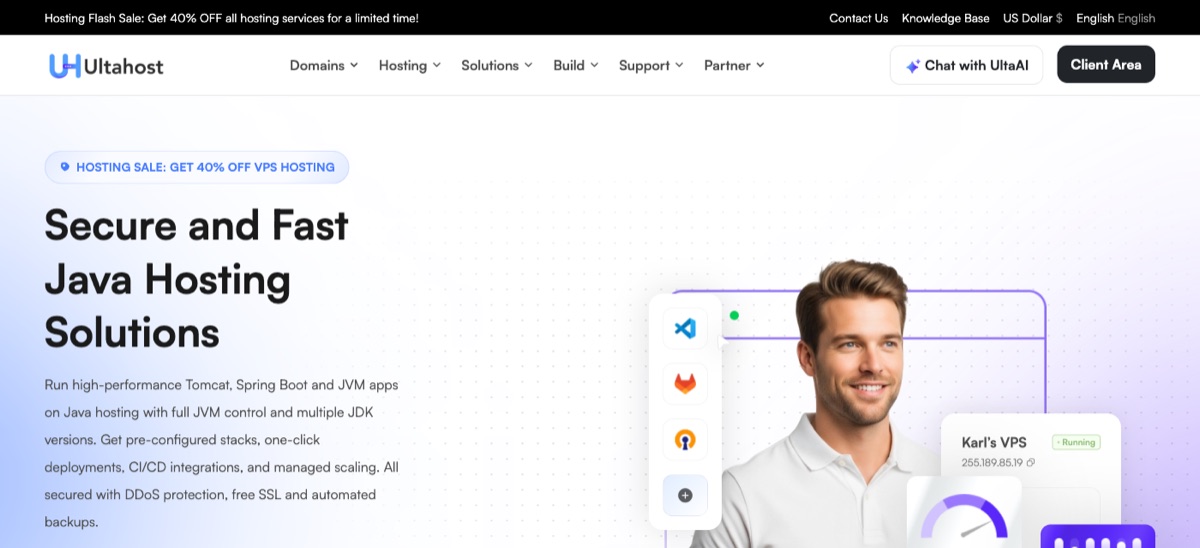
VPS Basic has 1 CPU core, 1 GB of DDR5 RAM and 30 GB of NVMe SSD. That's tight for Tomcat plus a database, so VPS Business (2 CPU cores, 2 GB of RAM, 50 GB NVMe) or VPS Professional (3 CPU cores, 4 GB of RAM, 75 GB NVMe) is the better start for a real app. UltaHost doesn't say the cores are dedicated.
A 40% flash sale is running for a limited time, with no end date given. During the sale, VPS Basic costs $5.52/month on a 2-year term or $6.89 on monthly billing, against a regular price of $9.19/month. Check the cart for the price after your first term.
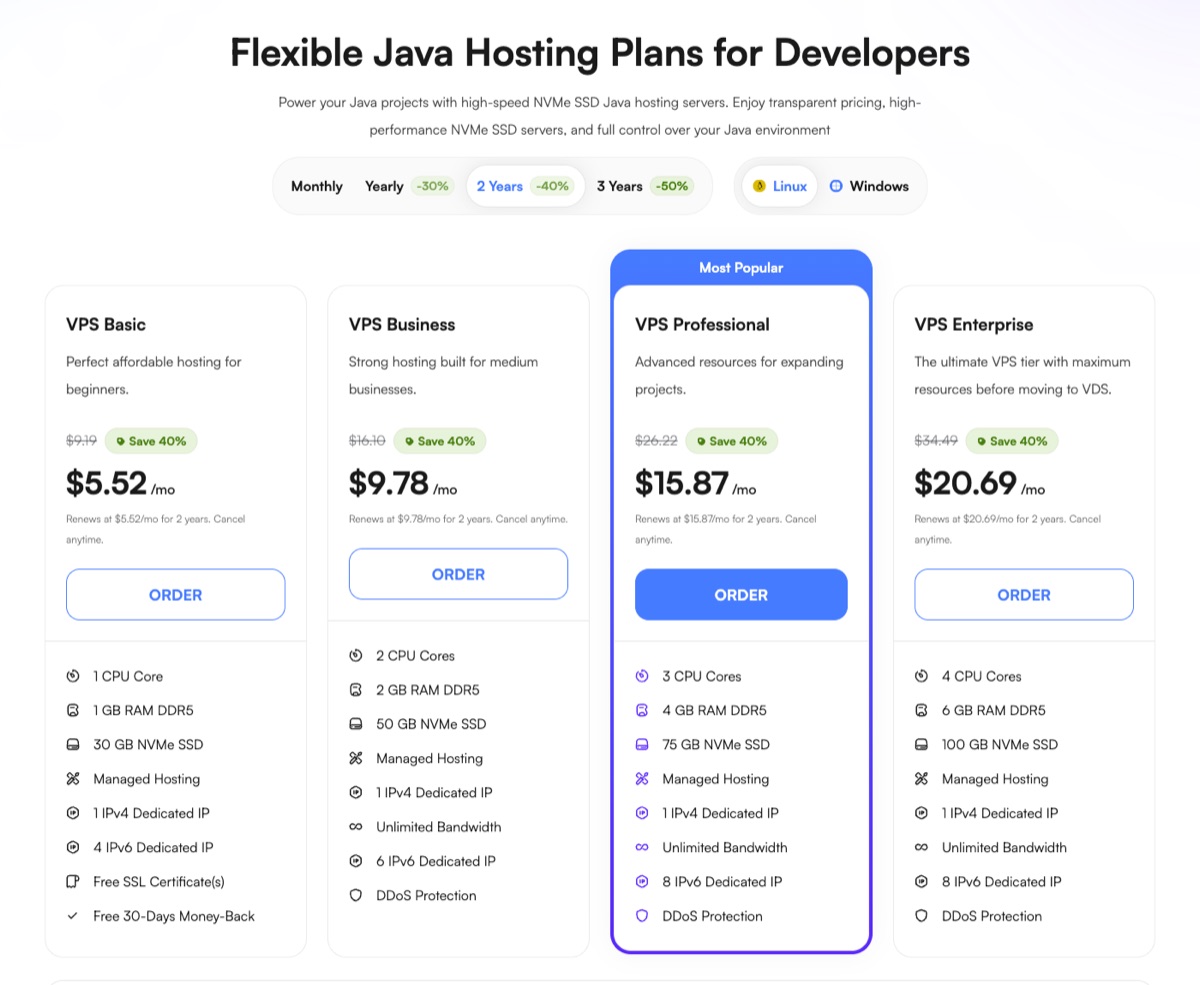
The order form offers 27 server locations across Europe, North and South America, Asia, the Middle East, Africa and Australia. You also pick the OS (Ubuntu, Debian, AlmaLinux, Rocky Linux and others) and an optional panel, from the free Hestia, CyberPanel and aaPanel to paid cPanel and Plesk.
The support scope depends on the management option and panel you choose. UltaHost's VPS FAQ says a fully managed VPS with a supported panel covers server updates, monitoring and management, so confirm what your plan includes before you rely on it for Tomcat.
Why UltaHost?
- JDK 8, 11, 17 and 21
- NVMe SSD and DDR5 RAM
- Dedicated IPv4 on every plan
- 27 server locations
- Free SSL and DDoS protection
- 30-day money-back guarantee
Free Tomcat Hosting Providers
Let’s not create suspense and give the spoiler at first. All of them will just offer a free trial. Within this trial, you can see if you can handle the unmanaged hosting or not.
Note: These are unmanaged cloud VPS servers. In simpler words, you will need technical knowledge to install Tomcat and use the hosting. Luckily, all four given below offer a free trial or free credits.
You can try out the server and use the credits to see the estimated charges. If you don’t have technical skills, you can go with the above list.
#1 Kamatera
Hosting type: Cloud VPS with a one-click Tomcat image; you manage the server yourself.
Kamatera gives new accounts a 30-day free trial with up to $100 of cloud services, including one server in the configuration of your choice. A valid credit card is required. You can pick Tomcat from Kamatera's app list when you create the server, so you don't have to install it by hand.
#2 Vultr
Hosting type: Cloud VPS; you install Tomcat yourself.
Vultr is yet another amazing free Tomcat web server you can go for. The cloud VPS has various configuration options to choose from.
You can choose the OS, location, and then select the size to deploy the server. There are 33 locations from which you can choose the best one.
It allows you to install a Tomcat server on the server. With just a couple of lines of code, you can install Tomcat on the server.
Make sure you have selected Ubuntu or CentOS. Once installed, you can deploy your java app and make it live.
They have a great infrastructure that can monitor the server’s health and make sure you get the best service that you are looking for. You can track the server’s health and monitor the insights as well. Last but not least, they have easy account management options.
Trial Details: Vultr gives new accounts promotional credit (its $50 offer is valid for 30 days). You add a payment method to verify the account, and the credit amount depends on the promotion you sign up with.
#3 Digital Ocean
Hosting type: Cloud VPS (Droplets); you install Tomcat yourself.
If you are looking for free Tomcat web hosting, there are good chances that you are running low on budget. Digital Ocean will provide you with the best service with affordable pricing options. If you are a developer, it will give you the best performance here.
The server is also known as a developer-friendly cloud. It’s easy to deploy your app here and make the changes. You will have to install Tomcat on the server.
The free credit lets you test a small server before you pay. The price isn’t huge once the credit is used up.
Trial Details: New accounts get a $5 free credit, valid for 90 days.
Why go with DigitalOcean?
- Developer friendly
- Easy to deploy
- Less cost
- Developer tools
- Support is great
#4 Akamai Cloud (formerly Linode)
Hosting type: Cloud VPS; you install Tomcat yourself.
Akamai bought Linode, and the Linode cloud is now sold as Akamai Cloud Computing. If you are new to the world of cloud servers, you surely might be worried about the pricing, right? Akamai Cloud offers a solution to that problem with predictable pricing.
The cloud server is a great alternative to AWS. Akamai Cloud's pricing is predictable and low.
Trial Details: New accounts get a US$100 credit, which you have to use during the trial period (Akamai's documentation describes it as a 60-day credit). A valid payment method is required to confirm your identity.
Why go with Akamai Cloud?
- Predictable pricing
- Global infrastructure
- Awesome Support
- Marketplace for apps
- Various configuration options are available
Criteria for choosing the best tomcat server hosting?
Before you choose any provider, there are certain criteria to keep in mind:
1. Pre-installed or Manual Installation
The first thing that you need to see is whether Tomcat comes installed on the hosting or you will have to install it on your own. If it comes pre-installed, it’s good for all.
However, if you have to install it on your own, you will need technical knowledge for the same. Even if you know how to install Tomcat, it’s better if it comes pre-installed.
This usually comes down to the hosting type. On shared Tomcat hosting like MochaHost or a managed Java platform like Infomaniak's Jelastic Cloud, Tomcat is ready for you. On a VPS from Contabo, InterServer or Hostinger, you install it yourself, while Kamatera sits in between with a ready Tomcat image on a server you manage.
2. Version and Support
You will have to see the tomcat version, JDK, MySQL, PostgreSQL. Etc. You should also see if it supports all the popular frameworks such as JSF, Struts, Hibernate, Spring, etc. You can look for java servlet support too.
If all the things are available. You can see whether it supports other languages like PHP or not. Further, you can also look for JNDI/JDBC support.
3. Basic Hosting Needs
You should always look for the basic hosting server features:
- Storage: it will define how much storage you have.
- Uptime: If the server is offline once a day, you should look for another hosting. The server you are choosing must be available all the time. You can look for at least a 99.9 % uptime guarantee.
- Bandwidth: Bandwidth will determine how much data you use. If your web page is 100 kb and 4 people visit it, you will use 400 kb of bandwidth. Make sure you get enough bandwidth.
- Support: Look for the support. You should if they provide live chat support or phone support.
- Websites: You can see how many java websites you can host in the plan.
Which one to Choose?
You might be thinking which of these is the best, right? Well, depending on your budget, you can go with any of them. I recommend Kamatera if you want a cloud VPS where Tomcat is set up for you from a ready image, and Infomaniak's Jelastic Cloud if you'd rather not run a server at all.
For shared Tomcat hosting on a fixed monthly price, go with Mochahost. If your Java app needs a lot of memory on a small budget, Contabo gives you 8 GB of RAM from $5.28/month, but you install and maintain Java and Tomcat yourself.
Please note that not all the above-mentioned hosts are managed servers. MochaHost (shared hosting) and Infomaniak (managed PaaS) handle Tomcat for you, and UltaHost sells its Java VPS plans as managed.
Kamatera, Contabo, InterServer and Hostinger give you a VPS that you set up and maintain yourself. If you have a bit of technical knowledge or you are ready to look at some tutorials, you can go with unmanaged hosting.
What is tomcat web hosting exactly?

Not all servers can run java apps. You will need Tomcat installed on the server if you want to host java apps.
For the same reason, you will need to find a web hosting service that allows you to host java apps. In simpler words, you will have to find the hosting that already has Tomcat installed on their server or they will allow you to install it.
As most websites are using WordPress and other CMS, many web hosting companies don’t have Tomcat installed on the server and they don’t even provide the same. Therefore, you will have to find the hosting that does so.
Advantages of using tomcat JSP hosting for web apps?
If you are wondering why you should be using Tomcat host for web apps, here are some of the reasons for it. Of course, there are many reasons why you should be using it. We will just see a couple of them.
- It is easy to configure and run.
- The performance is great. You can run multiple instances at the same time without any issues.
- If you want to improve the security of your apps, you can do it with the help of Tomcat. It has the best security features you can go with. So, Apache Tomcat can handle all the security for you.
- Apache Tomcat is open-source and free to use.
- There are some great hosting providers offering Tomcat hosting at a very affordable price. You can also get any VPS and install Tomcat on it.
- There are a lot of customization options that make it more flexible.
- The lightweight of the server gives you another reason to use it.
- More than 60% of Java developers use Apache Tomcat as their server. Therefore, it’s one of the most popular servers there.
- The community and the documentation are great here.
Final Words
To conclude, these were some of the best Tomcat hosting services you can use. Kamatera, Infomaniak and MochaHost lead my list, and each one covers a different hosting type: a cloud VPS, a managed Java platform and shared hosting.
You can surely see the tomcat version information when you are going with any of the services.
 Kamatera
 Infomaniak
 MochaHost
 Contabo
Compare these plans in a table
| Provider | Kamatera | Infomaniak | MochaHost | Contabo |
|---|---|---|---|---|
| Features | Cloud VPS with one-click Tomcat image (Tomcat 11/10), managed by you, multiple data centers | Managed Java PaaS, Tomcat container, auto-scaling, Swiss data centers | Shared Tomcat hosting, private JVM, Tomcat Manager, free SSL | Unmanaged VPS (install Tomcat yourself), 8 GB RAM, 4 vCPU, unlimited traffic |
| Starting price | From $4.00 (30-day free trial) | From €5.32/month pay-per-use (14-day free trial) | From $7.85/month | From $5.28/month |
| Our score | 9.9/10 | 9.6/10 | 9.5/10 | 8.8/10 |
If you are a technical person, you can go with an unmanaged VPS and install Tomcat yourself. Otherwise, I suggest shared Tomcat hosting or a managed Java platform, as that will be a better option for you.
FAQ (Frequently Asked Questions)
Does Hostinger support Java?
Not on its shared hosting. Hostinger says Java servlets and JSP need root access, which its Web and Cloud plans don't have, so its VPS is the supported option, and you install Java and Tomcat on it yourself.
How much does Java hosting cost?
It depends on the hosting type. An unmanaged VPS where you install Tomcat yourself starts at $5.28/month at Contabo (24-month term), and Infomaniak's pay-per-use Java platform starts at about €5.32/month for its smallest container. Shared Tomcat hosting at MochaHost starts at $7.85/month on a 1-year term.
What is the best hosting for Java applications?
Kamatera is my top pick for most Java applications: a cloud VPS with a ready Tomcat image and a 30-day free trial. If you don't want to manage a server, Infomaniak's Jelastic Cloud runs Tomcat as a managed platform, and MochaHost is the best shared hosting option.
Can I start with free Java web hosting?
The only way you host it for free would be to use one of the mentioned hosting companies that offer a free trial.