


Read a few Namecheap reviews but still can’t decide whether it’s good or bad? Welcome to another WebHostingAdvices guide.
At WebHostingAdvices, we aim to provide accurate advice about your host. Today, it’s Namecheap’s turn.
We will see why Namecheap hosting sucks. Later, we will see who can still stick with Namecheap hosting and I’ll list some alternatives for the rest of you.
Prices, plans, support chats and test results were checked in November 2026.
Let’s start.
Contents
Why does Namecheap hosting suck?
Below are a few of the reasons why WebHostingAdvices doesn’t recommend going with Namecheap.
Account suspension for resource abuse
To begin with, the resource limits are quite low for a shared hosting plan. You get what you pay for.
Namecheap is quite cheap compared to others. So, the resources are also lower.
Stellar and Stellar Plus get a 50% CPU limit, and on CloudLinux, which Namecheap uses for these limits, that means half of one CPU core, with short bursts up to 200%. Stellar Business gets one full core (100%, bursting to 400%). RAM is 1 GB on Stellar and 2 GB on the other two plans. Namecheap’s hosting support confirmed these limits when I asked.
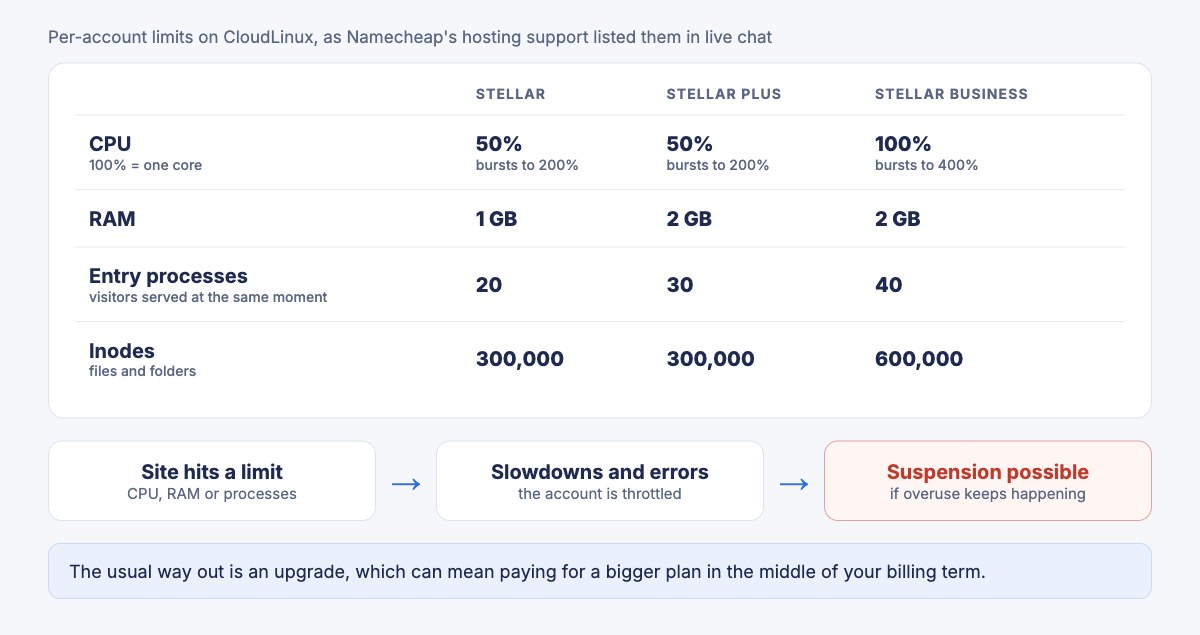
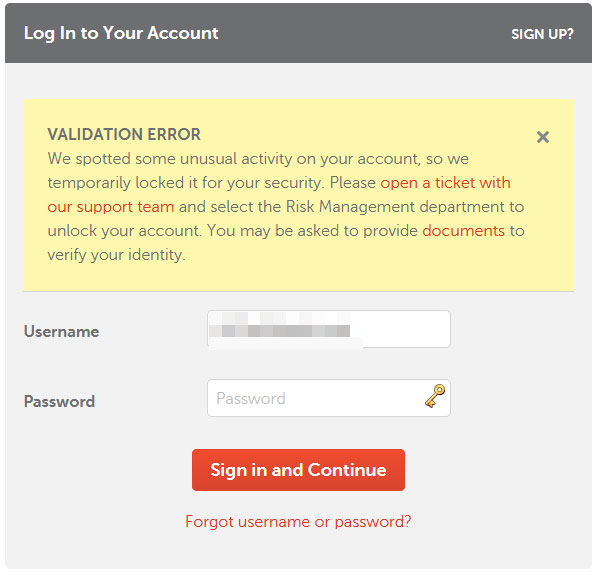
However, the problem is that if you somehow exhaust the resources or reach the limit, they can suspend your account with or without warning.
In the end, your only option will be to upgrade your hosting. This hurts your budget when you have to upgrade in the middle of a billing term.
Poor Customer Support
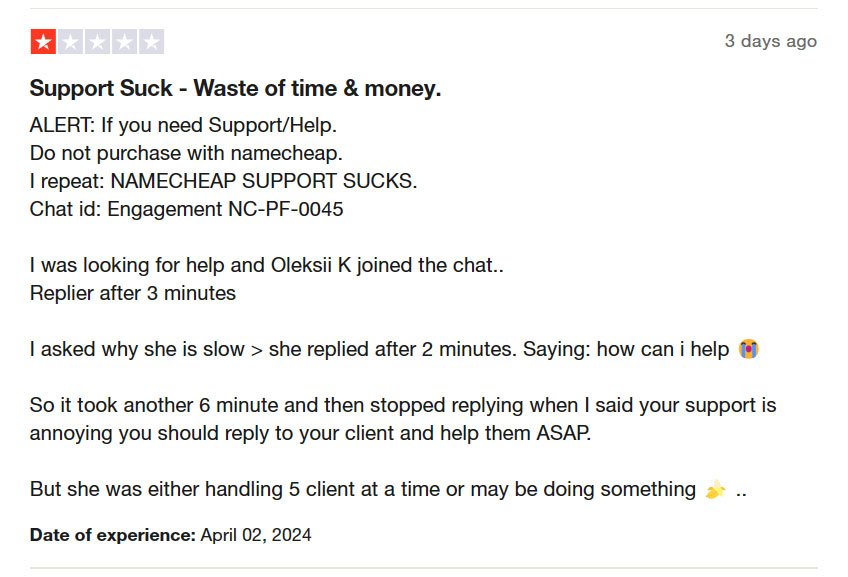
Namecheap had excellent customer support at one point. However, their support has gotten worse lately.
They still solve most problems, but they take a lot longer to do it.
I tested the live chat again on November 18, 2026. A human agent joined in under a minute, but that agent only sent me a link to the plans page. The hosting specialist I was then transferred to gave detailed answers, but each one took 2 to 6 minutes, and six questions took almost an hour.
Namecheap also lacks phone support despite being a US-based host.
URL forwarding without HTTPS
Namecheap's DNS itself isn't slow. I timed its nameservers against Cloudflare's with public test probes, and from data centers both answered in under 20 ms:
| Test location | Namecheap DNS | Cloudflare DNS |
|---|---|---|
| Ashburn, USA | 0 to 17 ms | 0 to 3 ms |
| Frankfurt, Germany | 0 to 4 ms | 4 ms |
| London, UK | 2 to 10 ms | 4 to 6 ms |
| Singapore | 3 to 4 ms | 4 ms |
| Sydney, Australia | 0 to 2 ms | 0 to 3 ms |
| Malaysia (home and office networks) | 12 to 250 ms | 11 to 37 ms |
Median response per nameserver, three probes per location. Namecheap: dns1/dns2.registrar-servers.com and dns1.namecheaphosting.com; Cloudflare: two of its customer nameservers.
The exception was some networks in Malaysia, including my own connection in Kuala Lumpur, where a Namecheap lookup took about 230 ms against under 40 ms for Cloudflare. Resolvers cache the answer, so that delay mostly hits a visitor's first lookup.
The real problem is Namecheap's URL forwarding (the URL Redirect record). Its forwarding server only answers plain HTTP. In my tests, every HTTPS connection to it timed out after 15 seconds, from Ashburn and Frankfurt as well as from Malaysia. A visitor who opens the https:// address of a forwarded domain gets no page at all, and browsers that try HTTPS first make visitors wait before they fall back to HTTP. Over HTTP, the redirect itself took 0.3 to 0.8 seconds.
If you need to forward a domain, do it at Cloudflare or at your host, where the redirect works over HTTPS.
Everyone should follow these rules when choosing hosting.
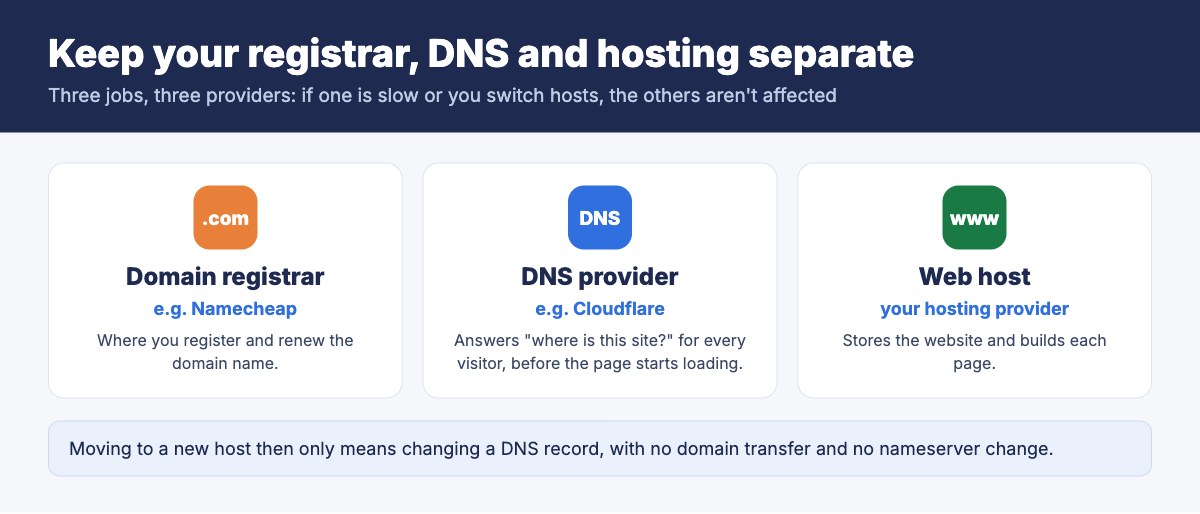
- You should never use your registrar as a DNS server.
- Never use your DNS server as your host.
- Never keep the registrar and host the same.
Ideally, your domain name registrar, DNS, and hosting should always be different. This makes it easier to switch between hosting providers.
I recommend connecting your domain to Cloudflare and using its DNS.
Limited email sending limit
Like most shared hosts, Namecheap limits how many emails you can send. The limit applies to each domain, not to your account as a whole.
Their limit starts at 50 emails per hour per domain for the stellar plan. It's 200 an hour on Stellar Plus and 10,000 on Stellar Business.
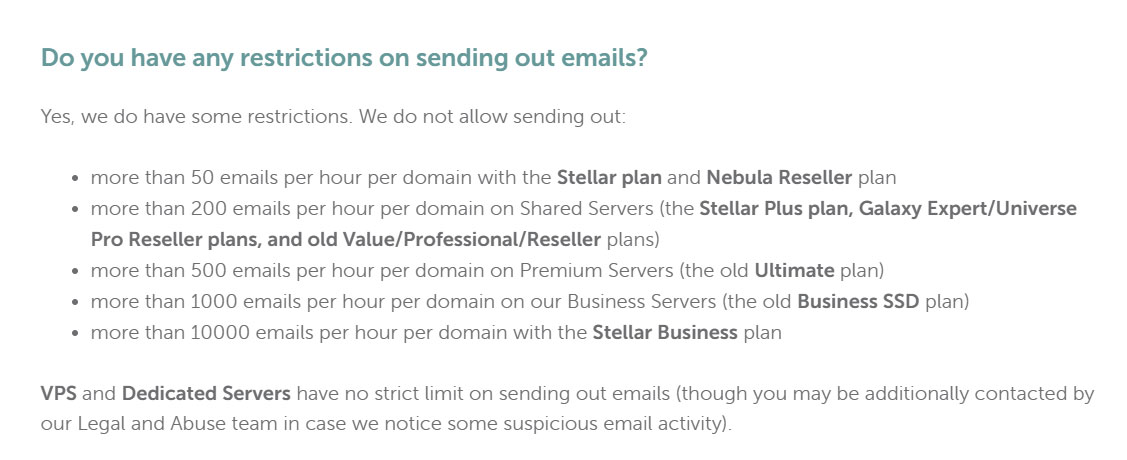
These limits won’t affect most people. Most people won’t send more than 50 emails per hour. However, if you run an eCommerce website, you will need to send more than 50 emails an hour during peak hours.
There are almost no hard limits on VPS and dedicated servers.
Slow Hosting
The last reason is that Namecheap sites often feel slow once they get busy. On light traffic the servers hold up: in my web hosting benchmarks, Namecheap earned a B rating and ranked 9th of 23 shared hosts, with an average server time of 534 ms across 2 live sites (Grafana k6 from Ashburn, USA). Under load, two customer sites slowed to about 4.4 seconds at 50 visitors at once. My own Stellar Plus test shop held up better: its uncached pages went from 500 ms to 2.17 seconds at 46 visitors at once, and none of the 871 requests failed. My Namecheap hosting review has the full results and my own test account.
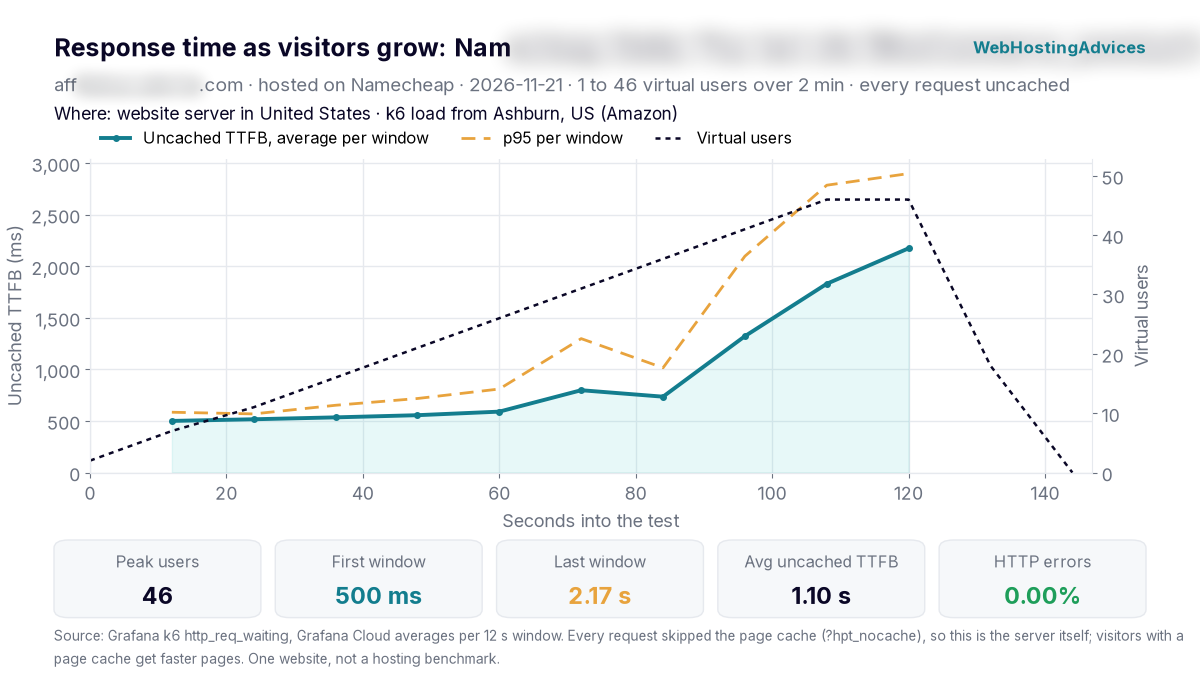
Load test on my own Stellar Plus WooCommerce shop: Grafana k6 from Ashburn, USA, website server in Phoenix (US), 1 to 46 visitors over 2 minutes, every request uncached. One website, not a hosting benchmark.
The bottleneck is the plan limits. On my account, four copies of the same PHP job ran only about 1.3 cores of work at once on a busy server, and disk writes stopped at the 50 MB/s I/O cap. With half a CPU core on Stellar and Stellar Plus, a WordPress site with heavy plugins or a traffic spike runs into the limit and slows down, and Namecheap expects you to upgrade when that happens regularly.
Lack of Scalability
The scalability is quite limited. Their 2nd shared plan (Stellar Plus) has unmetered storage but a 300,000 inode limit, and their best plan (Stellar Business) has a 50 GB storage limit with 600,000 inodes.
With only three plans, the storage options are quite limited.
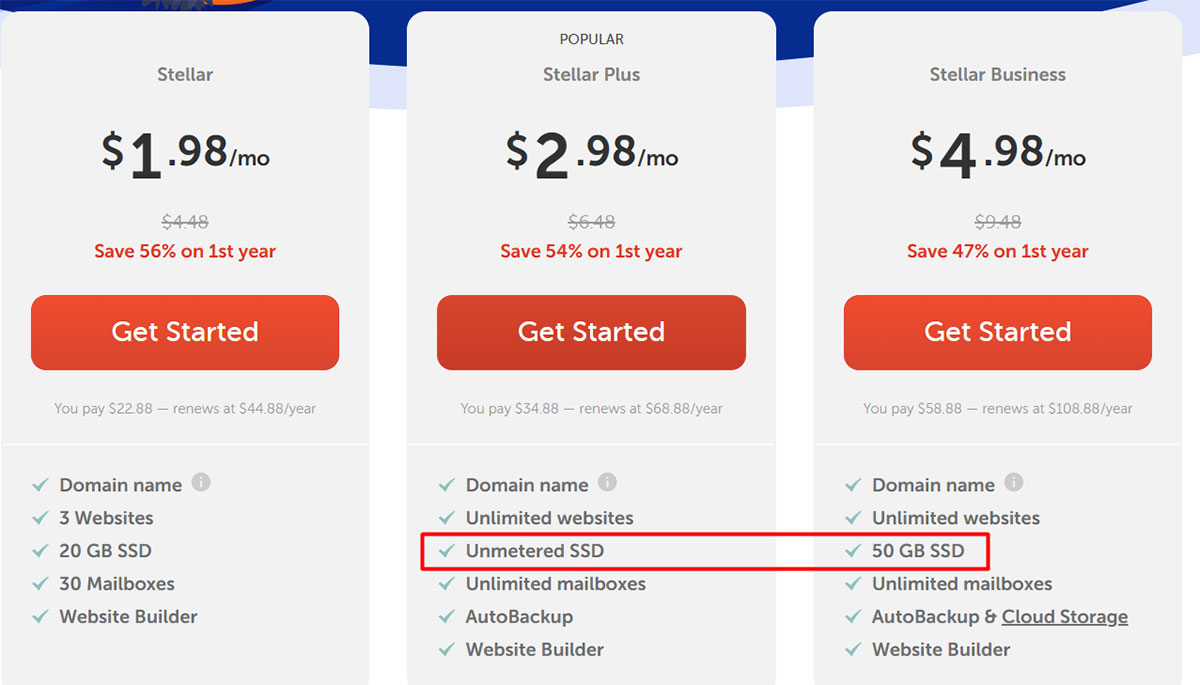
Their VPS is also quite limited with an 8-core CPU. There are fewer add-ons for medium to large enterprises. So, once you start growing, it becomes harder to stay on Namecheap, and you will have to find an alternative.
Best Alternatives to Namecheap
So, Namecheap hosting sucks and you need a few alternatives. Here are my picks.
- Domain: For domain names, you could even go with Namecheap if needed. However, if Namecheap doesn’t quite suit you, NameSilo is a good alternative for domains because of its low prices and good domain management.
- Hosting: I recommend Hostinger if you want decent performance in a similar price range.

Make sure to keep the domain name and hosting separate.
Conclusion
Namecheap was a good hosting provider a few years back. However, in recent years, they have damaged their reputation. Every hosting provider has its pros and cons.
You can still use Namecheap as a domain registrar. However, if you’re at all serious about your website, choose another hosting provider. Namecheap hosting is only good for a hobby website.
FAQ (Frequently Asked Questions)
Is Namecheap really cheap?
I wouldn’t say it’s super cheap, but it’s more affordable than other hosts. However, you will have to compromise on performance.
Why is Namecheap so cheap?
Namecheap is cheap because the performance is not worth it. It’s only good for complete beginners who want to try out web hosting.
Does Namecheap have hidden fees?
No, Namecheap doesn’t have any hidden fees, but two costs surprise people. Renewals cost more than double the first-year price, and refunds aren't automatic: when you cancel, the account and all its data are deleted immediately, and you have to ask support for the refund, which Namecheap reviews case by case.